
Before you write a single line of AI code, you need a mental model of what you are actually talking to. Not the marketing version. Not the “it’s like a brain” version. The engineering version — the one that helps you debug, optimize costs, and build things that work.
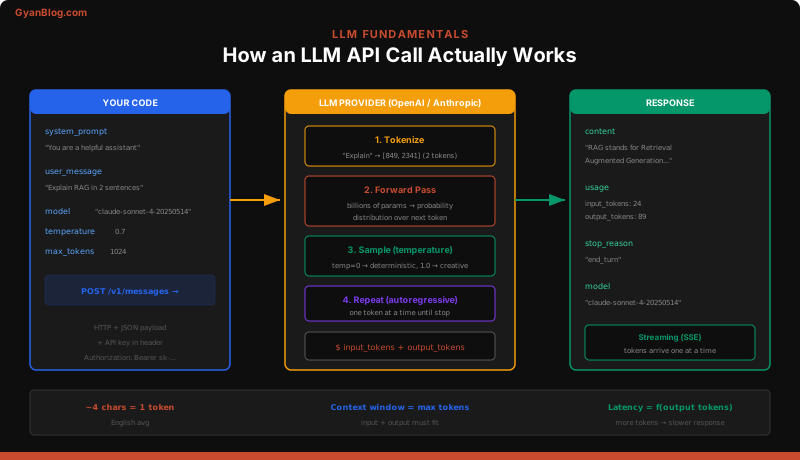
This lesson gives you that mental model. By the end, you will understand exactly what happens between your requests.post() call and the text that comes back.
1. What LLMs Actually Are (The Programmer Version)
An LLM is a next-token prediction function. That is it. Given a sequence of tokens, it returns a probability distribution over the next token.
f(tokens) -> probability_distribution_over_next_tokenIt is not a database. It does not “look things up.” It does not “know” things the way a SQL query returns rows. It has compressed statistical patterns from its training data into billions of numerical weights, and it uses those weights to predict what token is most likely to come next.
This distinction matters every day in practice:
- It can be confidently wrong. There is no retrieval step that fails loudly. The model always produces output — even when it is hallucinating.
- It has no state between calls. Every API call is independent. The model does not remember your last request unless you send the conversation history yourself.
- It is not deterministic by default. The same input can produce different outputs (controlled by temperature).
Think of it as a very sophisticated autocomplete. Your phone keyboard predicts the next word. GPT-4 predicts the next token with the benefit of 1.8 trillion parameters of compressed knowledge.
Generation is a loop, not a single step
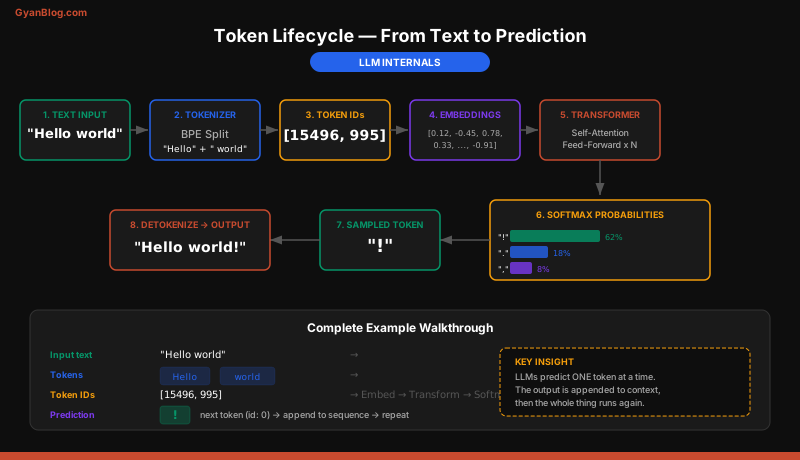
When you ask an LLM to write a paragraph, it does not generate the paragraph in one shot. It predicts one token, appends it to the input, and predicts the next one. Repeat until it hits a stop condition.
Input:  "The capital of France is"
Step 1: predict " Paris"      -> "The capital of France is Paris"
Step 2: predict "."            -> "The capital of France is Paris."
Step 3: predict <stop>         -> done
This autoregressive loop is why streaming exists (you can send tokens as they are generated) and why longer outputs cost more (each token requires a full forward pass).
2. Tokens — The Currency of LLMs
Everything in the LLM world is measured in tokens. Not words. Not characters. Tokens.
A token is roughly 3-4 English characters, or about 0.75 words. But the mapping is not simple — it depends on the tokenizer.
import tiktoken

enc = tiktoken.encoding_for_model("gpt-4o")

text = "Hello, world! This is a test."
tokens = enc.encode(text)

print(f"Text: {text}")
print(f"Tokens: {tokens}")
print(f"Token count: {len(tokens)}")
print(f"Decoded individually:")
for t in tokens:
    print(f"  {t} -> '{enc.decode([t])}'")
Output:
Text: Hello, world! This is a test.
Tokens: [9906, 11, 1917, 0, 1115, 374, 264, 1296, 13]
Token count: 9
Decoded individually:
  9906 -> 'Hello'
  11 -> ','
  1917 -> ' world'
  0 -> '!'
  1115 -> ' This'
  374 -> ' is'
  264 -> ' a'
  1296 -> ' test'
  13 -> '.'
Why tokens matter to you as a programmer
- Cost. You pay per token — both input and output. A 4,000-token prompt with a 1,000-token response at GPT-4o pricing costs
(4000 * $2.50 + 1000 * $10.00) / 1_000_000 = $0.02. - Context window limits. Every model has a maximum number of tokens it can process in a single call. Input tokens + output tokens must fit inside this window.
- Latency. More input tokens = longer time-to-first-token. More output tokens = longer total response time.
Quick token estimation rules
| Content | Approximate tokens |
|---|---|
| 1 English word | ~1.3 tokens |
| 1 page of text | ~400-500 tokens |
| 1 line of Python code | ~10-15 tokens |
| A typical JSON API response | ~200-400 tokens |
| A 10-page document | ~4,000-5,000 tokens |
For Anthropic’s Claude, use the anthropic SDK’s built-in token counting:
from anthropic import Anthropic

client = Anthropic()
count = client.count_tokens("Hello, world! This is a test.")
print(f"Token count: {count}")
3. The API Mental Model
Forget everything you know about websockets, gRPC, and complex protocols. LLM APIs are plain HTTP POST endpoints. You send JSON, you get JSON back.
import requests

response = requests.post(
    "https://api.openai.com/v1/chat/completions",
    headers={
        "Authorization": "Bearer sk-your-key-here",
        "Content-Type": "application/json",
    },
    json={
        "model": "gpt-4o",
        "messages": [
            {"role": "user", "content": "What is 2 + 2?"}
        ],
    },
)

data = response.json()
print(data["choices"][0]["message"]["content"])
# "4"
That is the entire interaction pattern. Every LLM API call you will ever make is a variation of this: POST a list of messages, get back a completion.
The response JSON looks like this:
{
  "id": "chatcmpl-abc123",
  "object": "chat.completion",
  "created": 1711600000,
  "model": "gpt-4o-2024-08-06",
  "choices": [
    {
      "index": 0,
      "message": {
        "role": "assistant",
        "content": "2 + 2 equals 4."
      },
      "finish_reason": "stop"
    }
  ],
  "usage": {
    "prompt_tokens": 12,
    "completion_tokens": 8,
    "total_tokens": 20
  }
}
Pay attention to the usage field. That is your bill.
4. Messages Format — Roles Matter
Every LLM API uses a messages array with three roles: system, user, and assistant. Understanding these roles is the difference between a working AI feature and a confused chatbot.
messages = [
    {
        "role": "system",
        "content": "You are a senior Python code reviewer. Be concise. "
                   "Point out bugs, security issues, and style problems. "
                   "Format output as a numbered list."
    },
    {
        "role": "user",
        "content": "Review this code:\n\ndef login(user, pw):\n"
                   "    if pw == 'admin123':\n        return True"
    },
]
What each role does
System — Sets the persona, constraints, and output format. The model treats system messages as high-priority instructions. Put your guardrails, format requirements, and behavioral rules here.
User — The human’s input. This is where the actual question, task, or data goes.
Assistant — The model’s previous responses. You include these to maintain conversation context across API calls.
Multi-turn conversations
Since the API is stateless, you simulate conversation history by sending the full message chain:
messages = [
    {"role": "system", "content": "You are a helpful assistant."},
    {"role": "user", "content": "What is the capital of France?"},
    {"role": "assistant", "content": "The capital of France is Paris."},
    {"role": "user", "content": "What is its population?"},
]
# The model knows "its" refers to Paris because you sent the history.
Every token in that history counts against your context window and your bill. This is why conversation history management is a real engineering problem — you cannot just append forever.
5. Key Parameters
These parameters control how the model generates output. Know these cold.
response = client.chat.completions.create(
    model="gpt-4o",               # Which model to use
    messages=messages,              # The conversation
    temperature=0.7,                # Randomness: 0.0 = deterministic, 2.0 = chaos
    max_tokens=1024,                # Hard cap on output length
    top_p=1.0,                      # Nucleus sampling threshold
    stop=["\n\n---"],               # Stop generating when this string appears
    frequency_penalty=0.0,          # Penalize repeated tokens
    presence_penalty=0.0,           # Penalize tokens that appeared at all
)
Temperature — the one you will use most
Temperature controls the randomness of token selection.
| Temperature | Behavior | Use case |
|---|---|---|
| 0.0 | Always picks the highest-probability token | Code generation, structured output, classification |
| 0.3-0.7 | Mostly predictable with some variation | General-purpose chat, summarization |
| 1.0-1.5 | Creative, surprising, occasionally incoherent | Brainstorming, creative writing |
| 2.0 | Near-random | Almost never useful |
Rule of thumb: If you need the same answer every time (data extraction, code generation), use temperature=0. If you want variety, use 0.7.
max_tokens — your safety valve
This caps the output length. The model will stop generating once it hits this limit, even mid-sentence. Set it based on your expected output size:
- Classification label:
max_tokens=10 - One-paragraph summary:
max_tokens=200 - Code generation:
max_tokens=2048 - Long-form writing:
max_tokens=4096
If you do not set it, the model generates until it naturally stops or hits the model’s maximum output limit. Always set it in production to control costs and prevent runaway responses.
stop sequences — underrated and useful
Stop sequences tell the model to halt generation when a specific string appears:
# Extract just the SQL query, stop before any explanation
response = client.chat.completions.create(
    model="gpt-4o",
    messages=[
        {"role": "system", "content": "Generate a SQL query. Output only the query."},
        {"role": "user", "content": "Get all users who signed up last month"},
    ],
    stop=["```", "\n\n"],  # Stop at code fence or double newline
    temperature=0.0,
)
6. Context Window — Your Memory Limit
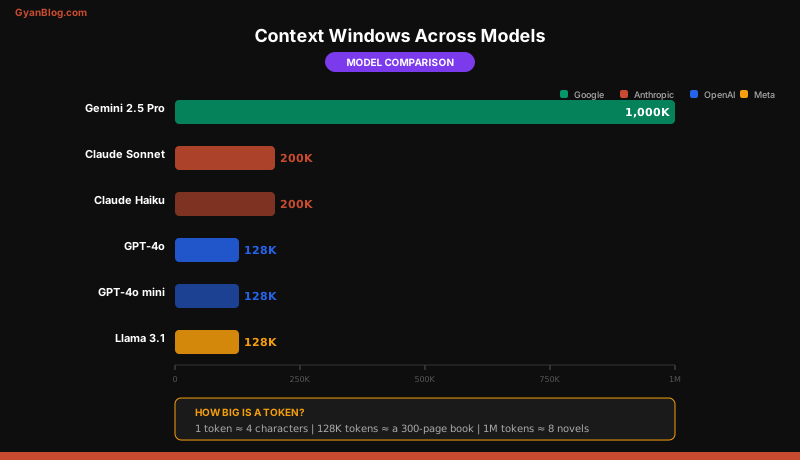
The context window is the maximum number of tokens the model can process in a single call — input and output combined.
| Model | Context window |
|---|---|
| GPT-4o | 128K tokens |
| GPT-4o mini | 128K tokens |
| Claude 3.5 Sonnet | 200K tokens |
| Claude 3.7 Sonnet | 200K tokens |
| Gemini 1.5 Pro | 2M tokens |
| Llama 3.1 405B | 128K tokens |
128K tokens sounds like a lot — roughly 300 pages of text. But it fills up fast when you are stuffing in code files, documentation, or conversation history.
What happens when you exceed the window
The API rejects your request with an error. It does not silently truncate.
# This is what you get back:
# openai.BadRequestError: This model's maximum context length is 128000 tokens.
# However, your messages resulted in 135420 tokens.
Practical strategies for managing context
def trim_conversation(messages, max_tokens=100000):
    """Keep system message + most recent messages that fit."""
    system_msg = [m for m in messages if m["role"] == "system"]
    other_msgs = [m for m in messages if m["role"] != "system"]

    # Simple approach: keep removing oldest messages until we fit
    # In production, use tiktoken to count precisely
    while estimate_tokens(system_msg + other_msgs) > max_tokens:
        other_msgs.pop(0)  # Remove oldest non-system message

    return system_msg + other_msgs
Bigger context windows are not always better. Larger inputs mean higher cost, higher latency, and — counter-intuitively — sometimes worse performance. Models can struggle to find relevant information in very long contexts (the “lost in the middle” problem). Send what the model needs, not everything you have.
7. Streaming — Server-Sent Events
By default, the API waits until the entire response is generated before returning it. For a 500-token response, that might be 3-5 seconds of staring at a blank screen.
Streaming sends tokens as they are generated, using Server-Sent Events (SSE).
from openai import OpenAI

client = OpenAI()

stream = client.chat.completions.create(
    model="gpt-4o",
    messages=[{"role": "user", "content": "Explain DNS in 3 sentences."}],
    stream=True,
)

for chunk in stream:
    delta = chunk.choices[0].delta
    if delta.content:
        print(delta.content, end="", flush=True)
print()  # Final newline
Each SSE chunk looks like this:
data: {"id":"chatcmpl-abc","choices":[{"delta":{"content":" DNS"},"index":0}]}
data: {"id":"chatcmpl-abc","choices":[{"delta":{"content":" translates"},"index":0}]}
...
data: [DONE]
When to stream
- Chat interfaces — Always. Users perceive streamed responses as faster even though total time is the same.
- Batch processing — Never. You are just adding complexity for no benefit.
- API backends — Depends. If your downstream consumer can handle streaming, do it. If they need the full response to proceed, skip it.
Anthropic’s streaming is slightly different
from anthropic import Anthropic

client = Anthropic()

with client.messages.stream(
    model="claude-sonnet-4-20250514",
    max_tokens=1024,
    messages=[{"role": "user", "content": "Explain DNS in 3 sentences."}],
) as stream:
    for text in stream.text_stream:
        print(text, end="", flush=True)
print()
8. Cost Model — Input vs. Output Tokens
LLM pricing has two dimensions: input tokens (your prompt) and output tokens (the completion). Output tokens are always more expensive because each one requires a full forward pass through the model.
Current pricing (as of early 2026)
| Model | Input (per 1M tokens) | Output (per 1M tokens) |
|---|---|---|
| GPT-4o | $2.50 | $10.00 |
| GPT-4o mini | $0.15 | $0.60 |
| Claude 3.7 Sonnet | $3.00 | $15.00 |
| Claude 3.5 Haiku | $0.80 | $4.00 |
| Gemini 1.5 Pro | $1.25 | $5.00 |
Estimating costs for your application
def estimate_monthly_cost(
    requests_per_day: int,
    avg_input_tokens: int,
    avg_output_tokens: int,
    input_price_per_m: float,  # Price per 1M input tokens
    output_price_per_m: float, # Price per 1M output tokens
) -> dict:
    daily_input = requests_per_day * avg_input_tokens
    daily_output = requests_per_day * avg_output_tokens

    daily_cost = (
        (daily_input / 1_000_000) * input_price_per_m +
        (daily_output / 1_000_000) * output_price_per_m
    )

    return {
        "daily_cost": round(daily_cost, 2),
        "monthly_cost": round(daily_cost * 30, 2),
        "cost_per_request": round(daily_cost / requests_per_day, 6),
    }

# Example: customer support bot
print(estimate_monthly_cost(
    requests_per_day=5000,
    avg_input_tokens=2000,   # System prompt + conversation history
    avg_output_tokens=500,   # Typical response
    input_price_per_m=2.50,  # GPT-4o input
    output_price_per_m=10.00 # GPT-4o output
))
# {'daily_cost': 50.0, 'monthly_cost': 1500.0, 'cost_per_request': 0.01}
Cost reduction strategies
- Use the smallest model that works. GPT-4o mini is 16x cheaper than GPT-4o for input. Test your use case on cheaper models first.
- Cache system prompts. Both OpenAI and Anthropic offer prompt caching that discounts repeated prefixes by 50-90%.
- Minimize conversation history. Summarize old turns instead of sending raw history.
- Set
max_tokensaggressively. Do not let the model ramble on your dime. - Batch when possible. OpenAI’s Batch API offers 50% discounts for non-real-time workloads.
9. Rate Limits and Error Handling
Every LLM API enforces rate limits — usually tokens-per-minute (TPM) and requests-per-minute (RPM). When you hit them, you get a 429 status code.
import time
from openai import OpenAI, RateLimitError, APIError

client = OpenAI()

def call_llm_with_retry(messages, max_retries=3):
    """Call the LLM with exponential backoff on rate limits."""
    for attempt in range(max_retries):
        try:
            response = client.chat.completions.create(
                model="gpt-4o",
                messages=messages,
                temperature=0.0,
                max_tokens=1024,
            )
            return response.choices[0].message.content

        except RateLimitError as e:
            wait_time = 2 ** attempt  # 1s, 2s, 4s
            print(f"Rate limited. Waiting {wait_time}s...")
            time.sleep(wait_time)

        except APIError as e:
            if e.status_code >= 500:
                # Server error — retry
                time.sleep(1)
                continue
            raise  # Client error — do not retry

    raise Exception("Max retries exceeded")
Common error codes
| Code | Meaning | Action |
|---|---|---|
| 400 | Bad request (malformed JSON, too many tokens) | Fix your request |
| 401 | Invalid API key | Check your key |
| 429 | Rate limit exceeded | Back off and retry |
| 500 | Server error | Retry with backoff |
| 529 | Overloaded (Anthropic) | Retry with backoff |
Timeouts
LLM calls are slow. A complex GPT-4o request can take 10-30 seconds. Set your HTTP timeout accordingly:
# Default timeouts are often too short for LLM calls
client = OpenAI(timeout=60.0)  # 60 seconds

# Or per-request with the requests library
response = requests.post(url, json=payload, timeout=60)
10. API Shape Comparison: OpenAI vs. Anthropic vs. Google
All three major providers follow the same pattern (send messages, get completion) but differ in field names and conventions.
OpenAI
from openai import OpenAI

client = OpenAI()  # Uses OPENAI_API_KEY env var

response = client.chat.completions.create(
    model="gpt-4o",
    messages=[
        {"role": "system", "content": "You are a helpful assistant."},
        {"role": "user", "content": "Hello"},
    ],
    temperature=0.7,
    max_tokens=1024,
)

text = response.choices[0].message.content
input_tokens = response.usage.prompt_tokens
output_tokens = response.usage.completion_tokens
Anthropic
from anthropic import Anthropic

client = Anthropic()  # Uses ANTHROPIC_API_KEY env var

response = client.messages.create(
    model="claude-sonnet-4-20250514",
    system="You are a helpful assistant.",     # System is a top-level param
    messages=[
        {"role": "user", "content": "Hello"},  # No system role in messages
    ],
    temperature=0.7,
    max_tokens=1024,                           # Required, not optional
)

text = response.content[0].text           # content is a list of blocks
input_tokens = response.usage.input_tokens
output_tokens = response.usage.output_tokens
Google (Gemini)
from google import genai

client = genai.Client()  # Uses GOOGLE_API_KEY env var

response = client.models.generate_content(
    model="gemini-2.0-flash",
    contents="Hello",
    config=genai.types.GenerateContentConfig(
        system_instruction="You are a helpful assistant.",
        temperature=0.7,
        max_output_tokens=1024,
    ),
)

text = response.text
input_tokens = response.usage_metadata.prompt_token_count
output_tokens = response.usage_metadata.candidates_token_count
Key differences at a glance
| Feature | OpenAI | Anthropic | |
|---|---|---|---|
| System message | In messages array | Top-level system param |
system_instruction in config |
| Output field | choices[0].message.content |
content[0].text |
response.text |
| max_tokens | Optional | Required | Optional (max_output_tokens) |
| Streaming | stream=True |
.stream() context manager |
config={"stream": True} |
| Token field names | prompt_tokens, completion_tokens |
input_tokens, output_tokens |
prompt_token_count, candidates_token_count |
The differences are cosmetic. Once you have called one LLM API, switching to another takes 15 minutes of reading docs. The concepts — messages, tokens, temperature, context windows — are universal.
Key Takeaways
- LLMs are next-token predictors, not knowledge databases. They generate text by predicting one token at a time in a loop. They can be confidently wrong because there is no retrieval step that fails.
- Tokens are the fundamental unit. Roughly 4 characters each. You pay per token, you are limited by tokens, and latency scales with tokens. Learn to estimate token counts.
- The API is a stateless HTTP POST. Send messages, get a completion. The model remembers nothing between calls — you manage conversation state yourself.
- System/user/assistant roles structure your prompts. System sets behavior, user provides input, assistant captures history. This structure is your primary lever for controlling output quality.
- Temperature 0 for deterministic tasks, 0.7 for general use. Always set
max_tokensin production. Use stop sequences when you need precise output boundaries. - Context window = working memory. Everything — system prompt, conversation history, user input, and generated output — must fit. Manage it actively or pay the price in cost and quality.
- Stream for user-facing UIs, skip it for batch processing. Streaming improves perceived latency without changing actual generation time.
- Output tokens cost 3-4x more than input tokens. The cheapest optimization is generating less. Use the smallest model that meets your quality bar.
- Always implement retry with exponential backoff. Rate limits and transient errors are normal, not exceptional. Build for them from day one.
- All major APIs follow the same pattern. OpenAI, Anthropic, and Google differ in field names, not concepts. Learn one and you can use all three.