
This lesson is all code. By the end, you will have working Python scripts that call both OpenAI and Anthropic, stream responses, extract structured data with function calling, and handle the errors that will inevitably come up in production.
No wrappers, no frameworks, no magic. Just the SDKs and the HTTP APIs underneath them.
1. Setting Up
Install both SDKs and a few utilities we will use throughout:
pip install openai anthropic python-dotenv tenacity instructor pydanticStore your API keys in a .env file at the project root. Never hardcode them.
# .env
OPENAI_API_KEY=sk-proj-...
ANTHROPIC_API_KEY=sk-ant-...
Load them at the top of every script:
import os
from dotenv import load_dotenv

load_dotenv()

# Both SDKs pick up their respective env vars automatically,
# but you can also pass them explicitly:
openai_key = os.getenv("OPENAI_API_KEY")
anthropic_key = os.getenv("ANTHROPIC_API_KEY")
That is the entire setup. No config files, no YAML, no Docker. Two API keys and a virtualenv.
2. OpenAI Chat Completions
The core primitive is chat.completions.create. You send a list of messages, you get a completion back.
from openai import OpenAI

client = OpenAI()  # reads OPENAI_API_KEY from env

response = client.chat.completions.create(
    model="gpt-4o",
    max_tokens=300,
    temperature=0.7,
    messages=[
        {"role": "system", "content": "You are a helpful assistant."},
        {"role": "user", "content": "Explain HTTP status codes in three sentences."},
    ],
)

# The response is a Pydantic model, not a dict
message = response.choices[0].message
print(message.content)
print(f"Tokens used: {response.usage.prompt_tokens} in, {response.usage.completion_tokens} out")
Key things to notice:
- messages is an ordered list. The model sees them in sequence.
- system sets the persona and instructions. Always use it.
- max_tokens caps the response length. Always set it. Unbounded completions are a billing hazard.
- temperature controls randomness. Use 0 for deterministic tasks, 0.7-1.0 for creative ones.
- The response object has
choices(usually one), each with amessagethat hascontentandrole.
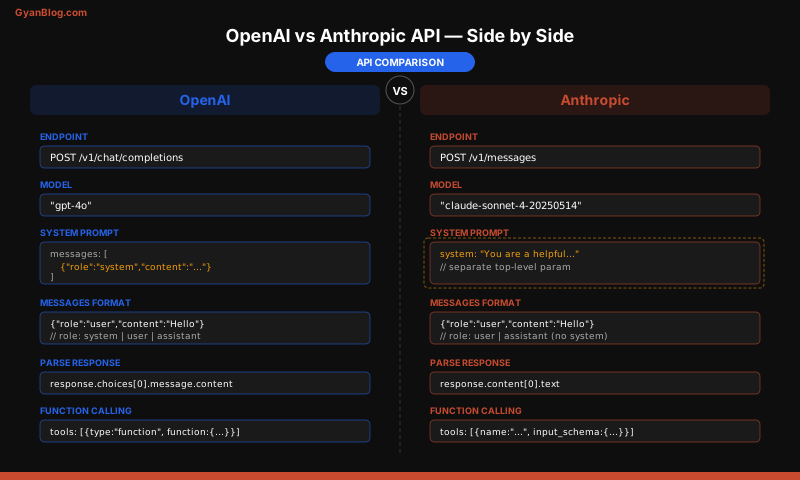
3. Anthropic Messages API
Anthropic’s API is structurally similar but has a few important differences.
import anthropic

client = anthropic.Anthropic()  # reads ANTHROPIC_API_KEY from env

response = client.messages.create(
    model="claude-sonnet-4-20250514",
    max_tokens=300,
    system="You are a helpful assistant.",
    messages=[
        {"role": "user", "content": "Explain HTTP status codes in three sentences."},
    ],
)

# Response structure differs from OpenAI
print(response.content[0].text)
print(f"Tokens used: {response.usage.input_tokens} in, {response.usage.output_tokens} out")
The differences that matter:
| Aspect | OpenAI | Anthropic |
|---|---|---|
| System prompt | Inside messages array as {"role": "system", ...} |
Separate system parameter |
| Response text | response.choices[0].message.content |
response.content[0].text |
| Token counts | usage.prompt_tokens / usage.completion_tokens |
usage.input_tokens / usage.output_tokens |
| max_tokens | Optional (but set it) | Required |
| Model names | gpt-4o, gpt-4o-mini |
claude-sonnet-4-20250514, claude-haiku-4-20250414 |
Both return structured objects, not raw JSON. Both SDKs handle auth, retries on 500s, and response parsing for you.
4. Streaming Responses
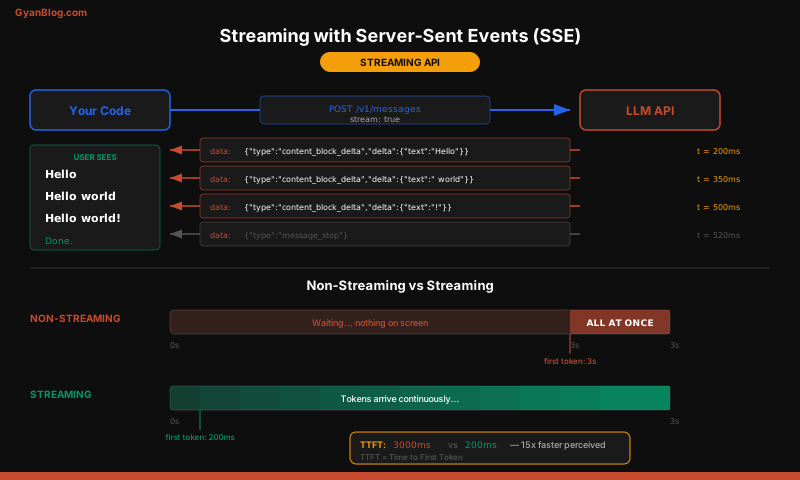
For any user-facing application, streaming is non-negotiable. Nobody wants to stare at a blank screen for 5 seconds.
OpenAI Streaming
from openai import OpenAI

client = OpenAI()

stream = client.chat.completions.create(
    model="gpt-4o",
    max_tokens=500,
    messages=[{"role": "user", "content": "Write a short poem about APIs."}],
    stream=True,
)

full_response = ""
for chunk in stream:
    delta = chunk.choices[0].delta
    if delta.content:
        print(delta.content, end="", flush=True)
        full_response += delta.content

print()  # newline after stream completes
Anthropic Streaming
import anthropic

client = anthropic.Anthropic()

full_response = ""
with client.messages.stream(
    model="claude-sonnet-4-20250514",
    max_tokens=500,
    messages=[{"role": "user", "content": "Write a short poem about APIs."}],
) as stream:
    for text in stream.text_stream:
        print(text, end="", flush=True)
        full_response += text

print()
Anthropic’s .messages.stream() context manager is cleaner than manually iterating SSE events. It also gives you stream.get_final_message() at the end with full usage stats.
Async Streaming
Both SDKs support async for use in web servers:
import asyncio
from openai import AsyncOpenAI
import anthropic

async def stream_openai():
    client = AsyncOpenAI()
    stream = await client.chat.completions.create(
        model="gpt-4o",
        max_tokens=200,
        messages=[{"role": "user", "content": "Hello"}],
        stream=True,
    )
    async for chunk in stream:
        if chunk.choices[0].delta.content:
            print(chunk.choices[0].delta.content, end="", flush=True)

async def stream_anthropic():
    client = anthropic.AsyncAnthropic()
    async with client.messages.stream(
        model="claude-sonnet-4-20250514",
        max_tokens=200,
        messages=[{"role": "user", "content": "Hello"}],
    ) as stream:
        async for text in stream.text_stream:
            print(text, end="", flush=True)

asyncio.run(stream_openai())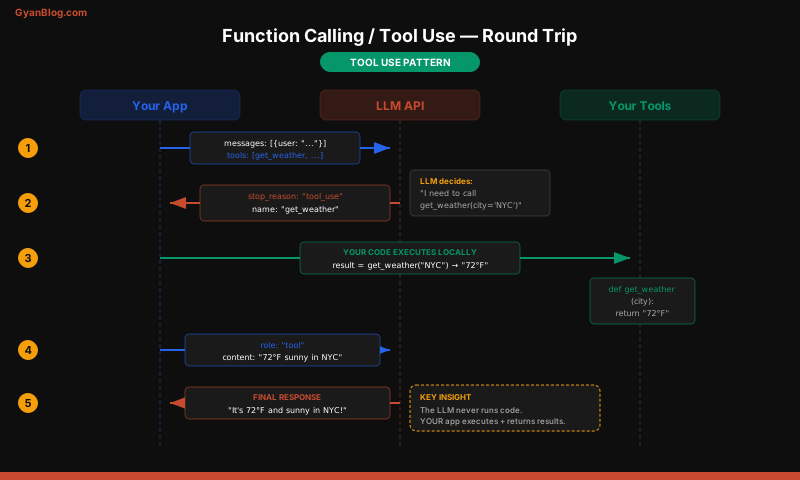
5. Function Calling / Tool Use
This is where LLM APIs go from “chatbot” to “programmable reasoning engine.” You define functions (tools) that the model can request to call. The model does not execute anything — it returns a structured request saying “call this function with these arguments,” and your code decides whether to actually do it.
OpenAI Function Calling
import json
from openai import OpenAI

client = OpenAI()

tools = [
    {
        "type": "function",
        "function": {
            "name": "get_weather",
            "description": "Get current weather for a city",
            "parameters": {
                "type": "object",
                "properties": {
                    "city": {"type": "string", "description": "City name"},
                    "unit": {
                        "type": "string",
                        "enum": ["celsius", "fahrenheit"],
                        "description": "Temperature unit",
                    },
                },
                "required": ["city"],
            },
        },
    }
]

response = client.chat.completions.create(
    model="gpt-4o",
    max_tokens=300,
    messages=[{"role": "user", "content": "What's the weather in Tokyo?"}],
    tools=tools,
    tool_choice="auto",
)

message = response.choices[0].message

if message.tool_calls:
    tool_call = message.tool_calls[0]
    args = json.loads(tool_call.function.arguments)
    print(f"Model wants to call: {tool_call.function.name}({args})")

    # Execute the function (your real implementation here)
    weather_result = {"temp": 22, "unit": "celsius", "condition": "cloudy"}

    # Send the result back to the model
    followup = client.chat.completions.create(
        model="gpt-4o",
        max_tokens=300,
        messages=[
            {"role": "user", "content": "What's the weather in Tokyo?"},
            message,  # the assistant's tool_call message
            {
                "role": "tool",
                "tool_call_id": tool_call.id,
                "content": json.dumps(weather_result),
            },
        ],
        tools=tools,
    )
    print(followup.choices[0].message.content)
Anthropic Tool Use
import json
import anthropic

client = anthropic.Anthropic()

tools = [
    {
        "name": "get_weather",
        "description": "Get current weather for a city",
        "input_schema": {
            "type": "object",
            "properties": {
                "city": {"type": "string", "description": "City name"},
                "unit": {
                    "type": "string",
                    "enum": ["celsius", "fahrenheit"],
                    "description": "Temperature unit",
                },
            },
            "required": ["city"],
        },
    }
]

response = client.messages.create(
    model="claude-sonnet-4-20250514",
    max_tokens=300,
    messages=[{"role": "user", "content": "What's the weather in Tokyo?"}],
    tools=tools,
)

# Anthropic returns content blocks -- check for tool_use type
for block in response.content:
    if block.type == "tool_use":
        print(f"Model wants to call: {block.name}({block.input})")

        weather_result = {"temp": 22, "unit": "celsius", "condition": "cloudy"}

        # Send tool result back
        followup = client.messages.create(
            model="claude-sonnet-4-20250514",
            max_tokens=300,
            messages=[
                {"role": "user", "content": "What's the weather in Tokyo?"},
                {"role": "assistant", "content": response.content},
                {
                    "role": "user",
                    "content": [
                        {
                            "type": "tool_result",
                            "tool_use_id": block.id,
                            "content": json.dumps(weather_result),
                        }
                    ],
                },
            ],
            tools=tools,
        )
        print(followup.content[0].text)
The key structural difference: OpenAI uses a tool role for results. Anthropic nests tool_result content blocks inside a user message. Both achieve the same thing.
6. Structured Outputs
Getting JSON back from an LLM instead of free-form text is critical for any programmatic use case.
OpenAI JSON Mode
from openai import OpenAI

client = OpenAI()

response = client.chat.completions.create(
    model="gpt-4o",
    max_tokens=300,
    response_format={"type": "json_object"},
    messages=[
        {"role": "system", "content": "Return JSON with keys: name, age, skills (array)."},
        {"role": "user", "content": "Describe a senior Python developer."},
    ],
)

import json
data = json.loads(response.choices[0].message.content)
print(data["name"], data["skills"])
Structured Outputs with Pydantic (instructor library)
The instructor library patches the OpenAI and Anthropic clients to return validated Pydantic models directly. This is the best approach for production.
import instructor
from pydantic import BaseModel
from openai import OpenAI

class Developer(BaseModel):
    name: str
    age: int
    skills: list[str]
    years_experience: int

# Patch the client -- everything else works the same
client = instructor.from_openai(OpenAI())

developer = client.chat.completions.create(
    model="gpt-4o",
    max_tokens=300,
    response_model=Developer,
    messages=[
        {"role": "user", "content": "Describe a senior Python developer."},
    ],
)

# developer is a fully validated Pydantic model
print(f"{developer.name}, {developer.years_experience} years")
print(f"Skills: {', '.join(developer.skills)}")
The same pattern works with Anthropic:
import instructor
import anthropic
from pydantic import BaseModel

class Developer(BaseModel):
    name: str
    age: int
    skills: list[str]
    years_experience: int

client = instructor.from_anthropic(anthropic.Anthropic())

developer = client.messages.create(
    model="claude-sonnet-4-20250514",
    max_tokens=300,
    response_model=Developer,
    messages=[
        {"role": "user", "content": "Describe a senior Python developer."},
    ],
)

print(f"{developer.name}: {developer.skills}")
instructor handles retries when the model returns malformed JSON. It re-sends the request with the validation error as context so the model can self-correct. This is much more reliable than parsing JSON yourself with try/except.
7. Multi-Turn Conversations
LLM APIs are stateless. Every request must include the full conversation history. There is no session ID or server-side memory.
from openai import OpenAI

client = OpenAI()

conversation = [
    {"role": "system", "content": "You are a Python tutor. Be concise."},
]

def chat(user_message: str) -> str:
    conversation.append({"role": "user", "content": user_message})

    response = client.chat.completions.create(
        model="gpt-4o",
        max_tokens=500,
        messages=conversation,
    )

    assistant_message = response.choices[0].message.content
    conversation.append({"role": "assistant", "content": assistant_message})
    return assistant_message

print(chat("What is a decorator?"))
print(chat("Show me an example."))
print(chat("Can decorators take arguments?"))
Context Window Management
Models have finite context windows (128K tokens for GPT-4o, 200K for Claude). For long conversations, you need a strategy:
import tiktoken

def count_tokens(messages: list[dict], model: str = "gpt-4o") -> int:
    """Approximate token count for a message list."""
    enc = tiktoken.encoding_for_model(model)
    total = 0
    for msg in messages:
        total += 4  # message overhead
        total += len(enc.encode(msg["content"]))
    return total

def trim_conversation(messages: list[dict], max_tokens: int = 100_000) -> list[dict]:
    """Keep the system prompt and most recent messages that fit."""
    system = [m for m in messages if m["role"] == "system"]
    history = [m for m in messages if m["role"] != "system"]

    trimmed = []
    token_count = count_tokens(system)

    # Add messages from most recent backward
    for msg in reversed(history):
        msg_tokens = count_tokens([msg])
        if token_count + msg_tokens > max_tokens:
            break
        trimmed.insert(0, msg)
        token_count += msg_tokens

    return system + trimmed
This is the simplest strategy: keep the system prompt and as many recent messages as fit. For smarter approaches (summarizing old messages, using RAG to recall relevant history), see Lesson 4 on RAG.
8. Image / Vision Inputs
Both GPT-4o and Claude support image inputs. You can send URLs or base64-encoded images.
OpenAI Vision
import base64
from openai import OpenAI

client = OpenAI()

# Option 1: URL
response = client.chat.completions.create(
    model="gpt-4o",
    max_tokens=300,
    messages=[
        {
            "role": "user",
            "content": [
                {"type": "text", "text": "What's in this image?"},
                {
                    "type": "image_url",
                    "image_url": {"url": "https://example.com/photo.jpg"},
                },
            ],
        }
    ],
)

# Option 2: Base64
with open("screenshot.png", "rb") as f:
    b64 = base64.standard_b64encode(f.read()).decode("utf-8")

response = client.chat.completions.create(
    model="gpt-4o",
    max_tokens=300,
    messages=[
        {
            "role": "user",
            "content": [
                {"type": "text", "text": "Describe this screenshot."},
                {
                    "type": "image_url",
                    "image_url": {"url": f"data:image/png;base64,{b64}"},
                },
            ],
        }
    ],
)
print(response.choices[0].message.content)
Anthropic Vision
import base64
import anthropic

client = anthropic.Anthropic()

with open("screenshot.png", "rb") as f:
    b64 = base64.standard_b64encode(f.read()).decode("utf-8")

response = client.messages.create(
    model="claude-sonnet-4-20250514",
    max_tokens=300,
    messages=[
        {
            "role": "user",
            "content": [
                {
                    "type": "image",
                    "source": {
                        "type": "base64",
                        "media_type": "image/png",
                        "data": b64,
                    },
                },
                {"type": "text", "text": "Describe this screenshot."},
            ],
        }
    ],
)
print(response.content[0].text)
Note the structural difference: OpenAI wraps images in image_url with a URL (even for base64, using a data URI). Anthropic uses a dedicated image content block with explicit source fields. Anthropic also supports direct URL references via {"type": "url", "url": "https://..."} in the source field.
9. Error Handling
LLM APIs fail. Rate limits, timeouts, server errors, malformed responses. Production code must handle all of these.
Basic Error Handling
from openai import OpenAI, APIError, RateLimitError, APITimeoutError

client = OpenAI(timeout=30.0)  # 30s timeout

try:
    response = client.chat.completions.create(
        model="gpt-4o",
        max_tokens=300,
        messages=[{"role": "user", "content": "Hello"}],
    )
except RateLimitError:
    print("Rate limited -- back off and retry")
except APITimeoutError:
    print("Request timed out -- try again or use a smaller prompt")
except APIError as e:
    print(f"API error: {e.status_code} {e.message}")
Retries with tenacity
The tenacity library handles exponential backoff cleanly:
from tenacity import retry, stop_after_attempt, wait_exponential, retry_if_exception_type
from openai import OpenAI, RateLimitError, APITimeoutError

client = OpenAI(timeout=30.0)

@retry(
    stop=stop_after_attempt(3),
    wait=wait_exponential(multiplier=1, min=2, max=30),
    retry=retry_if_exception_type((RateLimitError, APITimeoutError)),
)
def call_llm(prompt: str) -> str:
    response = client.chat.completions.create(
        model="gpt-4o",
        max_tokens=300,
        messages=[{"role": "user", "content": prompt}],
    )
    return response.choices[0].message.content

# Will retry up to 3 times with 2s, 4s, 8s backoff on rate limits
result = call_llm("What is Python?")
The same pattern applies to Anthropic. Both SDKs also have built-in retry logic for transient 500-level errors, but rate limits (429) need explicit handling with backoff.
Timeout Configuration
# OpenAI -- set per-client or per-request
client = OpenAI(timeout=30.0, max_retries=2)

# Anthropic -- same pattern
client = anthropic.Anthropic(timeout=30.0, max_retries=2)
10. Async Patterns
For web servers and high-throughput pipelines, use the async clients. This lets you make concurrent calls without threads.
import asyncio
from openai import AsyncOpenAI
import anthropic

async def ask_openai(prompt: str) -> str:
    client = AsyncOpenAI()
    response = await client.chat.completions.create(
        model="gpt-4o",
        max_tokens=200,
        messages=[{"role": "user", "content": prompt}],
    )
    return response.choices[0].message.content

async def ask_anthropic(prompt: str) -> str:
    client = anthropic.AsyncAnthropic()
    response = await client.messages.create(
        model="claude-sonnet-4-20250514",
        max_tokens=200,
        messages=[{"role": "user", "content": prompt}],
    )
    return response.content[0].text

async def main():
    # Fire both requests concurrently
    openai_task = ask_openai("What is Python's GIL? One sentence.")
    anthropic_task = ask_anthropic("What is Python's GIL? One sentence.")

    openai_answer, anthropic_answer = await asyncio.gather(
        openai_task, anthropic_task
    )

    print(f"OpenAI:    {openai_answer}")
    print(f"Anthropic: {anthropic_answer}")

asyncio.run(main())
Concurrent Batch Processing
A realistic pattern — process a list of items through an LLM with controlled concurrency:
import asyncio
from openai import AsyncOpenAI

async def process_item(client: AsyncOpenAI, sem: asyncio.Semaphore, item: str) -> dict:
    async with sem:  # limit concurrency
        response = await client.chat.completions.create(
            model="gpt-4o-mini",
            max_tokens=100,
            messages=[
                {"role": "system", "content": "Classify the sentiment as positive, negative, or neutral. Return only the label."},
                {"role": "user", "content": item},
            ],
        )
        return {"text": item, "sentiment": response.choices[0].message.content.strip()}

async def batch_classify(texts: list[str], max_concurrent: int = 5) -> list[dict]:
    client = AsyncOpenAI()
    sem = asyncio.Semaphore(max_concurrent)
    tasks = [process_item(client, sem, text) for text in texts]
    return await asyncio.gather(*tasks)

reviews = [
    "This product is amazing!",
    "Terrible customer service.",
    "It works fine, nothing special.",
    "Best purchase I've ever made.",
    "Broke after two days.",
]

results = asyncio.run(batch_classify(reviews))
for r in results:
    print(f"{r['sentiment']:>10}  {r['text']}")
The semaphore is critical. Without it, you will fire all requests simultaneously and hit rate limits immediately. Set max_concurrent to stay within your API tier’s rate limit.
Key Takeaways
- Use the official SDKs.
pip install openai anthropicgives you typed responses, automatic retries on 500s, and proper auth handling. Do not hand-roll HTTP requests. - Always set
max_tokens. Unbounded completions waste money and can hang for minutes. Set a reasonable cap for your use case. - Stream for anything user-facing. Both SDKs support
stream=True. The perceived latency improvement is dramatic. - Function calling is the structured extraction API. When you need the model to return data in a specific shape, define tools. The model fills in the arguments; your code executes.
- Use
instructor+ Pydantic for reliable structured outputs. It handles validation, retries on malformed JSON, and works with both providers. - LLM APIs are stateless. You manage conversation history. Send the full message list every time. Trim from the front when you approach the context window limit.
- Handle errors explicitly. Rate limits (429) need exponential backoff. Timeouts need retries. Malformed responses need fallback logic.
tenacitymakes this clean. - Use async for throughput. When processing batches or serving concurrent users,
AsyncOpenAIandAsyncAnthropicwith semaphore-controlled concurrency will keep you within rate limits while maximizing throughput. - The two APIs are 90% the same. The message format, tool definitions, and image handling differ in structure but not in concept. Learning one makes the other trivial.