
You have a workflow: take user input, search a database, feed results to an LLM, parse the response, maybe call another API, then format the output. You could wire this up with plain Python. Or you could use a framework that provides abstractions for each step. This lesson covers LangChain — the most popular orchestration framework — along with LlamaIndex and the honest tradeoffs of using any framework at all.
Why Orchestration Frameworks Exist
A single API call to an LLM is simple. But real applications need more:
- Multi-step workflows — search, then summarize, then extract entities, then store results
- Tool use — the LLM needs to call functions (search engines, databases, calculators)
- Memory — conversations span multiple turns, and the LLM has no built-in state
- Retrieval — pull relevant documents from a vector store before generating a response
- Error handling — retries, fallbacks, token limit management
Managing all of this with raw API calls gets messy fast. Orchestration frameworks provide building blocks so you don’t reinvent the plumbing every time.

Here is what that plumbing looks like without a framework:
import openai

def research_and_summarize(query: str) -> str:
    # Step 1: Generate search terms
    search_response = openai.chat.completions.create(
        model="gpt-4o",
        messages=[{"role": "user", "content": f"Generate 3 search queries for: {query}"}]
    )
    search_terms = search_response.choices[0].message.content

    # Step 2: Search (pretend this calls a real API)
    results = search_database(search_terms)

    # Step 3: Summarize results
    summary_response = openai.chat.completions.create(
        model="gpt-4o",
        messages=[
            {"role": "system", "content": "Summarize the following search results."},
            {"role": "user", "content": f"Query: {query}\n\nResults:\n{results}"}
        ]
    )
    return summary_response.choices[0].message.content
This works for one workflow. But when you have twenty workflows, each with different steps, retries, and error handling, the boilerplate multiplies. That is the problem frameworks solve.
LangChain Core Concepts
Install LangChain and the OpenAI integration:
pip install langchain langchain-openai langchain-communityLangChain is organized around a few core abstractions:
| Concept | What It Does | Example |
|---|---|---|
| Model | Wraps an LLM API | ChatOpenAI(model="gpt-4o") |
| Prompt | Templates for LLM input | ChatPromptTemplate.from_template(...) |
| Chain | Sequential pipeline of steps | prompt -> model -> parser |
| Tool | Function the LLM can call | search, calculator, custom code |
| Agent | LLM that decides which tools to use | ReAct agent loop |
| Memory | Persists conversation state | Buffer, summary, window |
| Retriever | Fetches relevant documents | Vector store search |
Models
LangChain wraps LLM providers behind a common interface:
from langchain_openai import ChatOpenAI
from langchain_anthropic import ChatAnthropic

# Same interface, different providers
openai_llm = ChatOpenAI(model="gpt-4o", temperature=0)
claude_llm = ChatAnthropic(model="claude-sonnet-4-20250514", temperature=0)

# Both use .invoke() with the same message format
response = openai_llm.invoke("What is the capital of France?")
print(response.content)  # "The capital of France is Paris."
Prompts
Prompt templates separate your prompt structure from the variables:
from langchain_core.prompts import ChatPromptTemplate

prompt = ChatPromptTemplate.from_messages([
    ("system", "You are a {role}. Respond in {language}."),
    ("user", "{question}")
])

# Fill in the variables
messages = prompt.invoke({
    "role": "helpful translator",
    "language": "Spanish",
    "question": "How do I order coffee?"
})
Chains — Sequential LLM Pipelines
A chain connects steps together. The modern way to build chains in LangChain is LCEL (LangChain Expression Language), which uses the pipe operator |.
Basic Chain with LCEL
from langchain_openai import ChatOpenAI
from langchain_core.prompts import ChatPromptTemplate
from langchain_core.output_parsers import StrOutputParser

prompt = ChatPromptTemplate.from_template(
    "Explain {topic} in one paragraph for a software engineer."
)
model = ChatOpenAI(model="gpt-4o")
parser = StrOutputParser()

# Pipe syntax: prompt -> model -> parser
chain = prompt | model | parser

# Run it
result = chain.invoke({"topic": "consensus algorithms"})
print(result)
# "Consensus algorithms like Raft and Paxos allow distributed systems..."
The | operator chains components together. Each component’s output becomes the next component’s input. StrOutputParser extracts the string content from the model’s response object.
Multi-Step Chains
You can compose chains that feed one LLM call into another:
from langchain_core.prompts import ChatPromptTemplate
from langchain_core.output_parsers import StrOutputParser
from langchain_openai import ChatOpenAI

model = ChatOpenAI(model="gpt-4o")
parser = StrOutputParser()

# Step 1: Generate an outline
outline_prompt = ChatPromptTemplate.from_template(
    "Create a 3-point outline for a blog post about {topic}."
)
outline_chain = outline_prompt | model | parser

# Step 2: Write the post from the outline
write_prompt = ChatPromptTemplate.from_template(
    "Write a short blog post based on this outline:\n{outline}"
)
write_chain = write_prompt | model | parser

# Compose them: output of outline_chain feeds into write_chain
full_chain = outline_chain | (lambda outline: {"outline": outline}) | write_chain

result = full_chain.invoke({"topic": "database indexing"})
Structured Output Parsing
Parse LLM responses into Python objects instead of raw strings:
from langchain_core.output_parsers import JsonOutputParser
from pydantic import BaseModel, Field

class MovieReview(BaseModel):
    title: str = Field(description="Movie title")
    rating: int = Field(description="Rating from 1-10")
    summary: str = Field(description="One-sentence summary")

parser = JsonOutputParser(pydantic_object=MovieReview)

prompt = ChatPromptTemplate.from_template(
    "Review this movie: {movie}\n{format_instructions}"
).partial(format_instructions=parser.get_format_instructions())

chain = prompt | model | parser

result = chain.invoke({"movie": "The Matrix"})
# {'title': 'The Matrix', 'rating': 9, 'summary': 'A mind-bending sci-fi...'}
Tools and Function Calling
Tools let the LLM call external functions. This is how you give an LLM the ability to search the web, query a database, or run code.
Defining Custom Tools
from langchain_core.tools import tool

@tool
def get_weather(city: str) -> str:
    """Get the current weather for a city."""
    # In production, call a real weather API
    fake_data = {"London": "15C, cloudy", "Tokyo": "22C, sunny"}
    return fake_data.get(city, f"No data for {city}")

@tool
def calculate(expression: str) -> str:
    """Evaluate a mathematical expression."""
    try:
        return str(eval(expression))  # Don't use eval in production
    except Exception as e:
        return f"Error: {e}"

# Tools have a name, description, and schema — all derived from the function
print(get_weather.name)         # "get_weather"
print(get_weather.description)  # "Get the current weather for a city."
print(get_weather.args_schema.schema())
# {'properties': {'city': {'type': 'string'}}, 'required': ['city'], ...}
The docstring matters. The LLM reads it to decide when to use the tool. Write clear, specific descriptions.
Binding Tools to a Model
from langchain_openai import ChatOpenAI

model = ChatOpenAI(model="gpt-4o")
model_with_tools = model.bind_tools([get_weather, calculate])

# The model can now decide to call these tools
response = model_with_tools.invoke("What's the weather in Tokyo?")

# Check if the model wants to call a tool
print(response.tool_calls)
# [{'name': 'get_weather', 'args': {'city': 'Tokyo'}, 'id': 'call_abc123'}]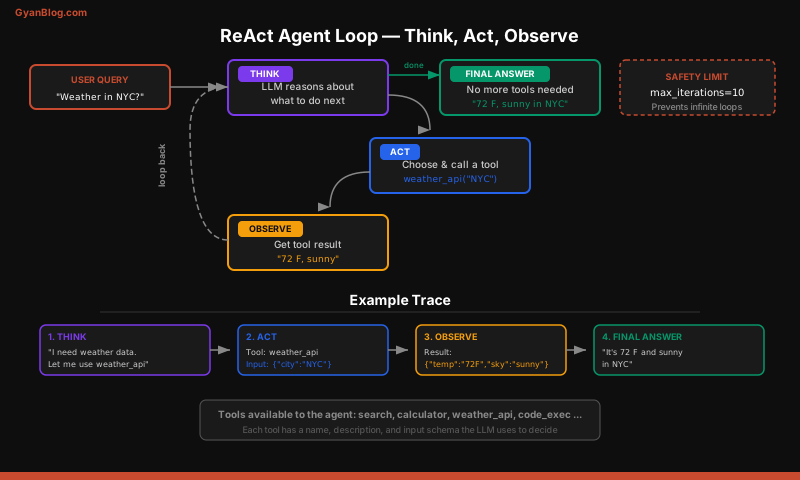
Agents — LLM Decides What To Do
A chain follows a fixed sequence. An agent lets the LLM decide which tools to call and in what order. The agent runs in a loop: think, act, observe, repeat.
ReAct Agent
The ReAct (Reasoning + Acting) pattern is the most common agent architecture:
from langchain_openai import ChatOpenAI
from langchain.agents import create_tool_calling_agent, AgentExecutor
from langchain_core.prompts import ChatPromptTemplate

# Define tools
tools = [get_weather, calculate]

# Create the prompt with agent scratchpad
prompt = ChatPromptTemplate.from_messages([
    ("system", "You are a helpful assistant. Use tools when needed."),
    ("user", "{input}"),
    ("placeholder", "{agent_scratchpad}")
])

# Create agent and executor
model = ChatOpenAI(model="gpt-4o")
agent = create_tool_calling_agent(model, tools, prompt)
executor = AgentExecutor(agent=agent, tools=tools, verbose=True)

# Run it — the agent decides which tools to call
result = executor.invoke({
    "input": "What's the weather in London? Also, what's 1547 * 23?"
})
With verbose=True, you can see the agent’s reasoning:
> Entering new AgentExecutor chain...
Invoking: `get_weather` with `{'city': 'London'}`
15C, cloudy
Invoking: `calculate` with `{'expression': '1547 * 23'}`
35581
The weather in London is 15C and cloudy. And 1547 * 23 = 35,581.
> Finished chain.
The Agent Loop
Here is what happens inside an agent, step by step:
- The LLM receives the user message plus descriptions of available tools
- The LLM either responds directly or requests a tool call
- If a tool call is requested, the framework executes the tool and feeds the result back
- The LLM sees the tool result and decides: respond to the user, or call another tool
- Repeat until the LLM generates a final response
This loop is powerful but dangerous. A confused agent can loop forever or call tools with bad arguments. Always set max_iterations on your AgentExecutor.
executor = AgentExecutor(
    agent=agent,
    tools=tools,
    verbose=True,
    max_iterations=5,          # Stop after 5 tool calls
    handle_parsing_errors=True  # Don't crash on malformed tool calls
)
Memory — Conversation State
LLMs are stateless. Every API call is independent. Memory components manage conversation history so the LLM can reference earlier messages.
Conversation Buffer Memory
Stores the full conversation history. Simple but eats tokens fast.
from langchain.memory import ConversationBufferMemory
from langchain_openai import ChatOpenAI
from langchain.chains import ConversationChain

memory = ConversationBufferMemory()
llm = ChatOpenAI(model="gpt-4o")

conversation = ConversationChain(llm=llm, memory=memory)

conversation.invoke({"input": "My name is Alex."})
conversation.invoke({"input": "What's my name?"})
# "Your name is Alex."
Window Memory
Keeps only the last N messages. Good for long conversations where early context doesn’t matter.
from langchain.memory import ConversationBufferWindowMemory

# Keep last 5 exchanges
memory = ConversationBufferWindowMemory(k=5)
Summary Memory
Uses an LLM to summarize the conversation so far. Trades compute for token savings.
from langchain.memory import ConversationSummaryMemory

memory = ConversationSummaryMemory(llm=ChatOpenAI(model="gpt-4o-mini"))
When to Use Each
| Memory Type | Token Cost | Good For |
|---|---|---|
| Buffer | High (grows linearly) | Short conversations, debugging |
| Window | Capped | Chatbots, support agents |
| Summary | Medium (LLM call per turn) | Long conversations, cost-sensitive apps |
For most production applications, window memory with k=10 to k=20 is the practical default.
LangChain + RAG
LangChain integrates with vector stores to build retrieval-augmented generation pipelines.
Basic Retrieval Chain
from langchain_openai import OpenAIEmbeddings, ChatOpenAI
from langchain_community.vectorstores import FAISS
from langchain_core.prompts import ChatPromptTemplate
from langchain_core.runnables import RunnablePassthrough
from langchain_core.output_parsers import StrOutputParser

# Load documents into a vector store
embeddings = OpenAIEmbeddings()
vectorstore = FAISS.from_texts(
    ["Python was created by Guido van Rossum in 1991.",
     "Rust was first released in 2010 by Mozilla.",
     "Go was designed at Google and released in 2009."],
    embeddings
)
retriever = vectorstore.as_retriever(search_kwargs={"k": 2})

# Build the RAG chain
prompt = ChatPromptTemplate.from_template(
    "Answer based on this context:\n{context}\n\nQuestion: {question}"
)

def format_docs(docs):
    return "\n".join(doc.page_content for doc in docs)

rag_chain = (
    {"context": retriever | format_docs, "question": RunnablePassthrough()}
    | prompt
    | ChatOpenAI(model="gpt-4o")
    | StrOutputParser()
)

result = rag_chain.invoke("When was Go released?")
# "Go was released in 2009."
Document Strategies
When you retrieve many documents, you need a strategy for feeding them to the LLM:
| Strategy | How It Works | Best For |
|---|---|---|
| Stuff | Concatenate all docs into one prompt | Few, short documents |
| Map/Reduce | Summarize each doc, then summarize the summaries | Many documents |
| Refine | Process docs one by one, refining the answer each time | Sequential reasoning |
from langchain.chains import create_stuff_documents_chain

stuff_chain = create_stuff_documents_chain(
    llm=ChatOpenAI(model="gpt-4o"),
    prompt=ChatPromptTemplate.from_template(
        "Summarize these documents:\n{context}"
    )
)
For most applications, stuff is the default. Switch to map/reduce when your retrieved documents exceed the context window.
LlamaIndex Overview
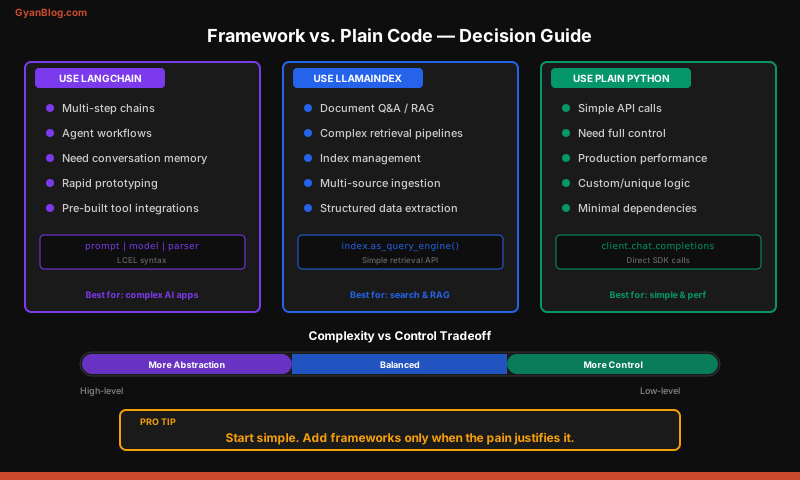
LlamaIndex is the other major framework. Where LangChain is a general orchestration toolkit, LlamaIndex is laser-focused on RAG and data retrieval.
When to Choose LlamaIndex Over LangChain
- Your primary use case is search over documents (RAG)
- You need advanced index types (tree, keyword, knowledge graph)
- You want built-in evaluation for retrieval quality
- You don’t need complex agent workflows
Basic LlamaIndex Usage
pip install llama-indexfrom llama_index.core import VectorStoreIndex, SimpleDirectoryReader
# Load documents from a directory
documents = SimpleDirectoryReader("./data").load_data()
# Build an index — handles chunking, embedding, and storage
index = VectorStoreIndex.from_documents(documents)
# Query it
query_engine = index.as_query_engine()
response = query_engine.query("What are the main findings?")
print(response)That is it. Five lines to go from a folder of files to a queryable knowledge base. LlamaIndex handles chunking, embedding, storage, retrieval, and response synthesis.
Index Types
LlamaIndex offers several index structures:
from llama_index.core import (
    VectorStoreIndex,    # Embedding similarity — general purpose
    TreeIndex,           # Hierarchical summarization — good for long docs
    KeywordTableIndex,   # Keyword extraction — good for exact-match queries
)

# Vector index (most common)
vector_index = VectorStoreIndex.from_documents(documents)

# Tree index — summarizes at each level
tree_index = TreeIndex.from_documents(documents)
Use VectorStoreIndex for 90% of cases. The others are situational.
When NOT to Use a Framework
Frameworks come with a complexity tax. Here is when LangChain and similar tools make your life harder, not easier.
The Complexity Tax
# Without LangChain: 8 lines, zero dependencies
import openai

def summarize(text: str) -> str:
    response = openai.chat.completions.create(
        model="gpt-4o",
        messages=[
            {"role": "system", "content": "Summarize the following text."},
            {"role": "user", "content": text}
        ]
    )
    return response.choices[0].message.content

# With LangChain: more lines, three extra dependencies
from langchain_openai import ChatOpenAI
from langchain_core.prompts import ChatPromptTemplate
from langchain_core.output_parsers import StrOutputParser

chain = (
    ChatPromptTemplate.from_template("Summarize: {text}")
    | ChatOpenAI(model="gpt-4o")
    | StrOutputParser()
)
result = chain.invoke({"text": some_text})
For a single LLM call, the framework adds complexity for zero benefit.
Debugging Difficulty
When a LangChain chain fails, the stack trace often looks like this:
File "langchain_core/runnables/base.py", line 4524, in invoke
File "langchain_core/runnables/base.py", line 1720, in invoke
File "langchain_core/runnables/base.py", line 3961, in invoke
    ... 15 more frames of internal plumbing ...
Compare that to debugging a plain function where you can set a breakpoint and step through your logic. Abstractions that obscure failures are expensive.
Abstraction Leaks
Frameworks paper over provider differences, but those differences matter:
- Token counting works differently between OpenAI and Anthropic
- Streaming formats vary between providers
- Tool calling schemas are not identical
- Error codes and rate limit behavior differ
When you hit an edge case, the framework’s abstraction leaks and you end up reading its source code anyway.
When to Skip the Framework
- Simple API calls — one model, one prompt, one response
- Prototyping — get something working before adding abstractions
- Performance-critical paths — frameworks add latency and memory overhead
- When you need full control — custom retry logic, token budgets, provider-specific features
Building Without Frameworks
Here is a lightweight approach that gives you composability without the heavyweight dependencies.
A Minimal Chain in Plain Python
import openai
from dataclasses import dataclass

client = openai.OpenAI()

def llm_call(system: str, user: str, model: str = "gpt-4o") -> str:
    """Single LLM call — the only abstraction you need."""
    response = client.chat.completions.create(
        model=model,
        messages=[
            {"role": "system", "content": system},
            {"role": "user", "content": user}
        ]
    )
    return response.choices[0].message.content

def research_pipeline(topic: str) -> dict:
    """Multi-step pipeline — plain functions, no framework."""
    # Step 1: Generate questions
    questions = llm_call(
        system="Generate 3 research questions. Return as numbered list.",
        user=f"Topic: {topic}"
    )

    # Step 2: Answer each question
    answers = llm_call(
        system="Answer these research questions concisely.",
        user=questions
    )

    # Step 3: Synthesize into a summary
    summary = llm_call(
        system="Write a 2-paragraph summary based on these Q&A pairs.",
        user=f"Questions:\n{questions}\n\nAnswers:\n{answers}"
    )

    return {"questions": questions, "answers": answers, "summary": summary}
This is readable, debuggable, and has zero dependencies beyond the OpenAI SDK.
Lightweight Memory
class ConversationMemory:
    def __init__(self, max_messages: int = 20):
        self.messages: list[dict] = []
        self.max_messages = max_messages

    def add(self, role: str, content: str):
        self.messages.append({"role": role, "content": content})
        # Trim to window size, always keep system message
        if len(self.messages) > self.max_messages:
            system = [m for m in self.messages if m["role"] == "system"]
            recent = self.messages[-self.max_messages:]
            self.messages = system + [m for m in recent if m["role"] != "system"]

    def get_messages(self) -> list[dict]:
        return self.messages.copy()

# Usage
memory = ConversationMemory(max_messages=10)
memory.add("system", "You are a helpful assistant.")
memory.add("user", "What is Python?")

response = client.chat.completions.create(
    model="gpt-4o",
    messages=memory.get_messages()
)
memory.add("assistant", response.choices[0].message.content)
Lightweight Tool Calling
import json

# Define tools as plain functions with a registry
TOOLS = {}

def register_tool(func):
    """Decorator to register a function as an LLM-callable tool."""
    TOOLS[func.__name__] = func
    return func

@register_tool
def search_docs(query: str) -> str:
    """Search the document database."""
    return f"Results for '{query}': [doc1, doc2, doc3]"

@register_tool
def get_user(user_id: int) -> str:
    """Look up a user by ID."""
    return json.dumps({"id": user_id, "name": "Alice", "role": "admin"})

def execute_tool_call(tool_name: str, arguments: dict) -> str:
    """Execute a tool by name with the given arguments."""
    if tool_name not in TOOLS:
        return f"Unknown tool: {tool_name}"
    return TOOLS[tool_name](**arguments)
This is 20 lines of code. It replaces hundreds of lines of framework abstractions. You can add retries, logging, and error handling exactly where you need them.
The Decision Framework
Ask these questions before reaching for LangChain:
- How many LLM calls per workflow? If one or two, skip the framework.
- Do you need agents? If the LLM needs to dynamically choose tools, a framework helps.
- How many tool integrations? LangChain has 100+ built-in integrations. If you need five of them, that saves real work.
- Is this a prototype or production? Prototype with plain code. Add a framework if the complexity justifies it.
- Does your team know the framework? Framework abstractions only help if everyone understands them.
The honest answer for most projects: start without a framework, add LangChain when you hit a specific pain point it solves, and use LlamaIndex if your core problem is RAG over documents.
Key Takeaways
- LangChain organizes LLM workflows into models, prompts, chains, tools, agents, and memory — each solving a specific coordination problem.
- LCEL pipe syntax (
prompt | model | parser) is the modern way to build chains. It is composable and supports streaming out of the box. - Tools give LLMs capabilities beyond text generation. The LLM reads the tool description to decide when and how to call it. Clear docstrings matter.
- Agents are autonomous loops where the LLM decides which tools to call. Always set
max_iterationsto prevent runaway loops. - Memory is your responsibility. LLMs are stateless. Choose buffer memory for short conversations, window memory for long ones, summary memory when tokens are expensive.
- LlamaIndex is purpose-built for RAG. If your primary workflow is “search documents, then answer questions,” LlamaIndex gets you there faster than LangChain.
- Frameworks have a complexity tax. More dependencies, harder debugging, abstraction leaks. For simple API calls, plain Python is better.
- Start without a framework. A
llm_call()helper function, a list for memory, and a dictionary for tool registration cover most use cases in under 50 lines of code. - Add a framework when you feel the pain — when you are building agent loops, managing dozens of tools, or wiring together complex multi-step retrieval pipelines. That is when the abstractions earn their keep.