
Python’s module system is straightforward once you understand the mechanics: every .py file is a module, directories with __init__.py are packages, and sys.path determines where Python looks for imports. This lesson covers the full stack — from basic imports to virtual environments to modern dependency management.
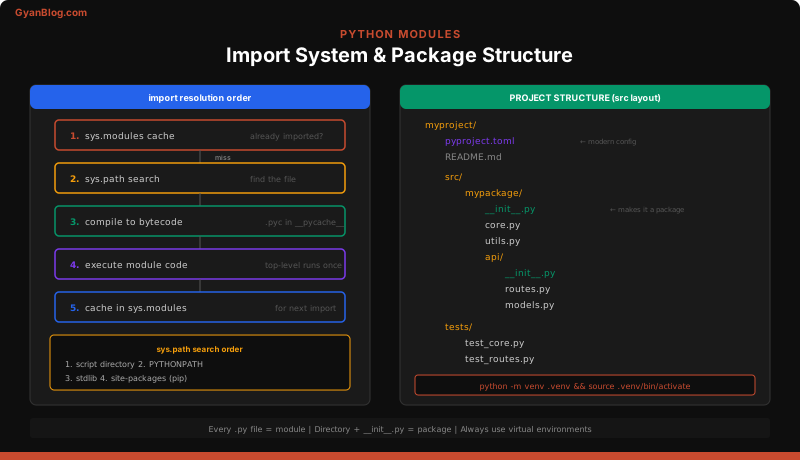
Modules
A module is any .py file. When you import it, Python executes the file top-to-bottom and creates a module object.
# utils.py
def slugify(text: str) -> str:
    return text.lower().replace(" ", "-")

PI = 3.14159
Import Variants
# Import the module — access via namespace
import utils
utils.slugify("Hello World")

# Import specific names into current namespace
from utils import slugify, PI
slugify("Hello World")

# Alias — common for long module names
import numpy as np
import pandas as pd

# Import everything (avoid this — pollutes namespace, hides origin)
from utils import *
__name__ and __main__
When Python runs a file directly, it sets __name__ to "__main__". When the file is imported, __name__ is set to the module’s qualified name.
# db.py
def connect(url: str):
    print(f"Connecting to {url}")

def _test_connection():
    connect("sqlite:///test.db")
    print("Connection OK")

# Only runs when executed directly: python db.py
# Does NOT run when imported: from db import connect
if __name__ == "__main__":
    _test_connection()
This is Python’s equivalent of public static void main. Use it for quick tests, CLI entry points, or demo code.
Module Attributes
Every module has built-in attributes:
import json

json.__name__    # 'json'
json.__file__    # '/usr/lib/python3.12/json/__init__.py'
json.__doc__     # module docstring
json.__package__ # 'json'
json.__path__    # ['/usr/lib/python3.12/json'] (packages only)
How Imports Work
When you write import foo, Python does three things in order:
- Checks
sys.modules— a dict cache of already-imported modules. If found, returns immediately. - Searches
sys.path— an ordered list of directories. First match wins. - Executes the module — runs the file top-to-bottom, creates a module object, caches it in
sys.modules.
sys.path Search Order
import sys
for p in sys.path:
    print(p)
Typical order:
- The directory containing the script being run (or
""for interactive mode) PYTHONPATHenvironment variable entries- Standard library directories
site-packages(where pip installs third-party packages)
Gotcha: If you name a file json.py in your project directory, it shadows the standard library json module. Python searches the script directory first. This is the #1 cause of mysterious import failures for beginners.
.pyc Files and __pycache__
Python compiles modules to bytecode and caches them in __pycache__/ as .pyc files. This speeds up subsequent imports — not execution. The files are named like module.cpython-312.pyc (tagged with the Python version).
You can safely delete __pycache__/ — it’s regenerated automatically. Add it to .gitignore.
# .gitignore
__pycache__/
*.pyc
Reloading Modules
Modules are cached after first import. In a long-running REPL or notebook, use importlib.reload:
import importlib
import mymodule

# After editing mymodule.py:
importlib.reload(mymodule)
This re-executes the module file. Existing references to old objects are not updated — only the module namespace changes.
Packages
A package is a directory containing an __init__.py file (which can be empty). Packages let you organize modules hierarchically.
myapp/
    __init__.py
    models/
        __init__.py
        user.py
        order.py
    services/
        __init__.py
        auth.py
        billing.py
    utils.py
__init__.py
This file runs when the package is imported. Common uses:
# myapp/models/__init__.py

# Re-export for convenient access
from .user import User, UserRole
from .order import Order, OrderStatus

# Now consumers can do:
# from myapp.models import User, Order
# Instead of:
# from myapp.models.user import User
An empty __init__.py is fine — it just marks the directory as a package.
Absolute vs Relative Imports
# Inside myapp/services/auth.py

# Absolute import — always works, always clear
from myapp.models.user import User
from myapp.utils import slugify

# Relative import — shorter, but only works inside packages
from ..models.user import User    # go up one level, then into models
from ..utils import slugify       # go up one level
from . import billing             # same package (services)
from .billing import charge       # same package, specific name
Rule of thumb: Use absolute imports for public APIs and cross-package references. Use relative imports within tightly coupled sub-packages.
Gotcha: Relative imports don’t work in scripts run directly (python myapp/services/auth.py). They only work when the file is imported as part of a package. Use python -m myapp.services.auth instead.
Package Structure for Real Projects
The src layout is the modern standard. It prevents accidental imports from the project root.
my-project/
    pyproject.toml
    README.md
    src/
        myapp/
            __init__.py
            main.py
            models/
                __init__.py
                user.py
            services/
                __init__.py
                auth.py
    tests/
        __init__.py
        test_user.py
        test_auth.py
    scripts/
        seed_db.py
Why src/ layout? Without it, import myapp in tests might import the local directory instead of the installed package. The src/ directory forces you to install the package (pip install -e .) before imports work, catching packaging bugs early.
Entry Points
Define CLI entry points in pyproject.toml instead of relying on if __name__ == "__main__":
[project.scripts]
myapp = "myapp.main:cli"
After pip install -e ., you can run myapp from anywhere.
Virtual Environments
Virtual environments isolate project dependencies. Without them, all projects share one global Python installation and fight over package versions.
Creating and Using
# Create a virtual environment
python -m venv .venv

# Activate it (macOS/Linux)
source .venv/bin/activate

# Activate it (Windows)
.venv\Scripts\activate

# Your prompt changes to show the active env
(.venv) $ python --version
(.venv) $ which python   # points to .venv/bin/python

# Deactivate when done
deactivate
What Happens Under the Hood
python -m venv .venv creates a directory with:
.venv/
    bin/            # (Scripts/ on Windows)
        python      # symlink to system Python
        pip
        activate
    lib/
        python3.12/
            site-packages/   # isolated package directory
    pyvenv.cfg      # config pointing to base Python
When activated, the shell prepends .venv/bin/ to PATH. That’s it — no magic. python and pip now resolve to the venv copies, and site-packages is isolated.
Always add .venv/ to .gitignore. Never commit the virtual environment.
# .gitignore
.venv/
pip — Package Management
pip installs packages from PyPI (Python Package Index) — the central repository with 500k+ packages.
Common Commands
# Install a package
pip install requests

# Install a specific version
pip install requests==2.31.0

# Install with version constraints
pip install "requests>=2.28,<3.0"

# Upgrade a package
pip install --upgrade requests

# Uninstall
pip uninstall requests

# Show installed packages
pip list

# Show details about a package
pip show requests
requirements.txt
The traditional way to pin dependencies:
# Generate from current environment
pip freeze > requirements.txt

# Install from file
pip install -r requirements.txt
A requirements.txt looks like:
requests==2.31.0
sqlalchemy==2.0.23
pydantic==2.5.3
Tip: pip freeze dumps everything, including transitive dependencies. For cleaner dependency management, manually maintain a requirements.in with direct dependencies and use pip-compile (from pip-tools) to generate the full requirements.txt.
Editable Installs
For developing a package locally:
# Install your project in editable mode
pip install -e .

# With optional dev dependencies
pip install -e ".[dev]"
This creates a symlink so changes to your source code are reflected immediately — no reinstall needed.
Modern Tooling — pyproject.toml
pyproject.toml is the modern standard for Python project configuration (PEP 621). It replaces setup.py, setup.cfg, and requirements.txt.
[build-system]
requires = ["hatchling"]
build-backend = "hatchling.build"

[project]
name = "myapp"
version = "1.0.0"
description = "My application"
requires-python = ">=3.11"
dependencies = [
    "requests>=2.28",
    "sqlalchemy>=2.0",
    "pydantic>=2.0",
]

[project.optional-dependencies]
dev = [
    "pytest>=7.0",
    "ruff>=0.1.0",
    "mypy>=1.7",
]

[project.scripts]
myapp = "myapp.main:cli"

[tool.pytest.ini_options]
testpaths = ["tests"]

[tool.ruff]
line-length = 100
Alternative Build/Dependency Tools
| Tool | What It Does |
|---|---|
| uv | Fast pip/venv replacement written in Rust. Drop-in compatible. Use uv pip install, uv venv. Dramatically faster. |
| poetry | Dependency resolver + venv manager + build tool. Uses pyproject.toml with its own [tool.poetry] section. Generates poetry.lock. |
| pdm | Similar to poetry but uses PEP 621 standard metadata. Supports PEP 582 (local __pypackages__). |
| hatch | Build backend + environment manager. Lightweight, standards-compliant. |
If you’re starting a new project in 2026, uv is the pragmatic choice for speed. poetry has the largest ecosystem. All of them use pyproject.toml.
Common Patterns and Gotchas
Circular Imports
Circular imports happen when module A imports module B and module B imports module A.
# models.py
from services import validate  # imports services -> services imports models -> crash

class User:
    def save(self):
        validate(self)

# services.py
from models import User  # circular!

def validate(user: User):
    ...
Fixes:
# Fix 1: Import inside the function (defer the import)
# models.py
class User:
    def save(self):
        from services import validate  # import when needed, not at module load
        validate(self)

# Fix 2: Restructure — move shared types to a third module
# types.py (no imports from models or services)
# models.py imports from types
# services.py imports from types

# Fix 3: Use TYPE_CHECKING for type hints only
from __future__ import annotations
from typing import TYPE_CHECKING

if TYPE_CHECKING:
    from models import User  # only imported during type checking, not at runtime

def validate(user: "User"):
    ...
Lazy Imports
Defer expensive imports to speed up module load time:
# Instead of this (slow startup):
import pandas as pd  # 200ms+ import time

def process(data):
    return pd.DataFrame(data)

# Do this (fast startup, pay cost only when called):
def process(data):
    import pandas as pd
    return pd.DataFrame(data)
Large frameworks like Django and TensorFlow use lazy imports extensively.
Conditional Imports
Handle optional dependencies or platform differences:
# Optional dependency
try:
    import ujson as json  # faster JSON library
except ImportError:
    import json           # fall back to stdlib

# Platform-specific
import sys
if sys.platform == "win32":
    from .windows import get_home_dir
else:
    from .posix import get_home_dir
The __all__ Variable
Controls what from module import * exports:
# mymodule.py
__all__ = ["public_func", "PublicClass"]

def public_func():
    ...

def _private_helper():
    ...

class PublicClass:
    ...
Without __all__, import * exports everything that doesn’t start with _. With __all__, only the listed names are exported. Always define __all__ in __init__.py files of public packages.
Namespace Packages (PEP 420)
Regular packages require __init__.py. Namespace packages don’t — they allow a package to span multiple directories or distributions.
# Two separate distributions on sys.path:
path1/
    mypkg/
        module_a.py
path2/
    mypkg/
        module_b.py

# Both are importable:
from mypkg import module_a  # found in path1
from mypkg import module_b  # found in path2
Python merges them into a single logical package. This is used by large organizations (e.g., google.cloud.* packages are separate distributions under the google namespace).
When to use: Almost never in application code. Useful for plugin architectures or when splitting a large package into independently installable pieces.
Gotcha: If any directory in the namespace has an __init__.py, it becomes a regular package and blocks the namespace merge for that path. Be consistent — either all directories have __init__.py or none do.
Key Takeaways
- Every
.pyfile is a module. Importing it executes the file and caches the result insys.modules. sys.pathcontrols import resolution. Script directory first, thenPYTHONPATH, then stdlib, thensite-packages. Name collisions with stdlib modules are a common trap.- Packages are directories with
__init__.py. Use__init__.pyto re-export public APIs for cleaner consumer imports. - Use absolute imports by default. Reserve relative imports for tightly coupled sub-packages.
- Always use virtual environments.
python -m venv .venvper project, no exceptions. Neverpip installinto the system Python. pip freeze > requirements.txtfor pinning. Usepip-toolsor a modern tool for better dependency resolution.pyproject.tomlis the standard. It replacessetup.py,setup.cfg, and consolidates tool configuration.- Fix circular imports by deferring imports into functions, restructuring into a third module, or using
TYPE_CHECKING. - Use
if __name__ == "__main__"as a guard for code that should only run when the file is executed directly. - Use the
src/layout for packages you intend to distribute or test properly.