
A load balancer sits between clients and servers, distributing incoming requests across multiple backend instances. Without one, a single server handles all traffic and becomes both a bottleneck and a single point of failure. With one, you get horizontal scalability, fault tolerance, and the ability to deploy without downtime.
But load balancers are not all the same. The algorithm you choose, the layer you operate at, and how you handle health checks and session state all affect your system’s behavior under load and during failures.
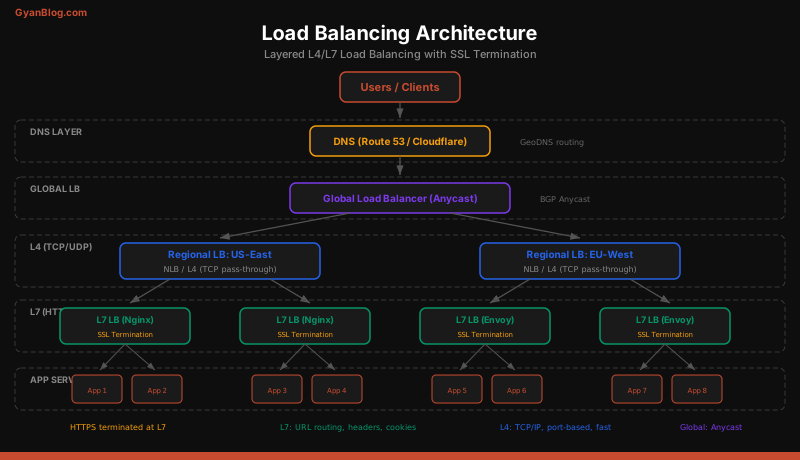
L4 vs L7 Load Balancing
Load balancers operate at different layers of the network stack, and the layer determines what information they can use to make routing decisions.
Layer 4 (Transport Layer)
An L4 load balancer operates at the TCP/UDP level. It sees source IP, destination IP, source port, and destination port. It does not understand HTTP, headers, cookies, or URL paths. It simply forwards TCP connections to backend servers.
How it works: The client opens a TCP connection to the load balancer’s IP. The LB selects a backend server and either forwards packets directly (DSR — Direct Server Return) or proxies the entire connection.
Client -> [L4 LB] -> Backend Server
(TCP only — cannot inspect HTTP content)Advantages:
- Extremely fast — operates on raw packets, not parsed HTTP
- Protocol-agnostic — works with HTTP, gRPC, WebSocket, database connections, anything over TCP
- Low overhead — nanosecond-level added latency
Disadvantages:
- Cannot route by URL path, HTTP headers, or cookies
- Cannot terminate SSL (the backend must handle TLS)
- Cannot do content-based routing
Real-world examples: AWS NLB, HAProxy in TCP mode, LVS, MetalLB (Kubernetes).
Layer 7 (Application Layer)
An L7 load balancer understands HTTP. It can inspect URL paths, headers, cookies, query parameters, and even request bodies. This enables intelligent routing decisions.
How it works: The client opens a TCP connection to the load balancer. The LB terminates the TCP connection, parses the HTTP request, makes a routing decision, and opens a new connection to the selected backend.
Client -> [L7 LB] -> /api/* -> API Servers
                   -> /static/* -> CDN / Static Servers
-> /ws/* -> WebSocket ServersAdvantages:
- Content-based routing (route /api to API servers, /static to CDN)
- SSL termination (offload TLS from backends)
- Header manipulation (add X-Request-ID, X-Forwarded-For)
- Request/response compression
- Rate limiting and WAF integration
- Sticky sessions based on cookies
Disadvantages:
- Higher latency — must parse every HTTP request
- More resource-intensive — terminates and re-establishes connections
- Only works with HTTP-based protocols (or protocols it understands)
Real-world examples: Nginx, AWS ALB, Envoy, HAProxy in HTTP mode, Traefik, Caddy.
When to Use Which
| Scenario | Use |
|---|---|
| Generic TCP traffic (databases, custom protocols) | L4 |
| HTTP routing by path, header, or hostname | L7 |
| TLS passthrough (backend handles its own certs) | L4 |
| SSL termination (LB handles certs, backends get HTTP) | L7 |
| Maximum performance, minimal latency | L4 |
| WebSocket upgrade with path-based routing | L7 |
| gRPC with per-service routing | L7 |
In practice, many architectures use both: an L4 load balancer at the edge (for raw performance and DDoS resilience) fronting L7 load balancers that handle intelligent HTTP routing.
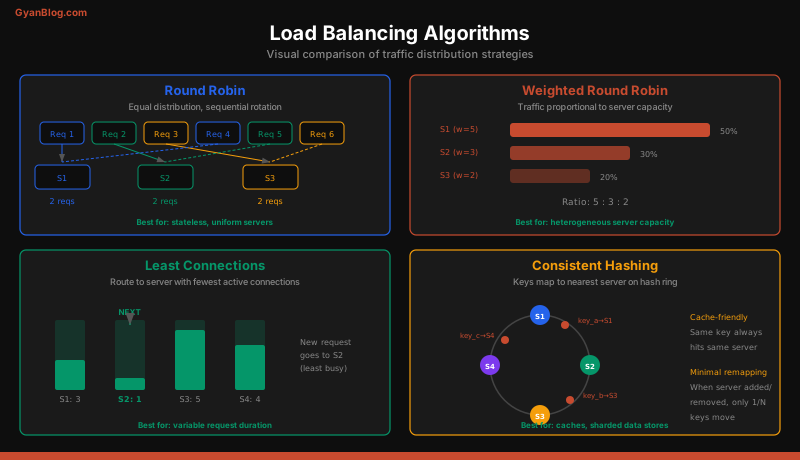
Load Balancing Algorithms
Round Robin
The simplest algorithm. Requests go to servers in sequential order: Server 1, Server 2, Server 3, Server 1, Server 2, Server 3, and so on.
class RoundRobinBalancer:
    def __init__(self, servers):
        self.servers = servers
        self.index = 0

    def next_server(self):
        server = self.servers[self.index % len(self.servers)]
        self.index += 1
        return server

# Usage
lb = RoundRobinBalancer(["server-1", "server-2", "server-3"])
for _ in range(6):
    print(lb.next_server())
# server-1, server-2, server-3, server-1, server-2, server-3
Best for: Stateless services with homogeneous servers (same hardware, same capacity).
Problem: If Server 1 is a powerful machine and Server 3 is half its size, round robin overloads Server 3.
Weighted Round Robin
Like round robin, but servers with higher weights receive proportionally more traffic.
class WeightedRoundRobinBalancer:
    def __init__(self, servers_with_weights):
        """servers_with_weights: [("server-1", 5), ("server-2", 3), ("server-3", 2)]"""
        self.servers = []
        for server, weight in servers_with_weights:
            self.servers.extend([server] * weight)
        self.index = 0

    def next_server(self):
        server = self.servers[self.index % len(self.servers)]
        self.index += 1
        return server

# 8-core machine gets weight 5, 4-core gets 3, 2-core gets 2
lb = WeightedRoundRobinBalancer([
    ("big-server", 5),
    ("medium-server", 3),
    ("small-server", 2)
])
# big-server gets 50% of requests, medium gets 30%, small gets 20%
Best for: Heterogeneous server fleet with known capacity differences.
Least Connections
Routes each request to the server with the fewest active connections. This naturally adapts to servers with different processing speeds — a faster server finishes requests sooner, drops its connection count, and receives the next request.
import heapq
import threading

class LeastConnectionsBalancer:
    def __init__(self, servers):
        self.lock = threading.Lock()
        # Min-heap: (connection_count, server_name)
        self.heap = [(0, server) for server in servers]
        heapq.heapify(self.heap)
        self.connections = {server: 0 for server in servers}

    def acquire_server(self):
        with self.lock:
            count, server = heapq.heappop(self.heap)
            self.connections[server] = count + 1
            heapq.heappush(self.heap, (count + 1, server))
            return server

    def release_server(self, server):
        with self.lock:
            self.connections[server] -= 1
            # Rebuild heap (simplified — production uses indexed heap)
            self.heap = [(c, s) for s, c in self.connections.items()]
            heapq.heapify(self.heap)

# Usage
lb = LeastConnectionsBalancer(["server-1", "server-2", "server-3"])
server = lb.acquire_server()
try:
    process_request(server)
finally:
    lb.release_server(server)
Best for: Requests with variable processing time (some take 10ms, some take 5 seconds). Long-running connections like WebSockets.
IP Hash
Hash the client’s IP address to determine the server. The same client always hits the same server.
import hashlib

class IPHashBalancer:
    def __init__(self, servers):
        self.servers = servers

    def get_server(self, client_ip):
        hash_val = int(hashlib.md5(client_ip.encode()).hexdigest(), 16)
        index = hash_val % len(self.servers)
        return self.servers[index]

lb = IPHashBalancer(["server-1", "server-2", "server-3"])
print(lb.get_server("192.168.1.100"))  # Always the same server
print(lb.get_server("10.0.0.50"))      # Always the same server
Best for: Session affinity without cookies. Basic cache locality.
Problem: Adding or removing servers changes the hash mapping, causing most clients to switch servers. Use consistent hashing instead.
Consistent Hashing
Maps both servers and requests onto a virtual ring. Each request is routed to the nearest server clockwise on the ring. When a server is added or removed, only the requests near that server on the ring are remapped — everything else stays put.
import hashlib
from bisect import bisect_right

class ConsistentHashBalancer:
    def __init__(self, servers, virtual_nodes=150):
        self.ring = []           # Sorted list of (hash, server)
        self.hash_to_server = {} # hash -> server mapping
        self.virtual_nodes = virtual_nodes

        for server in servers:
            self.add_server(server)

    def _hash(self, key):
        return int(hashlib.md5(key.encode()).hexdigest(), 16)

    def add_server(self, server):
        for i in range(self.virtual_nodes):
            virtual_key = f"{server}:vn{i}"
            h = self._hash(virtual_key)
            self.ring.append(h)
            self.hash_to_server[h] = server
        self.ring.sort()

    def remove_server(self, server):
        for i in range(self.virtual_nodes):
            virtual_key = f"{server}:vn{i}"
            h = self._hash(virtual_key)
            self.ring.remove(h)
            del self.hash_to_server[h]

    def get_server(self, key):
        if not self.ring:
            return None
        h = self._hash(key)
        idx = bisect_right(self.ring, h) % len(self.ring)
        return self.hash_to_server[self.ring[idx]]

# Usage
lb = ConsistentHashBalancer(["cache-1", "cache-2", "cache-3"])
print(lb.get_server("user:12345"))   # -> cache-2
print(lb.get_server("session:abc"))  # -> cache-1

# Add a new cache server — only ~1/N keys remap
lb.add_server("cache-4")
print(lb.get_server("user:12345"))   # Likely still cache-2
Best for: Cache layers (Memcached, Redis), sharded data stores, CDNs. Any system where you need consistent routing and cannot afford to remap everything when servers change.
Power of Two Choices
Pick two random servers, then route to the one with fewer active connections. Surprisingly, this simple algorithm achieves near-optimal load distribution with O(1) overhead.
import random

class PowerOfTwoBalancer:
    def __init__(self, servers):
        self.servers = {s: 0 for s in servers}

    def get_server(self):
        candidates = random.sample(list(self.servers.keys()), 2)
        a, b = candidates
        return a if self.servers[a] <= self.servers[b] else b

    def connect(self, server):
        self.servers[server] += 1

    def disconnect(self, server):
        self.servers[server] -= 1
Best for: Large server pools (hundreds of instances). Combines the simplicity of random selection with load-awareness.
Health Checks
A load balancer without health checks is a traffic distributor that happily sends requests to dead servers. Health checks are not optional.
Active Health Checks
The load balancer periodically sends probe requests to each backend:
# Nginx upstream with active health checks (requires nginx-plus or OpenResty)
upstream api_backend {
    zone api_backend 64k;

    server 10.0.1.10:8080;
    server 10.0.1.11:8080;
    server 10.0.1.12:8080;

    # Check every 5 seconds, mark unhealthy after 3 failures,
    # mark healthy again after 2 successes
    health_check interval=5s fails=3 passes=2 uri=/healthz;
}
Passive Health Checks
The load balancer monitors real traffic responses. If a server returns too many errors, it is marked unhealthy:
# Nginx passive health checks (open-source nginx)
upstream api_backend {
    server 10.0.1.10:8080 max_fails=3 fail_timeout=30s;
    server 10.0.1.11:8080 max_fails=3 fail_timeout=30s;
    server 10.0.1.12:8080 max_fails=3 fail_timeout=30s;
}

# max_fails=3: After 3 failed requests, mark server as down
# fail_timeout=30s: Keep server marked down for 30 seconds, then retry
Best practice: Use both. Active checks detect crashes quickly (even when there is no traffic). Passive checks catch intermittent errors under load.
Session Affinity (Sticky Sessions)
Some applications store session state on the server. If a user’s second request goes to a different server, their session is lost. Session affinity ensures a user’s requests always go to the same server.
Cookie-Based Affinity (Preferred)
The load balancer inserts a cookie identifying the backend server:
upstream app_backend {
    server 10.0.1.10:8080;
    server 10.0.1.11:8080;
    server 10.0.1.12:8080;

    # Nginx-plus sticky cookie
    sticky cookie srv_id expires=1h domain=.myapp.com path=/;
}
The Better Solution: Externalize State
Sticky sessions are a band-aid. The correct solution is to make your services stateless by storing session data externally:
# Instead of server-local sessions, use Redis
import redis
import json

redis_client = redis.Redis(host='redis-cluster', port=6379)

def get_session(session_id):
    data = redis_client.get(f"session:{session_id}")
    return json.loads(data) if data else None

def set_session(session_id, data, ttl=3600):
    redis_client.setex(
        f"session:{session_id}",
        ttl,
        json.dumps(data)
    )
With externalized sessions, every server can handle any request, and you do not need sticky sessions at all. This is strictly better — it simplifies load balancing, enables true horizontal scaling, and eliminates the risk of losing sessions when a server dies.
SSL/TLS Termination
L7 load balancers can terminate SSL, so backend servers receive plain HTTP. This centralizes certificate management and offloads the CPU-intensive TLS handshake.
# Nginx SSL termination
server {
    listen 443 ssl http2;
    server_name api.myapp.com;

    ssl_certificate     /etc/ssl/certs/myapp.crt;
    ssl_certificate_key /etc/ssl/private/myapp.key;
    ssl_protocols       TLSv1.2 TLSv1.3;
    ssl_ciphers         HIGH:!aNULL:!MD5;

    # HSTS — tell browsers to always use HTTPS
    add_header Strict-Transport-Security "max-age=31536000; includeSubDomains" always;

    # Forward to backend over plain HTTP
    location / {
        proxy_pass http://api_backend;
        proxy_set_header Host $host;
        proxy_set_header X-Real-IP $remote_addr;
        proxy_set_header X-Forwarded-For $proxy_add_x_forwarded_for;
        proxy_set_header X-Forwarded-Proto $scheme;
    }
}
For sensitive internal traffic, you can also use TLS between the load balancer and backends (end-to-end encryption). This is called SSL re-encryption or SSL bridging.
Real-World Nginx Configuration
A production-grade Nginx load balancer configuration:
# /etc/nginx/nginx.conf
worker_processes auto;
worker_rlimit_nofile 65535;

events {
    worker_connections 16384;
    multi_accept on;
    use epoll;
}

http {
    # Upstream: API servers
    upstream api_servers {
        least_conn;

        server 10.0.1.10:8080 weight=5 max_fails=3 fail_timeout=30s;
        server 10.0.1.11:8080 weight=5 max_fails=3 fail_timeout=30s;
        server 10.0.1.12:8080 weight=3 max_fails=3 fail_timeout=30s;

        keepalive 64;   # Keep persistent connections to backends
    }

    # Upstream: WebSocket servers
    upstream ws_servers {
        ip_hash;   # Same client always hits the same WS server
        server 10.0.2.10:9090;
        server 10.0.2.11:9090;
    }

    # Rate limiting
    limit_req_zone $binary_remote_addr zone=api_limit:10m rate=100r/s;

    server {
        listen 443 ssl http2;
        server_name api.myapp.com;

        ssl_certificate     /etc/ssl/certs/myapp.crt;
        ssl_certificate_key /etc/ssl/private/myapp.key;

        # API traffic
        location /api/ {
            limit_req zone=api_limit burst=50 nodelay;

            proxy_pass http://api_servers;
            proxy_http_version 1.1;
            proxy_set_header Connection "";
            proxy_set_header Host $host;
            proxy_set_header X-Real-IP $remote_addr;
            proxy_set_header X-Forwarded-For $proxy_add_x_forwarded_for;
            proxy_set_header X-Request-ID $request_id;

            proxy_connect_timeout 5s;
            proxy_read_timeout 30s;
            proxy_send_timeout 10s;

            # Retry on connection failure, not on HTTP errors
            proxy_next_upstream error timeout;
            proxy_next_upstream_tries 2;
        }

        # WebSocket traffic
        location /ws/ {
            proxy_pass http://ws_servers;
            proxy_http_version 1.1;
            proxy_set_header Upgrade $http_upgrade;
            proxy_set_header Connection "upgrade";
            proxy_read_timeout 3600s;   # Keep WS connections alive
        }

        # Static assets — serve directly or forward to CDN
        location /static/ {
            alias /var/www/static/;
            expires 30d;
            add_header Cache-Control "public, immutable";
        }
    }

    # Redirect HTTP to HTTPS
    server {
        listen 80;
        server_name api.myapp.com;
        return 301 https://$host$request_uri;
    }
}
Global Load Balancing
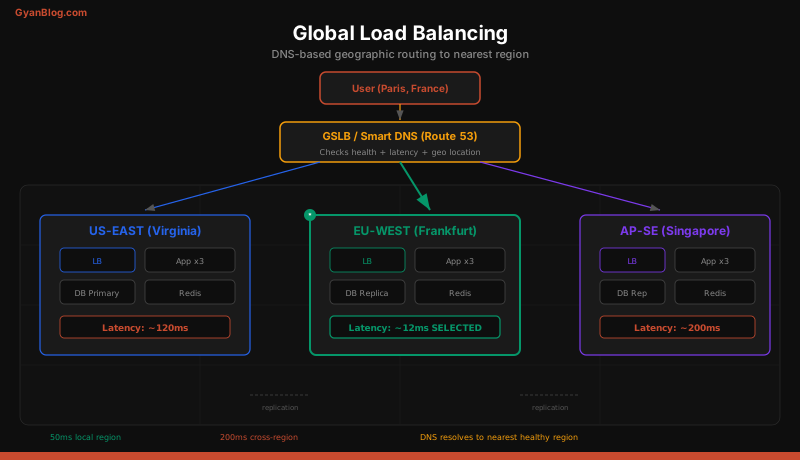
When your users are distributed worldwide, you need to route them to the nearest data center. There are three main approaches.
DNS-Based Routing (GeoDNS)
The DNS server returns different IP addresses based on the client’s geographic location.
User in Tokyo -> DNS query for api.myapp.com
                -> DNS returns 13.250.x.x (Singapore, nearest)

User in Berlin -> DNS query for api.myapp.com
-> DNS returns 3.120.x.x (Frankfurt, nearest)Advantages: Simple, works with any infrastructure. Disadvantages: Limited by DNS TTL. If a region fails, clients continue sending traffic to the dead region until the DNS cache expires (60-300 seconds). Also, DNS resolvers do not always represent the user’s actual location accurately.
Anycast
Multiple data centers announce the same IP address via BGP. The internet’s routing infrastructure automatically sends each client to the nearest data center.
api.myapp.com -> 203.0.113.1
                 ├── Announced from US-East
                 ├── Announced from EU-West
                 └── Announced from AP-Southeast

User in Tokyo -> BGP routes to AP-Southeast (closest)
User in Berlin -> BGP routes to EU-West (closest)Advantages: Instant failover (BGP reconvergence, typically under 30 seconds). No DNS TTL issues. Naturally routes to the nearest healthy data center. Disadvantages: Requires owning your own IP space and ASN, or using a provider that does (Cloudflare, Google Cloud).
GSLB (Global Server Load Balancing)
A dedicated GSLB appliance or service actively monitors the health and performance of all regions and makes intelligent routing decisions.
# Simplified GSLB decision logic
def route_request(client_ip):
    client_region = geoip_lookup(client_ip)
    regions = get_all_regions()

    # Filter to healthy regions
    healthy = [r for r in regions if r.health_check_passing]

    if not healthy:
        raise AllRegionsDownError()

    # Score each region
    scores = []
    for region in healthy:
        latency_score = estimate_latency(client_region, region)
        load_score = region.current_load / region.capacity
        cost_score = region.cost_per_request

        # Weighted combination
        total = (0.5 * latency_score +
                 0.3 * load_score +
                 0.2 * cost_score)
        scores.append((total, region))

    # Route to the best-scoring region
    scores.sort(key=lambda x: x[0])
return scores[0][1]Examples: AWS Global Accelerator, Cloudflare Load Balancing, F5 GTM, NS1.
AWS Load Balancer Comparison
| Feature | ALB (Application) | NLB (Network) | CLB (Classic) |
|---|---|---|---|
| Layer | L7 | L4 | L4/L7 |
| Protocols | HTTP, HTTPS, gRPC | TCP, UDP, TLS | TCP, HTTP |
| Routing | Path, host, header, query | IP, port | Basic |
| WebSocket | Yes | Yes (passthrough) | No |
| SSL termination | Yes | Optional (TLS) | Yes |
| Static IP | No (use Global Accelerator) | Yes | No |
| Performance | Good | Millions of req/s | Legacy |
| Cost | Per-LCU | Per-NLCU | Per-hour |
Recommendation: Use ALB for HTTP workloads (most web apps). Use NLB for non-HTTP protocols, ultra-low latency, or when you need static IPs. Do not use CLB for new projects.
Common Mistakes
-
No health checks — The load balancer sends traffic to dead servers. Always configure both active and passive health checks.
-
Sticky sessions as the default — Sticky sessions prevent effective load balancing and make scaling painful. Externalize state instead.
-
Round robin for variable workloads — If some requests take 10ms and others take 10 seconds, round robin creates hot spots. Use least connections.
-
No connection limits — A single client opening thousands of connections can exhaust backend capacity. Set
max_connson your upstreams. -
Ignoring the load balancer as a SPOF — A single load balancer is itself a single point of failure. Run redundant load balancers in active-passive or active-active configuration.
-
Using L7 where L4 suffices — If you do not need content-based routing, L4 gives you better performance with less overhead.
Key Takeaways
-
L4 is fast but blind. L7 is smart but slower. Use L4 for raw TCP forwarding and maximum throughput. Use L7 when you need routing by URL path, headers, cookies, or need SSL termination.
-
Match the algorithm to the workload. Round robin for uniform stateless services. Least connections for variable-duration requests. Consistent hashing for caches and sharded data. Weighted variants for heterogeneous servers.
-
Health checks are non-negotiable. Active checks detect crashes even with zero traffic. Passive checks catch failures under load. Use both. An unhealthy server that receives traffic is worse than a missing server.
-
Externalize session state. Store sessions in Redis or a database, not in server memory. This eliminates the need for sticky sessions and enables true stateless horizontal scaling.
-
SSL termination at the load balancer simplifies everything. Centralize certificate management. Offload TLS from application servers. Use HTTP/2 between clients and the LB, and keepalive connections to backends.
-
Global load balancing requires DNS or anycast. DNS-based routing is simple but limited by TTL. Anycast provides instant failover. GSLB adds intelligence (health, latency, cost). Most production systems combine multiple approaches.
-
The load balancer itself must be redundant. One load balancer is a single point of failure. Run at least two, with automatic failover between them. Cloud-managed load balancers (ALB, NLB) handle this for you.
-
Monitor your load balancer metrics. Track active connections, request rate, error rate, latency percentiles (p50, p95, p99), and backend health status. These are your earliest indicators of system stress.