
Every system starts synchronous. User clicks a button, server does the work, server responds. It works until it doesn’t. The moment your checkout flow needs to charge a payment, update inventory, send a confirmation email, notify the warehouse, and update analytics — all in one request — you have a problem. One slow downstream service and the entire request blocks. One service goes down and the whole operation fails. Message queues break this coupling. The producer drops a message onto the queue and moves on. Consumers process it when they’re ready. The producer doesn’t wait, doesn’t care if the consumer is slow, and doesn’t fail if the consumer is temporarily down. This is the foundation of every large-scale distributed system.
Why Message Queues Exist
Three problems that queues solve, each independently worth the added complexity:
Decoupling. The order service shouldn’t know or care that the email service exists. It publishes an “order.completed” event. Whatever services care about that event can subscribe. Adding a new consumer (say, a loyalty-points service) requires zero changes to the producer.
Buffering. Black Friday hits and your checkout traffic spikes 50x. Without a queue, your payment service gets hammered and starts dropping requests. With a queue, those requests pile up and get processed at whatever rate your payment service can handle. The queue absorbs the spike.
Async processing. Sending a confirmation email takes 2 seconds. Generating a PDF invoice takes 5 seconds. Resizing an uploaded image takes 10 seconds. None of these need to happen before you respond to the user. Drop them on a queue, return 202 Accepted, process them in the background.
# Without a queue -- synchronous, tightly coupled, fragile
def handle_order(order):
    charge_payment(order)        # 500ms, can fail
    update_inventory(order)      # 200ms, can fail
    send_confirmation(order)     # 2000ms, can fail
    notify_warehouse(order)      # 300ms, can fail
    update_analytics(order)      # 100ms, can fail
    return {"status": "ok"}      # Total: 3100ms, 5 failure points

# With a queue -- async, decoupled, resilient
def handle_order(order):
    charge_payment(order)        # Only the critical path stays sync
    queue.publish("order.completed", order)
    return {"status": "ok"}      # Total: 500ms, 1 failure point
The remaining services subscribe to the order.completed event and process independently. If the email service is down for 5 minutes, those messages wait in the queue. When it comes back, it catches up. No data lost, no user impact.
Point-to-Point vs Pub/Sub
Two fundamental messaging patterns that serve different purposes:
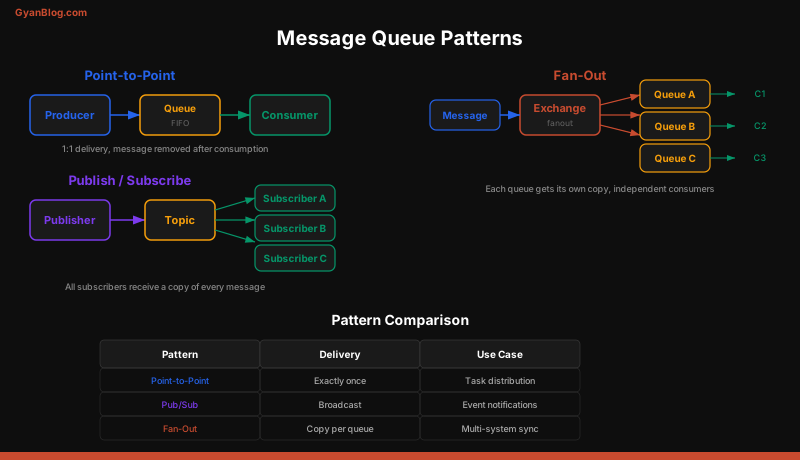
Point-to-point (task queue). One producer, one consumer per message. Think of it as a work queue. You have 1000 images to resize. You push them onto a queue. 10 worker processes pull from the same queue. Each image gets processed exactly once. RabbitMQ’s default behavior.
# Point-to-point: each message processed by exactly one consumer
import pika

connection = pika.BlockingConnection(pika.ConnectionParameters("localhost"))
channel = connection.channel()
channel.queue_declare(queue="image_resize", durable=True)

# Producer
channel.basic_publish(
    exchange="",
    routing_key="image_resize",
    body=json.dumps({"image_id": "abc123", "width": 800}),
    properties=pika.BasicProperties(delivery_mode=2)  # persistent
)

# Consumer (run multiple instances for parallelism)
def callback(ch, method, properties, body):
    task = json.loads(body)
    resize_image(task["image_id"], task["width"])
    ch.basic_ack(delivery_tag=method.delivery_tag)

channel.basic_qos(prefetch_count=1)
channel.basic_consume(queue="image_resize", on_message_callback=callback)
channel.start_consuming()
Pub/sub (fan-out). One producer, many consumers. Every subscriber gets every message. The order service publishes “order.completed” and the email service, analytics service, and warehouse service all receive a copy. Kafka’s default behavior (every consumer group gets all messages).
# Pub/sub with Kafka: every consumer group gets every message
from kafka import KafkaProducer, KafkaConsumer

producer = KafkaProducer(
    bootstrap_servers=["localhost:9092"],
    value_serializer=lambda v: json.dumps(v).encode("utf-8")
)

# Producer publishes once
producer.send("order.completed", {
    "order_id": "ord_789",
    "user_id": "usr_123",
    "total": 99.99
})

# Email service consumer (group: email-service)
email_consumer = KafkaConsumer(
    "order.completed",
    bootstrap_servers=["localhost:9092"],
    group_id="email-service",
    value_deserializer=lambda m: json.loads(m.decode("utf-8"))
)

# Analytics service consumer (group: analytics-service)
# Gets the SAME messages, processes independently
analytics_consumer = KafkaConsumer(
    "order.completed",
    bootstrap_servers=["localhost:9092"],
    group_id="analytics-service",
    value_deserializer=lambda m: json.loads(m.decode("utf-8"))
)
There’s also fan-out with filtering. RabbitMQ supports this natively with topic exchanges and routing keys. A message with routing key order.completed.us matches subscribers bound to order.completed.* and order.# but not order.cancelled.*.
Apache Kafka Deep Dive
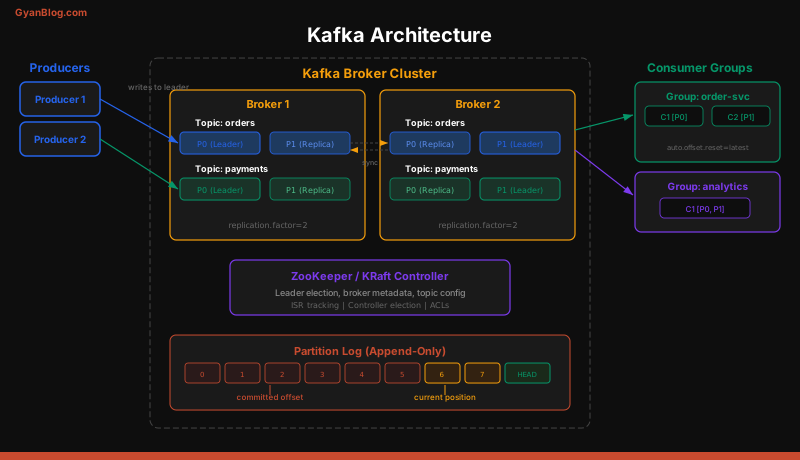
Kafka is not a traditional message queue. It’s a distributed commit log. This distinction matters because it changes how you think about message consumption.
Topics and Partitions
A topic is a named stream of events. “order.completed”, “user.signup”, “payment.failed” — each is a topic. Topics are split into partitions, and partitions are where the performance comes from.
Each partition is an ordered, append-only log. Messages within a partition have a sequential offset. Kafka guarantees ordering within a partition but not across partitions.
Topic: order.completed (3 partitions)

Partition 0: [msg0, msg1, msg4, msg7, msg10, ...]
Partition 1: [msg2, msg3, msg5, msg8, msg11, ...]
Partition 2: [msg6, msg9, msg12, msg13, msg14, ...]
How does Kafka decide which partition a message goes to? By the message key. Messages with the same key always go to the same partition. This is how you guarantee ordering for a specific entity:
# All events for order "ord_789" go to the same partition
# This guarantees they're processed in order
producer.send(
    "order.events",
    key=b"ord_789",
    value={"type": "created", "timestamp": "2026-03-28T10:00:00Z"}
)
producer.send(
    "order.events",
    key=b"ord_789",
    value={"type": "paid", "timestamp": "2026-03-28T10:00:05Z"}
)
producer.send(
    "order.events",
    key=b"ord_789",
    value={"type": "shipped", "timestamp": "2026-03-28T10:01:00Z"}
)
Consumer Groups
A consumer group is a set of consumers that cooperate to consume a topic. Kafka assigns each partition to exactly one consumer in the group. If you have 6 partitions and 3 consumers in a group, each consumer gets 2 partitions. If you have 6 partitions and 8 consumers, 2 consumers sit idle — you can never have more active consumers than partitions.
Topic: order.completed (6 partitions)
Consumer Group: email-service (3 consumers)

Consumer A: Partition 0, Partition 1
Consumer B: Partition 2, Partition 3
Consumer C: Partition 4, Partition 5
Scaling consumers is trivial: add more instances to the group. Kafka rebalances automatically. But be warned — rebalancing pauses consumption briefly and can cause duplicate processing if you’re not careful with offset commits.
Retention and Replay
Unlike RabbitMQ, Kafka doesn’t delete messages after consumption. Messages are retained for a configurable period (default 7 days) or until a size limit is hit. This means:
- New consumers can replay history. Deploy a new analytics service and it can process every order from the last 7 days.
- Consumers can rewind. Found a bug in your processing logic? Reset the consumer group offset to yesterday and reprocess.
- Multiple consumer groups are independent. The email service being slow doesn’t affect the analytics service.
# Reset consumer group to earliest offset (replay all retained messages)
kafka-consumer-groups.sh \
  --bootstrap-server localhost:9092 \
  --group analytics-service \
  --topic order.completed \
  --reset-offsets --to-earliest \
  --execute
Exactly-Once Semantics
Kafka supports exactly-once processing through idempotent producers and transactional consumers. The producer assigns a sequence number to each message. If a retry sends the same message twice, the broker deduplicates it.
producer = KafkaProducer(
    bootstrap_servers=["localhost:9092"],
    enable_idempotence=True,           # Deduplicate retries
    acks="all",                         # Wait for all replicas
    transactional_id="order-processor"  # Enable transactions
)

producer.init_transactions()
try:
    producer.begin_transaction()
    producer.send("output-topic", value=result)
    producer.send_offsets_to_transaction(offsets, consumer_group_id)
    producer.commit_transaction()
except Exception:
    producer.abort_transaction()
In practice, most systems use at-least-once delivery with idempotent consumers. True exactly-once adds latency and complexity. Make your consumers idempotent and you’ll be fine.
RabbitMQ: When You Need Smart Routing
RabbitMQ is a traditional message broker. Messages go through an exchange, which routes them to queues based on routing keys and bindings. Consumers pull from queues.
Exchange Types
Direct exchange:   Routes to queues with an exact routing key match
Fanout exchange:   Routes to ALL bound queues (ignores routing key)
Topic exchange:    Routes based on pattern matching (*.error, order.#)
Headers exchange:  Routes based on message headers (rarely used)
import pika
connection = pika.BlockingConnection(pika.ConnectionParameters("localhost"))
channel = connection.channel()
# Declare a topic exchange
channel.exchange_declare(exchange="events", exchange_type="topic", durable=True)
# Email service: only cares about completed orders
channel.queue_declare(queue="email-orders", durable=True)
channel.queue_bind(exchange="events", queue="email-orders",
routing_key="order.completed")
# Analytics service: cares about ALL order events
channel.queue_declare(queue="analytics-orders", durable=True)
channel.queue_bind(exchange="events", queue="analytics-orders",
routing_key="order.*")
# Fraud service: cares about ALL events across ALL entities
channel.queue_declare(queue="fraud-all", durable=True)
channel.queue_bind(exchange="events", queue="fraud-all",
routing_key="#")Acknowledgments and Redelivery
RabbitMQ supports manual acknowledgments. The consumer must explicitly ack a message after processing it. If the consumer crashes before acking, RabbitMQ redelivers the message to another consumer.
def process_message(ch, method, properties, body):
    try:
        result = do_work(json.loads(body))
        ch.basic_ack(delivery_tag=method.delivery_tag)
    except TransientError:
        # Requeue: put it back for retry
        ch.basic_nack(delivery_tag=method.delivery_tag, requeue=True)
    except PermanentError:
        # Reject: send to dead letter queue
        ch.basic_nack(delivery_tag=method.delivery_tag, requeue=False)

channel.basic_qos(prefetch_count=10)  # Don't overwhelm the consumer
channel.basic_consume(queue="email-orders", on_message_callback=process_message)
Dead Letter Queues
Messages fail. The payment API returns a 500. The email address is invalid. The JSON is malformed. You need a strategy for failed messages. That’s what dead letter queues (DLQs) are for.
A DLQ is a separate queue where messages go when they can’t be processed. Instead of retrying forever or dropping the message, you route it to the DLQ for inspection and manual intervention.
# RabbitMQ: declare a queue with dead-letter routing
channel.queue_declare(
    queue="email-orders",
    durable=True,
    arguments={
        "x-dead-letter-exchange": "dlx",
        "x-dead-letter-routing-key": "email-orders.dead",
        "x-message-ttl": 60000,        # 60 second TTL
        "x-max-delivery-count": 3       # Max 3 attempts (RabbitMQ 3.10+)
    }
)

# The dead letter queue itself
channel.exchange_declare(exchange="dlx", exchange_type="direct", durable=True)
channel.queue_declare(queue="email-orders-dlq", durable=True)
channel.queue_bind(exchange="dlx", queue="email-orders-dlq",
                   routing_key="email-orders.dead")
A good DLQ strategy: retry 3 times with exponential backoff, then route to DLQ. Have alerting on DLQ depth. Build tooling to inspect, edit, and replay DLQ messages.
Kafka vs RabbitMQ: Decision Guide
This comes up in every system design interview. Here’s the real answer:
| Dimension | Kafka | RabbitMQ |
|---|---|---|
| Model | Distributed commit log | Traditional message broker |
| Throughput | Millions of msgs/sec | Tens of thousands/sec |
| Retention | Configurable (days/weeks/forever) | Until consumed and acked |
| Ordering | Per partition | Per queue |
| Routing | Primitive (topics only) | Rich (exchanges, routing keys, headers) |
| Consumer model | Pull (consumer polls) | Push (broker delivers) |
| Replay | Yes (rewind offset) | No (message deleted after ack) |
| Protocol | Custom binary | AMQP (interoperable) |
| Best for | Event streaming, logs, high throughput | Task queues, complex routing, RPC |
Use Kafka when:
- You need event streaming (analytics, audit logs, change data capture)
- Multiple services need the same event stream
- You need to replay events
- Throughput is above 100K messages/sec
- You want a durable event log
Use RabbitMQ when:
- You need a task queue (background jobs, image processing)
- You need complex routing logic
- You need request-reply (RPC) patterns
- Message ordering per entity is less important
- You want simplicity over raw throughput
In practice, many large systems use both. Kafka for the event backbone. RabbitMQ for task queues and service-to-service communication.
Event Sourcing
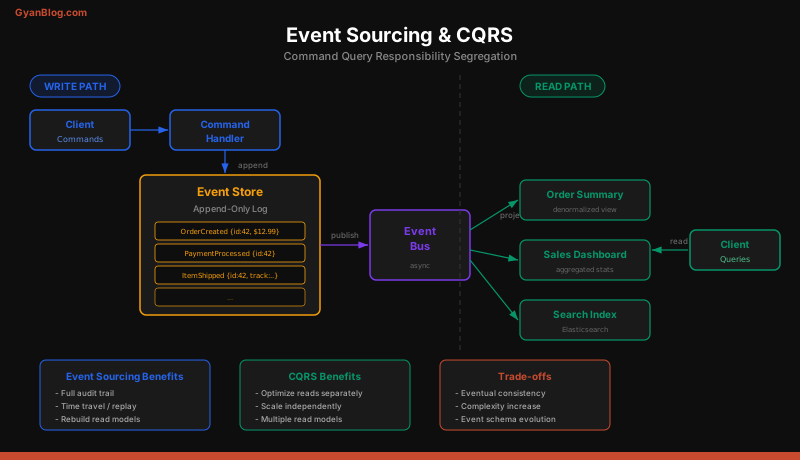
Traditional systems store current state. An order is “shipped.” A user’s balance is “$42.50.” Event sourcing flips this: instead of storing the current state, you store the sequence of events that led to it. The current state is derived by replaying events.
# Traditional: store current state
# orders table: {id: "ord_789", status: "shipped", total: 99.99}
# One row, overwritten on each update. History is lost.

# Event sourcing: store events
events = [
    {"type": "OrderCreated",   "order_id": "ord_789", "total": 99.99,
     "timestamp": "2026-03-28T10:00:00Z"},
    {"type": "PaymentReceived","order_id": "ord_789", "amount": 99.99,
     "timestamp": "2026-03-28T10:00:05Z"},
    {"type": "ItemPacked",     "order_id": "ord_789", "warehouse": "us-east",
     "timestamp": "2026-03-28T10:30:00Z"},
    {"type": "OrderShipped",   "order_id": "ord_789", "tracking": "1Z999AA",
     "timestamp": "2026-03-28T11:00:00Z"},
]

# Current state = fold over events
def get_order_state(events):
    state = {"status": "unknown", "total": 0}
    for event in events:
        if event["type"] == "OrderCreated":
            state["status"] = "created"
            state["total"] = event["total"]
        elif event["type"] == "PaymentReceived":
            state["status"] = "paid"
        elif event["type"] == "OrderShipped":
            state["status"] = "shipped"
            state["tracking"] = event["tracking"]
    return state
Why bother? Three reasons:
- Complete audit trail. Every change is recorded. You can answer “what happened to order X at 3pm on Tuesday?” without special audit logging.
- Temporal queries. What was the state of this account on January 15th? Replay events up to that date.
- Event replay. Found a bug in your billing logic? Fix the code, replay all events, recalculate every balance.
The tradeoff: event stores grow forever, replaying events gets slow (use snapshots), and reasoning about eventual state is harder than reading a row from a database.
CQRS: Command Query Responsibility Segregation
CQRS separates your write model from your read model. Writes go to an event store (optimized for appending). Reads come from a materialized view (optimized for querying).
# Write side: accepts commands, produces events
class OrderCommandHandler:
    def handle_create_order(self, command):
        # Validate
        if command.total <= 0:
            raise ValueError("Invalid order total")
        # Produce event
        event = OrderCreated(
            order_id=generate_id(),
            user_id=command.user_id,
            items=command.items,
            total=command.total
        )
        self.event_store.append(event)
        self.event_bus.publish(event)

# Read side: consumes events, builds query-optimized views
class OrderReadModelUpdater:
    def on_order_created(self, event):
        self.db.execute("""
            INSERT INTO order_summary (order_id, user_id, total, status, created_at)
            VALUES (%s, %s, %s, 'created', %s)
        """, (event.order_id, event.user_id, event.total, event.timestamp))

    def on_order_shipped(self, event):
        self.db.execute("""
            UPDATE order_summary SET status='shipped', tracking=%s
            WHERE order_id=%s
        """, (event.tracking, event.order_id))
The read side can have multiple projections — one optimized for the order list page, another for the admin dashboard, another for the search index. Each listens to the same events and builds its own view.
The catch: the read model is eventually consistent. After a write, there’s a delay before the read model is updated. For most applications, this delay is milliseconds. For some use cases (e.g., showing the user their just-placed order), you may need to read from the write side or use “read your own writes” patterns.
Idempotency: The Golden Rule
In any queue-based system, messages can be delivered more than once. The broker crashes after delivering but before recording the ack. The consumer processes the message but crashes before acknowledging it. The network hiccups. Whatever the cause, your consumer will see duplicates.
The solution is idempotency — processing the same message twice produces the same result as processing it once.
# BAD: not idempotent
def process_payment(event):
    charge_customer(event.user_id, event.amount)  # Double charge!

# GOOD: idempotent with deduplication
def process_payment(event):
    # Check if we've already processed this event
    if redis.sismember("processed_events", event.event_id):
        return  # Already processed, skip

    charge_customer(event.user_id, event.amount)
    redis.sadd("processed_events", event.event_id)
    # Set TTL so we don't store dedup keys forever
    redis.expire("processed_events", 86400 * 7)  # 7 days

# BETTER: idempotent by design (use idempotency keys)
def process_payment(event):
    # The payment provider deduplicates using the idempotency key
    stripe.charges.create(
        amount=int(event.amount * 100),
        currency="usd",
        customer=event.stripe_customer_id,
        idempotency_key=f"order_{event.order_id}"  # Same order = same charge
    )
Design your consumers to be idempotent from day one. It’s much harder to retrofit.
Ordering Guarantees
Ordering is nuanced. Most queues guarantee ordering within a partition or queue, but not globally.
Kafka: Ordering per partition. Use the entity ID as the message key to ensure all events for one entity go to the same partition and are processed in order.
RabbitMQ: Ordering per queue, but only with a single consumer. Multiple consumers on the same queue can process messages out of order (consumer A gets msg1, consumer B gets msg2, B finishes first).
# Kafka: partition key ensures ordering per order
producer.send("order.events", key=b"ord_789", value=event1)
producer.send("order.events", key=b"ord_789", value=event2)
# event1 is ALWAYS processed before event2 for ord_789

# But events for DIFFERENT orders may be on different partitions
producer.send("order.events", key=b"ord_111", value=event_a)
producer.send("order.events", key=b"ord_789", value=event_b)
# No ordering guarantee between event_a and event_b
If you need strict global ordering, you’re limited to a single partition — which means a single consumer and limited throughput. This is rarely necessary. Think carefully about whether you need per-entity ordering (almost always sufficient) or global ordering (very expensive).
Backpressure
What happens when producers outpace consumers? Messages pile up. Queue depth grows. Memory fills up. Eventually the broker crashes or starts dropping messages.
Backpressure is the mechanism for slowing down producers when consumers can’t keep up.
# RabbitMQ: prefetch limits how many unacked messages a consumer holds
channel.basic_qos(prefetch_count=10)
# Consumer won't receive message 11 until it acks one of the first 10

# Kafka: consumer controls its own pace (pull model)
# Consumer only polls when ready -- natural backpressure
consumer = KafkaConsumer(
    "high-volume-topic",
    max_poll_records=100,       # Process 100 at a time
    max_poll_interval_ms=300000 # 5 min max between polls before rebalance
)
for batch in consumer:
    process(batch)  # Take as long as you need

# Application-level backpressure: reject or delay at the API layer
from fastapi import FastAPI, HTTPException

app = FastAPI()

@app.post("/orders")
async def create_order(order: Order):
    queue_depth = get_queue_depth("order-processing")
    if queue_depth > 10000:
        raise HTTPException(
            status_code=503,
            detail="System busy, please retry",
            headers={"Retry-After": "30"}
        )
    queue.publish("order-processing", order.dict())
    return {"status": "accepted"}
Monitor queue depth as a key metric. Alert when it grows beyond a threshold. Scale consumers horizontally to keep up with producers.
Key Takeaways
-
Message queues solve three problems: decoupling (producers don’t know about consumers), buffering (absorb traffic spikes), and async processing (don’t block on slow work).
-
Point-to-point delivers each message to one consumer (task queues). Pub/sub delivers each message to all subscriber groups (event distribution). Most systems need both patterns.
-
Kafka is a distributed commit log with high throughput, retention, and replay. Use it for event streaming, analytics pipelines, and when multiple services need the same data stream.
-
RabbitMQ is a traditional message broker with rich routing, acknowledgments, and simple operations. Use it for task queues, background jobs, and complex routing requirements.
-
Dead letter queues catch failed messages after retries are exhausted. Build tooling to inspect, edit, and replay DLQ messages — they are your safety net.
-
Event sourcing stores state as a sequence of immutable events. It gives you a complete audit trail, temporal queries, and the ability to replay and recompute state.
-
CQRS separates the write model (event store, append-optimized) from the read model (materialized views, query-optimized). The read side is eventually consistent.
-
Idempotency is non-negotiable. Messages will be delivered more than once. Design consumers to handle duplicates from day one, either through deduplication checks or idempotent operations.
-
Ordering is per-partition (Kafka) or per-queue (RabbitMQ). Use entity IDs as partition keys to guarantee per-entity ordering. Global ordering requires a single partition and kills throughput.
-
Backpressure protects your system when producers outpace consumers. Use prefetch limits, pull-based consumption, and application-level rejection to prevent queue overflow.