
Your API has a problem. A single misbehaving client is sending 10,000 requests per second. Maybe it’s a buggy script in a tight loop. Maybe it’s a malicious actor scraping your data. Maybe it’s a legitimate customer whose retry logic has gone haywire. Whatever the cause, that one client is consuming resources that belong to everyone else. Response times spike. Error rates climb. Your database connection pool is exhausted. Rate limiting is not optional — it’s the first line of defense for any production API. Every major API (Stripe, GitHub, Twitter, AWS) rate limits aggressively. You should too.
Why Rate Limit
Four distinct reasons, each sufficient on its own:
Prevent abuse. Scrapers, brute-force attacks, credential stuffing, enumeration attacks. Without rate limits, your API is an all-you-can-eat buffet for bad actors.
Ensure fairness. One customer shouldn’t degrade service for others. Rate limits enforce fair resource allocation across tenants.
Control costs. Every API call costs you compute, bandwidth, and database queries. A runaway client can blow through your infrastructure budget in hours.
Protect downstream services. Your API might handle 50K req/s, but the database behind it can only handle 10K. Rate limiting at the API layer protects everything behind it.
The Five Algorithms
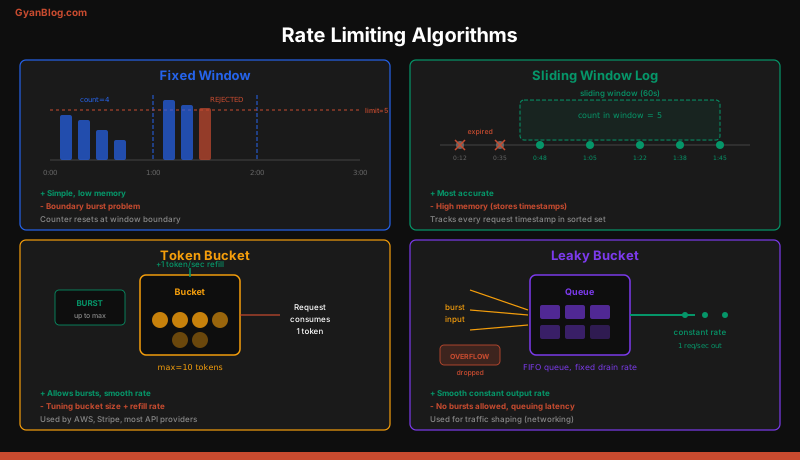
Every rate limiting implementation uses one of five algorithms. Each has distinct tradeoffs around accuracy, memory usage, and burst tolerance.
1. Fixed Window Counter
Divide time into fixed windows (e.g., 1-minute intervals). Count requests in each window. Reject when the count exceeds the limit.
import time
import redis

r = redis.Redis()

def fixed_window(user_id, limit=100, window_seconds=60):
    """Allow 100 requests per 60-second window."""
    window = int(time.time() // window_seconds)
    key = f"rate:{user_id}:{window}"

    count = r.incr(key)
    if count == 1:
        r.expire(key, window_seconds + 1)  # TTL slightly longer than window

    if count > limit:
        return False  # Rejected
    return True       # Allowed
Pros: Simple, low memory (one counter per user per window). Cons: Boundary problem. A user can send 100 requests at 11:59:59 and 100 more at 12:00:01 — 200 requests in 2 seconds while the limit is “100 per minute.”
2. Sliding Window Log
Store the timestamp of every request. To check the limit, count timestamps within the last N seconds. This eliminates the boundary problem.
def sliding_window_log(user_id, limit=100, window_seconds=60):
    """Exact sliding window using a sorted set of timestamps."""
    now = time.time()
    key = f"rate:{user_id}"
    window_start = now - window_seconds

    pipe = r.pipeline()
    pipe.zremrangebyscore(key, 0, window_start)     # Remove old entries
    pipe.zadd(key, {str(now): now})                  # Add current request
    pipe.zcard(key)                                   # Count entries
    pipe.expire(key, window_seconds + 1)
    results = pipe.execute()

    count = results[2]
    if count > limit:
        return False
    return True
Pros: Perfectly accurate. No boundary problem. Cons: High memory usage. Storing 100 timestamps per user per window adds up fast at scale. O(n) cleanup per request.
3. Sliding Window Counter
A hybrid of fixed window and sliding window log. Uses two adjacent fixed windows and weights the count based on where you are in the current window.
def sliding_window_counter(user_id, limit=100, window_seconds=60):
    """Approximate sliding window using weighted fixed windows."""
    now = time.time()
    current_window = int(now // window_seconds)
    previous_window = current_window - 1

    # How far into the current window are we? (0.0 to 1.0)
    elapsed = (now % window_seconds) / window_seconds

    current_count = int(r.get(f"rate:{user_id}:{current_window}") or 0)
    previous_count = int(r.get(f"rate:{user_id}:{previous_window}") or 0)

    # Weighted count: full current + proportional previous
    weighted = current_count + previous_count * (1 - elapsed)

    if weighted >= limit:
        return False

    r.incr(f"rate:{user_id}:{current_window}")
    r.expire(f"rate:{user_id}:{current_window}", window_seconds * 2)
    return True
Pros: Low memory (two counters per user), nearly as accurate as sliding window log. Cons: Approximate — the weighted calculation is a statistical smoothing, not exact. Good enough for virtually all production use cases.
4. Token Bucket
Imagine a bucket that holds tokens. Each request consumes one token. Tokens are added at a fixed rate. If the bucket is empty, the request is rejected. The bucket has a maximum capacity, which allows bursts up to that limit.
def token_bucket(user_id, rate=10, capacity=20):
    """
    Token bucket: 10 tokens/sec refill rate, 20 token capacity.
    Allows bursts of up to 20 requests, then rate-limits to 10/sec.
    """
    now = time.time()
    key = f"bucket:{user_id}"

    # Get current state
    data = r.hgetall(key)
    if data:
        tokens = float(data[b"tokens"])
        last_refill = float(data[b"last_refill"])
    else:
        tokens = capacity
        last_refill = now

    # Refill tokens based on elapsed time
    elapsed = now - last_refill
    tokens = min(capacity, tokens + elapsed * rate)
    last_refill = now

    if tokens < 1:
        # Save state and reject
        r.hset(key, mapping={"tokens": tokens, "last_refill": last_refill})
        r.expire(key, int(capacity / rate) + 1)
        return False

    # Consume one token
    tokens -= 1
    r.hset(key, mapping={"tokens": tokens, "last_refill": last_refill})
    r.expire(key, int(capacity / rate) + 1)
    return True
Pros: Allows controlled bursts (good for real-world traffic patterns). Smooth rate enforcement. Used by AWS, Stripe, and most major APIs. Cons: Two parameters to tune (rate and capacity). Slightly more complex to reason about than a simple counter.
5. Leaky Bucket
Requests enter a FIFO queue (the bucket). The queue is processed at a fixed rate. If the queue is full, new requests are rejected. Think of it as a literal leaky bucket — water (requests) flows in at any rate, but leaks out at a constant rate.
def leaky_bucket(user_id, rate=10, capacity=20):
    """
    Leaky bucket: processes at 10 req/sec, queue capacity 20.
    Smooths out bursts -- output rate is always constant.
    """
    now = time.time()
    key = f"leaky:{user_id}"

    data = r.hgetall(key)
    if data:
        queue_size = float(data[b"queue_size"])
        last_leak = float(data[b"last_leak"])
    else:
        queue_size = 0
        last_leak = now

    # Leak requests based on elapsed time
    elapsed = now - last_leak
    leaked = elapsed * rate
    queue_size = max(0, queue_size - leaked)
    last_leak = now

    if queue_size >= capacity:
        r.hset(key, mapping={"queue_size": queue_size, "last_leak": last_leak})
        return False

    queue_size += 1
    r.hset(key, mapping={"queue_size": queue_size, "last_leak": last_leak})
    r.expire(key, int(capacity / rate) + 1)
    return True
Pros: Perfectly smooth output rate. Good for APIs that need to protect a fixed-capacity backend. Cons: No burst tolerance — even legitimate traffic spikes get queued or rejected. Less flexible than token bucket.
Algorithm Comparison
| Algorithm | Memory | Accuracy | Burst Handling | Complexity |
|---|---|---|---|---|
| Fixed window | Very low | Low (boundary issue) | None | Trivial |
| Sliding window log | High | Exact | None | Low |
| Sliding window counter | Low | Near-exact | None | Low |
| Token bucket | Low | High | Allows bursts | Medium |
| Leaky bucket | Low | High | Smooths bursts | Medium |
The default choice for most systems is token bucket. It handles bursts gracefully, uses minimal memory, and is easy to tune. Sliding window counter is a good alternative when you want simplicity without the fixed-window boundary problem.
Distributed Rate Limiting
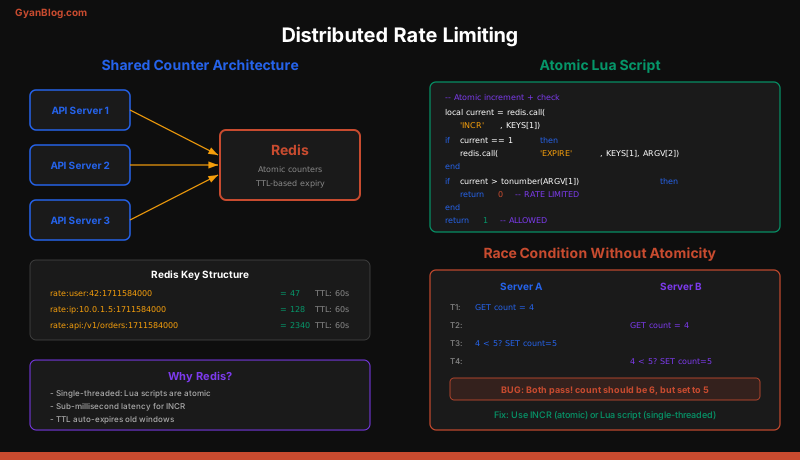
The algorithms above work on a single machine. In a distributed system with 20 API servers, each server needs to see the same rate limit state. The standard solution: centralized state in Redis.
The Race Condition Problem
Naive Redis implementations have a race condition. Two requests arrive simultaneously on different servers. Both read the counter as 99 (limit is 100). Both increment to 100. Both are allowed. But 101 requests have now been served.
The fix: use Lua scripts for atomic read-check-increment operations. Redis executes Lua scripts atomically — no other command runs between the read and the write.
# Atomic token bucket using a Redis Lua script
TOKEN_BUCKET_SCRIPT = """
local key = KEYS[1]
local rate = tonumber(ARGV[1])
local capacity = tonumber(ARGV[2])
local now = tonumber(ARGV[3])
local requested = tonumber(ARGV[4])

local data = redis.call('hmget', key, 'tokens', 'last_refill')
local tokens = tonumber(data[1])
local last_refill = tonumber(data[2])

if tokens == nil then
    tokens = capacity
    last_refill = now
end

local elapsed = now - last_refill
tokens = math.min(capacity, tokens + elapsed * rate)
last_refill = now

local allowed = 0
if tokens >= requested then
    tokens = tokens - requested
    allowed = 1
end

redis.call('hmset', key, 'tokens', tokens, 'last_refill', last_refill)
redis.call('expire', key, math.ceil(capacity / rate) + 1)

return { allowed, tostring(tokens) }
"""

class DistributedRateLimiter:
    def __init__(self, redis_client, rate=10, capacity=20):
        self.redis = redis_client
        self.rate = rate
        self.capacity = capacity
        self.script = self.redis.register_script(TOKEN_BUCKET_SCRIPT)

    def allow(self, user_id, tokens=1):
        import time
        result = self.script(
            keys=[f"ratelimit:{user_id}"],
            args=[self.rate, self.capacity, time.time(), tokens]
        )
        allowed = bool(result[0])
        remaining = float(result[1])
        return allowed, remaining
Handling Redis Failures
If Redis is down, you have two options:
- Fail open. Allow all requests. This is the right choice for most systems. A few seconds without rate limiting is better than a complete outage.
- Fail closed. Reject all requests. Use this only for security-critical rate limits (login attempts, password resets).
class ResilientRateLimiter:
    def __init__(self, limiter):
        self.limiter = limiter
        self.fail_open = True

    def allow(self, user_id):
        try:
            return self.limiter.allow(user_id)
        except redis.ConnectionError:
            if self.fail_open:
                return True, -1  # Allow, unknown remaining
            return False, 0       # Reject
For high-availability, use Redis Cluster or Redis Sentinel. For even more resilience, combine centralized rate limiting with local in-memory rate limiting as a fallback. The local limiter won’t be accurate across servers, but it prevents any single server from being overwhelmed.
Rate Limiting Architecture
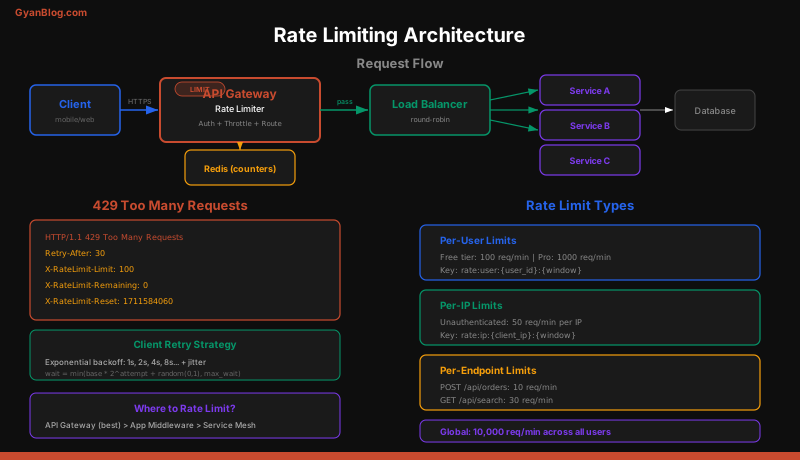
Where you enforce rate limits matters as much as which algorithm you use.
Layer 1: API Gateway / Load Balancer
This is where most rate limiting lives. Nginx, Kong, AWS API Gateway, Cloudflare — all have built-in rate limiting. This catches abuse before it reaches your application code.
# Nginx rate limiting configuration
http {
    # Define a rate limit zone: 10 req/sec per IP, 10MB shared memory
    limit_req_zone $binary_remote_addr zone=api_limit:10m rate=10r/s;

    # Define a connection limit zone
    limit_conn_zone $binary_remote_addr zone=conn_limit:10m;

    server {
        location /api/ {
            # Allow burst of 20, delay excess requests
            limit_req zone=api_limit burst=20 delay=10;
            limit_conn conn_limit 100;

            # Custom 429 response
            limit_req_status 429;

            proxy_pass http://backend;
        }
    }
}
Layer 2: Application Middleware
For more granular control — per-user, per-API-key, per-endpoint limits. This is where tiered rate limiting lives.
from fastapi import FastAPI, Request, HTTPException
from fastapi.responses import JSONResponse
import time

app = FastAPI()

class RateLimitMiddleware:
    def __init__(self, limiter):
        self.limiter = limiter
        # Tiered limits by plan
        self.limits = {
            "free":       {"rate": 10,  "capacity": 20},
            "starter":    {"rate": 100, "capacity": 200},
            "pro":        {"rate": 1000, "capacity": 2000},
            "enterprise": {"rate": 10000, "capacity": 20000},
        }

    async def __call__(self, request: Request, call_next):
        api_key = request.headers.get("X-API-Key")
        if not api_key:
            raise HTTPException(status_code=401, detail="API key required")

        plan = get_user_plan(api_key)
        config = self.limits.get(plan, self.limits["free"])

        allowed, remaining = self.limiter.allow(
            user_id=api_key,
            rate=config["rate"],
            capacity=config["capacity"]
        )

        if not allowed:
            retry_after = max(1, int(1 / config["rate"]))
            return JSONResponse(
                status_code=429,
                content={"error": "Rate limit exceeded", "plan": plan},
                headers={
                    "Retry-After": str(retry_after),
                    "X-RateLimit-Limit": str(int(config["rate"] * 60)),
                    "X-RateLimit-Remaining": str(int(remaining)),
                    "X-RateLimit-Reset": str(int(time.time()) + 60),
                }
            )

        response = await call_next(request)
        response.headers["X-RateLimit-Limit"] = str(int(config["rate"] * 60))
        response.headers["X-RateLimit-Remaining"] = str(int(remaining))
        return response
Layer 3: Service-Level Protection
Internal services rate limit each other to prevent cascading failures. Service A shouldn’t be able to DDoS Service B.
# Circuit breaker + rate limiter for internal services
class ServiceClient:
    def __init__(self, service_name, max_rps=500):
        self.limiter = TokenBucket(rate=max_rps, capacity=max_rps * 2)
        self.circuit_breaker = CircuitBreaker(
            failure_threshold=5,
            recovery_timeout=30
        )

    async def call(self, endpoint, payload):
        if not self.limiter.allow():
            raise ServiceOverloadError(
                f"Rate limit to {self.service_name} exceeded"
            )

        if self.circuit_breaker.is_open:
            raise CircuitOpenError(
                f"Circuit to {self.service_name} is open"
            )

        try:
            response = await http_client.post(endpoint, json=payload)
            self.circuit_breaker.record_success()
            return response
        except Exception as e:
            self.circuit_breaker.record_failure()
            raise
HTTP 429 and Response Headers
The HTTP standard defines 429 Too Many Requests for rate limiting. Always include these headers in your response:
HTTP/1.1 429 Too Many Requests
Retry-After: 30
X-RateLimit-Limit: 1000
X-RateLimit-Remaining: 0
X-RateLimit-Reset: 1711612800
Content-Type: application/json

{
    "error": "rate_limit_exceeded",
    "message": "You have exceeded 1000 requests per minute. Please retry after 30 seconds.",
    "retry_after": 30
}| Header | Purpose |
|---|---|
Retry-After |
Seconds until the client should retry (standard HTTP header) |
X-RateLimit-Limit |
Maximum requests allowed in the window |
X-RateLimit-Remaining |
Requests remaining in the current window |
X-RateLimit-Reset |
Unix timestamp when the window resets |
Good API clients respect these headers. Good API providers set them consistently. The Retry-After header is especially important — it tells clients exactly when to retry instead of hammering your API with exponential backoff guesses.
Rate Limiting vs Throttling vs Backpressure
These three terms are related but distinct:
Rate limiting rejects excess requests immediately. The client gets a 429. The request is not processed. This is a hard boundary.
Throttling slows down requests instead of rejecting them. Excess requests are queued or delayed. The client waits longer but eventually gets a response. Nginx’s delay parameter does this.
Backpressure propagates load information upstream. When a downstream service is overloaded, it signals the upstream service to slow down. This can cascade all the way to the client. Reactive Streams and gRPC flow control implement backpressure.
# Rate limiting: hard reject
if not rate_limiter.allow(user_id):
    return Response(status_code=429)

# Throttling: delay but eventually process
async def throttled_handler(request):
    await rate_limiter.acquire(user_id)  # Blocks until a token is available
    return await process_request(request)

# Backpressure: signal upstream to slow down
async def service_handler(request):
    queue_depth = get_queue_depth()
    if queue_depth > 1000:
        # Return 503 with load information
        return Response(
            status_code=503,
            headers={"X-Load-Level": "high", "Retry-After": "5"}
        )
    queue.enqueue(request)
    return Response(status_code=202)
In practice, you’ll use all three. Rate limiting at the API gateway to stop abuse. Throttling in middleware for fair scheduling. Backpressure between internal services to prevent cascading failures.
Tiered Rate Limits
Real-world APIs don’t have a single rate limit. They have tiered limits based on the client, endpoint, and HTTP method.
RATE_LIMIT_RULES = {
    # Per-IP limits (catch abuse before auth)
    "ip": {
        "default":           {"rate": 100,   "capacity": 200},
        "login":             {"rate": 5,     "capacity": 10},
        "password_reset":    {"rate": 3,     "capacity": 5},
    },
    # Per-API-key limits (after auth)
    "api_key": {
        "free":              {"rate": 10,    "capacity": 30},
        "pro":               {"rate": 100,   "capacity": 300},
        "enterprise":        {"rate": 1000,  "capacity": 3000},
    },
    # Per-endpoint limits (protect expensive operations)
    "endpoint": {
        "GET /api/search":   {"rate": 20,    "capacity": 40},
        "POST /api/export":  {"rate": 2,     "capacity": 5},
        "POST /api/upload":  {"rate": 5,     "capacity": 10},
    },
}

def check_all_limits(request):
    """Check multiple rate limit layers. Any rejection stops the request."""
    ip = request.client.host
    api_key = request.headers.get("X-API-Key")
    endpoint = f"{request.method} {request.url.path}"

    # Layer 1: IP-based (unauthenticated)
    ip_rule = RATE_LIMIT_RULES["ip"].get(
        request.url.path.split("/")[-1],
        RATE_LIMIT_RULES["ip"]["default"]
    )
    if not rate_limit(f"ip:{ip}", **ip_rule):
        return 429, "IP rate limit exceeded"

    # Layer 2: API key (authenticated)
    if api_key:
        plan = get_plan(api_key)
        key_rule = RATE_LIMIT_RULES["api_key"].get(
            plan, RATE_LIMIT_RULES["api_key"]["free"]
        )
        if not rate_limit(f"key:{api_key}", **key_rule):
            return 429, f"API key rate limit exceeded ({plan} plan)"

    # Layer 3: Endpoint-specific
    ep_rule = RATE_LIMIT_RULES["endpoint"].get(endpoint)
    if ep_rule and not rate_limit(f"ep:{api_key}:{endpoint}", **ep_rule):
        return 429, f"Endpoint rate limit exceeded for {endpoint}"

    return 200, "OK"
Notice how login and password reset have extremely tight per-IP limits — this is your brute-force protection. Expensive endpoints like search and export have their own limits independent of the user’s plan. Multiple layers ensure that no single dimension can be exploited.
Key Takeaways
-
Rate limiting is mandatory for any production API. It prevents abuse, ensures fairness, controls costs, and protects downstream services.
-
Token bucket is the default algorithm. It allows controlled bursts, uses minimal memory, and is used by AWS, Stripe, and most major APIs. Sliding window counter is the simplest accurate alternative.
-
Fixed window has a boundary problem — users can double their effective rate at window edges. Sliding window log is perfectly accurate but uses too much memory at scale.
-
For distributed rate limiting, use Redis with Lua scripts. Lua scripts execute atomically, eliminating race conditions. Fail open on Redis failures unless the rate limit is security-critical.
-
Implement rate limiting at the API gateway layer as your first line of defense. Add application-level middleware for per-user, per-plan, and per-endpoint limits. Use service-level rate limiting to prevent internal cascading failures.
-
Always return HTTP 429 with
Retry-After,X-RateLimit-Limit,X-RateLimit-Remaining, andX-RateLimit-Resetheaders. Good clients use these headers to self-regulate. -
Rate limiting rejects, throttling delays, backpressure signals. Use all three at different layers of your system. They serve different purposes and complement each other.
-
Tier your rate limits by IP (catch unauthenticated abuse), by API key/user (enforce plan limits), and by endpoint (protect expensive operations). Security-sensitive endpoints like login need strict per-IP limits regardless of the user’s plan.
-
Design for failure. Redis goes down, network partitions happen. Have a fallback strategy — local in-memory rate limiting, fail-open policies, or degraded-mode limits that are less accurate but still functional.
-
Rate limiting is cheaper than scaling for abuse. A few lines of Redis code save you from provisioning infrastructure to handle traffic that provides zero business value.