
Most web applications are request-response: the client asks, the server answers. But a growing class of features demands the server to push data to the client without being asked — chat messages, live scores, stock tickers, collaborative editing, notifications. These are real-time systems.
The challenge is not sending a single update. The challenge is maintaining millions of persistent connections, routing messages to the right clients, handling disconnections gracefully, and doing it all without melting your infrastructure.
This lesson covers the four main approaches to real-time communication, when to use each, and how to architect them at scale.
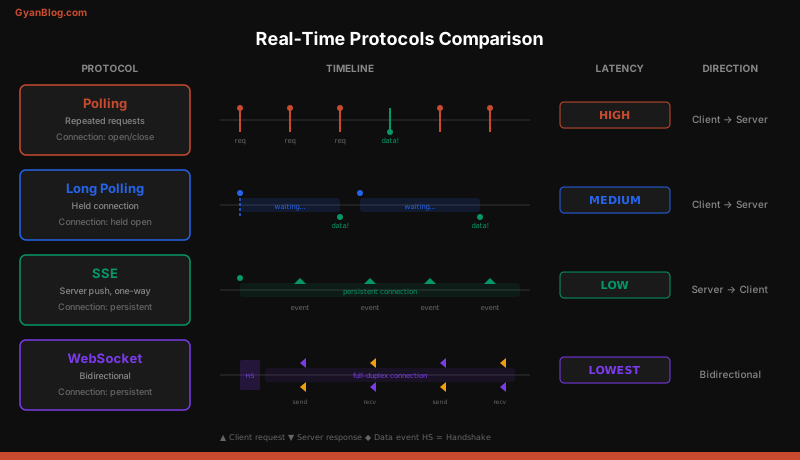
Short Polling
The simplest approach: the client repeatedly asks the server for new data at fixed intervals.
// Client-side short polling
function pollForMessages() {
  setInterval(async () => {
    const response = await fetch('/api/messages?since=' + lastTimestamp);
    const messages = await response.json();
    if (messages.length > 0) {
      lastTimestamp = messages[messages.length - 1].timestamp;
      renderMessages(messages);
    }
  }, 3000); // poll every 3 seconds
}
# Server-side — standard REST endpoint
@app.get("/api/messages")
def get_messages(since: float):
messages = db.query(
"SELECT * FROM messages WHERE created_at > %s ORDER BY created_at",
[since]
)
return jsonify(messages)How it works: The client sends an HTTP request every N seconds. The server responds immediately with whatever data is available (or an empty response).
Tradeoffs:
| Aspect | Detail |
|---|---|
| Latency | Up to N seconds (the polling interval) |
| Server load | One request per client per interval, regardless of new data |
| Complexity | Trivial to implement |
| Scalability | Terrible — 100K clients polling every 3s = 33K requests/second for nothing |
| Connection overhead | New TCP connection per request (or reuse with keep-alive) |
Short polling is only acceptable for dashboards with low user counts and relaxed latency requirements. For anything else, move on.
Long Polling
An improvement: the client sends a request, and the server holds it open until new data arrives (or a timeout).
# Server-side long polling (Python/Flask-style pseudocode)
import asyncio
from collections import defaultdict

# Per-channel waiters
waiters = defaultdict(list)

@app.get("/api/messages/poll")
async def long_poll(channel_id: str, timeout: int = 30):
    future = asyncio.get_event_loop().create_future()
    waiters[channel_id].append(future)

    try:
        # Block until data arrives or timeout
        result = await asyncio.wait_for(future, timeout=timeout)
        return jsonify({"messages": result})
    except asyncio.TimeoutError:
        return jsonify({"messages": []})
    finally:
        waiters[channel_id].remove(future)

@app.post("/api/messages")
async def post_message(channel_id: str, body: str):
    message = save_message(channel_id, body)

    # Wake all waiters for this channel
    for future in waiters[channel_id]:
        if not future.done():
            future.set_result([message])

    return jsonify(message)
// Client-side long polling with reconnection
async function longPoll() {
while (true) {
try {
const response = await fetch('/api/messages/poll?channel_id=123&timeout=30');
const data = await response.json();
if (data.messages.length > 0) {
renderMessages(data.messages);
}
// Immediately reconnect for next batch
} catch (error) {
// Backoff on failure
await sleep(Math.min(1000 * Math.pow(2, retries), 30000));
retries++;
}
}
}How it works: The client sends a request. The server holds the connection open. When data arrives, the server responds, and the client immediately sends a new request. If nothing happens within the timeout window (typically 20-30 seconds), the server sends an empty response and the client reconnects.
Tradeoffs:
| Aspect | Detail |
|---|---|
| Latency | Near-instant (data arrives as soon as it’s available) |
| Server load | One open connection per client, but no wasted empty responses |
| Complexity | Moderate — need to manage held connections and timeouts |
| Scalability | Better than polling, but each held connection consumes a thread/connection slot |
| Compatibility | Works everywhere, even through restrictive proxies |
Long polling was the workhorse of early real-time web (Gmail, early Facebook chat). It works through every proxy and firewall but has overhead from repeated HTTP headers and connection re-establishment.
Server-Sent Events (SSE)
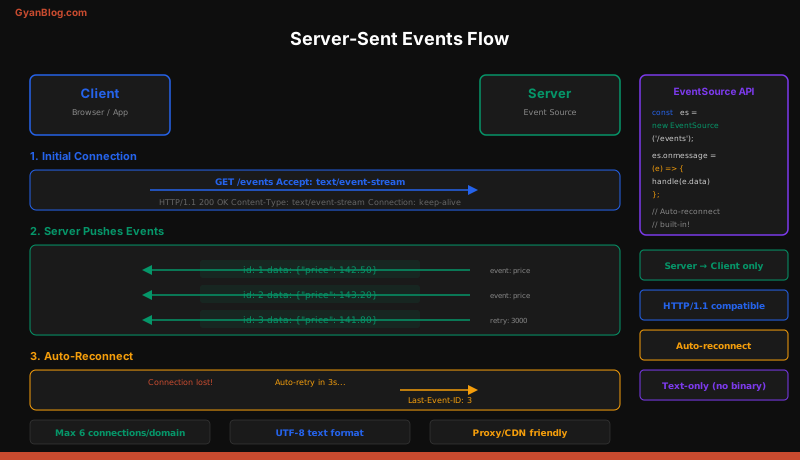
SSE is a browser-native protocol for server-to-client streaming over a single long-lived HTTP connection. The server sends events; the client listens. One direction only.
# Server-side SSE (Python/FastAPI)
from fastapi import FastAPI
from fastapi.responses import StreamingResponse
import asyncio
import json

app = FastAPI()

# Simple in-memory pub/sub
channels = defaultdict(list)

async def event_stream(channel_id: str):
    queue = asyncio.Queue()
    channels[channel_id].append(queue)

    try:
        while True:
            # Wait for new data
            data = await queue.get()

            # SSE format: each field on its own line, blank line terminates event
            yield f"id: {data['id']}\n"
            yield f"event: message\n"
            yield f"data: {json.dumps(data)}\n\n"
    except asyncio.CancelledError:
        channels[channel_id].remove(queue)

@app.get("/api/stream/{channel_id}")
async def stream(channel_id: str):
    return StreamingResponse(
        event_stream(channel_id),
        media_type="text/event-stream",
        headers={
            "Cache-Control": "no-cache",
            "Connection": "keep-alive",
            "X-Accel-Buffering": "no",  # Disable nginx buffering
        }
    )
// Client-side SSE — built-in browser API
const source = new EventSource('/api/stream/channel-123');
// The browser handles reconnection automatically
source.addEventListener('message', (event) => {
const data = JSON.parse(event.data);
renderMessage(data);
});
source.addEventListener('error', (event) => {
// EventSource auto-reconnects with the last event ID
console.log('Connection lost, reconnecting...');
});
// Custom event types
source.addEventListener('user-joined', (event) => {
const user = JSON.parse(event.data);
showNotification(`${user.name} joined`);
});SSE Wire Format
The SSE protocol is plain text over HTTP. Each event is a block of field lines separated by a blank line:
id: 42
event: message
data: {"user": "alice", "text": "hello"}
retry: 5000

id: 43
event: message
data: {"user": "bob", "text": "hey there"}
Key fields:
id— the browser stores this and sends it asLast-Event-IDheader on reconnectevent— the event type (defaults tomessage)data— the payload (can span multiple lines)retry— tells the browser how many milliseconds to wait before reconnecting
Why SSE Is Underrated
SSE has several advantages that developers overlook:
- Automatic reconnection. The browser reconnects and sends
Last-Event-IDso the server can resume from where it left off. You get this for free. - HTTP/2 multiplexing. Multiple SSE streams share a single TCP connection. This eliminates the old “6 connections per domain” browser limit.
- Standard HTTP. Works through proxies, load balancers, and CDNs with minimal configuration. No upgrade handshake.
- Simple server implementation. Any server that can stream HTTP responses can do SSE.
When SSE falls short: You need the client to send frequent messages to the server (chat input, gaming controls). SSE is server-to-client only. For bidirectional communication, you need WebSockets.
WebSockets
WebSockets provide full-duplex, bidirectional communication over a single persistent TCP connection. Both client and server can send messages at any time.
The Upgrade Handshake
A WebSocket connection starts as a regular HTTP request that gets “upgraded”:
GET /ws/chat HTTP/1.1
Host: example.com
Upgrade: websocket
Connection: Upgrade
Sec-WebSocket-Key: dGhlIHNhbXBsZSBub25jZQ==
Sec-WebSocket-Version: 13
Server responds:
HTTP/1.1 101 Switching Protocols
Upgrade: websocket
Connection: Upgrade
Sec-WebSocket-Accept: s3pPLMBiTxaQ9kYGzzhZRbK+xOo=
After this handshake, the connection switches from HTTP to the WebSocket binary frame protocol. No more HTTP overhead per message.
Implementation
# Server-side WebSocket (Python/FastAPI)
from fastapi import FastAPI, WebSocket, WebSocketDisconnect
from typing import Dict, Set
import json

app = FastAPI()

class ConnectionManager:
    def __init__(self):
        # channel_id -> set of active WebSocket connections
        self.channels: Dict[str, Set[WebSocket]] = defaultdict(set)

    async def connect(self, channel_id: str, websocket: WebSocket):
        await websocket.accept()
        self.channels[channel_id].add(websocket)

    def disconnect(self, channel_id: str, websocket: WebSocket):
        self.channels[channel_id].discard(websocket)

    async def broadcast(self, channel_id: str, message: dict):
        dead_connections = set()
        for connection in self.channels[channel_id]:
            try:
                await connection.send_json(message)
            except Exception:
                dead_connections.add(connection)

        # Clean up dead connections
        self.channels[channel_id] -= dead_connections

manager = ConnectionManager()

@app.websocket("/ws/chat/{channel_id}")
async def websocket_endpoint(websocket: WebSocket, channel_id: str):
    await manager.connect(channel_id, websocket)

    try:
        while True:
            data = await websocket.receive_json()

            message = {
                "user": data["user"],
                "text": data["text"],
                "timestamp": time.time(),
                "channel": channel_id
            }

            # Persist the message
            await save_to_database(message)

            # Broadcast to all connections in this channel
            await manager.broadcast(channel_id, message)

    except WebSocketDisconnect:
        manager.disconnect(channel_id, websocket)
        await manager.broadcast(channel_id, {
            "type": "system",
            "text": f"User disconnected"
        })
// Client-side WebSocket with reconnection logic
class ChatClient {
constructor(channelId) {
this.channelId = channelId;
this.retries = 0;
this.maxRetries = 10;
this.connect();
}
connect() {
this.ws = new WebSocket(`wss://example.com/ws/chat/${this.channelId}`);
this.ws.onopen = () => {
console.log('Connected');
this.retries = 0;
this.startHeartbeat();
};
this.ws.onmessage = (event) => {
const message = JSON.parse(event.data);
this.handleMessage(message);
};
this.ws.onclose = () => {
this.stopHeartbeat();
this.reconnect();
};
this.ws.onerror = (error) => {
console.error('WebSocket error:', error);
};
}
send(message) {
if (this.ws.readyState === WebSocket.OPEN) {
this.ws.send(JSON.stringify(message));
}
}
// Heartbeat keeps the connection alive through proxies/load balancers
startHeartbeat() {
this.heartbeatInterval = setInterval(() => {
this.send({ type: 'ping' });
}, 30000);
}
stopHeartbeat() {
clearInterval(this.heartbeatInterval);
}
// Exponential backoff reconnection
reconnect() {
if (this.retries >= this.maxRetries) {
console.error('Max retries reached');
return;
}
const delay = Math.min(1000 * Math.pow(2, this.retries), 30000);
console.log(`Reconnecting in ${delay}ms...`);
setTimeout(() => {
this.retries++;
this.connect();
}, delay);
}
handleMessage(message) {
// Application-specific message handling
renderMessage(message);
}
}Protocol Comparison
| Feature | Short Polling | Long Polling | SSE | WebSocket |
|---|---|---|---|---|
| Direction | Client to server | Client to server | Server to client | Bidirectional |
| Latency | High (interval) | Low | Low | Lowest |
| Connection overhead | High | Medium | Low | Lowest |
| Browser support | Universal | Universal | All modern | All modern |
| Auto-reconnect | Manual | Manual | Built-in | Manual |
| Binary data | No | No | No (text only) | Yes |
| HTTP/2 multiplexing | Yes | Yes | Yes | No (separate TCP) |
| Proxy-friendly | Yes | Mostly | Yes | Sometimes not |
| Server complexity | Trivial | Moderate | Low | High |
| Best for | Low-frequency dashboards | Fallback/legacy | Live feeds, notifications | Chat, gaming, collaboration |
Scaling WebSockets
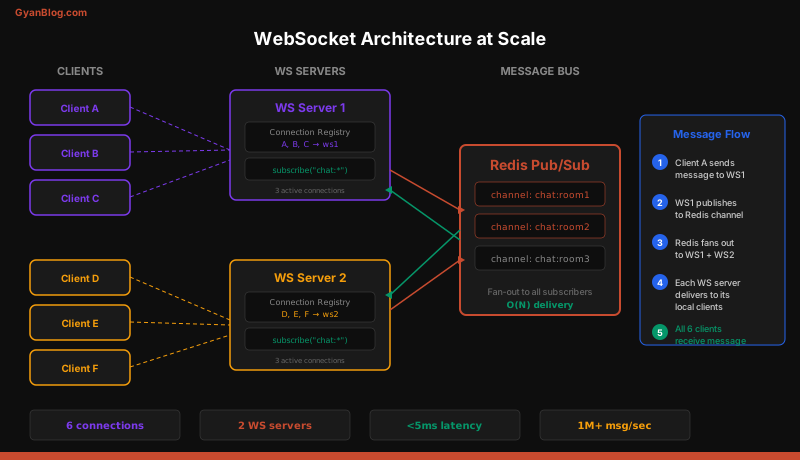
A single server can handle tens of thousands of WebSocket connections. The real problem is what happens when you have multiple servers.
The Multi-Server Problem
Client A connects to Server 1 and sends a message in a chat room. Client B is connected to Server 2 in the same room. How does Client B get the message?
The server-local ConnectionManager only knows about its own connections. You need a pub/sub backbone to bridge servers.
Redis Pub/Sub as a Message Bus
import aioredis

class DistributedConnectionManager:
    def __init__(self):
        self.local_connections: Dict[str, Set[WebSocket]] = defaultdict(set)
        self.redis = None

    async def initialize(self):
        self.redis = await aioredis.from_url("redis://redis-cluster:6379")
        # Start listening for messages from other servers
        asyncio.create_task(self._subscribe_loop())

    async def connect(self, channel_id: str, websocket: WebSocket):
        await websocket.accept()
        self.local_connections[channel_id].add(websocket)

    async def broadcast(self, channel_id: str, message: dict):
        # Publish to Redis — all servers (including this one) will receive it
        await self.redis.publish(
            f"chat:{channel_id}",
            json.dumps(message)
        )

    async def _subscribe_loop(self):
        pubsub = self.redis.pubsub()
        await pubsub.psubscribe("chat:*")

        async for msg in pubsub.listen():
            if msg["type"] == "pmessage":
                channel_id = msg["channel"].decode().split(":", 1)[1]
                data = json.loads(msg["data"])

                # Deliver to local connections only
                await self._deliver_local(channel_id, data)

    async def _deliver_local(self, channel_id: str, message: dict):
        dead = set()
        for ws in self.local_connections.get(channel_id, set()):
            try:
                await ws.send_json(message)
            except Exception:
                dead.add(ws)
        self.local_connections[channel_id] -= dead
Sticky Sessions vs Pub/Sub
Two approaches to the multi-server problem:
Sticky sessions (connection affinity): Route all connections for a given channel to the same server. Use consistent hashing on the channel ID in your load balancer. Simple, but creates hotspots when a single channel has many users.
Pub/sub backbone: Every server subscribes to a shared message bus (Redis, Kafka, NATS). Any server can receive a message and publish it; all servers deliver to their local connections. More complex, but distributes load evenly.
For most production systems, the pub/sub approach wins. Sticky sessions break when servers restart and create uneven load distribution.
Connection Limits
Each WebSocket connection consumes:
- A file descriptor on the server
- Memory for the connection state (~10-50 KB depending on buffers)
- A slot in your reverse proxy’s connection pool
A well-tuned Linux server can handle 500K-1M concurrent connections. But your bottleneck is usually somewhere else:
# Tune Linux for high connection counts
# /etc/sysctl.conf
net.core.somaxconn = 65535
net.ipv4.tcp_max_syn_backlog = 65535
fs.file-max = 2097152

# Per-process file descriptor limit
# /etc/security/limits.conf
*  soft  nofile  1048576
*  hard  nofile  1048576
Heartbeats and Connection Health
Connections die silently. The client’s network drops, a proxy times out, or the server process crashes. Without heartbeats, you’ll accumulate zombie connections that consume resources and never receive messages.
# Server-side heartbeat
async def websocket_with_heartbeat(websocket: WebSocket, channel_id: str):
    await manager.connect(channel_id, websocket)
    last_pong = time.time()

    async def heartbeat():
        nonlocal last_pong
        while True:
            await asyncio.sleep(30)
            if time.time() - last_pong > 90:  # 3 missed heartbeats
                await websocket.close(code=1001, reason="Heartbeat timeout")
                return
            try:
                await websocket.send_json({"type": "ping"})
            except Exception:
                return

    heartbeat_task = asyncio.create_task(heartbeat())

    try:
        while True:
            data = await websocket.receive_json()
            if data.get("type") == "pong":
                last_pong = time.time()
                continue
            # Handle normal messages
            await process_message(channel_id, data)
    except WebSocketDisconnect:
        heartbeat_task.cancel()
        manager.disconnect(channel_id, websocket)
Presence Detection
Knowing who is “online” is a common feature in chat and collaboration apps. It is surprisingly tricky at scale.
Naive Approach
Store a last_seen timestamp per user. Update it on every heartbeat. A user is “online” if their last_seen is within the last 60 seconds.
# Redis-based presence
async def update_presence(user_id: str, channel_id: str):
    pipe = redis.pipeline()
    # Set with expiration — auto-cleans if no heartbeat
    pipe.setex(f"presence:{user_id}", 60, channel_id)
    # Add to channel's online set (scored by timestamp)
    pipe.zadd(f"online:{channel_id}", {user_id: time.time()})
    await pipe.execute()

async def get_online_users(channel_id: str):
    # Remove stale entries (older than 60 seconds)
    cutoff = time.time() - 60
    await redis.zremrangebyscore(f"online:{channel_id}", "-inf", cutoff)
    # Return remaining online users
    return await redis.zrange(f"online:{channel_id}", 0, -1)
This works for small to medium scale. At very large scale (millions of users), presence becomes an expensive fan-out problem — when a user goes online, you might need to notify thousands of friends. Systems like Facebook use a tiered approach: frequent updates for close friends, batched updates for everyone else.
Fan-Out Patterns
When a message is sent to a channel with 10,000 members, you have a fan-out problem. Three strategies:
Fan-out on write: When the message arrives, immediately push it to all 10,000 connected clients. High write amplification, but reads are instant.
Fan-out on read: Store the message once. When each client polls or reconnects, pull unread messages from the channel. Low write cost, but reads require a database query per client.
Tiered fan-out: Push to currently connected clients (they are already listening). For offline clients, store a pointer and deliver when they reconnect. This is what most production chat systems do.
# Tiered fan-out
async def handle_new_message(channel_id: str, message: dict):
    # 1. Persist the message
    message_id = await db.insert("messages", message)

    # 2. Fan out to online users via WebSocket/pub-sub
    await redis.publish(f"chat:{channel_id}", json.dumps(message))

    # 3. For offline users, update their unread counter
    online_users = await get_online_users(channel_id)
    all_members = await db.query(
        "SELECT user_id FROM channel_members WHERE channel_id = %s",
        [channel_id]
    )
    offline_users = set(all_members) - set(online_users)

    # Batch update unread counts
    if offline_users:
        await db.execute(
            "UPDATE user_channels SET unread_count = unread_count + 1 "
            "WHERE channel_id = %s AND user_id IN %s",
            [channel_id, tuple(offline_users)]
        )
Real-World Example: Building a Chat System
Putting it all together. Here is the architecture for a chat system supporting 1M concurrent users:
Components:
- API Gateway / Load Balancer: Terminates TLS, routes WebSocket upgrades to chat servers.
- Chat Servers (stateful): Hold WebSocket connections. Each server handles ~50K connections. 20 servers for 1M users.
- Redis Pub/Sub: Message bus between chat servers. When Server A receives a message, it publishes to Redis. All servers subscribed to that channel deliver to their local connections.
- Message Store (Cassandra/ScyllaDB): Persists all messages. Partitioned by
(channel_id, time_bucket)for efficient range queries. - Presence Service: Tracks online/offline status in Redis with TTL-based expiry.
- Push Notification Service: Sends mobile push notifications to offline users (via APNs/FCM).
Message flow:
- Client sends message over WebSocket to Chat Server 3.
- Chat Server 3 persists the message to Cassandra (async write).
- Chat Server 3 publishes to Redis channel
chat:channel-456. - Chat Servers 1, 2, 4, … receive the Redis message and deliver to their local WebSocket connections in that channel.
- For offline members, the push notification service sends a mobile notification.
Key design decisions:
- Why not Kafka for the pub/sub? Redis Pub/Sub is fire-and-forget with microsecond latency. Kafka adds durability but also latency. For real-time chat, you want the lowest latency possible. Persistence is handled separately by the message store.
- Why Cassandra for messages? Chat messages are write-heavy, time-ordered, and partitioned by channel. Cassandra’s partition key + clustering key model maps perfectly to
(channel_id, timestamp). - Why 50K connections per server? Each connection uses ~20 KB of memory. 50K connections = ~1 GB of RAM for connection state alone. With message processing overhead, a 4-core server with 8 GB RAM comfortably handles this load.
Choosing the Right Protocol
Use this decision tree:
- Do you need bidirectional real-time? (chat, gaming, collaboration) — Use WebSockets.
- Do you only need server-to-client push? (live feeds, notifications, dashboards) — Use SSE.
- Are you behind restrictive corporate proxies that block WebSockets? — Use long polling as a fallback.
- Is low-frequency polling acceptable? (once per minute dashboards) — Use short polling. It is simple and sufficient.
- Do you need both? Many production systems offer WebSocket as the primary protocol with SSE or long polling as automatic fallbacks. Socket.IO does this transparently.
Key Takeaways
- Short polling is the simplest approach but wastes bandwidth and adds latency. Only acceptable for very low-frequency updates with few clients.
- Long polling holds the connection open until data arrives. Good compatibility, reasonable latency, but has overhead from repeated connection establishment.
- SSE is the best choice for server-to-client streaming. It runs over standard HTTP, supports auto-reconnect with
Last-Event-ID, and multiplexes over HTTP/2. Underrated and underused. - WebSockets are the gold standard for bidirectional real-time. Full-duplex, low overhead per message, but require careful connection management.
- At scale, the hard part is multi-server message routing. Use a pub/sub backbone (Redis, NATS, Kafka) to bridge servers. Each server handles its own local connections and subscribes to shared channels.
- Heartbeats are mandatory. Without them, zombie connections accumulate and your server’s connection count diverges from reality.
- Presence detection is a fan-out problem in disguise. Use TTL-based expiry in Redis and batch notifications for large friend lists.
- Tiered fan-out is the production pattern for chat: push to online users immediately via WebSocket, store unread pointers for offline users, and send push notifications asynchronously.
- Always implement reconnection with exponential backoff on the client side. Networks are unreliable, and your users will not notice brief disconnections if you handle them gracefully.