
Notification systems look simple on the surface. Something happens, you tell the user. But at scale, they become one of the most complex pieces of infrastructure in any product. You have multiple channels (push, email, SMS, in-app), each with their own delivery protocols, failure modes, and cost structures. You have user preferences that vary per channel and per notification type. You have deduplication to prevent the same alert from firing twice, rate limiting to avoid spamming users, priority levels because a fraud alert matters more than a marketing digest, and analytics to track what was delivered, opened, and clicked. The hard part is not sending notifications. It is not over-sending them.
Requirements
Before drawing boxes and arrows, pin down what the system needs to do.
Functional Requirements
- Send notifications through multiple channels: push (iOS/Android), email, SMS, and in-app
- Support triggered notifications (user action) and scheduled notifications (batch campaigns)
- Allow users to configure preferences per channel and per notification type
- Support templates with dynamic variables (user name, order number, etc.)
- Provide an in-app notification feed with read/unread status
- Track delivery status and engagement (delivered, opened, clicked)
Non-Functional Requirements
- Handle 10 million notifications per day (roughly 115 per second sustained, with spikes to 1,000+/s)
- Deliver urgent notifications (fraud alerts, OTPs) within 5 seconds
- At-least-once delivery for critical notifications, best-effort for marketing
- 99.9% uptime for the notification service
- No duplicate delivery for the same event
Back-of-Envelope Estimation
Daily notifications:     10M
Peak QPS:                ~1,000/s (10x average for spikes)
Push notifications:      40% = 4M/day
Emails:                  35% = 3.5M/day
SMS:                     10% = 1M/day (expensive, reserved for critical)
In-app:                  15% = 1.5M/day

Storage (notification log):
  Each record: ~500 bytes (metadata, status, timestamps)
  Daily: 10M * 500B = 5GB/day
  Yearly: ~1.8TB (need retention policy)

Third-party costs:
  SMS via Twilio: ~$0.0075/msg = $7,500/day for 1M SMS
  Push via APNs/FCM: free
  Email via SendGrid: ~$0.001/msg = $3,500/day for 3.5M emails
High-Level Architecture
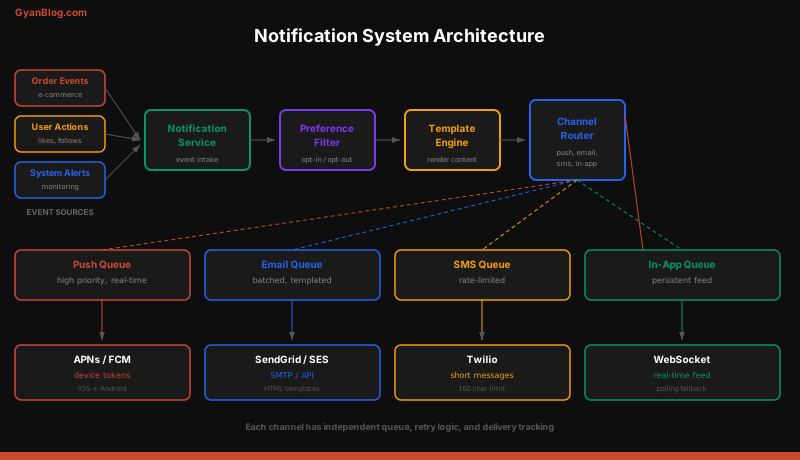
The system has six core components. Every notification flows through the same pipeline regardless of channel.
[Event Sources] --> [Notification Service API]
                           |
                    [Preference Service]  -- check: does user want this?
                           |
                    [Template Engine]     -- render: fill in variables
                           |
                    [Priority Router]     -- route: urgent vs normal vs batch
                       /   |   \
              [Push Q] [Email Q] [SMS Q]  [In-App Q]
                 |        |        |          |
            [Push Worker] [Email] [SMS]  [In-App Worker]
                 |        |        |          |
              [APNs/FCM] [SendGrid] [Twilio] [Notification DB]
                           |
                    [Analytics Service]
Let’s walk through each component.
Event Ingestion
Notifications are triggered by events. There are two types of sources.
Internal events come from other services via a message bus. An order service publishes order.shipped, a payment service publishes payment.failed, a security service publishes login.suspicious. The notification service subscribes to these events.
API calls come from the notification service’s own REST API. Marketing tools, admin dashboards, or other internal systems call it directly.
# POST /api/v1/notifications
{
    "event_type": "order.shipped",
    "recipient_id": "user_12345",
    "priority": "normal",          # urgent | normal | low
    "channels": ["push", "email"], # optional override; otherwise use preferences
    "data": {
        "order_id": "ORD-98765",
        "tracking_number": "1Z999AA10123456784",
        "carrier": "UPS",
        "estimated_delivery": "2026-04-02"
    },
    "idempotency_key": "order-shipped-ORD-98765"  # prevents duplicates
}
# POST /api/v1/notifications/bulk
{
"event_type": "marketing.weekly_digest",
"recipient_ids": ["user_1", "user_2", "user_3", ...], # or segment_id
"priority": "low",
"scheduled_at": "2026-03-29T09:00:00Z",
"data": {
"subject": "Your weekly roundup",
"top_articles": [...]
}
}The API validates the payload, assigns an internal notification ID, and drops the event into the processing pipeline. For bulk sends, it fans out into individual notification records.
class NotificationService:
    def create_notification(self, event: dict) -> str:
        # 1. Validate payload
        self._validate(event)

        # 2. Dedup check
        if self.dedup_store.exists(event["idempotency_key"]):
            return self.dedup_store.get(event["idempotency_key"])  # return existing ID

        # 3. Create notification record
        notification_id = uuid4()
        record = {
            "id": notification_id,
            "event_type": event["event_type"],
            "recipient_id": event["recipient_id"],
            "priority": event.get("priority", "normal"),
            "data": event["data"],
            "status": "pending",
            "created_at": datetime.utcnow()
        }
        self.db.insert("notifications", record)

        # 4. Mark idempotency key (TTL = 24 hours)
        self.dedup_store.set(event["idempotency_key"], notification_id, ttl=86400)

        # 5. Enqueue for processing
        self.queue.publish("notification.process", record)

        return notification_id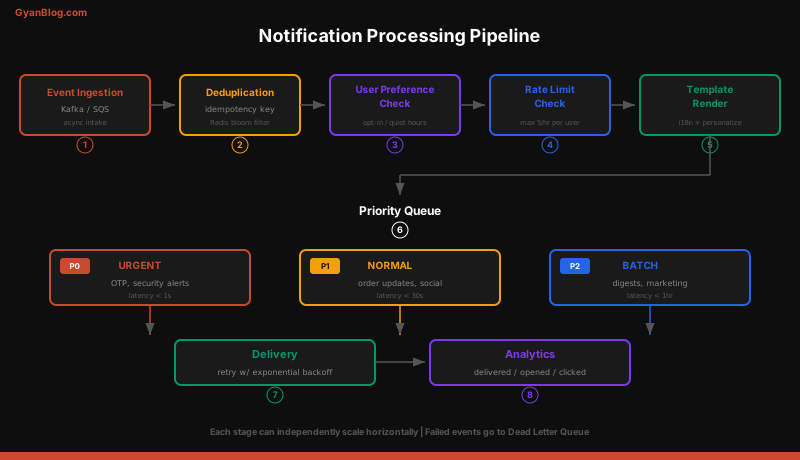
User Preference Service
This is the gatekeeper. Before sending anything, the system checks whether the user actually wants this notification on this channel.
Preferences are stored per user, per notification type, per channel:
CREATE TABLE notification_preferences (
    user_id         BIGINT NOT NULL,
    event_type      VARCHAR(100) NOT NULL,  -- 'order.shipped', 'marketing.*'
    channel         VARCHAR(20) NOT NULL,   -- 'push', 'email', 'sms', 'in_app'
    enabled         BOOLEAN DEFAULT true,
    quiet_hours     JSONB,                  -- {"start": "22:00", "end": "08:00", "timezone": "US/Pacific"}
    frequency_cap   INT,                    -- max notifications of this type per day
    updated_at      TIMESTAMP,
    PRIMARY KEY (user_id, event_type, channel)
);

-- Example: User wants order updates via push and email, but not SMS
INSERT INTO notification_preferences VALUES
    (12345, 'order.*', 'push', true, NULL, NULL, NOW()),
    (12345, 'order.*', 'email', true, NULL, NULL, NOW()),
    (12345, 'order.*', 'sms', false, NULL, NULL, NOW()),
    (12345, 'marketing.*', 'email', true, '{"start":"22:00","end":"08:00","tz":"US/Pacific"}', 3, NOW()),
    (12345, 'marketing.*', 'push', false, NULL, NULL, NOW());
The preference check happens early in the pipeline:
class PreferenceFilter:
    def get_enabled_channels(self, user_id: str, event_type: str) -> list[str]:
        """Return channels where user has opted in for this event type."""
        # Check exact match first, then wildcard patterns
        prefs = self.db.query(
            "SELECT channel, enabled, quiet_hours, frequency_cap "
            "FROM notification_preferences "
            "WHERE user_id = %s AND (%s LIKE event_type OR event_type = '*')",
            (user_id, event_type)
        )

        enabled_channels = []
        for pref in prefs:
            if not pref["enabled"]:
                continue
            if self._in_quiet_hours(pref["quiet_hours"]):
                continue
            if self._exceeds_frequency_cap(user_id, event_type, pref["channel"], pref["frequency_cap"]):
                continue
            enabled_channels.append(pref["channel"])

        return enabled_channels

    def _in_quiet_hours(self, quiet_hours: dict) -> bool:
        if not quiet_hours:
            return False
        now = datetime.now(timezone(quiet_hours["tz"]))
        start = time.fromisoformat(quiet_hours["start"])
        end = time.fromisoformat(quiet_hours["end"])
        # Handle overnight ranges (22:00 -> 08:00)
        if start > end:
            return now.time() >= start or now.time() <= end
        return start <= now.time() <= end
Important: urgent notifications (fraud alerts, OTPs, security) bypass preference checks entirely. A user cannot opt out of “someone is draining your bank account.”
Template Engine
Templates turn raw event data into human-readable messages. Each notification type has templates per channel.
# Template storage (could be DB or file-based)
TEMPLATES = {
    "order.shipped": {
        "push": {
            "title": "Your order is on its way!",
            "body": "Order {{order_id}} shipped via {{carrier}}. Tracking: {{tracking_number}}"
        },
        "email": {
            "subject": "Your order {{order_id}} has shipped",
            "template_id": "email_order_shipped_v3",  # SendGrid template ID
            "variables": ["order_id", "carrier", "tracking_number", "estimated_delivery"]
        },
        "sms": {
            "body": "Your order {{order_id}} shipped. Track: {{tracking_url}}"
        },
        "in_app": {
            "title": "Order Shipped",
            "body": "{{order_id}} is on its way via {{carrier}}",
            "action_url": "/orders/{{order_id}}/tracking",
            "icon": "package"
        }
    }
}

class TemplateEngine:
    def render(self, event_type: str, channel: str, data: dict) -> dict:
        template = self.templates[event_type][channel]
        rendered = {}
        for key, value in template.items():
            if isinstance(value, str):
                rendered[key] = self._interpolate(value, data)
            else:
                rendered[key] = value
        return rendered

    def _interpolate(self, template_str: str, data: dict) -> str:
        """Replace {{variable}} with actual values."""
        for key, value in data.items():
            template_str = template_str.replace(f"{{{{{key}}}}}", str(value))
        return template_str
Keep templates in a database, not hardcoded. Product teams need to update copy without deploying code. Version templates so you can A/B test subject lines and roll back bad changes.
Multi-Channel Delivery
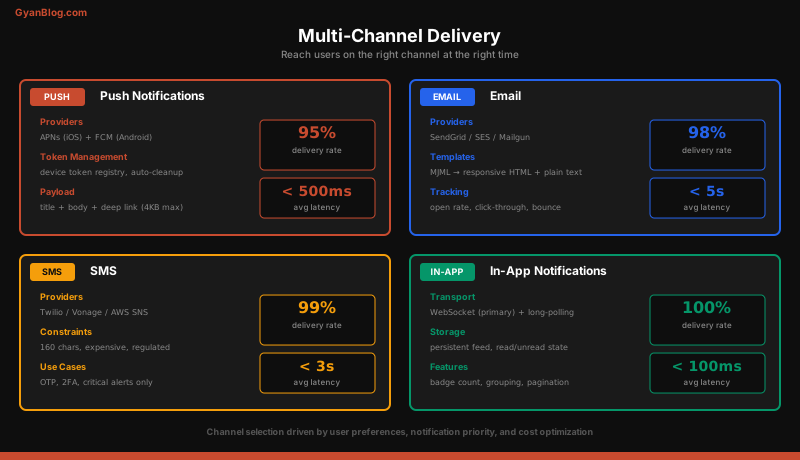
Each channel has its own queue, worker pool, and delivery logic. This isolation is critical: if the SMS provider goes down, email and push keep working.
Push Notifications (APNs / FCM)
class PushWorker:
    def __init__(self):
        self.apns_client = APNsClient(credentials="path/to/cert.pem")
        self.fcm_client = FCMClient(api_key=os.environ["FCM_API_KEY"])

    def deliver(self, notification: dict):
        user_id = notification["recipient_id"]
        devices = self.device_registry.get_devices(user_id)

        for device in devices:
            try:
                if device["platform"] == "ios":
                    self.apns_client.send(
                        device_token=device["token"],
                        alert=notification["rendered"]["title"],
                        body=notification["rendered"]["body"],
                        badge=self._get_unread_count(user_id)
                    )
                elif device["platform"] == "android":
                    self.fcm_client.send(
                        registration_id=device["token"],
                        title=notification["rendered"]["title"],
                        body=notification["rendered"]["body"],
                        data=notification["rendered"].get("data", {})
                    )
                self._update_status(notification["id"], device["id"], "delivered")
            except InvalidTokenError:
                # Token expired or invalid — remove from registry
                self.device_registry.remove(device["id"])
            except Exception as e:
                self._update_status(notification["id"], device["id"], "failed", str(e))
                self._enqueue_retry(notification, device)
Key detail: users have multiple devices. A single push notification fans out to all registered device tokens. Stale tokens must be cleaned up aggressively or you waste API calls and hit rate limits.
Email (SendGrid / SES)
class EmailWorker:
    def deliver(self, notification: dict):
        user = self.user_service.get(notification["recipient_id"])
        rendered = notification["rendered"]

        response = self.sendgrid.send(
            to=user["email"],
            from_email="[email protected]",
            subject=rendered["subject"],
            template_id=rendered.get("template_id"),
            dynamic_template_data=rendered.get("variables", {}),
            categories=[notification["event_type"]],  # for analytics
            custom_args={"notification_id": notification["id"]}
        )

        if response.status_code == 202:
            self._update_status(notification["id"], "email", "sent")
        else:
            self._handle_failure(notification, response)
SMS (Twilio)
class SMSWorker:
    def deliver(self, notification: dict):
        user = self.user_service.get(notification["recipient_id"])

        # SMS is expensive — double-check this is worth sending
        if notification["priority"] == "low":
            logger.warning(f"Skipping low-priority SMS for {notification['id']}")
            return

        message = self.twilio.messages.create(
            body=notification["rendered"]["body"],
            from_="+1234567890",
            to=user["phone_number"],
            status_callback=f"https://api.yourapp.com/webhooks/twilio/{notification['id']}"
        )
        self._update_status(notification["id"], "sms", "sent", sid=message.sid)
In-App Notifications
In-app notifications are stored in a database and served via API. No third-party provider needed.
CREATE TABLE in_app_notifications (
    id              UUID PRIMARY KEY,
    user_id         BIGINT NOT NULL,
    title           VARCHAR(200),
    body            TEXT,
    action_url      VARCHAR(500),
    icon            VARCHAR(50),
    is_read         BOOLEAN DEFAULT false,
    created_at      TIMESTAMP DEFAULT NOW(),
    expires_at      TIMESTAMP
);

CREATE INDEX idx_inapp_user_unread ON in_app_notifications (user_id, is_read, created_at DESC);
# GET /api/v1/notifications/feed?unread_only=true&limit=20
class NotificationFeedAPI:
def get_feed(self, user_id: str, unread_only: bool = False, limit: int = 20, cursor: str = None):
query = "SELECT * FROM in_app_notifications WHERE user_id = %s"
params = [user_id]
if unread_only:
query += " AND is_read = false"
if cursor:
query += " AND created_at < %s"
params.append(cursor)
query += " ORDER BY created_at DESC LIMIT %s"
params.append(limit)
notifications = self.db.query(query, params)
unread_count = self.db.count(
"SELECT COUNT(*) FROM in_app_notifications WHERE user_id = %s AND is_read = false",
[user_id]
)
return {
"notifications": notifications,
"unread_count": unread_count,
"next_cursor": notifications[-1]["created_at"] if notifications else None
}
# POST /api/v1/notifications/{id}/read
def mark_read(self, notification_id: str, user_id: str):
self.db.execute(
"UPDATE in_app_notifications SET is_read = true WHERE id = %s AND user_id = %s",
(notification_id, user_id)
)
# POST /api/v1/notifications/read-all
def mark_all_read(self, user_id: str):
self.db.execute(
"UPDATE in_app_notifications SET is_read = true WHERE user_id = %s AND is_read = false",
(user_id,)
)For real-time delivery to the client, push new in-app notifications over a WebSocket or SSE connection so the badge count updates without polling.
Priority Queues
Not all notifications are equal. A two-factor authentication code must arrive in seconds. A weekly digest can wait hours.
class PriorityRouter:
    # Three priority tiers with separate queues
    QUEUE_MAP = {
        "urgent": "notifications.urgent",    # OTP, fraud, security — processed immediately
        "normal": "notifications.normal",    # Transactional — order updates, payment confirmations
        "low":    "notifications.low"        # Marketing, digests, recommendations
    }

    # Worker allocation per priority
    WORKER_COUNTS = {
        "urgent": 20,   # Over-provisioned to guarantee low latency
        "normal": 50,   # Bulk of traffic
        "low":    10    # Throttled to avoid spamming
    }

    def route(self, notification: dict):
        priority = notification.get("priority", "normal")
        queue_name = self.QUEUE_MAP[priority]

        # Urgent notifications skip batching and dedup delay
        if priority == "urgent":
            self.queue.publish(queue_name, notification, priority=10)
        elif priority == "low":
            # Low priority notifications can be batched
            self.batcher.add(notification)  # Flushes every 5 minutes or at 100 items
        else:
            self.queue.publish(queue_name, notification, priority=5)
The urgent queue has dedicated workers that are intentionally over-provisioned. You pay for idle capacity, but a 30-second delay on a fraud alert costs more than a few extra server instances.
Deduplication
Duplicate notifications destroy user trust. There are multiple layers where duplicates can appear.
Layer 1: Idempotency keys at ingestion. Every notification request includes an idempotency key. If the same key arrives twice (because the caller retried), the second is a no-op.
# Redis-based dedup with TTL
class DeduplicationStore:
    def __init__(self, redis_client):
        self.redis = redis_client

    def check_and_set(self, key: str, notification_id: str, ttl: int = 86400) -> bool:
        """Returns True if this is a new key (not a duplicate)."""
        result = self.redis.set(f"dedup:{key}", notification_id, nx=True, ex=ttl)
        return result is not None  # None means key already existed

    def exists(self, key: str) -> bool:
        return self.redis.exists(f"dedup:{key}")
Layer 2: Content-based dedup. Even without an explicit idempotency key, detect near-duplicates by hashing the notification content + recipient + channel within a time window.
def content_dedup_key(recipient_id: str, event_type: str, channel: str, data: dict) -> str:
    """Generate a dedup key from notification content."""
    content_hash = hashlib.sha256(
        json.dumps(data, sort_keys=True).encode()
    ).hexdigest()[:16]
    return f"{recipient_id}:{event_type}:{channel}:{content_hash}"
Layer 3: Delivery-side dedup. Workers check if a notification has already been delivered before calling the external provider. This catches race conditions where two workers pick up the same message.
Rate Limiting Per User
Even after preference filtering and dedup, you can still overwhelm users. Rate limiting puts a hard ceiling on how many notifications a user receives.
class UserRateLimiter:
    # Limits per user per channel per time window
    LIMITS = {
        "push":  {"max": 10, "window": 3600},    # 10 push notifications per hour
        "email": {"max": 5,  "window": 86400},    # 5 emails per day
        "sms":   {"max": 3,  "window": 86400},    # 3 SMS per day
    }

    def allow(self, user_id: str, channel: str) -> bool:
        limit = self.LIMITS.get(channel)
        if not limit:
            return True

        key = f"rate:{user_id}:{channel}"
        current = self.redis.get(key)

        if current and int(current) >= limit["max"]:
            return False

        pipe = self.redis.pipeline()
        pipe.incr(key)
        pipe.expire(key, limit["window"])
        pipe.execute()
        return True
When a notification is rate-limited, do not silently drop it. Log it, and if the channel is email, consider batching the suppressed notifications into a digest.
Retry with Exponential Backoff
External providers fail. APNs returns 503, Twilio throttles you, SendGrid has a brief outage. Retries must be automatic but controlled.
class RetryHandler:
    MAX_RETRIES = 5
    BASE_DELAY = 1  # seconds

    def enqueue_retry(self, notification: dict, channel: str, attempt: int):
        if attempt >= self.MAX_RETRIES:
            self._mark_failed_permanently(notification["id"], channel)
            self._alert_ops(notification)  # page on-call for critical notifications
            return

        # Exponential backoff with jitter
        delay = self.BASE_DELAY * (2 ** attempt) + random.uniform(0, 1)
        delay = min(delay, 300)  # cap at 5 minutes

        self.queue.publish(
            f"notifications.retry.{channel}",
            {**notification, "retry_attempt": attempt + 1},
            delay_seconds=int(delay)
        )

    # Retry schedule:
    # Attempt 1: ~1s delay
    # Attempt 2: ~2s delay
    # Attempt 3: ~4s delay
    # Attempt 4: ~8s delay
    # Attempt 5: give up, mark as failed
For critical notifications (OTPs, security alerts), if the primary channel fails, fall back to a secondary channel. If push fails, try SMS. If SMS fails, try email.
class FallbackHandler:
    FALLBACK_CHAINS = {
        "urgent": ["push", "sms", "email"],
        "normal": ["push", "email"],
        "low":    ["email"]  # no fallback
    }

    def handle_failure(self, notification: dict, failed_channel: str):
        priority = notification["priority"]
        chain = self.FALLBACK_CHAINS.get(priority, [])

        current_index = chain.index(failed_channel) if failed_channel in chain else -1
        if current_index + 1 < len(chain):
            next_channel = chain[current_index + 1]
            self._send_via_channel(notification, next_channel)
Notification Grouping and Batching
Nobody wants 15 separate “someone liked your post” notifications in 10 minutes. Group related notifications.
class NotificationBatcher:
    BATCH_RULES = {
        "social.like":    {"window": 300, "max_batch": 50, "template": "{{count}} people liked your post"},
        "social.comment": {"window": 600, "max_batch": 20, "template": "{{count}} new comments on your post"},
        "social.follow":  {"window": 900, "max_batch": 30, "template": "{{count}} new followers"}
    }

    def add(self, notification: dict):
        event_type = notification["event_type"]
        user_id = notification["recipient_id"]
        rule = self.BATCH_RULES.get(event_type)

        if not rule:
            self._send_immediately(notification)
            return

        batch_key = f"batch:{user_id}:{event_type}"
        self.redis.rpush(batch_key, json.dumps(notification))
        self.redis.expire(batch_key, rule["window"])

        batch_size = self.redis.llen(batch_key)
        if batch_size >= rule["max_batch"]:
            self._flush_batch(batch_key, rule)

    def _flush_batch(self, batch_key: str, rule: dict):
        items = self.redis.lrange(batch_key, 0, -1)
        self.redis.delete(batch_key)

        count = len(items)
        summary = rule["template"].replace("{{count}}", str(count))
        # Send single grouped notification instead of N individual ones
        self._send_grouped(items, summary)
Analytics and Tracking
You need to know: was it delivered? Was it opened? Was it clicked?
CREATE TABLE notification_events (
    notification_id  UUID NOT NULL,
    channel          VARCHAR(20),
    event_type       VARCHAR(20),   -- 'sent', 'delivered', 'opened', 'clicked', 'bounced', 'failed'
    event_data       JSONB,
    created_at       TIMESTAMP DEFAULT NOW()
);

CREATE INDEX idx_notif_events ON notification_events (notification_id, channel, event_type);
Track delivery via provider webhooks:
# Webhook handlers for delivery tracking
@app.route("/webhooks/sendgrid", methods=["POST"])
def sendgrid_webhook():
    for event in request.json:
        notification_id = event.get("notification_id")
        if event["event"] == "delivered":
            track_event(notification_id, "email", "delivered")
        elif event["event"] == "open":
            track_event(notification_id, "email", "opened")
        elif event["event"] == "click":
            track_event(notification_id, "email", "clicked", {"url": event["url"]})
        elif event["event"] == "bounce":
            track_event(notification_id, "email", "bounced", {"reason": event["reason"]})

@app.route("/webhooks/twilio/<notification_id>", methods=["POST"])
def twilio_webhook(notification_id):
    status = request.form["MessageStatus"]
    track_event(notification_id, "sms", status)  # 'sent', 'delivered', 'failed', 'undelivered'
For push notification opens, the mobile client reports back when the user taps the notification. For in-app, you already track read status directly.
Aggregate these events into dashboards: delivery rate per channel, open rate by notification type, click-through rate, bounce rate, and opt-out rate. If your marketing email open rate drops below 15%, something is wrong with your targeting or content.
Database Schema Summary
-- Core notification record
CREATE TABLE notifications (
    id              UUID PRIMARY KEY,
    event_type      VARCHAR(100) NOT NULL,
    recipient_id    BIGINT NOT NULL,
    priority        VARCHAR(10) DEFAULT 'normal',
    data            JSONB,
    status          VARCHAR(20) DEFAULT 'pending',
    created_at      TIMESTAMP DEFAULT NOW(),
    processed_at    TIMESTAMP,
    idempotency_key VARCHAR(200) UNIQUE
);

-- Delivery attempts per channel
CREATE TABLE delivery_attempts (
    id              UUID PRIMARY KEY,
    notification_id UUID REFERENCES notifications(id),
    channel         VARCHAR(20),
    status          VARCHAR(20),    -- 'pending', 'sent', 'delivered', 'failed'
    attempt_number  INT DEFAULT 1,
    provider_id     VARCHAR(200),   -- external message ID from provider
    error_message   TEXT,
    created_at      TIMESTAMP DEFAULT NOW()
);
Use PostgreSQL for the notification log and delivery tracking. Use Redis for deduplication keys, rate limiting counters, and batching buffers. Use Kafka or RabbitMQ for the message queues between pipeline stages.
Scaling Considerations
Horizontal scaling. Each component (API, preference service, template engine, channel workers) scales independently. If email volume spikes, add more email workers without touching push workers.
Queue partitioning. Partition queues by user ID hash so notifications for the same user are processed in order. Out-of-order delivery can cause confusing notification feeds.
Database sharding. The notification log grows fast. Shard by user ID and implement a retention policy (90 days hot, archive to cold storage after that).
Provider failover. Don’t depend on a single email or SMS provider. Configure a secondary (e.g., SES as backup for SendGrid, Vonage as backup for Twilio) and switch automatically on sustained failures.
Global delivery. For a global user base, deploy notification workers in multiple regions. Use the provider endpoints closest to the user’s carrier/device for lower latency.
Key Takeaways
- A notification system is a pipeline: ingest, filter by preferences, render template, route by priority, deliver per channel, track status. Each stage is a separate service.
- Use separate queues per channel. Channel isolation means one provider outage does not block other channels.
- Deduplication has three layers: idempotency keys at ingestion, content hashing for near-duplicates, and delivery-side checks to prevent race conditions.
- Rate limiting per user per channel is non-negotiable. Without it, even legitimate notifications become spam.
- Priority queues ensure urgent notifications (OTP, fraud) are never stuck behind a marketing batch of 5 million emails.
- Retry with exponential backoff for all external provider calls. For critical notifications, implement channel fallback (push fails, try SMS).
- Group and batch low-priority notifications. “15 people liked your post” is better than 15 separate notifications.
- Track everything: sent, delivered, opened, clicked, bounced. Use provider webhooks for delivery confirmation. You cannot improve notification quality without these metrics.
- The hardest part of a notification system is restraint. Every team wants to send more notifications. Your system must make it easy to send less.