


Every breach post-mortem tells the same story: an unpatched service, a misconfigured firewall rule, a root account with password auth enabled. Server security isn’t glamorous, but it’s the difference between “we caught it in the logs” and “we found out from a journalist.”
This guide covers production server hardening from the network perimeter down to the data layer — with real configurations you can copy, paste, and deploy today.
Table of Contents
- Defense in Depth — The Security Model
- SSH Hardening
- Firewall Configuration
- User and Privilege Management
- TLS and Certificate Management
- Nginx Reverse Proxy Hardening
- Kernel and OS Hardening
- Automated Patch Management
- Logging and Monitoring
- File Integrity Monitoring
- Container Security
- Incident Response
- Security Audit Automation
- Production Hardening Checklist
Defense in Depth
Security is not a single wall — it’s concentric rings. If an attacker breaches one layer, the next layer should stop them. This is the defense in depth model, and it’s the foundation of every secure server architecture.
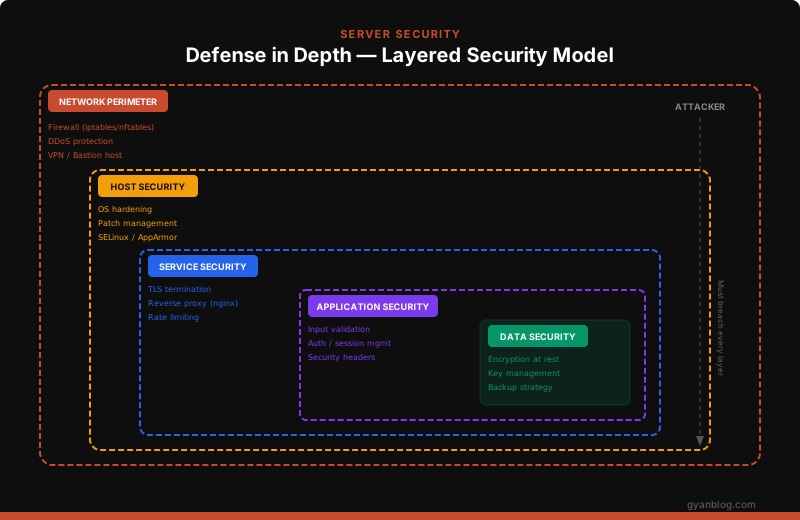
Each layer operates independently. A compromised web application shouldn’t grant access to the database. A breached database shouldn’t expose encryption keys. Every layer assumes the layer above it has already been compromised.
The six layers, from outside in:
| Layer | What It Protects | Key Controls |
|---|---|---|
| Network Perimeter | External attack surface | Firewall, DDoS protection, VPN |
| Host Security | Operating system | OS hardening, patching, MAC |
| Service Security | Running services | TLS, reverse proxy, rate limiting |
| Application Security | Application logic | Input validation, auth, headers |
| Data Security | Stored data | Encryption at rest, key management |
| Monitoring | Visibility | Logging, alerting, audit trails |
SSH Hardening
SSH is the front door to your server. If this is misconfigured, nothing else matters.
Disable Root Login and Password Auth
# /etc/ssh/sshd_config — the non-negotiable settings

# Never allow root to SSH directly
PermitRootLogin no

# Key-based auth only — disable password authentication
PasswordAuthentication no
PubkeyAuthentication yes

# Disable empty passwords (just in case)
PermitEmptyPasswords no

# Disable challenge-response (closes PAM password backdoor)
ChallengeResponseAuthentication no

# Only allow specific users
AllowUsers deployer admin

# Limit max auth attempts
MaxAuthTries 3

# Disconnect idle sessions after 5 minutes
ClientAliveInterval 300
ClientAliveCountMax 0

# Use only SSH protocol 2
Protocol 2
After editing, validate and reload:
# Test config syntax before reloading (saves you from lockouts)
sudo sshd -t

# Reload — not restart (keeps existing sessions alive)
sudo systemctl reload sshd
Change the Default Port
Security through obscurity isn’t a strategy, but changing the SSH port eliminates 99% of automated bot traffic:
# /etc/ssh/sshd_config
Port 2222

# Don't forget to update the firewall BEFORE reloading sshd
sudo ufw allow 2222/tcp
sudo ufw deny 22/tcp
sudo systemctl reload sshd
Generate Strong SSH Keys
# Ed25519 — modern, fast, secure (recommended)
ssh-keygen -t ed25519 -C "deploy@prod-server-01" -f ~/.ssh/id_ed25519_prod

# If you need RSA compatibility, use 4096-bit minimum
ssh-keygen -t rsa -b 4096 -C "deploy@prod-server-01" -f ~/.ssh/id_rsa_prod
Set Up fail2ban
fail2ban watches log files and bans IPs that show malicious behavior:
sudo apt install fail2ban

# Create a local config (never edit jail.conf directly)
sudo cp /etc/fail2ban/jail.conf /etc/fail2ban/jail.local
# /etc/fail2ban/jail.local
[sshd]
enabled = true
port = 2222
filter = sshd
logpath = /var/log/auth.log
maxretry = 3
bantime = 3600 # Ban for 1 hour
findtime = 600 # Within 10 minute window
banaction = iptables-multiport
# Recidive jail — bans repeat offenders for 1 week
[recidive]
enabled = true
filter = recidive
logpath = /var/log/fail2ban.log
bantime = 604800
findtime = 86400
maxretry = 3sudo systemctl enable fail2ban
sudo systemctl start fail2ban
# Check ban status
sudo fail2ban-client status sshdFirewall Configuration
The firewall is your first line of defense. The rule is simple: default deny, explicit allow.
UFW (Uncomplicated Firewall)
# Reset to clean state
sudo ufw reset

# Default policies — deny everything inbound, allow outbound
sudo ufw default deny incoming
sudo ufw default allow outgoing

# Allow only what you need
sudo ufw allow 2222/tcp comment 'SSH'
sudo ufw allow 80/tcp comment 'HTTP'
sudo ufw allow 443/tcp comment 'HTTPS'

# Rate limit SSH (auto-deny after 6 connections in 30 seconds)
sudo ufw limit 2222/tcp

# Enable the firewall
sudo ufw enable

# Verify rules
sudo ufw status verbose
iptables (For Fine-Grained Control)
#!/bin/bash
# firewall.sh — Production iptables ruleset

# Flush existing rules
iptables -F
iptables -X
iptables -Z

# Default policies: drop everything
iptables -P INPUT DROP
iptables -P FORWARD DROP
iptables -P OUTPUT ACCEPT

# Allow loopback
iptables -A INPUT -i lo -j ACCEPT

# Allow established connections
iptables -A INPUT -m state --state ESTABLISHED,RELATED -j ACCEPT

# SSH (rate limited: max 3 new connections per minute)
iptables -A INPUT -p tcp --dport 2222 -m state --state NEW \
  -m recent --set --name SSH
iptables -A INPUT -p tcp --dport 2222 -m state --state NEW \
  -m recent --update --seconds 60 --hitcount 4 --name SSH -j DROP
iptables -A INPUT -p tcp --dport 2222 -j ACCEPT

# HTTP/HTTPS
iptables -A INPUT -p tcp --dport 80 -j ACCEPT
iptables -A INPUT -p tcp --dport 443 -j ACCEPT

# Drop invalid packets
iptables -A INPUT -m state --state INVALID -j DROP

# Log dropped packets (rate limited to prevent log flooding)
iptables -A INPUT -m limit --limit 5/min -j LOG \
  --log-prefix "iptables-dropped: " --log-level 4

# Save rules (persist across reboots)
iptables-save > /etc/iptables/rules.v4
nftables (Modern Replacement)
nftables is the successor to iptables on modern Linux systems:
#!/usr/sbin/nft -f
# /etc/nftables.conf

flush ruleset

table inet firewall {
    chain input {
        type filter hook input priority 0; policy drop;

        # Allow loopback
        iif lo accept

        # Allow established/related
        ct state established,related accept

        # Drop invalid
        ct state invalid drop

        # SSH with rate limiting
        tcp dport 2222 ct state new limit rate 3/minute accept

        # HTTP/HTTPS
        tcp dport { 80, 443 } accept

        # ICMP (allow ping, rate limited)
        icmp type echo-request limit rate 1/second accept

        # Log everything else
        log prefix "nft-dropped: " limit rate 5/minute
    }

    chain forward {
        type filter hook forward priority 0; policy drop;
    }

    chain output {
        type filter hook output priority 0; policy accept;
    }
}
User and Privilege Management
The principle of least privilege: every user, process, and service gets the minimum permissions needed to do its job — nothing more.
Create Dedicated Service Accounts
# Create a deploy user with no interactive shell capability
sudo useradd -r -s /usr/sbin/nologin -d /opt/myapp -m deployer

# Create an application user
sudo useradd -r -s /usr/sbin/nologin -d /opt/myapp appuser

# Give the app user ownership of its directory only
sudo chown -R appuser:appuser /opt/myapp
sudo chmod 750 /opt/myapp
Lock Down sudo
# /etc/sudoers.d/deploy — granular sudo permissions
# deployer can restart services, nothing else
deployer ALL=(ALL) NOPASSWD: /usr/bin/systemctl restart myapp
deployer ALL=(ALL) NOPASSWD: /usr/bin/systemctl status myapp

# Require password for everything else (no NOPASSWD blanket)
# NEVER use: deployer ALL=(ALL) NOPASSWD: ALL
Validate sudoers file:
# Always use visudo to edit — it validates syntax
sudo visudo -cf /etc/sudoers.d/deploy
Disable Unused Accounts
# List all users with login shells
awk -F: '$7 !~ /nologin|false/ {print $1}' /etc/passwd

# Lock accounts that shouldn't be logging in
sudo usermod -L -s /usr/sbin/nologin games
sudo usermod -L -s /usr/sbin/nologin news
sudo usermod -L -s /usr/sbin/nologin mail

# Set password expiration policies
sudo chage -M 90 -W 14 -I 7 deployer
# Max age: 90 days, warn at 14 days, lock after 7 days of inactivity
TLS and Certificate Management
Every service exposed to the network must use TLS 1.3 (or at minimum TLS 1.2). There are no exceptions.
Certbot / Let’s Encrypt
# Install certbot
sudo apt install certbot python3-certbot-nginx

# Get a certificate
sudo certbot --nginx -d example.com -d www.example.com

# Automatic renewal (certbot installs a systemd timer by default)
sudo certbot renew --dry-run

# Verify the timer is active
sudo systemctl status certbot.timer
Strong TLS Configuration
# /etc/nginx/snippets/ssl-hardened.conf

# TLS 1.3 only (TLS 1.2 if you need legacy client support)
ssl_protocols TLSv1.3;

# Let the server pick the cipher (not the client)
ssl_prefer_server_ciphers off;

# Session settings
ssl_session_timeout 1d;
ssl_session_cache shared:SSL:50m;
ssl_session_tickets off;

# OCSP stapling
ssl_stapling on;
ssl_stapling_verify on;
resolver 1.1.1.1 1.0.0.1 valid=300s;

# DH parameters (generate with: openssl dhparam -out /etc/nginx/dhparam.pem 4096)
ssl_dhparam /etc/nginx/dhparam.pem;

# HSTS — tell browsers to always use HTTPS (2 years)
add_header Strict-Transport-Security "max-age=63072000; includeSubDomains; preload" always;
Certificate Monitoring Script
#!/usr/bin/env python3
"""cert_monitor.py — Alert when TLS certificates are near expiry."""

import ssl
import socket
import datetime
import sys

def check_cert_expiry(hostname: str, port: int = 443) -> int:
    """Return days until certificate expiry."""
    context = ssl.create_default_context()
    with socket.create_connection((hostname, port), timeout=10) as sock:
        with context.wrap_socket(sock, server_hostname=hostname) as ssock:
            cert = ssock.getpeercert()
            expiry = datetime.datetime.strptime(
                cert["notAfter"], "%b %d %H:%M:%S %Y %Z"
            )
            return (expiry - datetime.datetime.utcnow()).days

domains = ["example.com", "api.example.com", "admin.example.com"]

for domain in domains:
    try:
        days_left = check_cert_expiry(domain)
        status = "OK" if days_left > 30 else "WARNING" if days_left > 7 else "CRITICAL"
        print(f"[{status}] {domain}: {days_left} days remaining")
        if days_left <= 7:
            sys.exit(2)  # Nagios-compatible critical exit
    except Exception as e:
        print(f"[ERROR] {domain}: {e}")
        sys.exit(2)
Nginx Reverse Proxy Hardening
Never expose application servers directly. Always put a hardened reverse proxy in front.
# /etc/nginx/sites-available/myapp.conf

# Redirect HTTP → HTTPS
server {
    listen 80;
    server_name example.com;
    return 301 https://$host$request_uri;
}

server {
    listen 443 ssl http2;
    server_name example.com;

    # TLS
    ssl_certificate /etc/letsencrypt/live/example.com/fullchain.pem;
    ssl_certificate_key /etc/letsencrypt/live/example.com/privkey.pem;
    include /etc/nginx/snippets/ssl-hardened.conf;

    # Security headers
    add_header X-Frame-Options "SAMEORIGIN" always;
    add_header X-Content-Type-Options "nosniff" always;
    add_header X-XSS-Protection "1; mode=block" always;
    add_header Referrer-Policy "strict-origin-when-cross-origin" always;
    add_header Content-Security-Policy "default-src 'self'; script-src 'self'; style-src 'self' 'unsafe-inline';" always;
    add_header Permissions-Policy "camera=(), microphone=(), geolocation=()" always;

    # Hide server version
    server_tokens off;

    # Limit request body size (prevent large upload attacks)
    client_max_body_size 10m;

    # Rate limiting zone (defined in nginx.conf http block)
    # limit_req_zone $binary_remote_addr zone=api:10m rate=10r/s;
    limit_req zone=api burst=20 nodelay;

    # Block common attack patterns
    location ~* \.(env|git|svn|htaccess|htpasswd|ini|log|sh|sql|bak|config)$ {
        deny all;
        return 404;
    }

    # Block WordPress scanner bots
    location ~* ^/(wp-admin|wp-login|xmlrpc\.php) {
        deny all;
        return 404;
    }

    # Application proxy
    location / {
        proxy_pass http://127.0.0.1:3000;
        proxy_http_version 1.1;
        proxy_set_header Host $host;
        proxy_set_header X-Real-IP $remote_addr;
        proxy_set_header X-Forwarded-For $proxy_add_x_forwarded_for;
        proxy_set_header X-Forwarded-Proto $scheme;

        # Timeouts
        proxy_connect_timeout 5s;
        proxy_read_timeout 30s;
        proxy_send_timeout 30s;
    }
}
Nginx Rate Limiting
# /etc/nginx/nginx.conf — inside the http block

# Rate limiting zones
limit_req_zone $binary_remote_addr zone=api:10m rate=10r/s;
limit_req_zone $binary_remote_addr zone=login:10m rate=1r/s;

# Connection limiting
limit_conn_zone $binary_remote_addr zone=addr:10m;

# In your server block:
location /api/ {
    limit_req zone=api burst=20 nodelay;
    limit_conn addr 10;
    proxy_pass http://127.0.0.1:3000;
}

location /auth/login {
    limit_req zone=login burst=5;
    proxy_pass http://127.0.0.1:3000;
}
Kernel and OS Hardening
sysctl Security Parameters
# /etc/sysctl.d/99-security.conf

# Disable IP forwarding (unless this is a router)
net.ipv4.ip_forward = 0
net.ipv6.conf.all.forwarding = 0

# Disable source routing (prevents spoofed packets)
net.ipv4.conf.all.accept_source_route = 0
net.ipv6.conf.all.accept_source_route = 0

# Enable SYN flood protection
net.ipv4.tcp_syncookies = 1
net.ipv4.tcp_max_syn_backlog = 4096

# Ignore ICMP redirects (MITM prevention)
net.ipv4.conf.all.accept_redirects = 0
net.ipv4.conf.default.accept_redirects = 0
net.ipv6.conf.all.accept_redirects = 0

# Don't send ICMP redirects
net.ipv4.conf.all.send_redirects = 0

# Enable reverse path filtering (anti-spoofing)
net.ipv4.conf.all.rp_filter = 1
net.ipv4.conf.default.rp_filter = 1

# Ignore bogus ICMP error responses
net.ipv4.icmp_ignore_bogus_error_responses = 1

# Log martian packets (spoofed source addresses)
net.ipv4.conf.all.log_martians = 1

# Restrict kernel pointer exposure
kernel.kptr_restrict = 2

# Restrict dmesg access to root
kernel.dmesg_restrict = 1

# Disable core dumps
fs.suid_dumpable = 0

# Restrict ptrace (prevent process debugging attacks)
kernel.yama.ptrace_scope = 2

# Randomize memory layout (ASLR)
kernel.randomize_va_space = 2
Apply immediately:
sudo sysctl --systemAppArmor / SELinux
# Check AppArmor status
sudo aa-status

# Enforce a profile
sudo aa-enforce /etc/apparmor.d/usr.sbin.nginx

# For SELinux (RHEL/CentOS)
sudo sestatus
sudo setenforce 1

# Make SELinux enforcing permanent
sudo sed -i 's/SELINUX=permissive/SELINUX=enforcing/' /etc/selinux/config
Remove Unnecessary Services
# List all running services
systemctl list-units --type=service --state=running

# Disable services you don't need
sudo systemctl disable --now avahi-daemon
sudo systemctl disable --now cups
sudo systemctl disable --now bluetooth
sudo systemctl disable --now rpcbind

# Remove unnecessary packages
sudo apt autoremove --purge telnet rsh-client rsh-server
Automated Patch Management
Unpatched systems are the #1 attack vector. Automate this.
Unattended Upgrades (Debian/Ubuntu)
sudo apt install unattended-upgrades
sudo dpkg-reconfigure -plow unattended-upgrades
# /etc/apt/apt.conf.d/50unattended-upgrades
Unattended-Upgrade::Allowed-Origins {
"${distro_id}:${distro_codename}-security";
"${distro_id}ESMApps:${distro_codename}-apps-security";
};
// Auto-remove unused dependencies
Unattended-Upgrade::Remove-Unused-Dependencies "true";
// Auto-reboot at 3 AM if needed
Unattended-Upgrade::Automatic-Reboot "true";
Unattended-Upgrade::Automatic-Reboot-Time "03:00";
// Email notifications
Unattended-Upgrade::Mail "[email protected]";
Unattended-Upgrade::MailReport "on-change";
// Don't auto-upgrade these packages
Unattended-Upgrade::Package-Blacklist {
"nginx";
"postgresql";
};Patch Compliance Check Script
#!/bin/bash
# patch_check.sh — Run daily via cron

HOSTNAME=$(hostname)
UPDATES=$(apt list --upgradable 2>/dev/null | grep -c "upgradable")
SECURITY=$(apt list --upgradable 2>/dev/null | grep -c "security")

echo "[${HOSTNAME}] Pending: ${UPDATES} total, ${SECURITY} security"

if [ "$SECURITY" -gt 0 ]; then
    echo "CRITICAL: ${SECURITY} security patches pending on ${HOSTNAME}" | \
        mail -s "[SECURITY] Patches needed: ${HOSTNAME}" [email protected]
fi

# Check kernel version vs running
INSTALLED=$(dpkg -l linux-image-* | grep ^ii | tail -1 | awk '{print $3}')
RUNNING=$(uname -r)
if [ "$INSTALLED" != "$RUNNING" ]; then
    echo "WARNING: Reboot required (running: ${RUNNING}, installed: ${INSTALLED})"
fi
Logging and Monitoring
If you can’t see it, you can’t defend it. Centralized logging is non-negotiable.
Structured Logging with rsyslog
# /etc/rsyslog.d/50-remote.conf

# Forward all logs to central syslog server
*.* @@logserver.internal:514

# Log auth events to dedicated file
auth,authpriv.* /var/log/auth.log

# Log everything at info level and above
*.info;mail.none;authpriv.none;cron.none /var/log/messages
auditd — System Call Auditing
sudo apt install auditd

# /etc/audit/rules.d/server-hardening.rules

# Monitor SSH config changes
-w /etc/ssh/sshd_config -p wa -k sshd_config

# Monitor password and group changes
-w /etc/passwd -p wa -k identity
-w /etc/group -p wa -k identity
-w /etc/shadow -p wa -k identity
-w /etc/sudoers -p wa -k sudoers
-w /etc/sudoers.d/ -p wa -k sudoers

# Monitor cron changes
-w /etc/crontab -p wa -k cron
-w /var/spool/cron/ -p wa -k cron

# Log all commands run as root
-a always,exit -F arch=b64 -F euid=0 -S execve -k rootcmd

# Log file deletions
-a always,exit -F arch=b64 -S unlink -S unlinkat -S rename -S renameat -k delete

# Log mount operations
-a always,exit -F arch=b64 -S mount -S umount2 -k mount

# Log kernel module loading
-w /sbin/insmod -p x -k modules
-w /sbin/modprobe -p x -k modules
-w /sbin/rmmod -p x -k modules

# Make audit config immutable (requires reboot to change)
-e 2
# Load rules
sudo auditctl -R /etc/audit/rules.d/server-hardening.rules
# Search audit logs
sudo ausearch -k sshd_config -ts recent
sudo ausearch -k rootcmd -ts todayLog Monitoring with a Simple Watcher
#!/usr/bin/env python3
"""log_watcher.py — Monitor auth.log for suspicious patterns."""

import re
import subprocess
import time
from collections import defaultdict

PATTERNS = {
    "brute_force": re.compile(r"Failed password for .+ from (\d+\.\d+\.\d+\.\d+)"),
    "invalid_user": re.compile(r"Invalid user .+ from (\d+\.\d+\.\d+\.\d+)"),
    "root_login": re.compile(r"Accepted .+ for root from (\d+\.\d+\.\d+\.\d+)"),
    "sudo_fail": re.compile(r"sudo:.+authentication failure.+rhost=(\S+)"),
}

THRESHOLDS = {
    "brute_force": 10,    # 10 failed attempts
    "invalid_user": 5,    # 5 invalid user attempts
    "root_login": 1,      # Any root login
    "sudo_fail": 3,       # 3 sudo failures
}

def alert(event_type: str, ip: str, count: int):
    """Send alert via system mail."""
    msg = f"ALERT: {event_type} — {count} events from {ip}"
    print(msg)
    subprocess.run(
        ["mail", "-s", f"[SECURITY] {event_type}", "[email protected]"],
        input=msg.encode(),
        check=False,
    )

def monitor_log(logfile: str = "/var/log/auth.log"):
    """Tail the auth log and alert on suspicious patterns."""
    counters = defaultdict(lambda: defaultdict(int))

    proc = subprocess.Popen(
        ["tail", "-F", logfile],
        stdout=subprocess.PIPE,
        stderr=subprocess.DEVNULL,
    )

    for raw_line in proc.stdout:
        line = raw_line.decode("utf-8", errors="replace")

        for event_type, pattern in PATTERNS.items():
            match = pattern.search(line)
            if match:
                ip = match.group(1)
                counters[event_type][ip] += 1

                if counters[event_type][ip] >= THRESHOLDS[event_type]:
                    alert(event_type, ip, counters[event_type][ip])
                    counters[event_type][ip] = 0  # Reset after alert

if __name__ == "__main__":
    monitor_log()
File Integrity Monitoring
Detect unauthorized changes to critical system files with AIDE (Advanced Intrusion Detection Environment).
# Install AIDE
sudo apt install aide

# Initialize the database
sudo aideinit

# Move the new database into place
sudo cp /var/lib/aide/aide.db.new /var/lib/aide/aide.db
# /etc/aide/aide.conf — custom rules
# Monitor critical directories
/etc p+i+u+g+s+m+S+sha512
/bin p+i+u+g+s+m+S+sha512
/sbin p+i+u+g+s+m+S+sha512
/usr/bin p+i+u+g+s+m+S+sha512
/usr/sbin p+i+u+g+s+m+S+sha512
# Monitor SSH keys
/root/.ssh p+i+u+g+s+m+sha512
/home p+i+u+g+s+m+sha512
# Ignore log files (they change constantly)
!/var/log
!/var/cache
!/tmp# Run a check
sudo aide --check
# Set up daily cron
echo "0 4 * * * root /usr/bin/aide --check | mail -s 'AIDE Report' [email protected]" | \
sudo tee /etc/cron.d/aide-checkContainer Security
If you’re running containers, the host hardening extends into the container runtime.
Docker Daemon Hardening
{
  "icc": false,
  "userns-remap": "default",
  "no-new-privileges": true,
  "log-driver": "json-file",
  "log-opts": {
    "max-size": "10m",
    "max-file": "3"
  },
  "live-restore": true,
  "userland-proxy": false,
  "default-ulimits": {
    "nofile": {
      "Name": "nofile",
      "Hard": 64000,
      "Soft": 64000
    }
  }
}
Secure Dockerfile Patterns
# Use specific version tags — never use :latest
FROM node:22-alpine AS builder
# Run as non-root
RUN addgroup -S appgroup && adduser -S appuser -G appgroup
# Copy only what's needed
COPY package*.json ./
RUN npm ci --only=production
COPY . .
# Drop all capabilities, run as non-root
USER appuser
# Read-only filesystem
# (set at runtime: docker run --read-only --tmpfs /tmp)
# Health check
HEALTHCHECK \
CMD curl -f http://localhost:3000/health || exit 1
EXPOSE 3000
CMD ["node", "server.js"]Container Scanning
# Scan images for vulnerabilities with Trivy
trivy image myapp:latest

# Scan with severity filter
trivy image --severity HIGH,CRITICAL myapp:latest

# Scan running containers
docker ps -q | xargs -I{} trivy image {}

# Integrate into CI/CD
# In your GitHub Actions workflow:
# - name: Scan image
#   run: trivy image --exit-code 1 --severity CRITICAL myapp:${{ github.sha }}
Incident Response
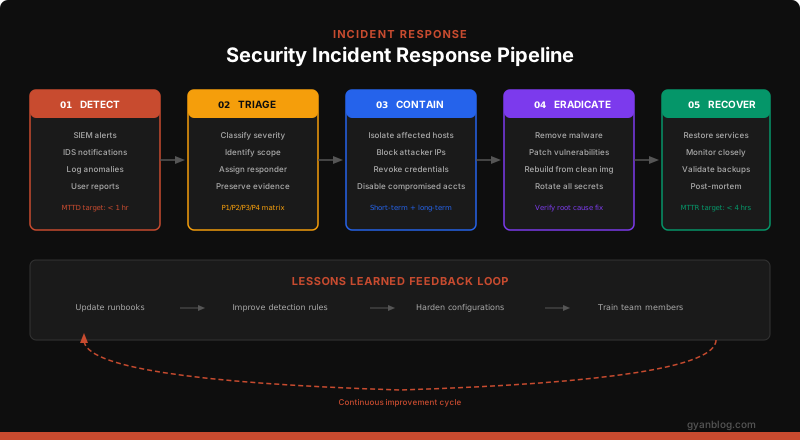
When a breach happens (not if), your response time determines the damage.
Incident Response Script
#!/bin/bash
# incident_response.sh — First responder toolkit
# Run immediately when a compromise is suspected

TIMESTAMP=$(date +%Y%m%d_%H%M%S)
EVIDENCE_DIR="/root/evidence_${TIMESTAMP}"
mkdir -p "$EVIDENCE_DIR"

echo "=== Incident Response Started: $(date) ==="
echo "Evidence directory: $EVIDENCE_DIR"

# 1. Capture volatile data FIRST (before it disappears)
echo "[1/8] Capturing network connections..."
ss -tulnp > "$EVIDENCE_DIR/network_connections.txt" 2>&1
netstat -anp > "$EVIDENCE_DIR/netstat.txt" 2>&1

echo "[2/8] Capturing running processes..."
ps auxwwf > "$EVIDENCE_DIR/processes.txt" 2>&1
ls -la /proc/*/exe 2>/dev/null > "$EVIDENCE_DIR/proc_exe_links.txt"

echo "[3/8] Capturing logged-in users..."
w > "$EVIDENCE_DIR/logged_in_users.txt" 2>&1
last -50 > "$EVIDENCE_DIR/last_logins.txt" 2>&1
lastb -50 > "$EVIDENCE_DIR/failed_logins.txt" 2>&1

echo "[4/8] Capturing open files..."
lsof -nP > "$EVIDENCE_DIR/open_files.txt" 2>&1

echo "[5/8] Capturing cron jobs..."
for user in $(cut -f1 -d: /etc/passwd); do
    crontab -l -u "$user" 2>/dev/null >> "$EVIDENCE_DIR/crontabs.txt"
done
ls -la /etc/cron.* >> "$EVIDENCE_DIR/cron_dirs.txt" 2>&1

echo "[6/8] Capturing recent file modifications..."
find / -mtime -1 -type f -not -path "/proc/*" -not -path "/sys/*" \
  2>/dev/null > "$EVIDENCE_DIR/recently_modified.txt"

echo "[7/8] Capturing auth logs..."
cp /var/log/auth.log "$EVIDENCE_DIR/"
cp /var/log/syslog "$EVIDENCE_DIR/"
journalctl --since "24 hours ago" > "$EVIDENCE_DIR/journal_24h.txt" 2>&1

echo "[8/8] Capturing system info..."
uname -a > "$EVIDENCE_DIR/system_info.txt"
cat /etc/os-release >> "$EVIDENCE_DIR/system_info.txt"
df -h > "$EVIDENCE_DIR/disk_usage.txt"
free -h > "$EVIDENCE_DIR/memory.txt"

# Create a hash of all evidence files
find "$EVIDENCE_DIR" -type f -exec sha256sum {} \; > "$EVIDENCE_DIR/evidence_hashes.txt"

echo ""
echo "=== Evidence collection complete ==="
echo "Files saved to: $EVIDENCE_DIR"
echo "NEXT STEPS:"
echo "  1. Review network connections for suspicious IPs"
echo "  2. Check processes for unknown binaries"
echo "  3. Review recent file modifications"
echo "  4. Check cron for persistence mechanisms"
echo "  5. Isolate the server if compromise is confirmed"
Security Audit Automation
Don’t rely on manual checks. Automate your security audits.
Lynis — Open Source Security Auditing
# Install Lynis
sudo apt install lynis

# Run a full system audit
sudo lynis audit system

# Run with specific profile
sudo lynis audit system --profile /etc/lynis/custom.prf

# Output to report file
sudo lynis audit system --report-file /var/log/lynis-report.dat
Custom Audit Script
#!/bin/bash
# security_audit.sh — Weekly automated security check

REPORT="/var/log/security-audit-$(date +%Y%m%d).txt"

echo "Security Audit Report — $(date)" > "$REPORT"
echo "========================================" >> "$REPORT"

# Check 1: World-writable files
echo -e "\n[CHECK] World-writable files:" >> "$REPORT"
find / -xdev -type f -perm -0002 -not -path "/proc/*" \
  2>/dev/null >> "$REPORT"

# Check 2: SUID/SGID binaries
echo -e "\n[CHECK] SUID/SGID binaries:" >> "$REPORT"
find / -xdev \( -perm -4000 -o -perm -2000 \) -type f \
  2>/dev/null >> "$REPORT"

# Check 3: Users with UID 0 (should only be root)
echo -e "\n[CHECK] UID 0 accounts:" >> "$REPORT"
awk -F: '$3 == 0 {print $1}' /etc/passwd >> "$REPORT"

# Check 4: Empty password fields
echo -e "\n[CHECK] Accounts with empty passwords:" >> "$REPORT"
sudo awk -F: '($2 == "" || $2 == "!") {print $1}' /etc/shadow >> "$REPORT"

# Check 5: SSH config check
echo -e "\n[CHECK] SSH configuration:" >> "$REPORT"
grep -E "^(PermitRootLogin|PasswordAuthentication|PubkeyAuthentication)" \
  /etc/ssh/sshd_config >> "$REPORT"

# Check 6: Open ports
echo -e "\n[CHECK] Listening ports:" >> "$REPORT"
ss -tulnp >> "$REPORT"

# Check 7: Failed login attempts (last 24h)
echo -e "\n[CHECK] Failed logins (24h):" >> "$REPORT"
journalctl _SYSTEMD_UNIT=sshd.service --since "24 hours ago" | \
  grep "Failed" | wc -l >> "$REPORT"

# Check 8: Pending security updates
echo -e "\n[CHECK] Pending security updates:" >> "$REPORT"
apt list --upgradable 2>/dev/null | grep -i security >> "$REPORT"

# Check 9: Firewall status
echo -e "\n[CHECK] Firewall status:" >> "$REPORT"
ufw status verbose >> "$REPORT" 2>&1

echo -e "\n========================================" >> "$REPORT"
echo "Audit complete. Report: $REPORT"

# Email the report
mail -s "Weekly Security Audit: $(hostname)" [email protected] < "$REPORT"
Production Hardening Checklist
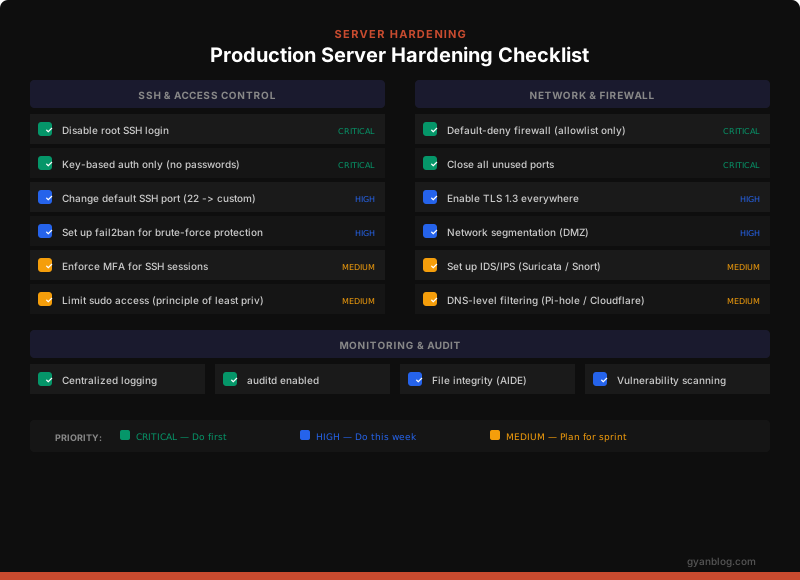
Here’s the complete checklist, organized by priority:
Critical (Day 1)
- [ ] Disable root SSH login
- [ ] Key-based SSH auth only (disable passwords)
- [ ] Default-deny firewall (allowlist only)
- [ ] Close all unused ports
- [ ] Enable automatic security updates
- [ ] Set up centralized logging
- [ ] Enable auditd
High (Week 1)
- [ ] Change SSH default port
- [ ] Install and configure fail2ban
- [ ] Enable TLS 1.3 on all services
- [ ] Set up network segmentation
- [ ] Configure security headers (nginx)
- [ ] Set up file integrity monitoring (AIDE)
- [ ] Restrict kernel parameters (sysctl hardening)
- [ ] Enable AppArmor/SELinux in enforcing mode
Medium (Sprint 1)
- [ ] Set up IDS/IPS (Suricata)
- [ ] Configure DNS-level filtering
- [ ] Enforce MFA for SSH
- [ ] Set up vulnerability scanning (Lynis)
- [ ] Create incident response runbook
- [ ] Set up certificate monitoring
- [ ] Implement log anomaly detection
- [ ] Regular penetration testing schedule
Quick Reference: Common Attack → Defense Mapping
| Attack Vector | What Happens | Defense |
|---|---|---|
| SSH brute force | Thousands of login attempts | fail2ban + key-only auth |
| Port scanning | Attacker maps your services | Default-deny firewall + close unused ports |
| Privilege escalation | User becomes root | Least privilege + SUID audit + SELinux |
| Web shell upload | Backdoor planted via app vuln | Read-only filesystem + integrity monitoring |
| Log tampering | Attacker covers tracks | Remote logging + append-only log server |
| Kernel exploit | Root via vulnerable kernel | Auto-patching + sysctl hardening + ASLR |
| Container escape | Break out of container | User namespaces + seccomp + no privileged mode |
| Supply chain | Compromised package | SCA scanning + signed packages + SBOM |
Key Takeaways
- Default deny everything — Firewalls, permissions, network access. Allowlist only what’s needed.
- Automate patching — Unattended upgrades for security patches. No excuses.
- SSH is sacred — Key-only, non-root, non-standard port, fail2ban. Period.
- Log everything, alert on anomalies — You can’t defend what you can’t see.
- Assume breach — Build your incident response plan before you need it. Practice it.
- Least privilege everywhere — Users, processes, containers. No service needs root.
- Layers, not walls — Each security layer should operate independently. If one fails, the next catches it.
Server security isn’t a one-time setup — it’s an ongoing discipline. Automate what you can, audit what you automate, and always assume the attacker is already inside.


