


“Redis is not just a cache. It’s a data structure server that happens to be incredibly fast.”
Redis (REmote DIctionary Server) started as a simple key-value store and evolved into one of the most versatile tools in a backend engineer’s toolkit. It powers session stores, real-time leaderboards, rate limiters, message brokers, and distributed locks — all with sub-millisecond latency.
This article goes deep: how Redis achieves its speed, what data structures it offers, how persistence and replication work, and the production patterns that make Redis indispensable in modern architectures.
Why Redis is Fast
Redis achieves 100,000+ operations per second on a single node. Three architectural decisions make this possible:
1. Everything Lives in Memory
There’s no disk seek. No page cache miss. Every read and write operates on in-memory data structures. This alone accounts for a 100x-1000x speedup over disk-based databases.
2. Single-Threaded Event Loop
Redis processes commands on a single thread using an event loop backed by I/O multiplexing (epoll on Linux, kqueue on macOS). This eliminates:
- Lock contention
- Context switching overhead
- Race conditions
The tradeoff: a single slow command (like KEYS * on millions of keys) blocks everything.
3. Efficient I/O Multiplexing
Redis uses non-blocking I/O to handle thousands of concurrent connections on a single thread. The kernel notifies Redis when a socket is ready to read or write — Redis never blocks waiting for I/O.
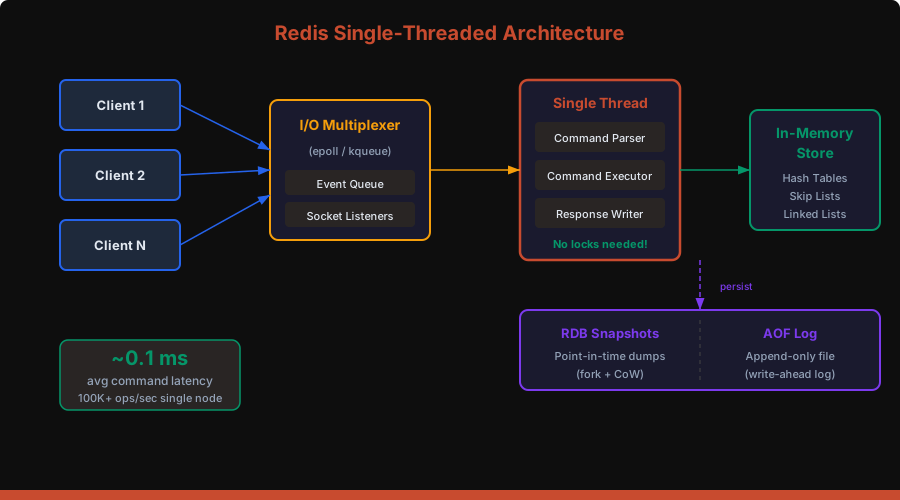
Redis 6.0+ note: Threaded I/O was added for network read/write, but command execution remains single-threaded. This improves throughput for large payloads without sacrificing the simplicity of single-threaded command processing.
Data Structures: The Real Power
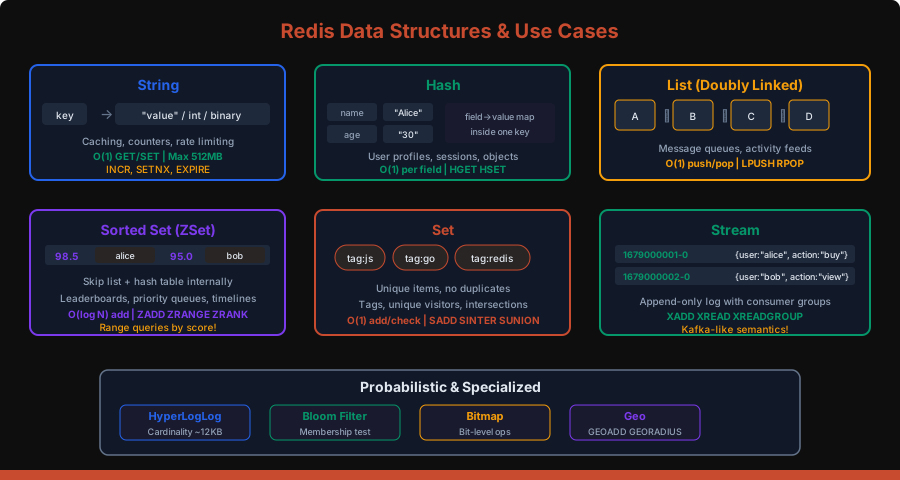
Redis isn’t just GET and SET. Its rich data structures are what make it a data structure server, not just a cache.
Strings
The simplest type. Stores text, integers, or binary data up to 512MB.
SET user:1001:name "Alice"
GET user:1001:name          -- "Alice"

-- Atomic counter
INCR page:views:homepage    -- 1
INCRBY page:views:homepage 10  -- 11

-- Set with expiration (caching pattern)
SET session:abc123 "{...}" EX 3600

-- Set only if not exists (distributed lock primitive)
SET lock:order:42 "worker-1" NX EX 30
Hashes
A hash map within a single key. Perfect for representing objects without serialization overhead.
HSET user:1001 name "Alice" age 30 email "[email protected]"
HGET user:1001 name         -- "Alice"
HGETALL user:1001           -- name, Alice, age, 30, email, [email protected]
HINCRBY user:1001 age 1     -- 31

-- Memory efficient: small hashes use ziplist encoding
-- (up to hash-max-ziplist-entries / hash-max-ziplist-value)
When to use Hash vs String with JSON? Hash wins when you frequently read/write individual fields. String with JSON wins when you always read/write the entire object.
Lists
Doubly-linked lists with O(1) push/pop at both ends.
-- Message queue pattern
LPUSH queue:emails "{to:'alice@...',subject:'Welcome'}"
RPOP queue:emails           -- dequeue from the other end

-- Blocking pop (consumer waits for new items)
BRPOP queue:emails 30       -- block up to 30 seconds

-- Capped list (keep last 100 notifications)
LPUSH notifications:user:1001 "{...}"
LTRIM notifications:user:1001 0 99
Sorted Sets (ZSets)
Unique members ordered by a floating-point score. Internally uses a skip list + hash table for O(log N) inserts and O(log N + M) range queries.
-- Leaderboard
ZADD leaderboard 9500 "alice" 8700 "bob" 9200 "charlie"
ZREVRANGE leaderboard 0 2 WITHSCORES
-- charlie 9200, alice 9500... wait, ZREVRANGE returns high→low:
-- alice 9500, charlie 9200, bob 8700

ZRANK leaderboard "bob"     -- 0 (lowest score)
ZREVRANK leaderboard "alice" -- 0 (highest score)

-- Time-series: use timestamp as score
ZADD events:user:1001 1679000001 "login" 1679000050 "purchase"
ZRANGEBYSCORE events:user:1001 1679000000 1679000060
Sets
Unordered collection of unique strings. Supports powerful set operations.
SADD tags:post:42 "redis" "database" "nosql"
SADD tags:post:43 "redis" "caching" "performance"

-- Intersection: posts tagged both "redis" and "caching"
SINTER tags:post:42 tags:post:43  -- "redis"

-- Unique visitor tracking
SADD visitors:2026-03-21 "user:1001" "user:1002"
SCARD visitors:2026-03-21          -- 2
Streams
An append-only log with consumer groups — Redis’s answer to Kafka-like messaging.
-- Produce events
XADD orders * user_id 1001 product "laptop" amount 999.99
-- Returns: "1679000001234-0" (auto-generated ID)

-- Create consumer group
XGROUP CREATE orders analytics-group 0

-- Consume as part of a group
XREADGROUP GROUP analytics-group consumer-1 COUNT 10 BLOCK 5000 STREAMS orders >

-- Acknowledge processing
XACK orders analytics-group "1679000001234-0"
Streams give you:
- Persistence — unlike Pub/Sub, messages survive restarts
- Consumer groups — fan-out with at-least-once delivery
- Backpressure — consumers read at their own pace
- Dead letter — check pending entries with
XPENDING
HyperLogLog
Probabilistic cardinality estimation using only 12KB of memory, regardless of the number of elements.
PFADD unique:visitors:today "user:1001" "user:1002" "user:1001"
PFCOUNT unique:visitors:today  -- 2 (±0.81% error)

-- Merge multiple days
PFMERGE unique:visitors:week unique:visitors:mon unique:visitors:tue
Persistence: Surviving Restarts
Redis is an in-memory store, but it offers two persistence mechanisms to survive restarts.
RDB (Redis Database) Snapshots
Point-in-time snapshots written to disk as a compact binary file.
# redis.conf
save 900 1      # snapshot if ≥1 key changed in 900 seconds
save 300 10     # snapshot if ≥10 keys changed in 300 seconds
save 60 10000   # snapshot if ≥10000 keys changed in 60 seconds
How it works: Redis fork()s a child process. The child writes the snapshot while the parent continues serving requests. Copy-on-Write (CoW) ensures the child sees a consistent snapshot without blocking the parent.
Pros: Compact file, fast restarts, good for backups Cons: Data loss between snapshots (could lose minutes of writes)
AOF (Append-Only File)
Every write command is appended to a log file.
# redis.conf
appendonly yes
appendfsync everysec   # fsync once per second (recommended)
# appendfsync always   # fsync on every write (slow but safe)
# appendfsync no       # let the OS decide (fastest, least safe)
AOF rewrite: Over time the AOF grows. Redis periodically rewrites it by forking a child that generates the minimal set of commands to reconstruct the current dataset.
Recommended: RDB + AOF Together
# redis.conf — production setup
appendonly yes
appendfsync everysec
save 900 1
save 300 10
save 60 10000
aof-use-rdb-preamble yes   # hybrid: RDB header + AOF tail (fast load + minimal loss)
The hybrid approach (Redis 4.0+) gives you fast restarts from RDB and minimal data loss from AOF.
Replication: Scaling Reads
Redis supports asynchronous master-replica replication. Replicas are exact copies of the master, updated in near real-time.
# replica.conf
replicaof master-host 6379
replica-read-only yesKey characteristics:
- Asynchronous — master doesn’t wait for replicas to acknowledge. This means a replica might serve slightly stale data.
- Full resync — on first connection (or after a long disconnect), the master sends a full RDB snapshot. After that, incremental replication continues via the replication backlog.
- Replica of replica — chain replication is supported to reduce master load.
Sentinel: High Availability Without Cluster
Redis Sentinel monitors masters and replicas, handles automatic failover, and acts as a service discovery endpoint.
# sentinel.conf
sentinel monitor mymaster 10.0.0.1 6379 2    # quorum of 2
sentinel down-after-milliseconds mymaster 5000
sentinel failover-timeout mymaster 60000Sentinel is the right choice when you need HA but don’t need to shard data across multiple nodes.
Redis Cluster: Scaling Writes
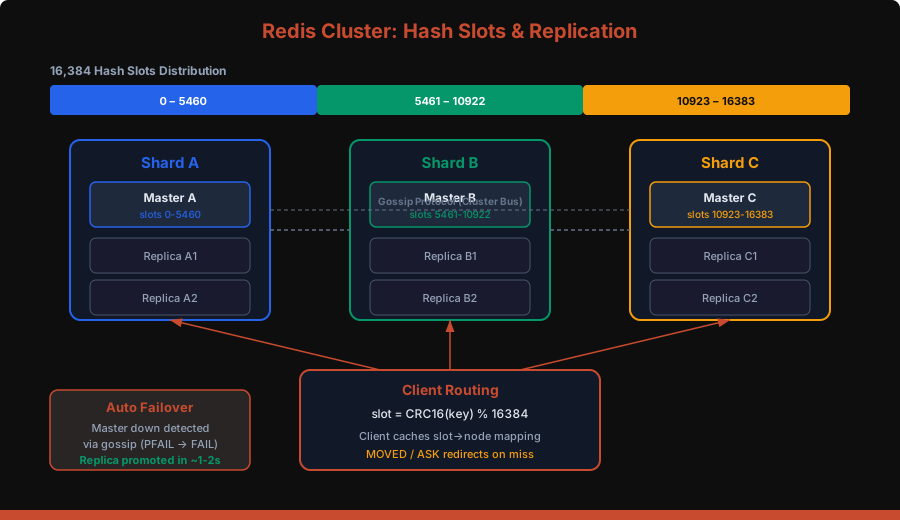
When a single master can’t handle your write throughput or your dataset exceeds a single node’s memory, you need Redis Cluster.
How Hash Slots Work
Redis Cluster divides the keyspace into 16,384 hash slots. Each key is assigned to a slot:
slot = CRC16(key) % 16384Each master node owns a subset of slots. When you send a command, the client (or node) computes the slot and routes to the correct node.
-- These keys might land on different shards:
SET user:1001 "..."   -- CRC16("user:1001") % 16384 = slot 5649 → Shard B
SET user:1002 "..."   -- CRC16("user:1002") % 16384 = slot 3280 → Shard A

-- Force keys to same slot using hash tags:
SET {user:1001}:profile "..."
SET {user:1001}:settings "..."
-- Both use CRC16("user:1001") → same slot → same shard
MOVED and ASK Redirects
If a client sends a command to the wrong node:
Client → Node A: GET user:1001
Node A → Client: MOVED 5649 10.0.0.2:6379
Client → Node B (10.0.0.2): GET user:1001
Client caches: slot 5649 → Node B
Smart clients (like ioredis, jedis, redis-py-cluster) cache the slot→node mapping and rarely get redirected.
Cluster Limitations
- Multi-key operations require all keys on the same slot (use
{hash tags}) - No multi-database support — only
db 0 - Lua scripts must only access keys in a single slot
- Transaction (MULTI/EXEC) limited to single slot
Pub/Sub: Real-Time Messaging
Redis Pub/Sub delivers messages to all connected subscribers in real time.
-- Subscriber
SUBSCRIBE chat:room:42

-- Publisher (different connection)
PUBLISH chat:room:42 "Hello, world!"
# Python subscriber with redis-py
import redis
r = redis.Redis()
pubsub = r.pubsub()
pubsub.subscribe('chat:room:42')
for message in pubsub.listen():
if message['type'] == 'message':
print(f"Received: {message['data']}")Pub/Sub pitfalls:
- Fire and forget — if a subscriber is disconnected, it misses messages. No persistence, no replay.
- No acknowledgment — you can’t know if a subscriber processed the message.
- Memory pressure — slow subscribers cause the output buffer to grow. Set limits:
# redis.conf
client-output-buffer-limit pubsub 32mb 8mb 60
When to use Pub/Sub vs Streams:
- Pub/Sub for real-time notifications where missing a message is acceptable
- Streams when you need persistence, consumer groups, and at-least-once delivery
Lua Scripting: Atomic Multi-Step Operations
Redis executes Lua scripts atomically — no other command runs while a script is executing.
-- Rate limiter: allow 100 requests per 60-second window
EVAL "
  local current = redis.call('INCR', KEYS[1])
  if current == 1 then
    redis.call('EXPIRE', KEYS[1], ARGV[1])
  end
  if current > tonumber(ARGV[2]) then
    return 0  -- rate limited
  end
  return 1    -- allowed
" 1 ratelimit:user:1001 60 100
# Python: load script once, call by SHA
import redis
r = redis.Redis()
rate_limit_script = r.register_script("""
local current = redis.call('INCR', KEYS[1])
if current == 1 then
redis.call('EXPIRE', KEYS[1], ARGV[1])
end
if current > tonumber(ARGV[2]) then
return 0
end
return 1
""")
# Use the script
allowed = rate_limit_script(keys=['ratelimit:user:1001'], args=[60, 100])Why Lua over MULTI/EXEC? Transactions (MULTI/EXEC) can’t read intermediate results — they just batch commands. Lua scripts can read, compute, and conditionally write in a single atomic operation.
Production Patterns
1. Distributed Locking with SETNX
-- Acquire lock
SET lock:resource:42 "worker-abc" NX EX 30

-- Release lock (only if we own it — use Lua for atomicity)
EVAL "
  if redis.call('GET', KEYS[1]) == ARGV[1] then
    return redis.call('DEL', KEYS[1])
  end
  return 0
" 1 lock:resource:42 "worker-abc"
For stronger guarantees across multiple Redis instances, use the Redlock algorithm — acquire the lock on a majority (N/2+1) of independent Redis nodes.
2. Rate Limiting with Sliding Window
import redis
import time

def is_rate_limited(r: redis.Redis, user_id: str,
                    window_sec: int = 60, max_requests: int = 100) -> bool:
    key = f"ratelimit:{user_id}"
    now = time.time()
    pipe = r.pipeline()

    # Remove entries outside the window
    pipe.zremrangebyscore(key, 0, now - window_sec)
    # Add current request
    pipe.zadd(key, {f"{now}": now})
    # Count requests in window
    pipe.zcard(key)
    # Set TTL to auto-cleanup
    pipe.expire(key, window_sec)

    results = pipe.execute()
    request_count = results[2]
    return request_count > max_requests
3. Caching with Cache-Aside
import redis
import json

r = redis.Redis(decode_responses=True)

def get_user(user_id: int) -> dict:
    cache_key = f"user:{user_id}"

    # Try cache first
    cached = r.get(cache_key)
    if cached:
        return json.loads(cached)

    # Cache miss — fetch from DB
    user = db.query("SELECT * FROM users WHERE id = %s", user_id)

    # Store in cache with TTL + jitter to prevent thundering herd
    ttl = 3600 + random.randint(0, 300)
    r.set(cache_key, json.dumps(user), ex=ttl)

    return user
4. Pipelining: Cut Network Round Trips
Every Redis command requires a network round trip. Pipelining sends multiple commands in one batch.
# Without pipelining: 1000 round trips
for i in range(1000):
    r.set(f"key:{i}", f"value:{i}")

# With pipelining: 1 round trip
pipe = r.pipeline()
for i in range(1000):
    pipe.set(f"key:{i}", f"value:{i}")
pipe.execute()  # sends all 1000 commands at once
Pipelining can improve throughput by 5-10x for bulk operations.
5. Session Store
// Node.js with ioredis
const Redis = require('ioredis');
const redis = new Redis();

async function createSession(userId, sessionData) {
  const sessionId = crypto.randomUUID();
  const key = `session:${sessionId}`;

  await redis.hmset(key, {
    userId,
    ...sessionData,
    createdAt: Date.now()
  });
  await redis.expire(key, 86400); // 24 hours

  return sessionId;
}

async function getSession(sessionId) {
  const key = `session:${sessionId}`;
  const session = await redis.hgetall(key);

  if (Object.keys(session).length === 0) return null;

  // Refresh TTL on access (sliding expiration)
  await redis.expire(key, 86400);
  return session;
}
Memory Management
Redis runs in memory, so managing memory is critical.
Eviction Policies
When Redis hits maxmemory, it evicts keys based on the configured policy:
| Policy | Behavior |
|---|---|
noeviction |
Return error on writes (default) |
allkeys-lru |
Evict least recently used keys |
allkeys-lfu |
Evict least frequently used keys (Redis 4.0+) |
volatile-lru |
LRU among keys with TTL set |
volatile-lfu |
LFU among keys with TTL set |
allkeys-random |
Random eviction |
volatile-ttl |
Evict keys closest to expiration |
# redis.conf
maxmemory 4gb
maxmemory-policy allkeys-lfu
Recommendation: Use allkeys-lfu for cache workloads. It’s better than LRU because it considers access frequency, not just recency.
Memory Optimization Tips
-- Check memory usage of a key
MEMORY USAGE user:1001

-- Check overall memory stats
INFO memory- Use hashes for small objects — Redis uses ziplist encoding for small hashes (up to 128 entries / 64 bytes per value by default), which is extremely memory efficient
- Set TTLs on everything — keys without TTLs accumulate forever
- Use short key names in production —
u:1001instead ofuser_profile_data:1001 - Avoid large keys — a 100MB string blocks the event loop during serialization
Monitoring and Debugging
Essential Commands
-- Real-time command stream (use cautiously in production)
MONITOR

-- Server stats
INFO all

-- Slow queries (commands taking >10ms)
SLOWLOG GET 10

-- Connected clients
CLIENT LIST

-- Key count and DB stats
DBSIZE
INFO keyspace

-- Find big keys (runs a scan, safe to use)
redis-cli --bigkeys
Key Metrics to Track
Common Pitfalls
1. Using KEYS in Production
-- NEVER do this in production — blocks the event loop, scans all keys
KEYS user:*

-- Use SCAN instead — iterates incrementally
SCAN 0 MATCH user:* COUNT 100
2. Hot Key Problem
A single key receiving disproportionate traffic can bottleneck a Redis node. Solutions:
- Read replicas — spread reads across replicas
- Local caching (L1) — cache hot keys in application memory with short TTL
- Key splitting — split
hot:counterintohot:counter:{0-9}, sum on read
3. Large Key Deletion
Deleting a key with millions of elements blocks Redis. Use UNLINK (Redis 4.0+) for async deletion:
-- Blocking (don't do this for large keys)
DEL my:huge:set

-- Non-blocking async deletion
UNLINK my:huge:set
4. Missing Connection Pooling
# BAD: new connection per request
def get_value(key):
    r = redis.Redis()  # TCP handshake every time
    return r.get(key)

# GOOD: connection pool
pool = redis.ConnectionPool(max_connections=50)

def get_value(key):
    r = redis.Redis(connection_pool=pool)
    return r.get(key)
Redis vs Alternatives
| Feature | Redis | Memcached | DragonflyDB | KeyDB |
|---|---|---|---|---|
| Data structures | Rich (strings, hashes, sets, zsets, streams) | Strings only | Redis-compatible | Redis-compatible |
| Persistence | RDB + AOF | None | Snapshots | RDB + AOF |
| Clustering | Hash slots (16,384) | Client-side sharding | Compatible | Compatible |
| Threading | Single-threaded (I/O threads 6.0+) | Multi-threaded | Multi-threaded | Multi-threaded |
| Pub/Sub | Yes | No | Yes | Yes |
| Lua scripting | Yes | No | Yes | Yes |
| Memory efficiency | Good | Slightly better for simple KV | Better (shared-nothing) | Similar |
| Throughput (single node) | ~100K ops/s | ~100K ops/s | ~1M ops/s (claimed) | ~200K ops/s |
Quick Reference: When to Use What
| Use Case | Data Structure | Key Commands |
|---|---|---|
| Caching | String | SET EX, GET, MGET |
| Session store | Hash | HSET, HGETALL, EXPIRE |
| Rate limiting | Sorted Set or String | ZADD+ZRANGEBYSCORE or INCR+EXPIRE |
| Leaderboard | Sorted Set | ZADD, ZREVRANGE, ZRANK |
| Queue | List or Stream | LPUSH/BRPOP or XADD/XREADGROUP |
| Unique counting | HyperLogLog | PFADD, PFCOUNT |
| Pub/Sub notifications | Pub/Sub | PUBLISH, SUBSCRIBE |
| Distributed lock | String | SET NX EX, Lua DEL |
| Geospatial queries | Geo | GEOADD, GEORADIUS |
| Event sourcing | Stream | XADD, XREADGROUP, XACK |
Wrapping Up
Redis succeeds because it makes the right tradeoffs: memory over disk, simplicity over flexibility, speed over durability (by default). Understanding these tradeoffs is what separates using Redis as a dumb cache from using it as a powerful building block in your architecture.
Start here:
- Use Redis as a cache with
allkeys-lfueviction and TTLs on everything - Add pipelining for bulk operations and connection pooling in your client
- Enable RDB + AOF hybrid persistence if you need durability
- Scale reads with replicas, scale writes with Redis Cluster
- Use Streams instead of Pub/Sub when you need message durability
- Monitor
used_memory,keyspace_hits/misses, andslowlogin production
Redis is simple to start with and deep enough to keep learning. The best way to understand it is to run it, break it, and fix it.


