


Every time two systems need to talk, someone has to design the contract between them. REST (Representational State Transfer) has become the default answer for web APIs — not because it’s perfect, but because it maps cleanly onto HTTP, which every developer already understands.
But “just use REST” is where most guidance ends. The hard questions — how to paginate a million rows, when to version, how to handle partial failures — are left as an exercise for the reader. This article is that exercise, solved.
What Communication Problem Does REST Solve?
Before REST, we had SOAP, XML-RPC, and custom TCP protocols. Each API was a snowflake. You needed to read a WSDL document, generate client stubs, and pray the serialization matched.
REST solves this by constraining your API to things HTTP already defines:
Resources  → URLs         (/users/42)
Actions    → HTTP Methods (GET, POST, PUT, DELETE)
Formats    → Content-Type (application/json)
Status     → HTTP Codes   (200, 404, 500)
This means a developer who has never seen your API can already guess that GET /users/42 returns user 42, and DELETE /users/42 removes them. That’s the superpower of REST: shared conventions eliminate documentation.
graph LR
    A[Client] -->|HTTP Request| B[REST API]
    B -->|JSON Response| A
    B -->|CRUD| C[(Database)]
    B -->|Events| D[Message Queue]
    B -->|Cache| E[Redis]

    style A fill:#2563eb,stroke:#1d4ed8,color:#fff
    style B fill:#059669,stroke:#047857,color:#fff
    style C fill:#f59e0b,stroke:#d97706,color:#fff
    style D fill:#7c3aed,stroke:#6d28d9,color:#fff
    style E fill:#c84b2f,stroke:#991b1b,color:#fff
REST vs the Alternatives
| Aspect | REST | GraphQL | gRPC |
|---|---|---|---|
| Protocol | HTTP/1.1+ | HTTP | HTTP/2 |
| Format | JSON (usually) | JSON | Protobuf (binary) |
| Contract | Informal/OpenAPI | Schema + types | .proto files |
| Over-fetching | Common | Solved | N/A |
| Browser support | Native | Needs client | Needs grpc-web |
| Caching | HTTP cache built-in | Hard (POST-based) | Manual |
| Best for | Public APIs, CRUD | Complex frontends | Service-to-service |
REST wins when you need broad compatibility, HTTP caching, and simplicity. Choose GraphQL when clients need flexible queries. Choose gRPC when you need raw speed between services.
Resource Design: The Foundation
The single most important decision in REST API design is how you model your resources. Get this wrong and everything else — pagination, versioning, permissions — becomes harder.
Use Nouns, Not Verbs
# Bad - RPC-style
POST /getUsers
POST /createUser
POST /deleteUser/42

# Good - Resource-oriented
GET    /users          # List users
POST   /users          # Create a user
GET    /users/42       # Get user 42
PUT    /users/42       # Replace user 42
PATCH  /users/42       # Partial update
DELETE /users/42       # Delete user 42
The HTTP method IS the verb. Adding verbs to URLs means you’re doing RPC-over-HTTP, not REST.
Nested Resources for Relationships
GET /users/42/orders           # Orders for user 42
GET /users/42/orders/7         # Order 7 of user 42
POST /users/42/orders          # Create order for user 42
But don’t nest more than two levels deep. If you need /users/42/orders/7/items/3/reviews, something is wrong. Flatten it:
GET /order-items/3/reviews # Reviews for order item 3Plural vs Singular
Always use plural nouns: /users, /orders, /products. Be consistent. The only exception is a singleton resource like /users/42/profile (a user has exactly one profile).
HTTP Methods and Status Codes
Method Semantics
graph TD
    subgraph "Safe Methods (no side effects)"
        GET["GET - Read resource"]
        HEAD["HEAD - Read headers only"]
        OPTIONS["OPTIONS - Read capabilities"]
    end

    subgraph "Idempotent Methods (same result if repeated)"
        PUT["PUT - Replace entire resource"]
        DELETE["DELETE - Remove resource"]
    end

    subgraph "Non-Idempotent"
        POST["POST - Create / trigger action"]
        PATCH["PATCH - Partial update"]
    end

    style GET fill:#059669,stroke:#047857,color:#fff
    style HEAD fill:#059669,stroke:#047857,color:#fff
    style OPTIONS fill:#059669,stroke:#047857,color:#fff
    style PUT fill:#2563eb,stroke:#1d4ed8,color:#fff
    style DELETE fill:#2563eb,stroke:#1d4ed8,color:#fff
    style POST fill:#c84b2f,stroke:#991b1b,color:#fff
    style PATCH fill:#c84b2f,stroke:#991b1b,color:#fff
Idempotency matters. If a network timeout occurs and the client retries a PUT, the result should be the same. For POST, you need an idempotency key:
POST /payments
Idempotency-Key: txn_abc123
Content-Type: application/json

{
  "amount": 5000,
  "currency": "USD"
}
Stripe popularized this pattern. The server stores the idempotency key and returns the cached result on retry instead of creating a duplicate payment.
Status Code Cheat Sheet
Use the most specific code that applies:
2xx Success
  200 OK           — GET, PUT, PATCH succeeded
  201 Created      — POST created a resource (include Location header)
  204 No Content   — DELETE succeeded, nothing to return

3xx Redirection
  301 Moved        — Resource URL changed permanently
  304 Not Modified — ETag/If-None-Match cache hit

4xx Client Error
  400 Bad Request  — Validation failed (include details)
  401 Unauthorized — No valid credentials
  403 Forbidden    — Valid credentials, insufficient permissions
  404 Not Found    — Resource doesn't exist
  409 Conflict     — State conflict (duplicate, version mismatch)
  422 Unprocessable — Semantically invalid (syntactically OK)
  429 Too Many     — Rate limit exceeded (include Retry-After)

5xx Server Error
  500 Internal     — Unhandled exception
  502 Bad Gateway  — Upstream service failed
  503 Unavailable  — Overloaded/maintenance (include Retry-After)
The Request-Response Flow
Here’s what a well-designed REST API call looks like end-to-end:
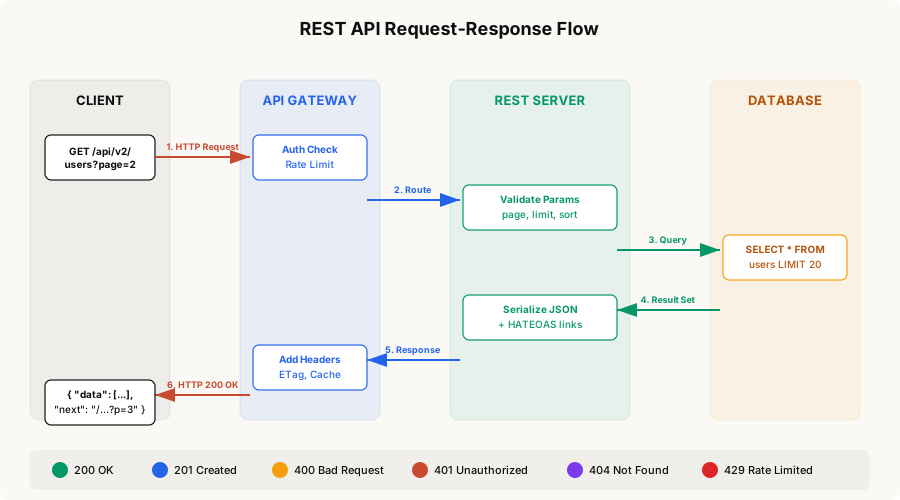
Every request passes through authentication, validation, business logic, and serialization. Each layer has a clear responsibility and a clear failure mode.
Pagination: The Three Strategies
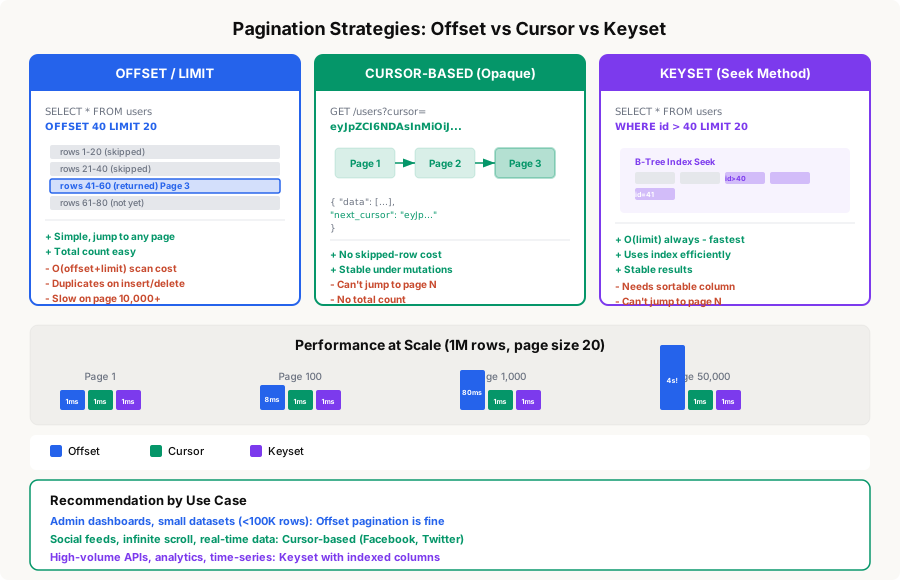
When your endpoint can return thousands of rows, you need pagination. There are three approaches, each with different tradeoffs.
1. Offset Pagination
The simplest approach. The client specifies which page to fetch:
GET /api/v1/users?page=3&per_page=20Server implementation:
SELECT * FROM users
ORDER BY created_at DESC
LIMIT 20 OFFSET 40;
Response:
{
  "data": [...],
  "pagination": {
    "page": 3,
    "per_page": 20,
    "total": 1847,
    "total_pages": 93
  }
}
The problem: The database still reads and discards the first 40 rows. At page 50,000, it reads 1,000,000 rows to return 20. Also, if a row is inserted while the user is on page 2, page 3 will show a duplicate.
2. Cursor-Based Pagination
Instead of a page number, the server returns an opaque cursor that points to the last item:
GET /api/v1/users?cursor=eyJpZCI6NDAsImNyZWF0ZWRfYXQiOiIyMDI1LTAzLTE1In0&limit=20The cursor is a base64-encoded pointer (often the last row’s ID and sort key):
// Encode cursor
const cursor = Buffer.from(
  JSON.stringify({ id: lastUser.id, created_at: lastUser.created_at })
).toString('base64');

// Decode and query
const { id, created_at } = JSON.parse(
  Buffer.from(cursor, 'base64').toString()
);

const users = await db.query(`
  SELECT * FROM users
  WHERE (created_at, id) < ($1, $2)
  ORDER BY created_at DESC, id DESC
  LIMIT 20
`, [created_at, id]);
Response:
{
  "data": [...],
  "pagination": {
    "next_cursor": "eyJpZCI6MjEsImNyZWF0ZWRfYXQiOiIyMDI1LTAzLTEwIn0",
    "has_more": true
  }
}
This is what Facebook, Twitter, and Slack use. It’s O(limit) regardless of how deep you paginate.
3. Keyset Pagination
Similar to cursor-based, but the parameters are transparent:
GET /api/v1/users?after_id=40&limit=20SELECT * FROM users
WHERE id > 40
ORDER BY id ASC
LIMIT 20;This leverages the B-tree index on id directly — the database seeks to id=41 and reads 20 rows. No scanning, no wasted I/O.
Which Pagination Should You Use?
graph TD
    A{How large is your dataset?} -->|< 100K rows| B[Offset is fine]
    A -->|100K - 10M rows| C{Do clients need random page access?}
    A -->|> 10M rows| D[Keyset pagination]
    C -->|Yes| E[Offset with max page limit]
    C -->|No| F[Cursor-based]

    style A fill:#0e0e0e,stroke:#0e0e0e,color:#fff
    style B fill:#2563eb,stroke:#1d4ed8,color:#fff
    style C fill:#f59e0b,stroke:#d97706,color:#fff
    style D fill:#7c3aed,stroke:#6d28d9,color:#fff
    style E fill:#2563eb,stroke:#1d4ed8,color:#fff
    style F fill:#059669,stroke:#047857,color:#fff
Versioning Your API
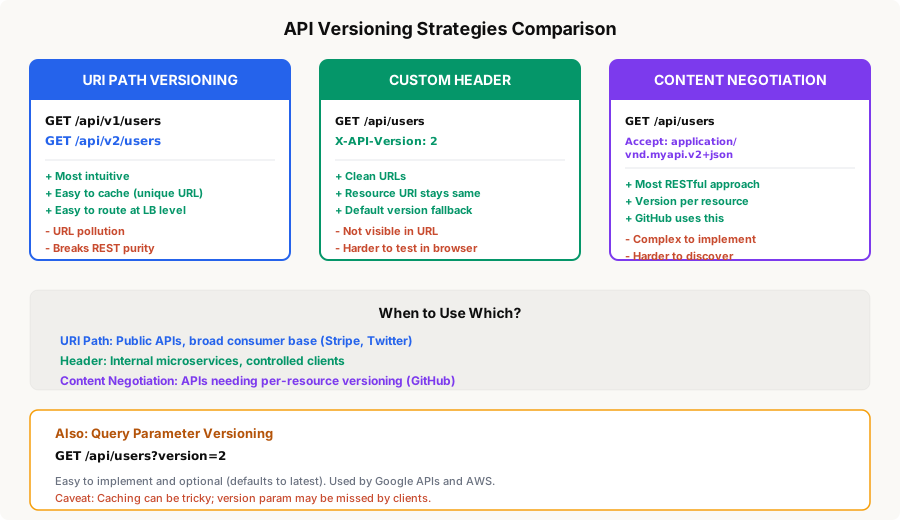
APIs evolve. Fields get added, renamed, or removed. Endpoints change behavior. You need a strategy for this that doesn’t break existing clients.
URI Path Versioning (Recommended for Public APIs)
GET /api/v1/users/42
GET /api/v2/users/42
This is what Stripe, Twilio, and most public APIs use. It’s explicit, cacheable, and easy to route at the load balancer level.
Implementation with Express:
const express = require('express');
const app = express();

// Version-specific routers
const v1Router = express.Router();
const v2Router = express.Router();

// V1: returns flat user object
v1Router.get('/users/:id', async (req, res) => {
  const user = await getUser(req.params.id);
  res.json({
    id: user.id,
    name: user.name,
    email: user.email
  });
});

// V2: returns nested structure with HATEOAS links
v2Router.get('/users/:id', async (req, res) => {
  const user = await getUser(req.params.id);
  res.json({
    data: {
      id: user.id,
      full_name: user.name,     // renamed field
      email: user.email,
      profile: {                 // new nested object
        avatar_url: user.avatar,
        bio: user.bio
      }
    },
    links: {
      self: `/api/v2/users/${user.id}`,
      orders: `/api/v2/users/${user.id}/orders`
    }
  });
});

app.use('/api/v1', v1Router);
app.use('/api/v2', v2Router);
Header Versioning (Good for Internal APIs)
GET /api/users/42
X-API-Version: 2app.get('/api/users/:id', async (req, res) => {
const version = parseInt(req.headers['x-api-version'] || '1');
const user = await getUser(req.params.id);
if (version >= 2) {
return res.json({ data: formatV2(user) });
}
return res.json(formatV1(user));
});Content Negotiation (Most RESTful)
GET /api/users/42
Accept: application/vnd.myapi.v2+json
GitHub uses this approach. It’s the most “correct” per REST theory, but harder to implement and test.
Versioning Rules
- Never break backwards compatibility in the same version. Adding fields is safe. Removing or renaming fields is breaking.
- Support at least N-1 versions. Give clients time to migrate.
- Use sunset headers to communicate deprecation:
Sunset: Sat, 01 Jan 2027 00:00:00 GMT
Deprecation: true
Link: </api/v3/users>; rel="successor-version"- Version the API, not individual endpoints. If
/v2/usersexists, all v2 endpoints should exist — even if they’re identical to v1.
Error Handling
A consistent error format is one of the most overlooked aspects of API design. Here’s a structure that works:
{
  "error": {
    "code": "VALIDATION_ERROR",
    "message": "Request validation failed",
    "details": [
      {
        "field": "email",
        "message": "Must be a valid email address",
        "value": "not-an-email"
      },
      {
        "field": "age",
        "message": "Must be between 0 and 150",
        "value": -5
      }
    ],
    "request_id": "req_abc123",
    "docs_url": "https://api.example.com/docs/errors#VALIDATION_ERROR"
  }
}
Implementation as middleware:
class ApiError extends Error {
  constructor(statusCode, code, message, details = []) {
    super(message);
    this.statusCode = statusCode;
    this.code = code;
    this.details = details;
  }
}

// Usage in route handlers
app.post('/api/v1/users', async (req, res) => {
  const errors = validateUser(req.body);
  if (errors.length > 0) {
    throw new ApiError(400, 'VALIDATION_ERROR', 'Request validation failed', errors);
  }
  // ... create user
});

// Global error handler
app.use((err, req, res, next) => {
  const statusCode = err.statusCode || 500;
  const code = err.code || 'INTERNAL_ERROR';

  res.status(statusCode).json({
    error: {
      code,
      message: err.message,
      details: err.details || [],
      request_id: req.id
    }
  });
});
Key rules:
- Always return a
request_idso support can trace issues - Use machine-readable
codestrings, not just HTTP status codes - Include field-level detail for validation errors
- Never expose stack traces or internal details in production
Filtering, Sorting, and Field Selection
Filtering
Use query parameters for simple filters:
GET /api/v1/orders?status=shipped&created_after=2025-01-01For complex filters, consider a structured syntax:
GET /api/v1/products?filter[price][gte]=10&filter[price][lte]=100&filter[category]=electronicsSorting
GET /api/v1/users?sort=-created_at,namePrefix with - for descending. Multiple fields separated by commas. This is the JSON:API convention.
app.get('/api/v1/users', async (req, res) => {
  const sortFields = (req.query.sort || '-created_at').split(',');
  const orderBy = sortFields.map(field => {
    if (field.startsWith('-')) {
      return `${field.slice(1)} DESC`;
    }
    return `${field} ASC`;
  });

  const users = await db.query(
    `SELECT * FROM users ORDER BY ${orderBy.join(', ')} LIMIT $1 OFFSET $2`,
    [limit, offset]
  );
  // ...
});
Sparse Field Selection
Let clients request only the fields they need:
GET /api/v1/users?fields=id,name,emailThis reduces payload size and can skip expensive JOINs on the backend.
Rate Limiting
Protect your API from abuse and ensure fair usage:
HTTP/1.1 200 OK
X-RateLimit-Limit: 1000
X-RateLimit-Remaining: 994
X-RateLimit-Reset: 1679529600

HTTP/1.1 429 Too Many Requests
Retry-After: 30
{
  "error": {
    "code": "RATE_LIMIT_EXCEEDED",
    "message": "Rate limit exceeded. Try again in 30 seconds."
  }
}
Common strategies:
graph LR
    subgraph "Fixed Window"
        FW[1000 req / hour<br/>Resets at :00]
    end
    subgraph "Sliding Window"
        SW[1000 req / rolling 60min<br/>Smoother distribution]
    end
    subgraph "Token Bucket"
        TB[10 tokens/sec refill<br/>Burst up to 100]
    end

    style FW fill:#2563eb,stroke:#1d4ed8,color:#fff
    style SW fill:#059669,stroke:#047857,color:#fff
    style TB fill:#7c3aed,stroke:#6d28d9,color:#fff
Token bucket is the most flexible — it allows bursts while enforcing average throughput. Redis makes this easy:
async function checkRateLimit(clientId, limit = 100, windowSec = 60) {
  const key = `rate:${clientId}`;
  const now = Date.now();

  const pipe = redis.pipeline();
  pipe.zremrangebyscore(key, 0, now - windowSec * 1000);
  pipe.zadd(key, now, `${now}-${Math.random()}`);
  pipe.zcard(key);
  pipe.expire(key, windowSec);

  const results = await pipe.exec();
  const count = results[2][1];

  return {
    allowed: count <= limit,
    remaining: Math.max(0, limit - count),
    reset: Math.ceil(now / 1000) + windowSec
  };
}
HATEOAS and Discoverability
HATEOAS (Hypermedia As The Engine Of Application State) means your responses include links to related actions. Clients follow links instead of constructing URLs:
{
  "data": {
    "id": 42,
    "full_name": "Jane Smith",
    "email": "[email protected]",
    "status": "active"
  },
  "links": {
    "self": "/api/v2/users/42",
    "orders": "/api/v2/users/42/orders",
    "deactivate": "/api/v2/users/42/deactivate"
  }
}
For paginated responses:
{
  "data": [...],
  "links": {
    "self": "/api/v2/users?page=3&per_page=20",
    "first": "/api/v2/users?page=1&per_page=20",
    "prev": "/api/v2/users?page=2&per_page=20",
    "next": "/api/v2/users?page=4&per_page=20",
    "last": "/api/v2/users?page=93&per_page=20"
  }
}
In practice, most teams skip full HATEOAS but include pagination links. That alone prevents a huge class of client-side bugs.
Security Best Practices
Authentication
Use Bearer tokens (JWT or opaque) in the Authorization header:
GET /api/v1/users
Authorization: Bearer eyJhbGciOiJSUzI1NiIs...
Never put tokens in query parameters — they leak into logs, browser history, and referrer headers.
Request Validation
Validate everything at the boundary:
const Joi = require('joi');

const createUserSchema = Joi.object({
  name: Joi.string().min(1).max(255).required(),
  email: Joi.string().email().required(),
  age: Joi.number().integer().min(0).max(150),
  role: Joi.string().valid('user', 'admin').default('user')
});

app.post('/api/v1/users', async (req, res) => {
  const { error, value } = createUserSchema.validate(req.body, {
    abortEarly: false,
    stripUnknown: true    // Ignore unexpected fields
  });

  if (error) {
    throw new ApiError(400, 'VALIDATION_ERROR', 'Validation failed',
      error.details.map(d => ({
        field: d.path.join('.'),
        message: d.message
      }))
    );
  }

  const user = await createUser(value);
  res.status(201).json({ data: user });
});
Other Security Headers
app.use((req, res, next) => {
  res.set({
    'X-Content-Type-Options': 'nosniff',
    'X-Frame-Options': 'DENY',
    'Strict-Transport-Security': 'max-age=31536000; includeSubDomains',
    'Cache-Control': 'no-store'    // for sensitive endpoints
  });
  next();
});
Caching
REST’s biggest advantage over GraphQL is native HTTP caching:
# Response with ETag
HTTP/1.1 200 OK
ETag: "abc123"
Cache-Control: max-age=300, public

# Conditional request (client sends ETag back)
GET /api/v1/products/42
If-None-Match: "abc123"

# Server responds with 304 if unchanged
HTTP/1.1 304 Not Modified
Cache-Control patterns:
Public, read-heavy:    Cache-Control: max-age=3600, public
User-specific:         Cache-Control: max-age=60, private
Mutable data:          Cache-Control: no-cache (revalidate every time)
Sensitive:             Cache-Control: no-store
API Design Checklist
Before shipping an API endpoint, verify:
- Resource URLs use plural nouns, no verbs
- HTTP methods match the action (GET reads, POST creates)
- Status codes are specific (not everything is 200 or 500)
- Request validation rejects bad input with clear error messages
- Pagination is implemented for any list endpoint
- Rate limiting headers are present
- Versioning strategy is in place
- Authentication uses Authorization header, not query params
- Error responses follow a consistent envelope format
- CORS headers are configured for browser clients
- Content-Type is set correctly (application/json)
- Idempotency is handled for non-safe operations
Real-World API Patterns
Stripe’s Approach
Stripe is widely considered the gold standard for REST API design:
- URI versioning (
/v1/) - Cursor pagination with
starting_afterandending_before - Idempotency keys for POST requests
- Expandable fields:
GET /v1/charges/ch_123?expand[]=customer - Consistent error objects with
type,code, andmessage
GitHub’s Approach
- Content negotiation versioning (
Accept: application/vnd.github.v3+json) - Link header pagination:
Link: <...?page=2>; rel="next", <...?page=5>; rel="last" - Rate limit headers on every response
- Webhook integration for real-time updates
Both prove that good REST API design scales to millions of developers.
Conclusion
REST API design is not about blindly following rules — it’s about making choices that reduce friction for your API consumers. The communication problem REST solves is shared understanding: by constraining your API to HTTP semantics, you give every developer a head start.
The most impactful practices, in order:
- Resource modeling — Get the nouns right and verbs follow naturally
- Consistent error format — Developers spend more time debugging failures than celebrating successes
- Cursor pagination — Offset breaks at scale; plan ahead
- Versioning strategy — Pick one, communicate it, stick to it
- Rate limiting — Protect yourself from day one, not after the first incident
Start simple. Add complexity only when your use case demands it. A well-designed REST API should feel obvious to anyone who’s used one before.


