


Introduction
Every non-trivial application eventually needs to handle large binary objects — profile pictures, uploaded documents, video files, backups, log archives. These “blobs” are fundamentally different from structured data. They’re large, opaque, and expensive to move around.
The naive approach — accepting a file upload through your API server, buffering it in memory, then writing it to disk or a database — breaks down fast. A single 500 MB video upload ties up a worker process, consumes memory, and creates a bottleneck that no amount of horizontal scaling will fix cheaply.
This article covers the battle-tested patterns for handling large blobs at scale.
The Core Problem
Blobs create unique challenges that don’t exist with structured data:
| Challenge | Structured Data | Blob Data |
|---|---|---|
| Size | Kilobytes | Megabytes to Terabytes |
| Transfer | Instant | Minutes to hours |
| Processing | CPU-light | CPU/GPU-heavy (transcode, resize) |
| Storage cost | Cheap | Expensive at scale |
| Caching | Easy (Redis, Memcached) | Hard (too large for memory) |
| Network | Low bandwidth | Saturates links |
The key insight: separate the data plane (blob bytes) from the control plane (metadata, auth, business logic). Your API server handles metadata and authorization. The blob bytes flow directly between the client and object storage.
Pattern 1: Presigned URL Upload
The most important pattern for blob handling. Instead of proxying uploads through your API server, generate a time-limited URL that allows the client to upload directly to object storage.
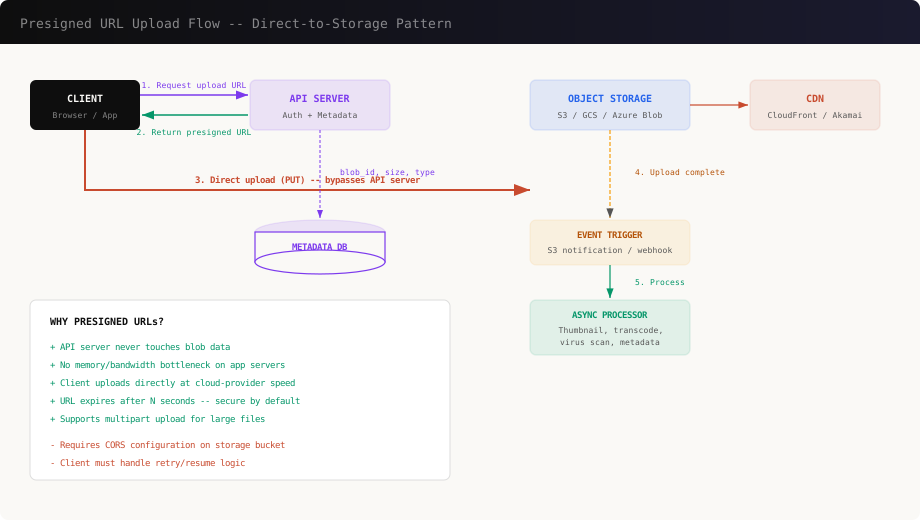
How It Works
- Client asks your API server: “I want to upload a 200 MB file”
- API server validates auth, checks quotas, generates a presigned URL
- Client uploads directly to S3/GCS using that URL
- Storage triggers an event (S3 notification) when upload completes
- Your async processor handles the rest (scan, transform, index)
Implementation: Presigned URL Generation
// Node.js -- generate presigned upload URL
import { S3Client, PutObjectCommand } from '@aws-sdk/client-s3';
import { getSignedUrl } from '@aws-sdk/s3-request-presigner';
import { randomUUID } from 'crypto';

const s3 = new S3Client({ region: 'us-east-1' });

async function createUploadUrl(userId, contentType, fileSize) {
  // Validate before generating URL
  const MAX_SIZE = 5 * 1024 * 1024 * 1024; // 5 GB
  const ALLOWED_TYPES = [
    'image/jpeg', 'image/png', 'image/webp',
    'video/mp4', 'application/pdf'
  ];

  if (fileSize > MAX_SIZE) {
    throw new Error('File too large');
  }
  if (!ALLOWED_TYPES.includes(contentType)) {
    throw new Error('Unsupported file type');
  }

  const blobId = randomUUID();
  const key = `staging/${userId}/${blobId}`;

  const command = new PutObjectCommand({
    Bucket: 'my-app-uploads',
    Key: key,
    ContentType: contentType,
    ContentLength: fileSize,
    Metadata: {
      'user-id': userId,
      'blob-id': blobId,
    },
  });

  const uploadUrl = await getSignedUrl(s3, command, {
    expiresIn: 3600, // URL valid for 1 hour
  });

  // Save metadata to database
  await db.blobs.create({
    id: blobId,
    userId,
    key,
    contentType,
    fileSize,
    status: 'pending_upload',
  });

  return { uploadUrl, blobId };
}
Client-Side Upload
// Browser -- upload directly to S3
async function uploadFile(file) {
  // Step 1: Get presigned URL from your API
  const { uploadUrl, blobId } = await fetch('/api/uploads', {
    method: 'POST',
    headers: { 'Content-Type': 'application/json' },
    body: JSON.stringify({
      contentType: file.type,
      fileSize: file.size,
    }),
  }).then(r => r.json());

  // Step 2: Upload directly to S3 (bypasses your server)
  const response = await fetch(uploadUrl, {
    method: 'PUT',
    headers: { 'Content-Type': file.type },
    body: file,
  });

  if (!response.ok) {
    throw new Error('Upload failed');
  }

  return blobId;
}
This single pattern eliminates the biggest bottleneck in blob handling. Your API server never touches the blob data — it only handles metadata.
Pattern 2: Chunked / Multipart Upload
For files larger than ~100 MB, a single PUT request is fragile. Network interruptions, browser timeouts, and memory pressure make single-request uploads unreliable. The solution: split the file into chunks and upload them independently.
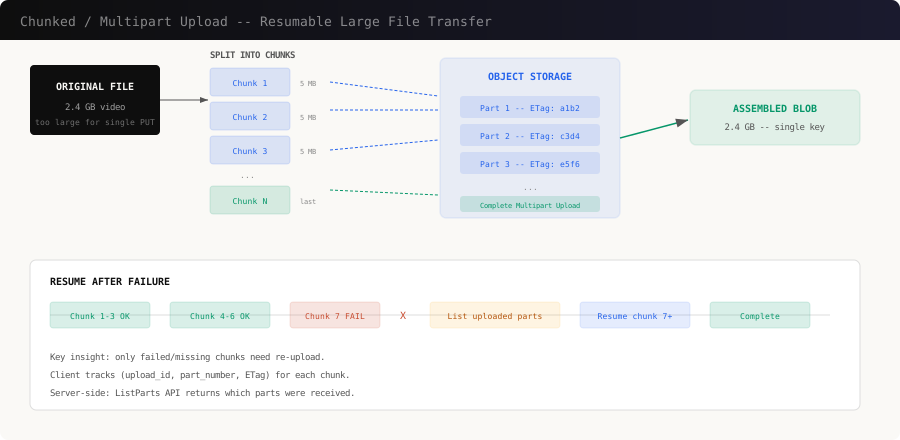
Why Chunks Matter
- Resumability: If chunk 47 of 100 fails, retry only chunk 47
- Parallelism: Upload 3-5 chunks simultaneously
- Progress tracking: Accurate progress bars per-chunk
- Memory efficiency: Only one chunk in memory at a time
Implementation: S3 Multipart Upload
# Python -- chunked upload with boto3
import boto3
import os
import math

s3 = boto3.client('s3')
CHUNK_SIZE = 10 * 1024 * 1024  # 10 MB per part

def upload_large_file(bucket, key, file_path):
    file_size = os.path.getsize(file_path)
    num_parts = math.ceil(file_size / CHUNK_SIZE)

    # Step 1: Initiate multipart upload
    response = s3.create_multipart_upload(
        Bucket=bucket,
        Key=key,
        ContentType='video/mp4',
    )
    upload_id = response['UploadId']
    parts = []

    try:
        with open(file_path, 'rb') as f:
            for part_number in range(1, num_parts + 1):
                chunk = f.read(CHUNK_SIZE)

                # Step 2: Upload each part
                part_response = s3.upload_part(
                    Bucket=bucket,
                    Key=key,
                    UploadId=upload_id,
                    PartNumber=part_number,
                    Body=chunk,
                )

                parts.append({
                    'PartNumber': part_number,
                    'ETag': part_response['ETag'],
                })

                progress = (part_number / num_parts) * 100
                print(f"  Part {part_number}/{num_parts}"
                      f" ({progress:.0f}%)")

        # Step 3: Complete the upload
        s3.complete_multipart_upload(
            Bucket=bucket,
            Key=key,
            UploadId=upload_id,
            MultipartUpload={'Parts': parts},
        )
        print(f"Upload complete: {key}")

    except Exception as e:
        # Abort on failure -- cleans up partial parts
        s3.abort_multipart_upload(
            Bucket=bucket,
            Key=key,
            UploadId=upload_id,
        )
        raise e
Resumable Upload Protocol
For production systems, combine multipart upload with a resume protocol:
// Resume-aware upload manager
class ResumableUploader {
  constructor(file, { chunkSize = 10 * 1024 * 1024 } = {}) {
    this.file = file;
    this.chunkSize = chunkSize;
    this.totalChunks = Math.ceil(file.size / chunkSize);
    this.uploadedParts = new Map(); // partNumber -> ETag
  }

  async start(bucket, key) {
    // Check for existing upload session
    let uploadId = localStorage.getItem(`upload:${key}`);

    if (uploadId) {
      // Resume: fetch already-uploaded parts
      const existing = await this.listParts(
        bucket, key, uploadId
      );
      existing.forEach(p => {
        this.uploadedParts.set(p.PartNumber, p.ETag);
      });
    } else {
      // New upload
      uploadId = await this.initiate(bucket, key);
      localStorage.setItem(`upload:${key}`, uploadId);
    }

    // Upload missing chunks (skip completed ones)
    for (let i = 1; i <= this.totalChunks; i++) {
      if (this.uploadedParts.has(i)) continue;

      const start = (i - 1) * this.chunkSize;
      const end = Math.min(start + this.chunkSize, this.file.size);
      const chunk = this.file.slice(start, end);

      const etag = await this.uploadPart(
        bucket, key, uploadId, i, chunk
      );
      this.uploadedParts.set(i, etag);

      this.onProgress?.(i / this.totalChunks);
    }

    // All parts uploaded -- complete
    await this.complete(bucket, key, uploadId);
    localStorage.removeItem(`upload:${key}`);
  }
}
Pattern 3: Content Processing Pipeline
Raw uploads are rarely usable as-is. Images need resizing, videos need transcoding, documents need scanning. This processing must be asynchronous — never block the upload response.
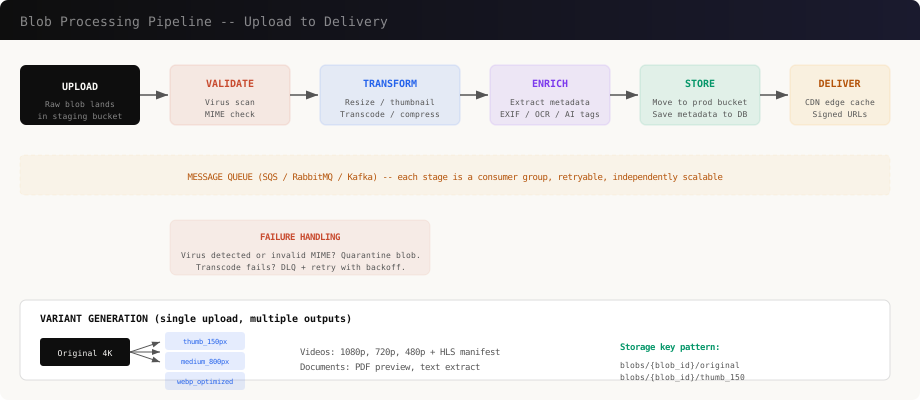
Pipeline Stages
Each stage is an independent consumer that reads from a queue, processes, and writes back:
# Python -- async processing pipeline with SQS
import json

def handle_upload_event(event):
    """Triggered by S3 upload notification."""
    for record in event['Records']:
        bucket = record['s3']['bucket']['name']
        key = record['s3']['object']['key']
        blob_id = extract_blob_id(key)

        # Enqueue for processing pipeline
        sqs.send_message(
            QueueUrl=VALIDATE_QUEUE,
            MessageBody=json.dumps({
                'blob_id': blob_id,
                'bucket': bucket,
                'key': key,
                'stage': 'validate',
            }),
        )

def validate_blob(message):
    """Stage 1: Virus scan + MIME validation."""
    blob = json.loads(message['Body'])

    # Download to temp storage for scanning
    local_path = download_to_temp(blob['bucket'], blob['key'])

    # Virus scan
    scan_result = clamav_scan(local_path)
    if scan_result != 'CLEAN':
        quarantine_blob(blob['blob_id'], scan_result)
        return  # Dead-letter, don't continue

    # MIME type verification (don't trust Content-Type)
    actual_mime = magic.from_file(local_path, mime=True)
    if actual_mime not in ALLOWED_MIMES:
        reject_blob(blob['blob_id'], actual_mime)
        return

    # Forward to transform stage
    sqs.send_message(
        QueueUrl=TRANSFORM_QUEUE,
        MessageBody=json.dumps({
            **blob,
            'stage': 'transform',
            'mime': actual_mime,
        }),
    )

def transform_blob(message):
    """Stage 2: Generate variants (thumbnails, transcodes)."""
    blob = json.loads(message['Body'])
    local_path = download_to_temp(blob['bucket'], blob['key'])

    if blob['mime'].startswith('image/'):
        variants = generate_image_variants(
            local_path, blob['blob_id']
        )
    elif blob['mime'].startswith('video/'):
        variants = generate_video_variants(
            local_path, blob['blob_id']
        )
    else:
        variants = []

    # Upload variants to production bucket
    for variant in variants:
        prod_key = f"blobs/{blob['blob_id']}/{variant['name']}"
        upload_to_s3('prod-bucket', prod_key, variant['path'])

    # Move original to production bucket
    move_to_prod(blob['bucket'], blob['key'], blob['blob_id'])

    # Update metadata in database
    db.blobs.update(blob['blob_id'], {
        'status': 'ready',
        'variants': [v['name'] for v in variants],
    })
Image Variant Generation
from PIL import Image

VARIANTS = {
    'thumb_150':  {'width': 150,  'quality': 80},
    'medium_800': {'width': 800,  'quality': 85},
    'large_1920': {'width': 1920, 'quality': 90},
}

def generate_image_variants(source_path, blob_id):
    """Generate multiple sizes from one source image."""
    results = []
    original = Image.open(source_path)

    for name, config in VARIANTS.items():
        # Maintain aspect ratio
        ratio = config['width'] / original.width
        new_height = int(original.height * ratio)

        resized = original.resize(
            (config['width'], new_height),
            Image.LANCZOS,
        )

        # Convert to WebP for smaller size
        output_path = f"/tmp/{blob_id}_{name}.webp"
        resized.save(
            output_path,
            'WebP',
            quality=config['quality'],
        )

        results.append({
            'name': name,
            'path': output_path,
            'width': config['width'],
            'height': new_height,
        })

    return results
Pattern 4: Storage Tiering
Not all blobs are accessed equally. A profile photo uploaded yesterday gets served thousands of times. A compliance document from three years ago might never be accessed again. Storage tiering exploits this access pattern difference to reduce costs dramatically.
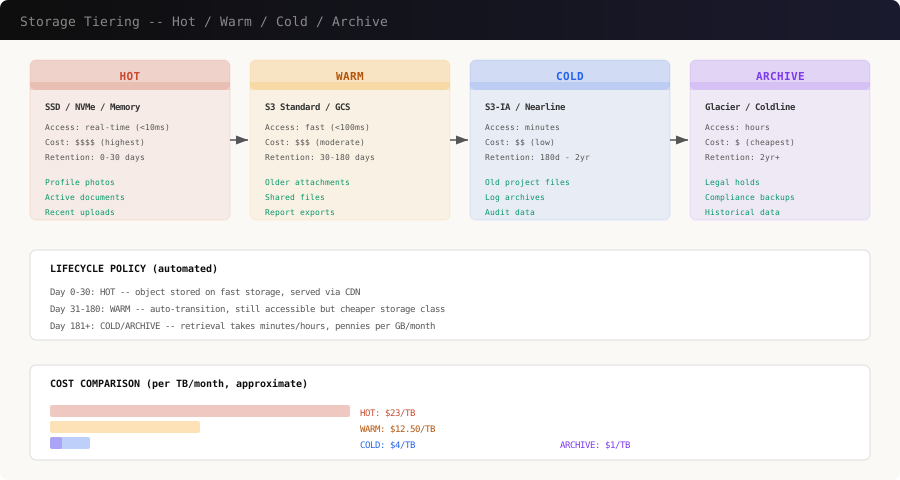
Lifecycle Policies
Configure automated transitions based on age and access patterns:
{
  "Rules": [
    {
      "ID": "tier-blobs-by-age",
      "Status": "Enabled",
      "Filter": { "Prefix": "blobs/" },
      "Transitions": [
        {
          "Days": 30,
          "StorageClass": "STANDARD_IA"
        },
        {
          "Days": 180,
          "StorageClass": "GLACIER_IR"
        },
        {
          "Days": 730,
          "StorageClass": "DEEP_ARCHIVE"
        }
      ]
    },
    {
      "ID": "cleanup-staging",
      "Status": "Enabled",
      "Filter": { "Prefix": "staging/" },
      "Expiration": { "Days": 1 }
    },
    {
      "ID": "abort-incomplete-uploads",
      "Status": "Enabled",
      "AbortIncompleteMultipartUpload": {
        "DaysAfterInitiation": 7
      }
    }
  ]
}
Access-Based Tiering
For smarter tiering, track access patterns and move blobs accordingly:
# Track blob access and auto-tier
class BlobAccessTracker:
    def __init__(self, redis_client, s3_client):
        self.redis = redis_client
        self.s3 = s3_client

    def record_access(self, blob_id):
        """Increment access counter, update last-accessed."""
        pipe = self.redis.pipeline()
        key = f"blob:access:{blob_id}"
        pipe.hincrby(key, "count", 1)
        pipe.hset(key, "last_accessed", int(time.time()))
        pipe.expire(key, 86400 * 90)  # Expire after 90 days
        pipe.execute()

    def evaluate_tier(self, blob_id, current_tier):
        """Determine if blob should be promoted or demoted."""
        stats = self.redis.hgetall(f"blob:access:{blob_id}")

        if not stats:
            # No access in 90 days -- demote
            return self._demote(current_tier)

        access_count = int(stats.get(b'count', 0))
        last_accessed = int(stats.get(b'last_accessed', 0))
        days_since = (time.time() - last_accessed) / 86400

        if access_count > 100 and days_since < 7:
            return 'hot'    # Frequently accessed
        elif access_count > 10 and days_since < 30:
            return 'warm'   # Moderately accessed
        elif days_since > 180:
            return 'archive' # Rarely accessed
        else:
            return 'cold'
Pattern 5: CDN and Edge Delivery
Serving blobs from your origin server is slow and expensive. A CDN caches blobs at edge locations worldwide, reducing latency and offloading bandwidth from your infrastructure.
Signed CDN URLs
Don’t serve blobs from public URLs. Use signed URLs with expiration:
// Generate signed CloudFront URL
import { getSignedUrl } from '@aws-sdk/cloudfront-signer';

function getBlobUrl(blobId, variant = 'original') {
  const key = `blobs/${blobId}/${variant}`;

  return getSignedUrl({
    url: `https://cdn.example.com/${key}`,
    keyPairId: process.env.CF_KEY_PAIR_ID,
    privateKey: process.env.CF_PRIVATE_KEY,
    dateLessThan: new Date(
      Date.now() + 3600 * 1000 // 1 hour
    ).toISOString(),
  });
}
On-the-Fly Transformation
Instead of pre-generating every possible variant, use an image CDN that transforms on request:
# Nginx + imgproxy -- resize on the fly
location ~* ^/images/(.+)$ {
    # Extract params from query string
    # /images/abc123?w=300&h=200&q=80

    proxy_pass http://imgproxy:8080/resize:fit:$arg_w:$arg_h/quality:$arg_q/plain/s3://prod-bucket/blobs/$1/original;

    # Cache transformed result at edge
    proxy_cache_valid 200 30d;
    add_header Cache-Control "public, max-age=2592000, immutable";
    add_header X-Cache-Status $upstream_cache_status;
}
This approach gives you infinite variants without pre-generating and storing them:
/images/abc123?w=150&h=150&q=80   -> thumbnail
/images/abc123?w=800&q=85         -> medium
/images/abc123?w=1920&q=90        -> full size
Pattern 6: Content-Addressable Storage and Deduplication
When multiple users upload the same file, you don’t need to store it twice. Content-addressable storage uses the hash of the file content as the storage key, automatically deduplicating identical blobs.
Hash-Based Deduplication
import hashlib

def content_hash(file_path, algorithm='sha256'):
    """Compute content hash for deduplication."""
    h = hashlib.new(algorithm)
    with open(file_path, 'rb') as f:
        while chunk := f.read(8192):
            h.update(chunk)
    return h.hexdigest()

def store_blob_deduplicated(file_path, user_id):
    """Store blob, deduplicating by content hash."""
    file_hash = content_hash(file_path)

    # Check if we already have this content
    existing = db.blobs.find_by_hash(file_hash)

    if existing:
        # Content exists -- just add a reference
        db.blob_refs.create({
            'user_id': user_id,
            'blob_hash': file_hash,
            'storage_key': existing.storage_key,
        })
        return existing.storage_key

    # New content -- upload to storage
    storage_key = f"cas/{file_hash[:2]}/{file_hash}"
    upload_to_s3('prod-bucket', storage_key, file_path)

    db.blobs.create({
        'hash': file_hash,
        'storage_key': storage_key,
        'size': os.path.getsize(file_path),
        'ref_count': 1,
    })

    return storage_key
Reference Counting for Deletion
With deduplication, you can’t just delete a blob when one user removes it — other users might reference the same content:
def delete_blob_reference(user_id, blob_hash):
    """Remove user's reference. Delete blob only at zero refs."""
    db.blob_refs.delete(user_id=user_id, blob_hash=blob_hash)

    remaining = db.blob_refs.count(blob_hash=blob_hash)

    if remaining == 0:
        # No more references -- safe to delete
        blob = db.blobs.find_by_hash(blob_hash)
        s3.delete_object(
            Bucket='prod-bucket',
            Key=blob.storage_key,
        )
        db.blobs.delete(hash=blob_hash)
Pattern 7: Database Design for Blob Metadata
Never store blob bytes in your database. Store metadata that points to object storage:
-- Blob metadata table
CREATE TABLE blobs (
    id          UUID PRIMARY KEY DEFAULT gen_random_uuid(),
    hash        CHAR(64) UNIQUE,           -- SHA-256
    storage_key TEXT NOT NULL,              -- S3 key
    bucket      TEXT NOT NULL DEFAULT 'prod-bucket',
    size_bytes  BIGINT NOT NULL,
    mime_type   TEXT NOT NULL,
    status      TEXT NOT NULL DEFAULT 'pending',
    -- CHECK (status IN ('pending','processing','ready','quarantined'))
    variants    JSONB DEFAULT '[]',
    metadata    JSONB DEFAULT '{}',         -- EXIF, dimensions, etc.
    created_at  TIMESTAMPTZ DEFAULT now(),
    updated_at  TIMESTAMPTZ DEFAULT now()
);

-- Reference table for deduplication
CREATE TABLE blob_references (
    id          UUID PRIMARY KEY DEFAULT gen_random_uuid(),
    user_id     UUID NOT NULL REFERENCES users(id),
    blob_id     UUID NOT NULL REFERENCES blobs(id),
    filename    TEXT,                        -- User's original filename
    context     TEXT,                        -- 'profile_photo', 'attachment', etc.
    created_at  TIMESTAMPTZ DEFAULT now(),
    UNIQUE (user_id, blob_id, context)
);

-- Index for fast lookups
CREATE INDEX idx_blobs_hash ON blobs(hash);
CREATE INDEX idx_blobs_status ON blobs(status)
    WHERE status != 'ready';
CREATE INDEX idx_blob_refs_user ON blob_references(user_id);
Putting It All Together
Here’s the complete flow for a production blob system:
Client                    API Server              Object Storage         Queue / Workers
  |                          |                         |                       |
  |-- POST /uploads -------->|                         |                       |
  |   {type, size}           |                         |                       |
  |                          |-- validate auth ------->|                       |
  |                          |-- generate presigned -->|                       |
  |<-- {uploadUrl, blobId} --|                         |                       |
  |                          |                         |                       |
  |-- PUT (direct upload) ---|------------------------>|                       |
  |   (blob bytes bypass     |                         |                       |
  |    API server entirely)  |                         |                       |
  |                          |                         |-- S3 event --------->|
  |                          |                         |                      |-- validate
  |                          |                         |                      |-- transform
  |                          |                         |<-- upload variants --|-- enrich
  |                          |<-- update metadata -----|                      |-- store
  |                          |                         |                       |
  |-- GET /blobs/{id} ------>|                         |                       |
  |<-- {cdnUrl, variants} ---|                         |                       |
  |                          |                         |                       |
  |-- GET cdn.example.com/.. |                    CDN edge                     |
  |<-- blob bytes (cached) --|                         |                       |
Key Decisions Cheat Sheet
| Decision | Recommendation |
|---|---|
| Upload path | Presigned URLs (never proxy through API) |
| Large files (>100 MB) | Chunked/multipart upload |
| Processing | Async pipeline via message queue |
| Storage | Object storage (S3/GCS), not database |
| Delivery | CDN with signed URLs |
| Image resizing | On-the-fly via imgproxy or pre-generate common sizes |
| Video transcoding | Dedicated service (AWS MediaConvert, FFmpeg workers) |
| Cost control | Storage tiering with lifecycle policies |
| Deduplication | Content-addressable hashing (SHA-256) |
| Deletion | Reference counting, then garbage collect |
| Metadata | PostgreSQL with JSONB for flexible attributes |
| Security | Signed URLs with expiration, virus scanning, MIME validation |
Common Pitfalls
Storing blobs in the database. PostgreSQL TOAST and MySQL BLOB columns work for small files, but they bloat your database, make backups slow, and can’t leverage CDN caching. Use object storage.
Proxying uploads through the API server. One 2 GB upload ties up a worker process for minutes. With 10 concurrent uploads, you’ve consumed all your workers. Presigned URLs eliminate this entirely.
Synchronous processing. If you resize images or scan for viruses in the upload request handler, your API response time becomes unpredictable. Always process asynchronously.
Trusting Content-Type headers. Users (and attackers) can send any Content-Type header. Always verify the actual file content server-side using magic bytes.
Forgetting to clean up. Incomplete multipart uploads, orphaned staging files, and dereferenced blobs all accumulate. Set lifecycle policies to auto-expire staging files and run a garbage collector for orphaned blobs.
No resumability. Mobile networks are unreliable. A 500 MB upload that fails at 95% and restarts from zero is a terrible user experience. Always support chunked uploads with resume.
Conclusion
Handling large blobs well is a matter of separating concerns: keep blob bytes off your API servers (presigned URLs), make uploads resilient (chunked/multipart), process asynchronously (queue-driven pipelines), serve from the edge (CDN), and manage costs (storage tiering). These patterns are used by every major platform that handles user-generated content — from Dropbox to YouTube to Slack.
The investment in getting this right pays off in server costs, user experience, and operational reliability. A well-designed blob pipeline handles a 50 KB profile photo and a 5 GB video upload with the same architecture — only the processing stages differ.


