


In the companion article on scaling reads, we covered caching, replicas, and CQRS. Reads are the easier problem — you can throw caches and replicas at them. Writes are fundamentally harder because every write must eventually hit durable storage, maintain consistency, and survive failures.
This article covers the patterns I reach for when a system needs to handle high write throughput — from tens of thousands to millions of writes per second.
The Architecture at a Glance
Here’s how write-scaling patterns compose in a real system:
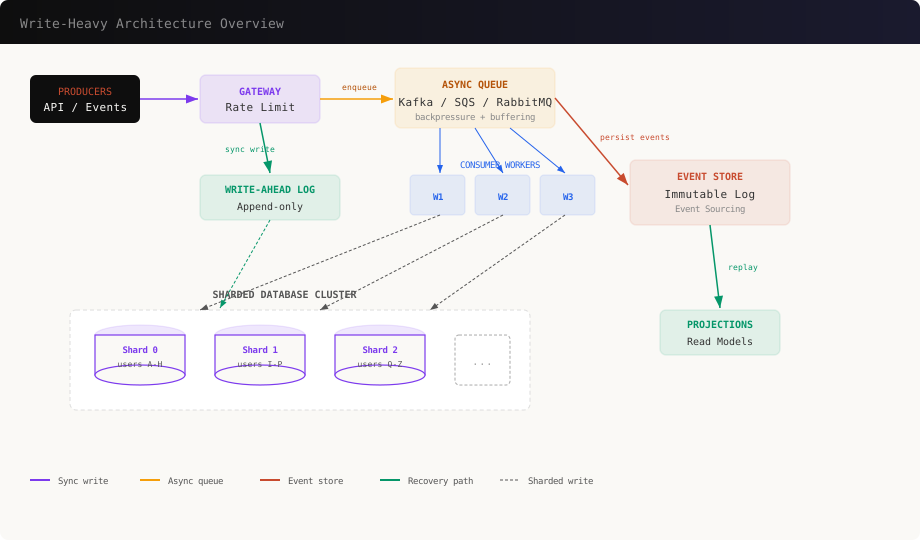
The key insight: writes flow through layers. Each layer absorbs pressure so the next layer can process at its own pace. Let’s work through each pattern.
Pattern 1: Async Write Queues — Absorb the Spike
The single most effective pattern for write scaling: don’t write to the database synchronously. Put a queue in front of it.
graph LR
    A[API Server] -->|enqueue| B[Message Queue]
    B -->|dequeue| C[Worker 1]
    B -->|dequeue| D[Worker 2]
    B -->|dequeue| E[Worker 3]
    C --> F[(Database)]
    D --> F
    E --> F
The queue acts as a shock absorber. Traffic spikes hit the queue, not the database. Workers consume at a steady rate the database can handle.
Implementation with Kafka
import { Kafka, Partitioners } from 'kafkajs';

const kafka = new Kafka({
  brokers: [process.env.KAFKA_BROKER],
  clientId: 'write-service',
});

// --- Producer: API Server ---
const producer = kafka.producer({
  createPartitioner: Partitioners.DefaultPartitioner,
});

async function handleOrderCreate(req: Request, res: Response) {
  const order = req.body;

  // Validate synchronously
  if (!order.items?.length) {
    return res.status(400).json({ error: 'Empty order' });
  }

  // Enqueue — returns instantly
  await producer.send({
    topic: 'orders',
    messages: [{
      key: order.userId, // Same user = same partition = ordering
      value: JSON.stringify({
        type: 'ORDER_CREATED',
        payload: order,
        timestamp: Date.now(),
      }),
    }],
  });

  // Return 202 Accepted — not 201 Created
  res.status(202).json({
    status: 'accepted',
    message: 'Order is being processed',
  });
}

// --- Consumer: Worker ---
const consumer = kafka.consumer({ groupId: 'order-writers' });

async function startWorker() {
  await consumer.connect();
  await consumer.subscribe({ topic: 'orders', fromBeginning: false });

  await consumer.run({
    eachMessage: async ({ message, heartbeat }) => {
      const event = JSON.parse(message.value.toString());

      try {
        await processOrder(event.payload);
        // Offset auto-committed on success
      } catch (err) {
        // Send to dead-letter queue for manual review
        await producer.send({
          topic: 'orders-dlq',
          messages: [{ value: message.value }],
        });
      }

      await heartbeat();
    },
  });
}
Key Design Decisions
Return 202, not 201. The write hasn’t happened yet. The client gets a fast acknowledgment, and the actual write happens asynchronously. If the client needs confirmation, use a webhook or polling endpoint.
Partition by entity ID. Kafka guarantees ordering within a partition. By keying on userId, all writes for the same user are processed sequentially — no race conditions.
Dead-letter queues. Failed writes go to a DLQ instead of being retried infinitely. An operations team reviews and replays them.
When NOT to Use Async Writes
- Financial transactions requiring synchronous confirmation
- Operations where the user must see the result immediately
- Writes that other writes depend on in the same request
For these cases, write synchronously but use the other patterns below to handle throughput.
Pattern 2: Database Sharding — Distribute the Load
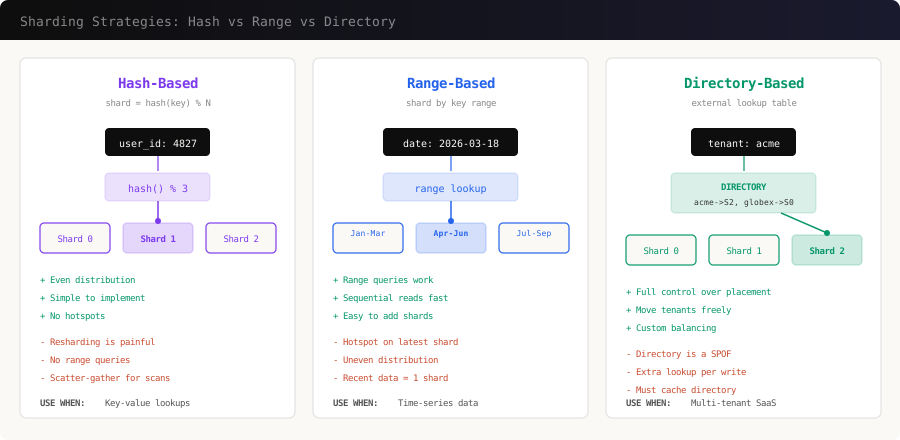
A single database instance has a write ceiling — typically 5,000-50,000 writes/second depending on hardware and write complexity. Sharding splits your data across multiple database instances so each handles a fraction of the load.
Hash-Based Sharding in Practice
import { createHash } from 'crypto';
import { Pool } from 'pg';

class ShardedDatabase {
  private shards: Pool[];

  constructor(shardConfigs: { host: string; port: number }[]) {
    this.shards = shardConfigs.map(
      (config) =>
        new Pool({
          host: config.host,
          port: config.port,
          database: 'app',
          max: 20,
        })
    );
  }

  // Consistent hashing — deterministic shard selection
  private getShardIndex(key: string): number {
    const hash = createHash('md5').update(key).digest('hex');
    const numeric = parseInt(hash.substring(0, 8), 16);
    return numeric % this.shards.length;
  }

  getShard(key: string): Pool {
    return this.shards[this.getShardIndex(key)];
  }

  async write(userId: string, sql: string, params: any[]): Promise<any> {
    const shard = this.getShard(userId);
    return shard.query(sql, params);
  }

  // Scatter-gather for cross-shard queries (expensive!)
  async queryAll(sql: string, params: any[]): Promise<any[]> {
    const results = await Promise.all(
      this.shards.map((shard) => shard.query(sql, params))
    );
    return results.flatMap((r) => r.rows);
  }
}

// Usage
const db = new ShardedDatabase([
  { host: 'shard-0.db.internal', port: 5432 },
  { host: 'shard-1.db.internal', port: 5432 },
  { host: 'shard-2.db.internal', port: 5432 },
]);

// All writes for user "abc123" go to the same shard
await db.write('abc123', 'INSERT INTO orders ...', [orderData]);
The Resharding Problem
The biggest pain with hash-based sharding: adding a shard changes hash % N for every key. Consistent hashing minimizes the damage:
import ConsistentHash from 'consistent-hash';

class ConsistentShardRouter {
  private ring: ConsistentHash;
  private shards: Map<string, Pool> = new Map();

  constructor(shardConfigs: { name: string; host: string }[]) {
    this.ring = new ConsistentHash();

    for (const config of shardConfigs) {
      // Add each shard multiple times (virtual nodes) for better distribution
      this.ring.add(config.name, 150);
      this.shards.set(
        config.name,
        new Pool({ host: config.host, database: 'app', max: 20 })
      );
    }
  }

  getShard(key: string): Pool {
    const shardName = this.ring.get(key);
    return this.shards.get(shardName)!;
  }

  // Adding a new shard only moves ~1/N of keys
  addShard(name: string, host: string): void {
    this.ring.add(name, 150);
    this.shards.set(
      name,
      new Pool({ host, database: 'app', max: 20 })
    );
  }
}
With consistent hashing, adding a 4th shard to a 3-shard cluster only moves ~25% of keys instead of rehashing everything.
Choosing a Shard Key
This is the most important decision in sharding. Get it wrong and you’ll have hotspots or impossible cross-shard queries.
| Shard Key | Good For | Bad For |
|---|---|---|
user_id |
Social apps, per-user data | Analytics across all users |
tenant_id |
Multi-tenant SaaS | Tenants with wildly different sizes |
order_id |
E-commerce writes | Queries by customer |
timestamp |
Time-series / IoT | Everything writes to latest shard |
geo_region |
Regional data laws | Users who travel |
Rule of thumb: shard by the key that appears in your WHERE clause most often.
Pattern 3: Write-Ahead Log (WAL) — Durability Before Performance
Every serious database uses a write-ahead log. The idea: before modifying actual data, write the intended change to a sequential, append-only log. If the system crashes mid-write, replay the log to recover.
graph TD
    A[Write Request] --> B[Append to WAL]
    B --> C[Acknowledge Client]
    C --> D[Apply to Data Pages]
    D --> E[Checkpoint]
    E --> F[Truncate Old WAL]

    style B fill:#059669,color:#fff,stroke:#059669
    style C fill:#2563eb,color:#fff,stroke:#2563eb
The crucial insight: sequential writes are 100x faster than random writes on both SSD and HDD. The WAL converts random updates into sequential appends.
Building a Simple WAL
import { createWriteStream, readFileSync, appendFileSync } from 'fs';

interface WALEntry {
  lsn: number;       // Log Sequence Number
  timestamp: number;
  operation: 'INSERT' | 'UPDATE' | 'DELETE';
  table: string;
  data: Record<string, any>;
}

class WriteAheadLog {
  private lsn = 0;
  private logPath: string;
  private stream: ReturnType<typeof createWriteStream>;

  constructor(logPath: string) {
    this.logPath = logPath;
    this.stream = createWriteStream(logPath, { flags: 'a' });
    this.recoverLSN();
  }

  private recoverLSN(): void {
    try {
      const content = readFileSync(this.logPath, 'utf-8');
      const lines = content.trim().split('\n').filter(Boolean);
      if (lines.length > 0) {
        const lastEntry = JSON.parse(lines[lines.length - 1]);
        this.lsn = lastEntry.lsn;
      }
    } catch {
      this.lsn = 0;
    }
  }

  // Append to WAL — must be durable before returning
  async append(
    operation: WALEntry['operation'],
    table: string,
    data: Record<string, any>
  ): Promise<number> {
    this.lsn++;
    const entry: WALEntry = {
      lsn: this.lsn,
      timestamp: Date.now(),
      operation,
      table,
      data,
    };

    return new Promise((resolve, reject) => {
      const line = JSON.stringify(entry) + '\n';
      this.stream.write(line, (err) => {
        if (err) reject(err);
        else resolve(this.lsn);
      });
    });
  }

  // Replay all entries after a given LSN
  async replay(afterLSN: number): Promise<WALEntry[]> {
    const content = readFileSync(this.logPath, 'utf-8');
    return content
      .trim()
      .split('\n')
      .filter(Boolean)
      .map((line) => JSON.parse(line) as WALEntry)
      .filter((entry) => entry.lsn > afterLSN);
  }
}

// Usage
const wal = new WriteAheadLog('/data/wal/orders.log');

// 1. Write to WAL first (fast — sequential append)
const lsn = await wal.append('INSERT', 'orders', {
  id: 'ord_123',
  amount: 4999,
  userId: 'usr_456',
});

// 2. Then apply to actual database (can be async)
await db.query('INSERT INTO orders ...', [orderData]);

// 3. On crash recovery
const missed = await wal.replay(lastCheckpointLSN);
for (const entry of missed) {
  await applyToDatabase(entry);
}
WAL in PostgreSQL
PostgreSQL’s WAL is why it can guarantee ACID even after a power failure. You can tune it for write throughput:
-- postgresql.conf tuning for write-heavy workloads

-- Larger WAL buffers = fewer disk flushes
wal_buffers = 64MB

-- Group commit: wait up to 10ms to batch WAL flushes
-- Trades tiny latency increase for massive throughput gain
commit_delay = 10000
commit_siblings = 5

-- Async commit: acknowledge before WAL flush
-- Risk: lose last ~200ms of transactions on crash
synchronous_commit = off

-- Checkpoint tuning
checkpoint_completion_target = 0.9
max_wal_size = 4GB
Setting synchronous_commit = off is the single biggest PostgreSQL write throughput optimization. You trade a tiny crash-recovery window (~200ms of commits) for 2-5x write throughput.
Pattern 4: Event Sourcing — Writes as Immutable Facts
Instead of storing the current state, store every change as an immutable event. The current state is derived by replaying events. This is a fundamentally write-optimized pattern because writes are append-only — no updates, no deletes, no locking.
graph LR
    subgraph "Event Store (append-only)"
        E1[AccountCreated] --> E2[MoneyDeposited $100]
        E2 --> E3[MoneyWithdrawn $30]
        E3 --> E4[MoneyDeposited $50]
        E4 --> E5[MoneyWithdrawn $10]
    end

    E5 --> S[Current State: $110]
Implementation
interface DomainEvent {
  eventId: string;
  aggregateId: string;
  type: string;
  data: Record<string, any>;
  timestamp: number;
  version: number;
}

class EventStore {
  private db: Pool;

  constructor(db: Pool) {
    this.db = db;
  }

  // Append events — optimistic concurrency via version check
  async append(
    aggregateId: string,
    events: Omit<DomainEvent, 'eventId' | 'timestamp'>[],
    expectedVersion: number
  ): Promise<void> {
    const client = await this.db.connect();

    try {
      await client.query('BEGIN');

      // Optimistic concurrency check
      const result = await client.query(
        `SELECT MAX(version) as current_version
         FROM events WHERE aggregate_id = $1`,
        [aggregateId]
      );
      const currentVersion = result.rows[0]?.current_version ?? 0;

      if (currentVersion !== expectedVersion) {
        throw new Error(
          `Concurrency conflict: expected version ${expectedVersion}, ` +
          `got ${currentVersion}`
        );
      }

      // Append all events
      for (const event of events) {
        await client.query(
          `INSERT INTO events
             (event_id, aggregate_id, type, data, timestamp, version)
           VALUES ($1, $2, $3, $4, $5, $6)`,
          [
            crypto.randomUUID(),
            aggregateId,
            event.type,
            JSON.stringify(event.data),
            Date.now(),
            event.version,
          ]
        );
      }

      await client.query('COMMIT');
    } catch (err) {
      await client.query('ROLLBACK');
      throw err;
    } finally {
      client.release();
    }
  }

  // Load all events for an aggregate
  async loadEvents(aggregateId: string): Promise<DomainEvent[]> {
    const result = await this.db.query(
      `SELECT * FROM events
       WHERE aggregate_id = $1
       ORDER BY version ASC`,
      [aggregateId]
    );
    return result.rows;
  }
}

// --- Aggregate: reconstruct state from events ---
class BankAccount {
  id: string;
  balance: number = 0;
  version: number = 0;

  private pendingEvents: DomainEvent[] = [];

  static fromEvents(events: DomainEvent[]): BankAccount {
    const account = new BankAccount();
    for (const event of events) {
      account.apply(event);
    }
    return account;
  }

  deposit(amount: number): void {
    if (amount <= 0) throw new Error('Amount must be positive');
    this.addEvent('MONEY_DEPOSITED', { amount });
  }

  withdraw(amount: number): void {
    if (amount > this.balance) throw new Error('Insufficient funds');
    this.addEvent('MONEY_WITHDRAWN', { amount });
  }

  private addEvent(type: string, data: any): void {
    const event = {
      aggregateId: this.id,
      type,
      data,
      version: this.version + 1,
    } as DomainEvent;

    this.apply(event);
    this.pendingEvents.push(event);
  }

  private apply(event: DomainEvent): void {
    switch (event.type) {
      case 'ACCOUNT_CREATED':
        this.id = event.aggregateId;
        break;
      case 'MONEY_DEPOSITED':
        this.balance += event.data.amount;
        break;
      case 'MONEY_WITHDRAWN':
        this.balance -= event.data.amount;
        break;
    }
    this.version = event.version;
  }
}
Snapshots: Avoiding the Replay Penalty
Replaying 10 million events to get current state is slow. Take periodic snapshots:
class SnapshotStore {
  async saveSnapshot(
    aggregateId: string,
    state: any,
    version: number
  ): Promise<void> {
    await this.db.query(
      `INSERT INTO snapshots (aggregate_id, state, version)
       VALUES ($1, $2, $3)
       ON CONFLICT (aggregate_id)
       DO UPDATE SET state = $2, version = $3`,
      [aggregateId, JSON.stringify(state), version]
    );
  }

  async loadAggregate(aggregateId: string): Promise<BankAccount> {
    // 1. Load latest snapshot
    const snap = await this.db.query(
      `SELECT * FROM snapshots WHERE aggregate_id = $1`,
      [aggregateId]
    );

    let account: BankAccount;
    let fromVersion = 0;

    if (snap.rows[0]) {
      account = Object.assign(new BankAccount(), JSON.parse(snap.rows[0].state));
      fromVersion = snap.rows[0].version;
    } else {
      account = new BankAccount();
    }

    // 2. Replay only events AFTER snapshot
    const events = await this.eventStore.db.query(
      `SELECT * FROM events
       WHERE aggregate_id = $1 AND version > $2
       ORDER BY version ASC`,
      [aggregateId, fromVersion]
    );

    for (const event of events.rows) {
      account.apply(event);
    }

    return account;
  }
}
Rule of thumb: snapshot every 100-1000 events depending on event complexity.
Pattern 5: Storage Engine Choice — LSM-Tree vs B-Tree
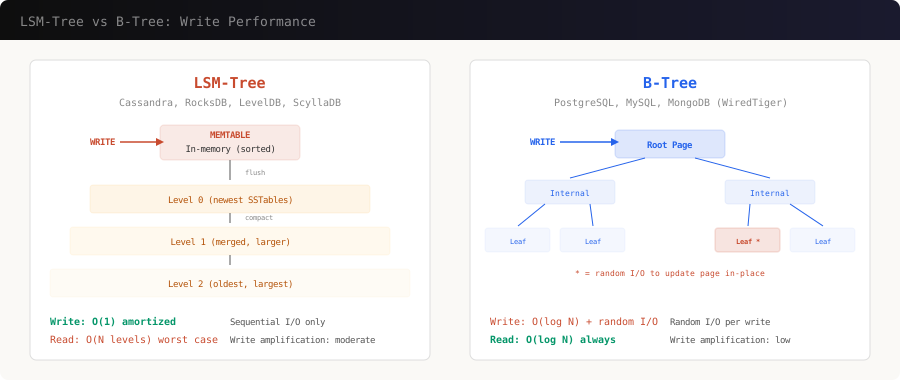
The storage engine under your database determines raw write performance. This is an infrastructure choice, not an application pattern, but it’s the most impactful decision for write throughput.
When to Pick Which
LSM-Tree (Cassandra, ScyllaDB, RocksDB, DynamoDB):
- Writes are sequential appends to a memtable, then flushed as sorted files
- Write throughput: 100,000+ writes/sec per node easily
- Reads require checking multiple levels (bloom filters help)
- Best for: write-heavy workloads, time-series, IoT, logging
B-Tree (PostgreSQL, MySQL, MongoDB):
- Writes require finding and updating the right page in-place
- Write throughput: 5,000-50,000 writes/sec depending on indexes
- Reads are always O(log N) — predictable
- Best for: read-heavy or balanced workloads, complex queries, transactions
// Cassandra write — optimized for throughput
const cassandra = new Client({
  contactPoints: ['node1', 'node2', 'node3'],
  localDataCenter: 'dc1',
  keyspace: 'analytics',
});

// This write is absurdly fast — just appends to memtable
await cassandra.execute(
  `INSERT INTO events (partition_key, event_time, event_type, data)
   VALUES (?, ?, ?, ?)`,
  [partitionKey, new Date(), 'page_view', JSON.stringify(eventData)],
  { prepare: true, consistency: types.consistencies.localOne }
);
With consistency: localOne, Cassandra acknowledges after writing to a single replica’s memtable — sub-millisecond latency. The tradeoff: you might lose that write if that one node dies before replication.
Pattern 6: Write Batching and Buffering
Small writes are expensive. A database round-trip costs 1-5ms regardless of payload size. Batch 1,000 small writes into one bulk operation and you’ve saved 999 round trips.
Application-Level Batching
class WriteBatcher<T> {
  private buffer: T[] = [];
  private timer: NodeJS.Timeout | null = null;
  private readonly maxSize: number;
  private readonly maxWaitMs: number;
  private readonly flushFn: (items: T[]) => Promise<void>;

  constructor(options: {
    maxSize: number;
    maxWaitMs: number;
    flushFn: (items: T[]) => Promise<void>;
  }) {
    this.maxSize = options.maxSize;
    this.maxWaitMs = options.maxWaitMs;
    this.flushFn = options.flushFn;
  }

  async add(item: T): Promise<void> {
    this.buffer.push(item);

    if (this.buffer.length >= this.maxSize) {
      await this.flush();
    } else if (!this.timer) {
      this.timer = setTimeout(() => this.flush(), this.maxWaitMs);
    }
  }

  async flush(): Promise<void> {
    if (this.buffer.length === 0) return;

    if (this.timer) {
      clearTimeout(this.timer);
      this.timer = null;
    }

    const batch = this.buffer.splice(0);

    try {
      await this.flushFn(batch);
    } catch (err) {
      // Put items back for retry
      this.buffer.unshift(...batch);
      throw err;
    }
  }
}

// Usage: batch up to 500 analytics events or flush every 2 seconds
const batcher = new WriteBatcher<AnalyticsEvent>({
  maxSize: 500,
  maxWaitMs: 2000,
  flushFn: async (events) => {
    // Single bulk INSERT instead of 500 individual ones
    const values = events.map(
      (e) => `('${e.userId}', '${e.event}', '${e.timestamp}')`
    );
    await db.query(
      `INSERT INTO analytics (user_id, event, timestamp)
       VALUES ${values.join(',')}`
    );
  },
});

// Each call is near-instant — actual write happens in batches
await batcher.add({ userId: 'u1', event: 'page_view', timestamp: Date.now() });
PostgreSQL COPY for Maximum Throughput
For bulk loading, COPY is 5-10x faster than INSERT:
import { pipeline } from 'stream/promises';
import { from as copyFrom } from 'pg-copy-streams';

async function bulkLoad(records: any[]): Promise<void> {
  const client = await pool.connect();

  try {
    const stream = client.query(
      copyFrom(`COPY events (user_id, event_type, payload, created_at)
                FROM STDIN WITH (FORMAT csv)`)
    );

    for (const record of records) {
      const line = [
        record.userId,
        record.eventType,
        JSON.stringify(record.payload),
        new Date().toISOString(),
      ].join(',') + '\n';

      stream.write(line);
    }

    stream.end();
    await pipeline(stream);
  } finally {
    client.release();
  }
}
Putting It All Together: The Decision Framework
How many writes/second do you need?
│
├── < 5,000/sec
│   └── Single PostgreSQL with tuned WAL settings
│       (synchronous_commit=off, wal_buffers=64MB)
│
├── 5,000 - 50,000/sec
│   ├── Can writes be async? → Queue + Workers
│   ├── Are writes small? → Batching
│   └── Still hitting limits? → Vertical scaling first
│
├── 50,000 - 500,000/sec
│   ├── Shard the database (hash-based)
│   ├── Queue + Sharded workers
│   └── Consider LSM-tree database (Cassandra, ScyllaDB)
│
└── > 500,000/sec
    ├── LSM-tree database + sharding
    ├── Event sourcing for audit-heavy domains
    └── Multi-region with conflict resolution
Cost vs Complexity
| Pattern | Complexity | Throughput Gain | When to Add |
|---|---|---|---|
| WAL tuning | Low | 2-5x | Day 1 |
| Write batching | Low | 5-10x for small writes | When round-trip latency dominates |
| Async queues | Medium | Absorbs 10-100x spikes | When writes are bursty |
| Sharding | High | Linear with shard count | When single node maxed out |
| LSM-tree DB | Medium | 10-50x vs B-tree | When writes dominate reads |
| Event sourcing | High | Append-only = fast writes | When you need full audit trail |
The Golden Rule
Optimize the write path in this order:
- Tune what you have — WAL settings, connection pooling, index cleanup
- Batch — stop doing one-at-a-time inserts
- Go async — queue writes and process at the database’s pace
- Shard — only when a single node is truly maxed out
- Change engines — switch to an LSM-tree database for extreme write loads
Most systems never need to go past step 3. The teams that jump straight to sharding usually regret it — you’re trading simple queries for distributed systems complexity. Make sure you’ve exhausted the simple options first.
Further Reading
- Designing Data-Intensive Applications by Martin Kleppmann — chapters 3 and 6 especially
- The Log: What every software engineer should know — Jay Kreps (LinkedIn/Kafka)
- Event Sourcing pattern — Microsoft Azure Architecture Center
- LSM-Tree paper — O’Neil et al., the original 1996 paper


