


Every office lobby has the same problem: a visitor walks in, nobody’s at the front desk, and they stand there awkwardly waiting. Or worse — they sign a paper logbook from 2005, scribble something illegible, and wander into the building.
An AI voicebot can fix this. The visitor picks up a phone (or speaks into a tablet), tells the bot who they’re here to see, and the bot handles everything — looks up the host, notifies them via Slack, prints a badge, and tells the visitor to take a seat.
Sounds simple. It’s not. This guide covers how to build it — and more importantly, how to handle the dozens of edge cases that will break your bot in the first week.
Table of Contents
- Architecture Overview
- The Voice Pipeline
- Setting Up the STT Layer
- The LLM Conversation Engine
- Conversation State Machine
- Tool Calls — The Bot Takes Action
- Text-to-Speech — Making It Sound Human
- Handling the Hard Problems
- Latency — The Silent Killer
- Telephony Integration with Twilio
- The Full Check-In Server
- Security and Privacy
- Deployment and Monitoring
Architecture Overview
The voicebot is a pipeline of four stages: audio in → text → thinking → audio out.
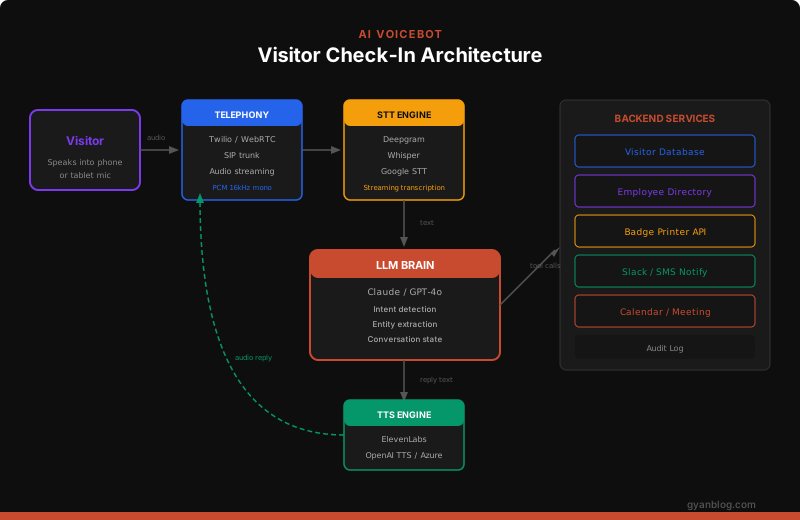
Every stage streams. The STT transcribes as the visitor speaks. The LLM starts generating as soon as it has enough context. The TTS starts synthesizing the first sentence while the LLM is still generating the second. This overlap is what makes the conversation feel natural instead of painfully slow.
| Component | Service | Why This One |
|---|---|---|
| Telephony | Twilio / WebRTC | Battle-tested, global PSTN, WebSocket audio streaming |
| STT | Deepgram Nova-2 | Fastest streaming STT, best accuracy for names, 200ms latency |
| LLM | Claude Haiku / GPT-4o-mini | Fast enough for real-time voice, smart enough for disambiguation |
| TTS | ElevenLabs Turbo v2 | Most natural voice, streaming output, 150ms first-byte |
| Notify | Slack API + Twilio SMS | Meet the host where they already are |
The Voice Pipeline
The core loop is deceptively simple:
Visitor speaks → mic captures audio → stream to STT
  → STT emits transcript → feed to LLM
    → LLM generates reply → stream to TTS
      → TTS emits audio → play to visitor
The trick is that everything must stream. If you wait for the visitor to finish speaking, then send the full audio to STT, then wait for the full transcript, then send it to the LLM, then wait for the full reply, then send it to TTS — you’ll have 5+ seconds of dead silence. The visitor will hang up.
Setting Up the STT Layer
Deepgram’s streaming API gives you word-by-word transcription as the visitor speaks. You get interim results (partial words) and final results (complete utterances).
# stt.py — Deepgram streaming speech-to-text

import asyncio
import json
from websockets import connect as ws_connect

DEEPGRAM_URL = "wss://api.deepgram.com/v1/listen"
DEEPGRAM_API_KEY = "your-api-key"

class SpeechToText:
    """Streaming STT via Deepgram WebSocket."""

    def __init__(self, on_transcript, on_utterance_end):
        self.on_transcript = on_transcript        # Called on each final transcript
        self.on_utterance_end = on_utterance_end  # Called when visitor stops talking
        self.ws = None

    async def connect(self):
        params = (
            f"?encoding=linear16&sample_rate=16000&channels=1"
            f"&model=nova-2"
            f"&smart_format=true"          # Proper casing, punctuation
            f"&endpointing=300"            # 300ms silence = utterance end
            f"&interim_results=true"
            f"&utterance_end_ms=1000"      # 1s silence = visitor done talking
        )

        headers = {"Authorization": f"Token {DEEPGRAM_API_KEY}"}
        self.ws = await ws_connect(
            DEEPGRAM_URL + params,
            additional_headers=headers,
        )

        # Start listening for transcripts
        asyncio.create_task(self._receive_loop())

    async def send_audio(self, audio_chunk: bytes):
        """Send raw PCM audio from telephony layer."""
        if self.ws:
            await self.ws.send(audio_chunk)

    async def _receive_loop(self):
        async for message in self.ws:
            data = json.loads(message)

            if data.get("type") == "Results":
                transcript = (
                    data["channel"]["alternatives"][0]["transcript"]
                )
                is_final = data["is_final"]
                confidence = data["channel"]["alternatives"][0]["confidence"]

                if is_final and transcript.strip():
                    await self.on_transcript(transcript, confidence)

            elif data.get("type") == "UtteranceEnd":
                await self.on_utterance_end()

    async def close(self):
        if self.ws:
            await self.ws.send(json.dumps({"type": "CloseStream"}))
            await self.ws.close()
Why Deepgram Over Whisper?
| Deepgram Nova-2 | OpenAI Whisper | |
|---|---|---|
| Latency | 200ms streaming | Batch only (2-5s) |
| Name accuracy | Excellent with custom vocab | Good but no customization |
| Streaming | Native WebSocket | Not supported (Whisper API) |
| Cost | $0.0043/min | $0.006/min |
For voice bots, streaming is non-negotiable. Whisper is excellent for post-processing (transcribing recorded calls), but Deepgram wins for real-time.
The LLM Conversation Engine
The LLM is the brain. It understands what the visitor said, decides what to do, and generates a natural response. The key is a tight system prompt with tool definitions.
# llm.py — Conversation engine with tool calling

import anthropic
from dataclasses import dataclass, field

client = anthropic.Anthropic()

SYSTEM_PROMPT = """You are a friendly, professional receptionist voicebot for Acme Corp.
Your job is to check in visitors. You are warm but efficient — don't waste their time.

RULES:
1. Greet the visitor and ask who they're here to see.
2. Use the lookup_employee tool to find the host.
3. If multiple matches, ask the visitor to clarify (first name + department).
4. Confirm the host with the visitor before proceeding.
5. Collect the visitor's name and company.
6. Use notify_host tool to send a Slack/SMS notification.
7. Use print_badge tool to print a visitor badge.
8. Tell the visitor their host has been notified and to please have a seat.

VOICE GUIDELINES (critical for TTS quality):
- Keep responses under 2 sentences. Shorter = faster.
- Don't use bullet points, markdown, or lists — this will be spoken aloud.
- Use natural contractions: "you're", "they'll", "I'll".
- Spell out abbreviations: say "engineering" not "eng".
- If you need to say a name you're unsure about, spell it out: "Sarah, S-A-R-A-H".
- Never say "As an AI" or "I'm a virtual assistant". Just be a receptionist.

HANDLING PROBLEMS:
- If you can't understand the visitor after 2 attempts, say:
  "I'm having trouble hearing you. Let me connect you with someone who can help."
  Then use the transfer_to_human tool.
- If the host isn't found, ask: "Could you spell the last name for me?"
- If the host doesn't respond to notification within 2 minutes, suggest the visitor
  try calling them directly or offer to try an alternate contact.
"""

TOOLS = [
    {
        "name": "lookup_employee",
        "description": "Search the employee directory by name. Returns matching employees with department and contact info.",
        "input_schema": {
            "type": "object",
            "properties": {
                "query": {
                    "type": "string",
                    "description": "Employee name to search (first, last, or full name)"
                }
            },
            "required": ["query"]
        }
    },
    {
        "name": "notify_host",
        "description": "Send a notification to the host employee that their visitor has arrived.",
        "input_schema": {
            "type": "object",
            "properties": {
                "employee_id": {"type": "string"},
                "visitor_name": {"type": "string"},
                "visitor_company": {"type": "string"},
                "purpose": {"type": "string"}
            },
            "required": ["employee_id", "visitor_name"]
        }
    },
    {
        "name": "print_badge",
        "description": "Print a visitor badge with the visitor's name, host, and date.",
        "input_schema": {
            "type": "object",
            "properties": {
                "visitor_name": {"type": "string"},
                "host_name": {"type": "string"},
                "company": {"type": "string"}
            },
            "required": ["visitor_name", "host_name"]
        }
    },
    {
        "name": "transfer_to_human",
        "description": "Transfer the call to a human receptionist. Use when the bot can't resolve the visitor's request.",
        "input_schema": {
            "type": "object",
            "properties": {
                "reason": {"type": "string"}
            },
            "required": ["reason"]
        }
    }
]


@dataclass
class Conversation:
    """Manages multi-turn conversation state with tool calling."""

    messages: list = field(default_factory=list)
    model: str = "claude-haiku-4-5-20251001"  # Fast model for real-time voice

    async def respond(self, visitor_text: str) -> tuple[str, list[dict]]:
        """Process visitor input and return (reply_text, tool_calls)."""
        self.messages.append({"role": "user", "content": visitor_text})

        response = client.messages.create(
            model=self.model,
            max_tokens=256,           # Keep replies short for voice
            system=SYSTEM_PROMPT,
            tools=TOOLS,
            messages=self.messages,
        )

        # Extract text and tool calls from response
        reply_text = ""
        tool_calls = []

        for block in response.content:
            if block.type == "text":
                reply_text = block.text
            elif block.type == "tool_use":
                tool_calls.append({
                    "id": block.id,
                    "name": block.name,
                    "input": block.input,
                })

        # Add assistant response to conversation history
        self.messages.append({"role": "assistant", "content": response.content})

        return reply_text, tool_calls

    async def add_tool_result(self, tool_id: str, result: str):
        """Feed a tool result back into the conversation."""
        self.messages.append({
            "role": "user",
            "content": [
                {
                    "type": "tool_result",
                    "tool_use_id": tool_id,
                    "content": result,
                }
            ],
        })
Why Haiku Over Opus for Voice?
Voice has a strict latency budget. The visitor is standing in a lobby waiting for a response. Every 100ms of silence feels like an eternity.
| Model | Time to First Token | Good Enough for Check-In? |
|---|---|---|
| Claude Opus 4.6 | 800-1500ms | Too slow for real-time |
| Claude Sonnet 4.6 | 400-800ms | Usable but tight |
| Claude Haiku 4.5 | 200-400ms | Sweet spot |
| GPT-4o-mini | 200-350ms | Also great |
Haiku is more than smart enough to handle “who are you here to see?” conversations. Save Opus for complex reasoning tasks — not lobby check-ins.
Conversation State Machine
The check-in flow follows a predictable state machine. Every state has a happy path and error fallbacks.
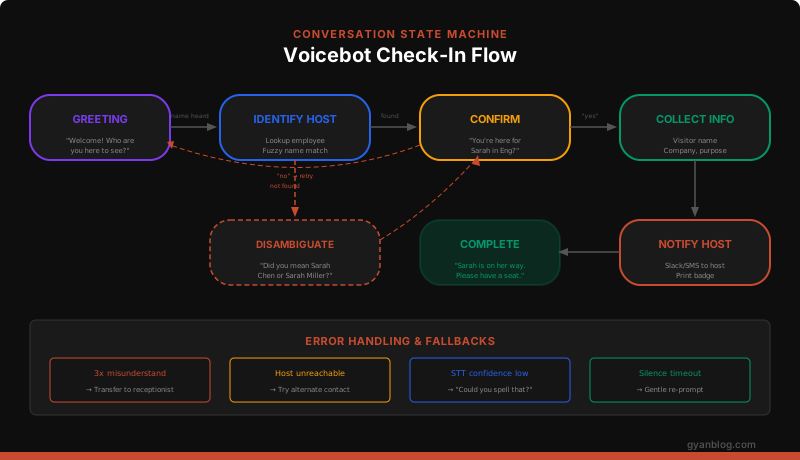
# states.py — Conversation state management

from enum import Enum
from dataclasses import dataclass, field

class CheckInState(Enum):
    GREETING = "greeting"
    IDENTIFY_HOST = "identify_host"
    DISAMBIGUATE = "disambiguate"
    CONFIRM_HOST = "confirm_host"
    COLLECT_VISITOR_INFO = "collect_visitor_info"
    NOTIFY_HOST = "notify_host"
    COMPLETE = "complete"
    TRANSFER_HUMAN = "transfer_human"
    ERROR = "error"

@dataclass
class CheckInSession:
    """Tracks the state of a single visitor check-in."""

    session_id: str
    state: CheckInState = CheckInState.GREETING
    host_name: str = ""
    host_id: str = ""
    host_department: str = ""
    visitor_name: str = ""
    visitor_company: str = ""
    purpose: str = ""
    misunderstand_count: int = 0
    max_misunderstand: int = 3
    candidates: list = field(default_factory=list)  # Multiple employee matches

    def transition(self, new_state: CheckInState):
        """Transition to a new state with validation."""
        valid_transitions = {
            CheckInState.GREETING: [
                CheckInState.IDENTIFY_HOST,
                CheckInState.TRANSFER_HUMAN,
            ],
            CheckInState.IDENTIFY_HOST: [
                CheckInState.CONFIRM_HOST,
                CheckInState.DISAMBIGUATE,
                CheckInState.GREETING,  # Retry if not found
                CheckInState.TRANSFER_HUMAN,
            ],
            CheckInState.DISAMBIGUATE: [
                CheckInState.CONFIRM_HOST,
                CheckInState.IDENTIFY_HOST,
                CheckInState.TRANSFER_HUMAN,
            ],
            CheckInState.CONFIRM_HOST: [
                CheckInState.COLLECT_VISITOR_INFO,
                CheckInState.GREETING,  # Visitor says "no, wrong person"
            ],
            CheckInState.COLLECT_VISITOR_INFO: [
                CheckInState.NOTIFY_HOST,
                CheckInState.TRANSFER_HUMAN,
            ],
            CheckInState.NOTIFY_HOST: [CheckInState.COMPLETE],
            CheckInState.COMPLETE: [],  # Terminal state
            CheckInState.TRANSFER_HUMAN: [],  # Terminal state
        }

        if new_state in valid_transitions.get(self.state, []):
            self.state = new_state
        else:
            raise ValueError(
                f"Invalid transition: {self.state.value} → {new_state.value}"
            )

    def record_misunderstand(self) -> bool:
        """Track failed understanding attempts. Returns True if max reached."""
        self.misunderstand_count += 1
        return self.misunderstand_count >= self.max_misunderstand
Tool Calls
When the LLM decides to look up an employee or notify a host, it emits tool calls. Here’s the backend that executes them:
# tools.py — Tool execution for voicebot actions

import httpx
from fuzzywuzzy import fuzz, process

# In-memory employee directory (in production, query your HR system)
EMPLOYEES = [
    {"id": "emp_001", "name": "Sarah Chen", "department": "Engineering", "slack": "@sarah.chen", "phone": "+14155551001"},
    {"id": "emp_002", "name": "Sarah Miller", "department": "Marketing", "slack": "@sarah.miller", "phone": "+14155551002"},
    {"id": "emp_003", "name": "James Wilson", "department": "Sales", "slack": "@james.wilson", "phone": "+14155551003"},
    {"id": "emp_004", "name": "Priya Patel", "department": "Engineering", "slack": "@priya.patel", "phone": "+14155551004"},
    {"id": "emp_005", "name": "Michael O'Brien", "department": "Legal", "slack": "@michael.obrien", "phone": "+14155551005"},
]


async def lookup_employee(query: str) -> dict:
    """Fuzzy search the employee directory.

    Returns exact match, multiple candidates, or not found.
    Handles misspellings, partial names, and phonetic similarities.
    """
    query = query.strip().lower()

    # Exact match first
    for emp in EMPLOYEES:
        if query == emp["name"].lower():
            return {"status": "found", "employees": [emp]}

    # Fuzzy match — find top candidates above threshold
    names = [emp["name"] for emp in EMPLOYEES]
    matches = process.extract(query, names, scorer=fuzz.token_sort_ratio, limit=5)

    # Filter by confidence threshold
    good_matches = [(name, score) for name, score in matches if score >= 65]

    if not good_matches:
        return {
            "status": "not_found",
            "message": f"No employee matching '{query}' found.",
        }

    if len(good_matches) == 1 and good_matches[0][1] >= 85:
        # High confidence single match
        emp = next(e for e in EMPLOYEES if e["name"] == good_matches[0][0])
        return {"status": "found", "employees": [emp]}

    # Multiple candidates — need disambiguation
    candidates = []
    for name, score in good_matches:
        emp = next(e for e in EMPLOYEES if e["name"] == name)
        candidates.append(emp)

    return {"status": "multiple", "employees": candidates}


async def notify_host(
    employee_id: str,
    visitor_name: str,
    visitor_company: str = "",
    purpose: str = "",
) -> dict:
    """Send Slack DM and SMS to the host employee."""
    emp = next((e for e in EMPLOYEES if e["id"] == employee_id), None)
    if not emp:
        return {"status": "error", "message": "Employee not found"}

    message = f"Your visitor {visitor_name}"
    if visitor_company:
        message += f" from {visitor_company}"
    message += " has arrived at the front desk."
    if purpose:
        message += f" Purpose: {purpose}."

    # Send Slack notification
    slack_sent = await _send_slack(emp["slack"], message)

    # Send SMS as backup
    sms_sent = await _send_sms(emp["phone"], message)

    return {
        "status": "notified",
        "slack": slack_sent,
        "sms": sms_sent,
        "message": f"Notified {emp['name']} via Slack and SMS.",
    }


async def print_badge(
    visitor_name: str,
    host_name: str,
    company: str = "",
) -> dict:
    """Send print job to the badge printer."""
    # In production, hit your badge printer API
    badge_data = {
        "visitor": visitor_name,
        "host": host_name,
        "company": company,
        "date": "2026-03-27",
        "badge_type": "visitor",
    }
    # await httpx.AsyncClient().post(BADGE_PRINTER_URL, json=badge_data)
    return {"status": "printed", "badge": badge_data}


async def _send_slack(slack_id: str, message: str) -> bool:
    """Send a Slack DM via webhook."""
    try:
        async with httpx.AsyncClient() as client:
            resp = await client.post(
                "https://slack.com/api/chat.postMessage",
                headers={"Authorization": f"Bearer {SLACK_TOKEN}"},
                json={"channel": slack_id, "text": message},
                timeout=5.0,
            )
            return resp.status_code == 200
    except httpx.TimeoutException:
        return False


async def _send_sms(phone: str, message: str) -> bool:
    """Send SMS via Twilio as backup notification."""
    try:
        async with httpx.AsyncClient() as client:
            resp = await client.post(
                f"https://api.twilio.com/2010-04-01/Accounts/{TWILIO_SID}/Messages.json",
                auth=(TWILIO_SID, TWILIO_AUTH),
                data={"To": phone, "From": TWILIO_FROM, "Body": message},
                timeout=5.0,
            )
            return resp.status_code == 201
    except httpx.TimeoutException:
        return False
Why Fuzzy Matching Matters
A visitor says “I’m here to see Sarah.” Your STT transcribes it perfectly. But you have two Sarahs:
- Sarah Chen (Engineering)
- Sarah Miller (Marketing)
Without fuzzy matching and disambiguation, the bot either picks the wrong one or crashes. The LLM handles this naturally:
Bot: “I found two Sarahs — Sarah Chen in Engineering and Sarah Miller in Marketing. Which one are you here to see?”
Visitor: “Engineering.”
Bot: “Great, Sarah Chen. And your name?”
Worse case: the visitor says “Sera” (accent) or “Sara” (no h) or “Sarah Chin” (close but wrong). Fuzzy matching with fuzzywuzzy handles all of these with a confidence threshold.
Text-to-Speech
The TTS layer converts the LLM’s text reply into natural-sounding audio. Streaming is critical — start playing audio as soon as the first sentence is ready.
# tts.py — ElevenLabs streaming text-to-speech

import httpx

ELEVENLABS_API_KEY = "your-api-key"
VOICE_ID = "21m00Tcm4TlvDq8ikWAM"  # "Rachel" — professional, warm

class TextToSpeech:
    """Streaming TTS via ElevenLabs."""

    def __init__(self, on_audio_chunk):
        self.on_audio_chunk = on_audio_chunk  # Callback for each audio chunk

    async def synthesize(self, text: str):
        """Stream text to audio, sending chunks as they arrive."""
        url = f"https://api.elevenlabs.io/v1/text-to-speech/{VOICE_ID}/stream"

        async with httpx.AsyncClient() as client:
            async with client.stream(
                "POST",
                url,
                headers={
                    "xi-api-key": ELEVENLABS_API_KEY,
                    "Content-Type": "application/json",
                },
                json={
                    "text": text,
                    "model_id": "eleven_turbo_v2_5",
                    "voice_settings": {
                        "stability": 0.7,        # Higher = more consistent
                        "similarity_boost": 0.8,  # Higher = closer to original voice
                        "style": 0.2,             # Low = professional, not dramatic
                    },
                    "output_format": "pcm_16000",  # Match telephony sample rate
                },
                timeout=10.0,
            ) as response:
                async for chunk in response.aiter_bytes(chunk_size=4096):
                    await self.on_audio_chunk(chunk)
Voice Selection Tips
- Professional receptionist: Use a warm, clear female or male voice. Avoid voices that sound too “AI-perfect” — a slight natural quality builds trust.
- Stability at 0.7: Keeps the voice consistent across utterances without sounding robotic.
- Speed: Don’t speed up the voice. Visitors in a lobby aren’t in a rush — clarity beats speed.
- Test with names: Some TTS voices butcher unusual names. Test with your actual employee directory.
Handling the Hard Problems
This is where most voicebot tutorials stop and real projects begin. Here’s what will actually break your bot.
Problem 1: Background Noise
Office lobbies are noisy. Doors opening, people talking, elevator dings. Your STT will pick up all of it.
# noise_handling.py — Filter low-confidence transcripts

async def on_transcript(text: str, confidence: float):
    """Only process transcripts above confidence threshold."""
    if confidence < 0.65:
        # Low confidence — likely noise, not speech
        print(f"[NOISE] Ignoring low-confidence transcript: '{text}' ({confidence:.2f})")
        return

    if len(text.strip()) < 3:
        # Too short to be meaningful ("uh", "um", background snippet)
        return

    await process_visitor_input(text)
Additional mitigations:
- Use a directional microphone or headset, not an open tablet mic
- Configure Deepgram’s
endpointingto 300ms (don’t cut off mid-sentence) - Use
keywordsparameter to boost name recognition accuracy
# Boost recognition of employee names
params += f"&keywords=Chen:2&keywords=Patel:2&keywords=O%27Brien:2"
Problem 2: Accents and Pronunciation
A visitor says “I’m here to see Preeyah Patel” (mispronouncing Priya). Or they have a thick accent and “Wilson” sounds like “Vilson.”
Solution: Fuzzy matching + phonetic matching + spelling fallback.
import jellyfish  # Phonetic matching library

def phonetic_match(query: str, candidates: list[str]) -> list[str]:
    """Match names phonetically using Metaphone."""
    query_code = jellyfish.metaphone(query)
    matches = []
    for name in candidates:
        for part in name.split():
            if jellyfish.metaphone(part) == query_code:
                matches.append(name)
                break
    return matches

# "Preeyah" → metaphone → "PR" → matches "Priya"
# "Vilson" → metaphone → "FLSN" → matches "Wilson"
And always have the spelling fallback in your system prompt:
“Could you spell the last name for me?”
Problem 3: The Visitor Doesn’t Know Who They’re Meeting
This happens more than you’d think. “I have a 2pm meeting but I don’t remember the name.”
# Calendar integration tool
CALENDAR_TOOL = {
    "name": "search_meetings",
    "description": "Search today's calendar for meetings with external visitors.",
    "input_schema": {
        "type": "object",
        "properties": {
            "visitor_name": {"type": "string"},
            "visitor_company": {"type": "string"},
            "time_range": {"type": "string", "description": "e.g., '2pm-3pm'"}
        }
    }
}
The LLM can ask: “What’s your name? I’ll check if there’s a meeting scheduled for you.” Then query the calendar API.
Problem 4: Silence
The visitor stops talking mid-sentence. Maybe they got distracted, maybe they’re thinking, maybe they walked away.
# silence_handler.py

import asyncio

class SilenceHandler:
    """Handle extended silence during conversation."""

    def __init__(self, on_reprompt, on_timeout):
        self.on_reprompt = on_reprompt
        self.on_timeout = on_timeout
        self._timer = None
        self.reprompt_count = 0

    async def reset(self):
        """Reset timer on any visitor speech."""
        if self._timer:
            self._timer.cancel()
        self.reprompt_count = 0
        self._start_timer()

    def _start_timer(self):
        self._timer = asyncio.get_event_loop().call_later(
            8.0,  # 8 seconds of silence
            lambda: asyncio.ensure_future(self._handle_silence())
        )

    async def _handle_silence(self):
        self.reprompt_count += 1

        if self.reprompt_count == 1:
            await self.on_reprompt("Are you still there? I can help you check in.")
        elif self.reprompt_count == 2:
            await self.on_reprompt(
                "I haven't heard anything. If you need help, just say something "
                "and I'll be right here."
            )
        else:
            await self.on_timeout()  # End session or transfer to human
Problem 5: Barge-In (Visitor Interrupts the Bot)
The bot is saying “I found Sarah Chen in Engineering, is that—” and the visitor blurts out “Yes!” mid-sentence.
# barge_in.py — Stop TTS when visitor starts speaking

class BargeInHandler:
    """Handle visitor interruptions during bot speech."""

    def __init__(self, tts, audio_player):
        self.tts = tts
        self.audio_player = audio_player
        self.bot_is_speaking = False

    async def on_bot_speech_start(self):
        self.bot_is_speaking = True

    async def on_bot_speech_end(self):
        self.bot_is_speaking = False

    async def on_visitor_speech_detected(self):
        """Visitor started talking while bot is speaking."""
        if self.bot_is_speaking:
            # Stop TTS playback immediately
            await self.audio_player.stop()
            self.bot_is_speaking = False
            # The STT will capture what the visitor said
            # and the conversation continues normally
This is critical for natural conversation. Without barge-in, the visitor has to wait for the bot to finish every sentence, which feels like talking to a wall.
Latency
Latency is the most important metric for a voicebot. If the bot takes more than 1.5 seconds to start responding, the experience feels broken.
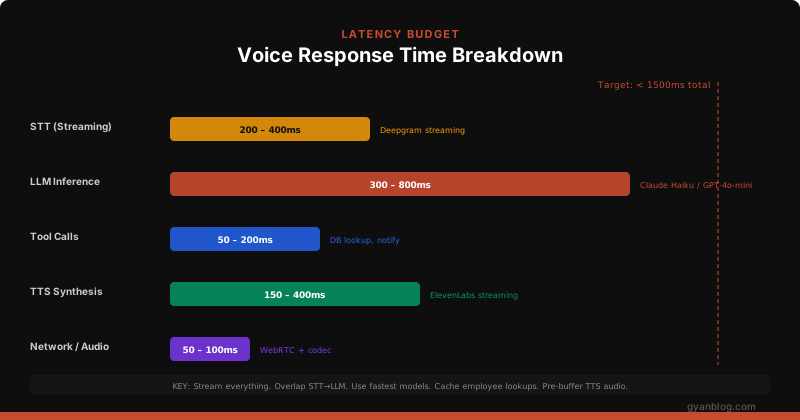
Optimization Strategies
# latency_optimizations.py

# 1. Overlap STT and LLM — start LLM as soon as utterance is detected
#    Don't wait for UtteranceEnd; use the "is_final" transcript chunks

# 2. Stream LLM → TTS — send each sentence to TTS as it's generated
async def stream_llm_to_tts(llm_response_stream, tts):
    buffer = ""
    for token in llm_response_stream:
        buffer += token
        # Send to TTS at sentence boundaries
        if buffer.rstrip().endswith((".", "!", "?", ":")):
            await tts.synthesize(buffer.strip())
            buffer = ""
    # Send remaining buffer
    if buffer.strip():
        await tts.synthesize(buffer.strip())

# 3. Cache employee lookups — don't hit the DB every time
from functools import lru_cache
import time

_employee_cache = {}
_cache_ttl = 300  # 5 minutes

def get_cached_employees():
    """Return cached employee list, refresh every 5 minutes."""
    if "data" not in _employee_cache or time.time() - _employee_cache["ts"] > _cache_ttl:
        _employee_cache["data"] = fetch_employees_from_db()
        _employee_cache["ts"] = time.time()
    return _employee_cache["data"]

# 4. Pre-warm TTS connection — open WebSocket before first response
# 5. Use regional endpoints — deploy STT/LLM/TTS in same region
# 6. Filler words — play "Let me check..." while waiting for tool results
The Filler Word Trick
When the bot needs to do a tool call (database lookup, Slack notification), there’s a natural pause. Instead of dead silence:
async def execute_tool_with_filler(tool_name: str, tool_input: dict, tts):
    """Play a filler phrase while executing a tool call."""
    fillers = {
        "lookup_employee": "Let me look that up for you.",
        "notify_host": "Great, I'll let them know you're here.",
        "print_badge": "Printing your badge now.",
    }

    filler = fillers.get(tool_name, "One moment please.")

    # Run filler TTS and tool call in parallel
    filler_task = asyncio.create_task(tts.synthesize(filler))
    tool_task = asyncio.create_task(execute_tool(tool_name, tool_input))

    await filler_task
    result = await tool_task
    return result
Telephony Integration
For a physical lobby phone, Twilio’s Media Streams gives you a WebSocket connection to a real phone:
# server.py — Twilio Media Streams + FastAPI

from fastapi import FastAPI, WebSocket
from fastapi.responses import Response

app = FastAPI()

# Twilio calls this URL when the phone rings
@app.post("/voice/incoming")
async def handle_incoming_call():
    """Return TwiML that connects the call to our WebSocket."""
    twiml = """<?xml version="1.0" encoding="UTF-8"?>
    <Response>
        <Connect>
            <Stream url="wss://your-server.com/voice/stream" />
        </Connect>
    </Response>"""
    return Response(content=twiml, media_type="application/xml")


@app.websocket("/voice/stream")
async def voice_stream(ws: WebSocket):
    """Handle bidirectional audio streaming with Twilio."""
    await ws.accept()

    session = CheckInSession(session_id="call_" + str(id(ws)))
    conversation = Conversation()
    stt = SpeechToText(
        on_transcript=lambda text, conf: handle_transcript(text, conf, conversation, ws),
        on_utterance_end=lambda: handle_utterance_end(conversation, ws),
    )
    await stt.connect()

    # Send initial greeting
    greeting = "Welcome to Acme Corp! Who are you here to see today?"
    await send_audio_to_caller(ws, greeting)

    try:
        async for message in ws.iter_json():
            event = message.get("event")

            if event == "media":
                # Decode Twilio's mulaw audio and forward to STT
                audio = base64.b64decode(message["media"]["payload"])
                pcm_audio = audioop.ulaw2lin(audio, 2)  # mulaw → PCM
                await stt.send_audio(pcm_audio)

            elif event == "stop":
                break
    finally:
        await stt.close()


async def send_audio_to_caller(ws: WebSocket, text: str):
    """Synthesize text and send audio back through Twilio stream."""
    tts = TextToSpeech(
        on_audio_chunk=lambda chunk: ws.send_json({
            "event": "media",
            "streamSid": stream_sid,
            "media": {"payload": base64.b64encode(
                audioop.lin2ulaw(chunk, 2)  # PCM → mulaw for Twilio
            ).decode()},
        })
    )
    await tts.synthesize(text)
The Full Check-In Server
Here’s how it all connects:
# main.py — Complete voicebot orchestrator

import asyncio
import json
from stt import SpeechToText
from tts import TextToSpeech
from llm import Conversation
from tools import lookup_employee, notify_host, print_badge
from states import CheckInSession, CheckInState

TOOL_HANDLERS = {
    "lookup_employee": lambda inp: lookup_employee(inp["query"]),
    "notify_host": lambda inp: notify_host(**inp),
    "print_badge": lambda inp: print_badge(**inp),
    "transfer_to_human": lambda inp: {"status": "transferred", "reason": inp["reason"]},
}


async def handle_checkin(audio_source, audio_sink):
    """Main voicebot loop for a single visitor session."""

    session = CheckInSession(session_id="session_001")
    conversation = Conversation()

    async def on_utterance_complete(text: str):
        """Called when the visitor finishes a sentence."""

        # Get LLM response (may include tool calls)
        reply, tool_calls = await conversation.respond(text)

        # Execute any tool calls
        for tool in tool_calls:
            handler = TOOL_HANDLERS.get(tool["name"])
            if handler:
                result = await handler(tool["input"])
                await conversation.add_tool_result(
                    tool["id"], json.dumps(result)
                )

                # If tools were called, get the follow-up response
                if tool_calls:
                    reply, more_tools = await conversation.respond("")
                    # Handle cascading tool calls if needed

        # Speak the reply to the visitor
        if reply:
            tts = TextToSpeech(on_audio_chunk=audio_sink.send)
            await tts.synthesize(reply)

    # Set up STT
    stt = SpeechToText(
        on_transcript=lambda text, conf: on_utterance_complete(text) if conf > 0.65 else None,
        on_utterance_end=lambda: None,  # Handled via transcript finality
    )
    await stt.connect()

    # Send greeting
    tts = TextToSpeech(on_audio_chunk=audio_sink.send)
    await tts.synthesize("Welcome to Acme Corp! Who are you here to see today?")

    # Stream audio from source to STT
    async for chunk in audio_source:
        await stt.send_audio(chunk)
Security and Privacy
Visitor check-in involves personal data. Handle it carefully.
Data Minimization
# Only store what you need, delete after the visit

async def create_visit_record(session: CheckInSession) -> dict:
    """Create an audit record with minimal PII."""
    return {
        "visit_id": generate_id(),
        "visitor_name": session.visitor_name,    # Needed for badge
        "host_id": session.host_id,              # Reference, not name
        "check_in_time": utcnow(),
        "check_out_time": None,
        "purpose": session.purpose,
        # Do NOT store: audio recordings, full transcripts, phone numbers
    }

async def cleanup_visit_data(visit_id: str, days_old: int = 30):
    """Delete visit records after retention period."""
    await db.execute(
        "DELETE FROM visits WHERE check_in_time < NOW() - INTERVAL '$1 days'",
        [days_old],
    )
Audio Recording Policy
- Don’t record audio by default. If you must (for compliance), inform the visitor at the start: “This call may be recorded for quality purposes.”
- Delete transcripts after check-in. The audit log only needs visitor name, host, and timestamp.
- Never log PII to application logs. Mask names and phone numbers.
Compliance Checklist
- [ ] GDPR consent (if operating in EU): Inform visitor of data processing
- [ ] Audio recording disclosure (varies by jurisdiction — some require two-party consent)
- [ ] Data retention policy: Auto-delete visit records after 30/60/90 days
- [ ] Access controls: Only security team can view visit logs
- [ ] Badge destruction: Visitors return badges at checkout
- [ ] No biometric storage: Don't store voiceprints or facial recognition data
Deployment and Monitoring
Health Checks
@app.get("/health")
async def health():
    """Check all voicebot dependencies."""
    checks = {
        "stt": await check_deepgram_connectivity(),
        "llm": await check_anthropic_connectivity(),
        "tts": await check_elevenlabs_connectivity(),
        "database": await check_db_connectivity(),
        "slack": await check_slack_connectivity(),
    }

    all_healthy = all(checks.values())
    return {
        "status": "healthy" if all_healthy else "degraded",
        "checks": checks,
    }
Key Metrics to Monitor
| Metric | Target | Alert Threshold |
|---|---|---|
| End-to-end latency (speech → response) | < 1.5s | > 2.5s |
| STT accuracy | > 90% | < 80% |
| Successful check-ins | > 85% | < 70% |
| Human transfer rate | < 15% | > 25% |
| Average session duration | < 90s | > 180s |
| Visitor satisfaction (post-visit survey) | > 4.0/5 | < 3.5/5 |
Logging for Debugging
import structlog

logger = structlog.get_logger()

async def on_transcript(text: str, confidence: float, session_id: str):
    logger.info(
        "stt_transcript",
        session_id=session_id,
        text=text,
        confidence=confidence,
        # Never log raw audio
    )

async def on_llm_response(reply: str, tools: list, latency_ms: float, session_id: str):
    logger.info(
        "llm_response",
        session_id=session_id,
        reply_length=len(reply),
        tool_calls=[t["name"] for t in tools],
        latency_ms=latency_ms,
    )
What Will Go Wrong (And How to Prepare)
From real deployments — the failure modes nobody writes about:
| Failure | Frequency | Fix |
|---|---|---|
| Visitor speaks a language the STT doesn’t support | Weekly | Detect language, fall back to human |
| Group arrives (3 people talking at once) | Daily | “I can check in one person at a time” |
| Child picks up the phone and babbles | Occasionally | Silence detection + human transfer |
| Visitor spells name letter-by-letter: “S-A-R-A-H” | Common | Train LLM to handle spelled-out names |
| Fire alarm goes off mid-check-in | Rare | Timeout + auto-terminate session |
| Twilio WebSocket drops mid-call | Rare | Reconnect logic + session recovery |
| Employee left the company but is still in directory | Weekly | Sync HR system daily + handle “no longer here” |
| Visitor is here for a delivery, not a meeting | Daily | Add “delivery” as a recognized purpose |
Key Takeaways
- Stream everything. STT, LLM, TTS — all streaming, all overlapping. Dead silence kills the experience.
- Use the fastest model. Haiku/GPT-4o-mini, not Opus/GPT-4. The conversation is simple — speed beats intelligence.
- Fuzzy match names. Phonetic matching + fuzzy string matching + spelling fallback. Names are the hardest part.
- Plan for failure. Every state needs an error path. The human transfer is your safety net — make it seamless.
- Latency budget is 1.5 seconds. If your total pipeline exceeds this, visitors will assume the bot is broken.
- Don’t record audio. Log structured events, not raw conversations. Privacy isn’t optional.
- The lobby is noisy. Invest in a good microphone and tune your confidence thresholds.
The voicebot doesn’t need to be perfect. It needs to handle 85% of check-ins without friction and hand off the remaining 15% to a human gracefully. That’s the bar.


