
vscode|June 24, 2020|2 min read

Microsoft Visual Studio Code - Must-have extensions for Developers

TL;DR

Essential VS Code extensions including Bracket Pair Colorizer, language support, and productivity tools that every developer should install.

Microsoft Visual Studio Code - Must-have extensions for Developers

Visual Studio Code is one of the awesome developer tools by Microsoft. Let’s discuss a few of the extensions which you must have installed in your IDE.

Here are the extensions:

1. Bracket Pair Colorizer

Bracket Pair Colorizer{:target=“_blank”} is one of the most useful extensions.

This extension shows matching bracket-pairs with colors. Multiple brackets are shown in a different color. When your code grows bigger and bigger, having code brackets in color is going to help a lot in visualizing the code block.

Bracket pair colorizer Bracket pair colorizer Bracket pair colorizer

2. Highlight Matching Tag

Highlight Matching Tag{:target=“_blank”} highlights the matching opening and closing tag. This extension officially supports ReactJs and Html, but other javascript like vue, angular, etc also works.
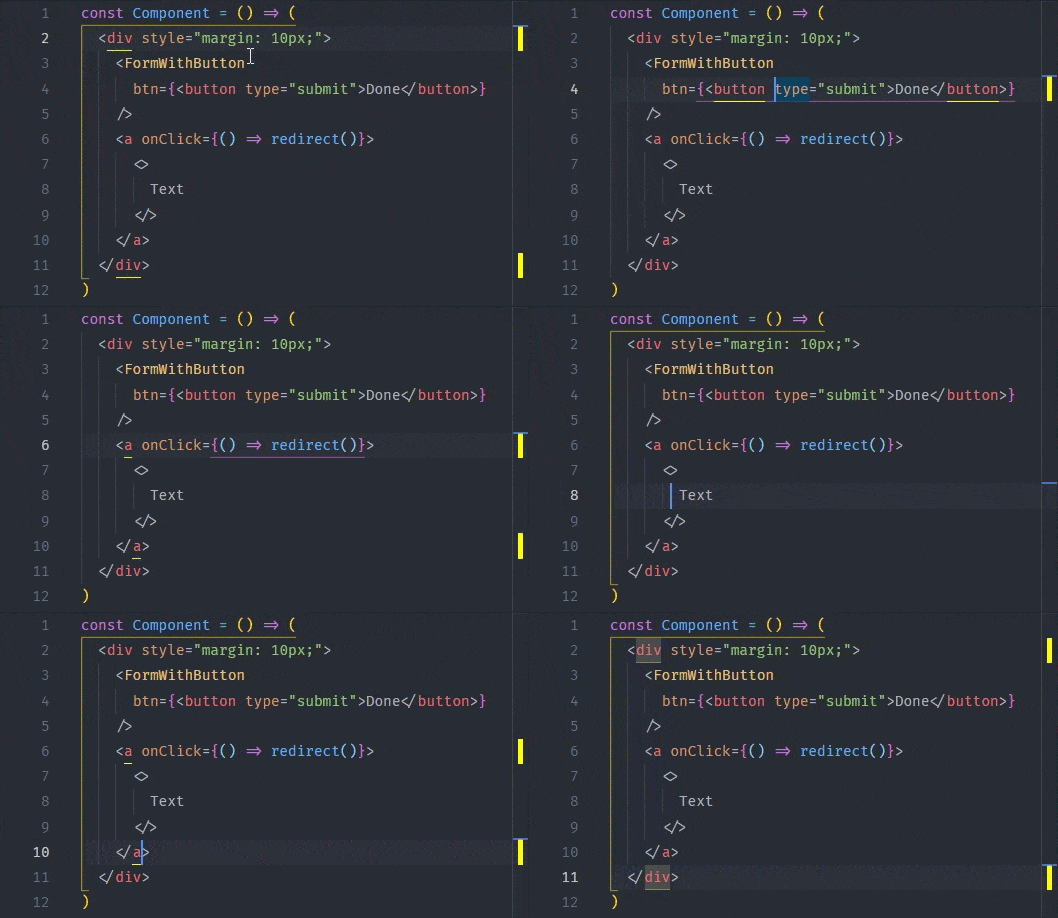
Highlight Matching Tag

This extension is also very helpful if you are making a screencast for some online tutorial videos or lectures.

3. Indent Rainbow

Indent Rainbow{:target=“_blank”} colorizes the code indentation. It helps you in differentiating different code indent blocks.

Indent Rainbow

4. Live Server Preview and Live Server

Live Server Preview{:target=“_blank”} (Live Server)[https://marketplace.visualstudio.com/items?itemName=ritwickdey.LiveServer]

They both are a live server with live-reloading enabled. It can serve your HTML files with the localhost server.
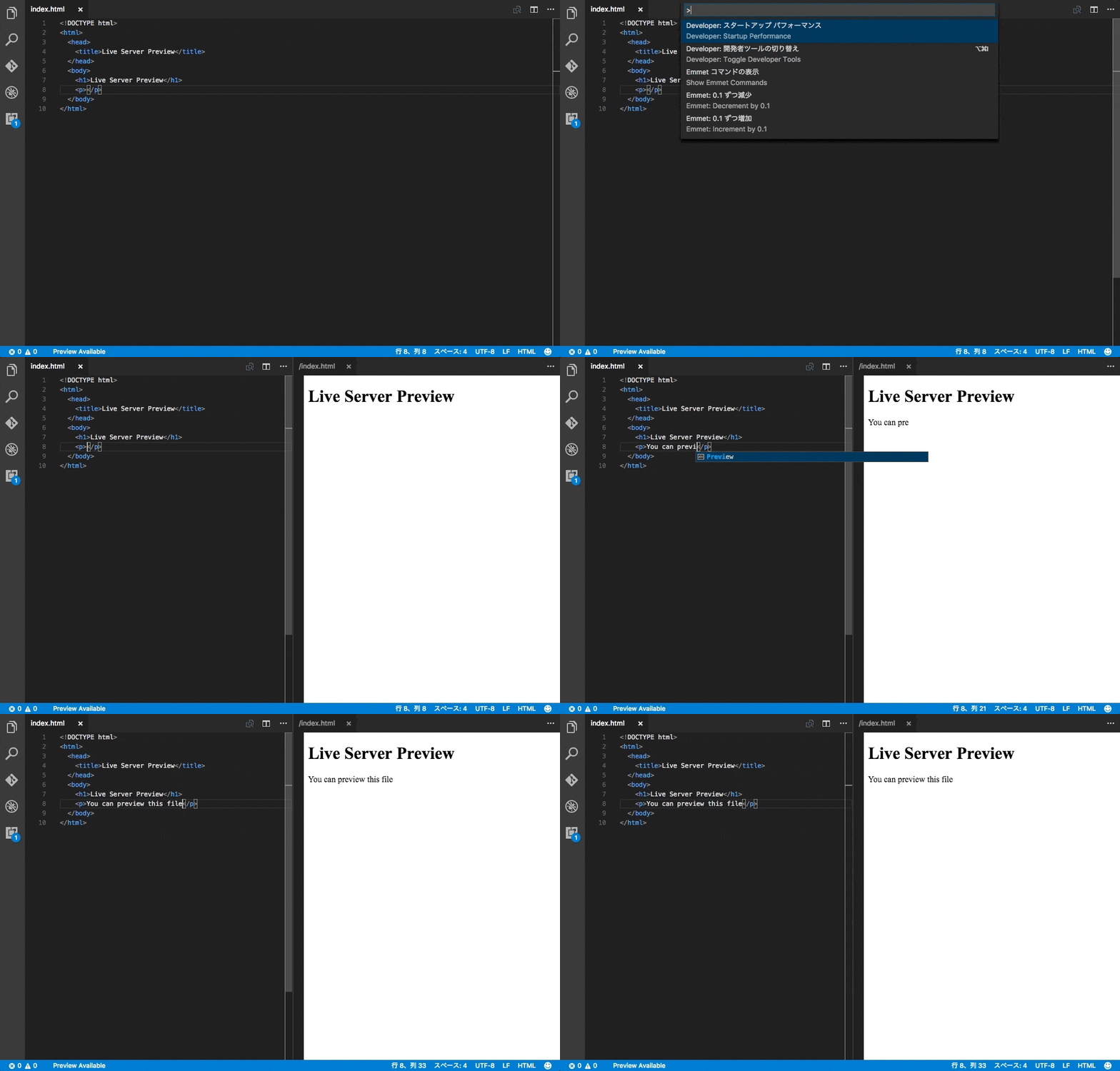
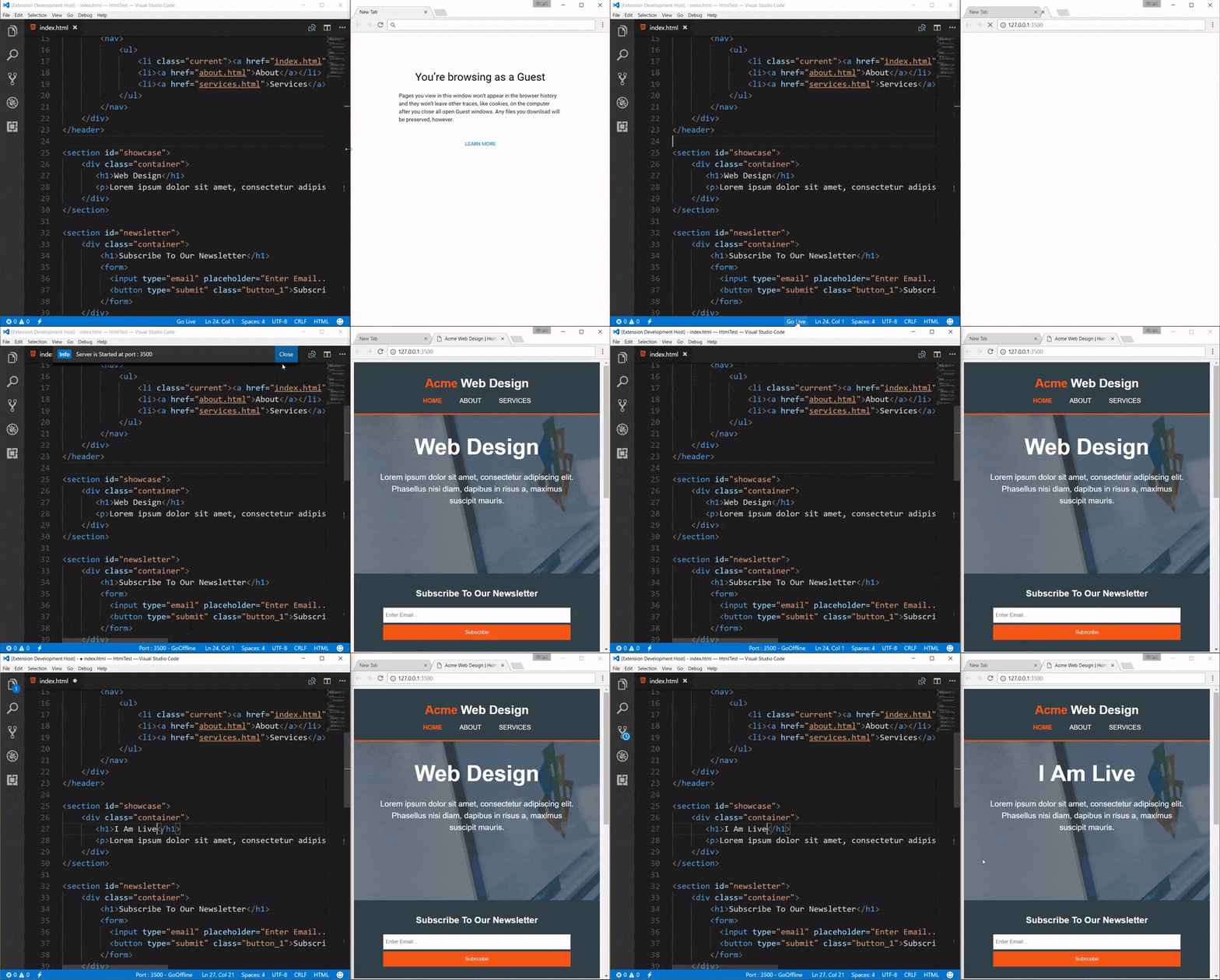
Live Server preview Live Server preview

5. ES7 React Native Snippets

ES7 React Native Snippets{:target=“_blank”} provides javascript and ReactJS/Redux snippets.

For example, just type rcc and it will write up the React Component in class, like below:

import React, { Component } from 'react'

export default class Book extends Component {
    render() {
        return (
            <div>
                
            </div>
        )
    }
}

This is a very-very-very useful extension if you are working on specially ReactJs.

6. Prettier Code Formatter

Prettier Code Formatter{:target=“_blank”} is another very useful extension.

It works on a bunch of languages. It’s a code formatter with pre-configured settings. It helps format your code with some predefined rules. It helps to maintain your code with the same code style across the team.

7. VS Code Styled Components

VS Code Styled Components{:target=“_blank”} is a syntax highlighting and Intellisense for styled-components.

It helps you differentiate styled-components in your javascript and typescript code.

VSCode styled components

Thanks for reading…

Related Posts

VS-Code - How to Debug and pass Command Line Arguments via Launch Config

VS-Code - How to Debug and pass Command Line Arguments via Launch Config

Introduction In this post, I will take example for Python project. And how we…

VS-Code - How to put vscode executable in system path and how to open source code directly in vscode

VS-Code - How to put vscode executable in system path and how to open source code directly in vscode

Introduction VS code is an excellent free IDE for maany types of programming…

How to solve java issue - could not load main class - Visual Studio Code

How to solve java issue - could not load main class - Visual Studio Code

Assuming you have a java project and is using Visual Studio Code as IDE. All of…

Visual Studio Code - How to associate file extension to a known programming language

Visual Studio Code - How to associate file extension to a known programming language

Problem Statement I have a drupal module, where there is a file of extension…

Claude Code Skills — Build a Better Engineering Workflow with AI-Powered Code Reviews, Security Scans, and More

Claude Code Skills — Build a Better Engineering Workflow with AI-Powered Code Reviews, Security Scans, and More

Most developers use Claude Code like a search engine — ask a question, get an…

Building an AI Voicebot for Visitor Check-In — A Practical Guide to Handling the Messy Parts

Building an AI Voicebot for Visitor Check-In — A Practical Guide to Handling the Messy Parts

Every office lobby has the same problem: a visitor walks in, nobody’s at the…

Latest Posts

Claude Code Skills — Build a Better Engineering Workflow with AI-Powered Code Reviews, Security Scans, and More

Claude Code Skills — Build a Better Engineering Workflow with AI-Powered Code Reviews, Security Scans, and More

Most developers use Claude Code like a search engine — ask a question, get an…

Building an AI Voicebot for Visitor Check-In — A Practical Guide to Handling the Messy Parts

Building an AI Voicebot for Visitor Check-In — A Practical Guide to Handling the Messy Parts

Every office lobby has the same problem: a visitor walks in, nobody’s at the…

Server Security Best Practices — Complete Hardening Guide for Production Systems

Server Security Best Practices — Complete Hardening Guide for Production Systems

Every breach post-mortem tells the same story: an unpatched service, a…

Staff Engineer Study Plan for MAANG Interviews — The Complete 12-Week Roadmap

Staff Engineer Study Plan for MAANG Interviews — The Complete 12-Week Roadmap

If you’re a Senior Engineer (L5) preparing for Staff (L6+) roles at MAANG…

XSS and CSRF Explained — The Complete Guide with Real Attack Examples and Defenses

XSS and CSRF Explained — The Complete Guide with Real Attack Examples and Defenses

XSS and CSRF have been in the OWASP Top 10 for over a decade. They’re among the…

OWASP Top 10 (2021) — Every Vulnerability Explained with Code

OWASP Top 10 (2021) — Every Vulnerability Explained with Code

The OWASP Top 10 is the industry standard for web application security risks. If…