


Most prompt engineering advice on the internet is useless in production. “Be specific.” “Give context.” “Use clear instructions.” Sure — but what does that actually look like when you’re building a system that processes 50,000 customer tickets a day, where a bad output means a real customer gets a wrong answer?
I’ve shipped LLM-powered features across multiple products over the past two years. Here are the six patterns I keep coming back to — not because they’re clever, but because they survive contact with real users, real edge cases, and real cost constraints.
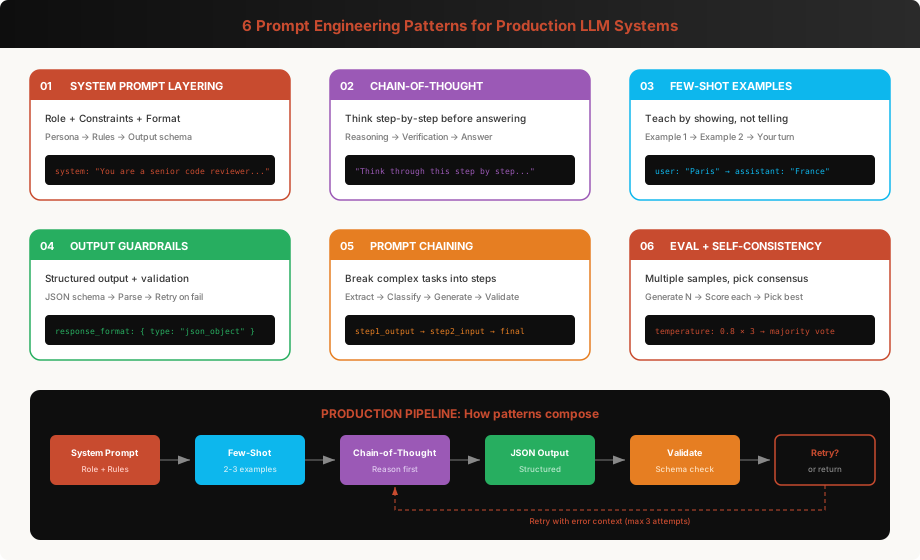
Pattern 1: System Prompt Layering
The system prompt is where most production value lives. It’s not one blob of text — it’s a structured document with distinct layers, each serving a specific purpose.
The Three-Layer System Prompt
function buildSystemPrompt(config: {
  role: string;
  domain: string;
  constraints: string[];
  outputFormat: object;
  examples?: { input: string; output: string }[];
}): string {
  return `
## Role
You are ${config.role}. You specialize in ${config.domain}.

## Constraints
${config.constraints.map((c, i) => `${i + 1}. ${c}`).join('\n')}

## Output Format
You MUST respond with valid JSON matching this schema:
${JSON.stringify(config.outputFormat, null, 2)}

Do not include any text before or after the JSON object.
${config.examples ? `
## Examples
${config.examples.map(ex => `
Input: ${ex.input}
Output: ${ex.output}
`).join('\n')}` : ''}`.trim();
}
Here’s what a production system prompt actually looks like for a code review assistant:
const codeReviewSystemPrompt = buildSystemPrompt({
  role: 'a senior software engineer performing code reviews',
  domain: 'TypeScript, Node.js, and React applications',
  constraints: [
    'Only comment on issues that would cause bugs, security vulnerabilities, or significant performance problems.',
    'Do NOT comment on style preferences, naming conventions, or formatting.',
    'If the code is fine, return an empty findings array. Do not invent issues.',
    'Rate severity as "critical", "warning", or "info".',
    'For each finding, suggest a specific fix — not just a description of the problem.',
    'Never suggest adding comments or documentation unless there is a genuine ambiguity that would mislead future developers.',
  ],
  outputFormat: {
    findings: [{
      file: 'string — relative file path',
      line: 'number — line number',
      severity: '"critical" | "warning" | "info"',
      issue: 'string — what is wrong',
      suggestion: 'string — specific code fix',
    }],
    summary: 'string — one sentence overall assessment',
  },
});
Why Layering Matters
Without explicit layers, the model conflates instructions. It’ll start inventing issues to seem helpful, or bury the output format in a paragraph of explanation. The layers create cognitive compartments — the model processes role identity, behavioral rules, and output structure as separate concerns.
The constraint layer is where you fight hallucination. Every production prompt I ship has at least one constraint that says “if you don’t know, say so” or “if there are no issues, return empty.” Without this, LLMs default to being helpful — which in production means making stuff up.
# Real example: a classifier that was hallucinating categories
# Before (broken):
system = "Classify this support ticket into a category."

# After (works):
system = """Classify this support ticket into EXACTLY ONE of these categories:
- billing
- shipping
- product_defect
- account_access
- other

If the ticket does not clearly fit any category, use "other".
Do NOT create new categories. Do NOT use multiple categories.
Respond with only the category name, nothing else."""
That “Do NOT create new categories” line saved us from a classifier that was generating categories like “billing_and_also_shipping” and “frustrated_customer_general.”
Pattern 2: Chain-of-Thought for Complex Reasoning
Chain-of-thought (CoT) isn’t just an academic trick. It’s the difference between a model that gets math wrong 40% of the time and one that gets it wrong 5% of the time. But in production, you need structured CoT — not just “think step by step.”
import Anthropic from '@anthropic-ai/sdk';

const anthropic = new Anthropic();

interface PricingAnalysis {
  reasoning: {
    step: string;
    conclusion: string;
  }[];
  recommendation: 'approve' | 'reject' | 'escalate';
  confidence: number;
  explanation: string;
}

async function analyzePricingRequest(request: {
  currentPrice: number;
  requestedDiscount: number;
  customerTier: string;
  dealSize: number;
  competitorMentioned: boolean;
}): Promise<PricingAnalysis> {
  const response = await anthropic.messages.create({
    model: 'claude-sonnet-4-6-20250514',
    max_tokens: 1024,
    system: `You are a pricing analyst for a B2B SaaS company.

## Task
Analyze discount requests and recommend approve, reject, or escalate.

## Reasoning Process
You MUST think through these steps in order:
1. Check if the discount exceeds tier-allowed maximum
2. Calculate the impact on deal margin
3. Assess strategic value (deal size, competitor pressure)
4. Make recommendation with confidence score (0-1)

## Rules
- Enterprise tier: up to 30% discount allowed
- Growth tier: up to 15% discount allowed
- Starter tier: up to 5% discount allowed
- Deals over $100K can get +10% additional discretion
- If confidence < 0.7, always escalate

## Output
Respond with valid JSON matching PricingAnalysis schema.`,
    messages: [{
      role: 'user',
      content: `Analyze this discount request:
- Current price: $${request.currentPrice}/mo
- Requested discount: ${request.requestedDiscount}%
- Customer tier: ${request.customerTier}
- Annual deal value: $${request.dealSize}
- Competitor mentioned: ${request.competitorMentioned}`
    }],
  });

  return JSON.parse(response.content[0].type === 'text'
    ? response.content[0].text : '');
}
The Hidden Benefit: Debuggability
The reasoning array in the output isn’t just for accuracy — it’s for debugging. When a pricing decision is wrong, you can look at the reasoning steps and see exactly where the model went off track. Was it the tier check? The margin calculation? The strategic assessment?
In production, I log every reasoning chain. When accuracy drops, I grep the reasoning for patterns:
# Analyzing failure patterns in CoT reasoning
import json
from collections import Counter

def analyze_failures(log_file: str) -> dict:
    failures = []

    with open(log_file) as f:
        for line in f:
            entry = json.loads(line)
            if entry['actual'] != entry['expected']:
                # Extract which reasoning step went wrong
                for step in entry['reasoning']:
                    if 'incorrect' in step.get('_eval_note', ''):
                        failures.append(step['step'])

    failure_counts = Counter(failures)
    return {
        'total_failures': len(failures),
        'by_step': failure_counts.most_common(),
        'top_failure': failure_counts.most_common(1)[0] if failures else None,
    }

# Output:
# {'total_failures': 47,
#  'by_step': [('margin_calculation', 23), ('tier_check', 15), ('strategic_value', 9)],
#  'top_failure': ('margin_calculation', 23)}
#
# Now I know to add more examples of margin calculations to my prompt
Pattern 3: Few-Shot Examples — The Art of Teaching by Showing
Few-shot examples are the most underrated prompt engineering technique. A good example is worth a hundred words of instruction. But in production, you need to be strategic about which examples you include.
Dynamic Few-Shot Selection
Don’t hard-code your examples. Select them based on the input:
import { cosineSimilarity } from './utils/math';
import { getEmbedding } from './utils/embeddings';

interface Example {
  input: string;
  output: string;
  embedding: number[];
  category: string;
}

class FewShotSelector {
  private examples: Example[] = [];

  constructor(private maxExamples: number = 3) {}

  async addExample(input: string, output: string, category: string) {
    const embedding = await getEmbedding(input);
    this.examples.push({ input, output, embedding, category });
  }

  async selectExamples(query: string): Promise<Example[]> {
    const queryEmbedding = await getEmbedding(query);

    // Score by semantic similarity
    const scored = this.examples.map(ex => ({
      ...ex,
      score: cosineSimilarity(queryEmbedding, ex.embedding),
    }));

    // Sort by similarity, but ensure category diversity
    scored.sort((a, b) => b.score - a.score);

    const selected: Example[] = [];
    const usedCategories = new Set<string>();

    for (const ex of scored) {
      if (selected.length >= this.maxExamples) break;

      // Prefer diverse categories — don't pick 3 examples from same category
      if (usedCategories.has(ex.category) && selected.length < this.maxExamples - 1) {
        continue;
      }

      selected.push(ex);
      usedCategories.add(ex.category);
    }

    return selected;
  }

  formatForPrompt(examples: Example[]): string {
    return examples.map((ex, i) =>
      `Example ${i + 1}:\nInput: ${ex.input}\nOutput: ${ex.output}`
    ).join('\n\n');
  }
}

// Usage
const selector = new FewShotSelector(3);

await selector.addExample(
  'The checkout button is broken on mobile',
  '{"category": "bug", "priority": "high", "component": "checkout", "platform": "mobile"}',
  'bug'
);
await selector.addExample(
  'Can we add dark mode to the dashboard?',
  '{"category": "feature_request", "priority": "low", "component": "dashboard", "platform": "web"}',
  'feature'
);
await selector.addExample(
  'App crashes when uploading files larger than 10MB',
  '{"category": "bug", "priority": "critical", "component": "upload", "platform": "all"}',
  'bug'
);

// For a new input, select the most relevant examples
const examples = await selector.selectExamples('Dark mode would be great for the settings page');
// Returns the dark mode example first (most similar), then diverse others
The Golden Rule: Include One Edge Case
Always include at least one example that shows what to do with ambiguous or tricky input. This is the example that does the most work:
# The edge case example prevents the most failures
examples = [
    # Normal case
    {
        "input": "I want to cancel my subscription",
        "output": {"intent": "cancellation", "urgency": "medium", "action": "route_to_retention"}
    },
    # Normal case
    {
        "input": "How do I update my payment method?",
        "output": {"intent": "billing_update", "urgency": "low", "action": "send_help_article"}
    },
    # EDGE CASE — this one prevents 60% of misclassifications
    {
        "input": "I love your product but this one feature is driving me crazy and I might leave",
        "output": {"intent": "feedback_with_churn_risk", "urgency": "high", "action": "route_to_retention"},
        "_note": "Mixed sentiment — positive overall but churn signal. Must catch the risk."
    }
]
Pattern 4: Output Guardrails — Parse, Validate, Retry
LLMs will break your output format. Not often — maybe 2-5% of the time. But at scale, 2% of 100,000 daily calls is 2,000 broken responses. You need guardrails.
import { z } from 'zod';
import Anthropic from '@anthropic-ai/sdk';

const anthropic = new Anthropic();

// Define the expected output schema with Zod
const TicketAnalysis = z.object({
  category: z.enum(['billing', 'shipping', 'product', 'account', 'other']),
  priority: z.enum(['critical', 'high', 'medium', 'low']),
  sentiment: z.number().min(-1).max(1),
  summary: z.string().max(200),
  suggestedAction: z.string(),
});

type TicketAnalysis = z.infer<typeof TicketAnalysis>;

async function analyzeTicket(
  ticketText: string,
  maxRetries: number = 3
): Promise<TicketAnalysis> {
  let lastError: Error | null = null;

  for (let attempt = 0; attempt < maxRetries; attempt++) {
    try {
      const messages: Anthropic.MessageParam[] = [
        { role: 'user', content: `Analyze this support ticket:\n\n${ticketText}` },
      ];

      // On retry, include the previous error so the model can self-correct
      if (lastError && attempt > 0) {
        messages.push(
          { role: 'assistant', content: 'I apologize for the formatting error. Let me try again.' },
          { role: 'user', content: `Your previous response had this error: ${lastError.message}\n\nPlease fix it and respond with valid JSON only.` }
        );
      }

      const response = await anthropic.messages.create({
        model: 'claude-sonnet-4-6-20250514',
        max_tokens: 512,
        system: `You are a support ticket analyzer. Respond ONLY with valid JSON.
Schema: { category, priority, sentiment (-1 to 1), summary (max 200 chars), suggestedAction }
Categories: billing, shipping, product, account, other
Priorities: critical, high, medium, low`,
        messages,
      });

      const text = response.content[0].type === 'text' ? response.content[0].text : '';

      // Strip markdown code fences if present
      const jsonStr = text.replace(/```json?\n?/g, '').replace(/```\n?/g, '').trim();

      // Parse and validate
      const parsed = JSON.parse(jsonStr);
      const validated = TicketAnalysis.parse(parsed);

      return validated;

    } catch (error) {
      lastError = error as Error;
      console.warn(`Attempt ${attempt + 1} failed:`, error.message);

      if (attempt === maxRetries - 1) {
        // Final fallback: return a safe default
        console.error('All retries exhausted, returning fallback');
        return {
          category: 'other',
          priority: 'medium',
          sentiment: 0,
          summary: ticketText.slice(0, 200),
          suggestedAction: 'Route to human agent for manual review',
        };
      }
    }
  }

  // TypeScript requires this, but we'll never reach here
  throw new Error('Unreachable');
}
The Retry Budget
In production, I set strict retry budgets:
                    ┌─────────────────────────────┐
                    │     Attempt 1 (normal)       │
                    │  Model: claude-sonnet        │
                    │  Temp: 0.1                   │
                    └──────────┬──────────────────┘
                               │ Parse fails?
                    ┌──────────▼──────────────────┐
                    │     Attempt 2 (with error)   │
                    │  Include error in context    │
                    │  Temp: 0.0 (deterministic)   │
                    └──────────┬──────────────────┘
                               │ Still fails?
                    ┌──────────▼──────────────────┐
                    │     Attempt 3 (fallback)     │
                    │  Simplified prompt           │
                    │  Smaller output schema       │
                    └──────────┬──────────────────┘
                               │ Still fails?
                    ┌──────────▼──────────────────┐
                    │     Safe Default             │
                    │  Log for human review        │
                    │  Flag for eval dataset       │
                    └─────────────────────────────┘
Critical insight: On retry, include the previous error in the prompt. Models are excellent at self-correcting when they know what went wrong. My retry success rate is ~92% on the second attempt just by saying “Your previous response had this error: [error]. Fix it.”
Pattern 5: Prompt Chaining — Decompose, Don’t Mega-Prompt
This is the pattern that improved my accuracy the most. Instead of one giant prompt that does everything, break the task into a pipeline of focused steps.
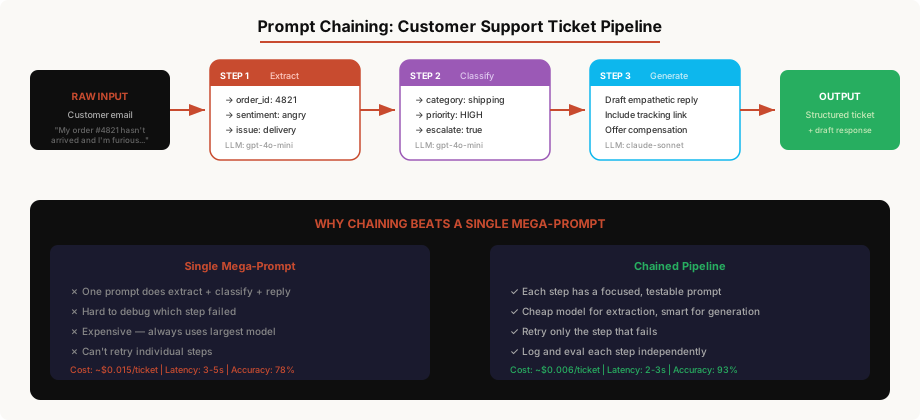
Real Implementation: Content Moderation Pipeline
import Anthropic from '@anthropic-ai/sdk';

const anthropic = new Anthropic();

// Step 1: Extract — cheap model, structured output
async function extractContent(post: string) {
  const response = await anthropic.messages.create({
    model: 'claude-haiku-4-5-20251001',  // Cheap and fast
    max_tokens: 256,
    system: `Extract structured data from this social media post.
Return JSON: { "language": string, "topics": string[], "mentions_people": boolean, "contains_urls": boolean, "word_count": number }`,
    messages: [{ role: 'user', content: post }],
  });

  return JSON.parse(response.content[0].text);
}

// Step 2: Classify — cheap model, focused task
async function classifyRisk(post: string, extracted: any) {
  const response = await anthropic.messages.create({
    model: 'claude-haiku-4-5-20251001',
    max_tokens: 128,
    system: `You are a content safety classifier. Given a post and its metadata, classify the risk level.

Risk levels:
- "safe" — no issues
- "review" — potentially problematic, needs human check
- "block" — clearly violates policy (hate speech, threats, explicit content)

Return JSON: { "risk": "safe"|"review"|"block", "flags": string[], "confidence": number }

Be conservative: if unsure, classify as "review", not "block".`,
    messages: [{
      role: 'user',
      content: `Post: "${post}"\nMetadata: ${JSON.stringify(extracted)}`
    }],
  });

  return JSON.parse(response.content[0].text);
}

// Step 3: Generate explanation — only for flagged content, use smarter model
async function generateExplanation(
  post: string,
  classification: any
): Promise<string> {
  if (classification.risk === 'safe') return '';

  const response = await anthropic.messages.create({
    model: 'claude-sonnet-4-6-20250514',  // Smarter model for nuanced explanation
    max_tokens: 256,
    system: `Write a brief, professional explanation for why this content was flagged.
This explanation will be shown to the content author.
Be specific about which part of their content triggered the flag.
Be respectful — assume good intent unless the violation is obvious.`,
    messages: [{
      role: 'user',
      content: `Post: "${post}"\nClassification: ${JSON.stringify(classification)}`
    }],
  });

  return response.content[0].text;
}

// The full pipeline
async function moderateContent(post: string) {
  // Step 1: Extract (Haiku — ~$0.0001)
  const extracted = await extractContent(post);

  // Step 2: Classify (Haiku — ~$0.0001)
  const classification = await classifyRisk(post, extracted);

  // Step 3: Explain — only if needed (Sonnet — ~$0.003)
  const explanation = await generateExplanation(post, classification);

  return {
    extracted,
    classification,
    explanation,
    // Total cost for safe content: ~$0.0002
    // Total cost for flagged content: ~$0.0032
    // vs single mega-prompt on Sonnet: ~$0.005 every time
  };
}
Why This Beats a Single Prompt
-
Cost: 95% of content is safe. You process it with Haiku at $0.0002/post. Only the 5% that gets flagged touches the expensive model. Total cost drops 80%.
-
Accuracy: Each step is simple enough that a small model nails it. The extraction step is basically structured data parsing — Haiku handles it perfectly. Classification with extracted metadata is more accurate than asking one model to do everything at once.
-
Debuggability: When moderation goes wrong, you know exactly which step failed. Was the extraction wrong? The classification? The explanation? Each step has its own logs and eval metrics.
-
Latency: Steps 1 and 2 can run in parallel when they don’t depend on each other. Even sequential, small-model calls are faster than one large-model call.
Pattern 6: Eval-Driven Iteration
This is the pattern that separates hobby projects from production systems. You don’t guess whether your prompt is good — you measure it.
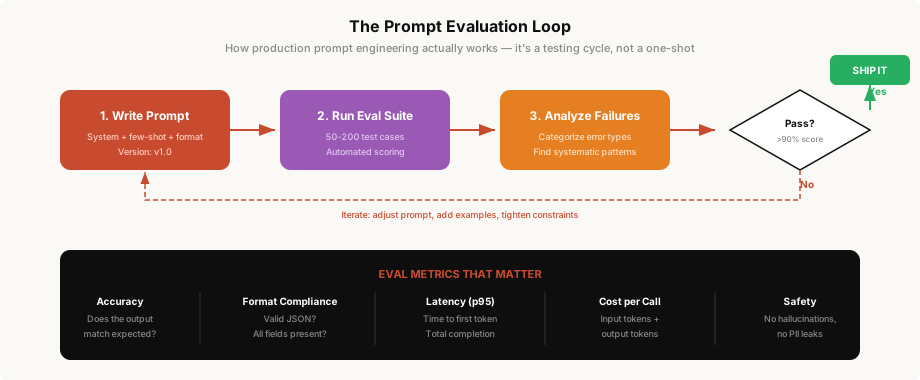
Building an Eval Suite
import json
import asyncio
from dataclasses import dataclass
from anthropic import AsyncAnthropic

client = AsyncAnthropic()

@dataclass
class EvalCase:
    input: str
    expected_output: dict
    category: str  # For stratified analysis
    difficulty: str  # "easy", "medium", "hard"

@dataclass
class EvalResult:
    case: EvalCase
    actual_output: dict | None
    passed: bool
    error: str | None
    latency_ms: float
    input_tokens: int
    output_tokens: int

class PromptEvaluator:
    def __init__(self, system_prompt: str, model: str = "claude-sonnet-4-6-20250514"):
        self.system_prompt = system_prompt
        self.model = model
        self.results: list[EvalResult] = []

    async def run_case(self, case: EvalCase) -> EvalResult:
        import time
        start = time.time()

        try:
            response = await client.messages.create(
                model=self.model,
                max_tokens=512,
                system=self.system_prompt,
                messages=[{"role": "user", "content": case.input}],
            )

            latency = (time.time() - start) * 1000
            text = response.content[0].text
            actual = json.loads(text.strip().strip('`').removeprefix('json\n'))

            # Check if output matches expected
            passed = self._check_match(actual, case.expected_output)

            return EvalResult(
                case=case,
                actual_output=actual,
                passed=passed,
                error=None,
                latency_ms=latency,
                input_tokens=response.usage.input_tokens,
                output_tokens=response.usage.output_tokens,
            )

        except Exception as e:
            return EvalResult(
                case=case,
                actual_output=None,
                passed=False,
                error=str(e),
                latency_ms=(time.time() - start) * 1000,
                input_tokens=0,
                output_tokens=0,
            )

    def _check_match(self, actual: dict, expected: dict) -> bool:
        """Flexible matching — checks key fields, ignores extra fields."""
        for key, expected_val in expected.items():
            if key not in actual:
                return False
            if isinstance(expected_val, str) and actual[key] != expected_val:
                return False
            if isinstance(expected_val, (int, float)):
                if abs(actual[key] - expected_val) > 0.1:
                    return False
        return True

    async def run_suite(self, cases: list[EvalCase], concurrency: int = 10):
        semaphore = asyncio.Semaphore(concurrency)

        async def bounded_run(case):
            async with semaphore:
                return await self.run_case(case)

        self.results = await asyncio.gather(*[bounded_run(c) for c in cases])

    def report(self) -> dict:
        total = len(self.results)
        passed = sum(1 for r in self.results if r.passed)
        errors = sum(1 for r in self.results if r.error)

        # Stratified accuracy
        by_category = {}
        for r in self.results:
            cat = r.case.category
            if cat not in by_category:
                by_category[cat] = {"total": 0, "passed": 0}
            by_category[cat]["total"] += 1
            if r.passed:
                by_category[cat]["passed"] += 1

        by_difficulty = {}
        for r in self.results:
            diff = r.case.difficulty
            if diff not in by_difficulty:
                by_difficulty[diff] = {"total": 0, "passed": 0}
            by_difficulty[diff]["total"] += 1
            if r.passed:
                by_difficulty[diff]["passed"] += 1

        latencies = [r.latency_ms for r in self.results if not r.error]
        total_tokens = sum(r.input_tokens + r.output_tokens for r in self.results)

        return {
            "accuracy": passed / total if total else 0,
            "pass_rate": f"{passed}/{total}",
            "error_rate": errors / total if total else 0,
            "by_category": {
                k: v["passed"] / v["total"]
                for k, v in by_category.items()
            },
            "by_difficulty": {
                k: v["passed"] / v["total"]
                for k, v in by_difficulty.items()
            },
            "latency_p50": sorted(latencies)[len(latencies) // 2] if latencies else 0,
            "latency_p95": sorted(latencies)[int(len(latencies) * 0.95)] if latencies else 0,
            "total_tokens": total_tokens,
            "est_cost": total_tokens * 0.000003,  # Rough estimate
        }
Using the Eval Suite
# Define your test cases
cases = [
    EvalCase(
        input="My order #1234 never arrived and it's been 3 weeks",
        expected_output={"category": "shipping", "priority": "high", "sentiment": -0.7},
        category="shipping",
        difficulty="easy",
    ),
    EvalCase(
        input="Love the product! Quick q — can I upgrade mid-cycle?",
        expected_output={"category": "billing", "priority": "low", "sentiment": 0.8},
        category="billing",
        difficulty="easy",
    ),
    EvalCase(
        input="This is ridiculous. Third time the app crashed during checkout. I'm switching to CompetitorX tomorrow.",
        expected_output={"category": "product", "priority": "critical", "sentiment": -0.9},
        category="product",
        difficulty="medium",
    ),
    # The hard edge case
    EvalCase(
        input="Hey just wanted to say thanks for fixing that bug, but also my invoice from last month seems wrong and the app is a bit slow today",
        expected_output={"category": "billing", "priority": "medium", "sentiment": 0.2},
        category="multi_issue",
        difficulty="hard",
    ),
    # ... 100+ more cases
]

# Run eval
evaluator = PromptEvaluator(system_prompt=ticket_classifier_v1)
await evaluator.run_suite(cases)

report = evaluator.report()
print(json.dumps(report, indent=2))

# Output:
# {
#   "accuracy": 0.87,
#   "pass_rate": "87/100",
#   "by_category": {
#     "shipping": 0.95,
#     "billing": 0.90,
#     "product": 0.85,
#     "multi_issue": 0.60    <-- This is where you focus next
#   },
#   "by_difficulty": {
#     "easy": 0.97,
#     "medium": 0.88,
#     "hard": 0.62
#   },
#   "latency_p50": 340,
#   "latency_p95": 890
# }
The eval tells you exactly where to focus. Multi-issue tickets at 60% accuracy? Add more multi-issue examples to your few-shot set. Hard cases at 62%? Maybe you need chain-of-thought for those specifically.
Version Your Prompts
// prompts/ticket-classifier.ts
export const TICKET_CLASSIFIER_PROMPT = {
  version: '2.3.1',
  changelog: [
    '2.3.1 — Added multi-issue edge case examples, accuracy 60% → 82%',
    '2.3.0 — Switched to structured CoT for hard cases',
    '2.2.0 — Added sentiment scoring',
    '2.1.0 — Tightened category constraints, stopped hallucinating categories',
    '2.0.0 — Migrated from GPT-4 to Claude Sonnet',
    '1.0.0 — Initial prompt',
  ],
  system: `...`,
  fewShotExamples: [...],
  evalBaseline: {
    accuracy: 0.91,
    latencyP95: 750,
    costPer1K: 0.45,
  },
};
Every prompt change gets a version bump. Every version has a baseline eval score. If the new version doesn’t beat the baseline, it doesn’t ship.
Putting It All Together: A Production Template
Here’s the template I use when building a new LLM-powered feature:
// template: production LLM feature

import { z } from 'zod';
import Anthropic from '@anthropic-ai/sdk';

const anthropic = new Anthropic();

// 1. Define output schema (Pattern 4)
const OutputSchema = z.object({
  // ... your schema here
});

// 2. Build layered system prompt (Pattern 1)
const SYSTEM_PROMPT = `
## Role
...

## Constraints
...

## Output Format
...
`.trim();

// 3. Prepare few-shot examples (Pattern 3)
const EXAMPLES = [
  // Include 2-3 examples, at least one edge case
];

// 4. Implement with retries (Pattern 4)
async function processInput(input: string) {
  const fewShotMessages: Anthropic.MessageParam[] = EXAMPLES.flatMap(ex => [
    { role: 'user' as const, content: ex.input },
    { role: 'assistant' as const, content: JSON.stringify(ex.output) },
  ]);

  for (let attempt = 0; attempt < 3; attempt++) {
    try {
      const response = await anthropic.messages.create({
        model: 'claude-sonnet-4-6-20250514',
        max_tokens: 1024,
        system: SYSTEM_PROMPT,
        messages: [
          ...fewShotMessages,
          { role: 'user', content: input },
        ],
      });

      const text = response.content[0].type === 'text' ? response.content[0].text : '';
      const json = text.replace(/```json?\n?/g, '').replace(/```/g, '').trim();
      return OutputSchema.parse(JSON.parse(json));

    } catch (error) {
      if (attempt === 2) {
        // Log failure, return safe default
        console.error('LLM processing failed after 3 attempts', { input, error });
        return getDefaultOutput(input);
      }
    }
  }
}

// 5. Write eval suite (Pattern 6)
// See eval pattern above — run before every prompt change
The Uncomfortable Truth
Here’s what nobody tells you about prompt engineering in production:
Your prompt will degrade over time. Not because the prompt changes, but because the input distribution shifts. Customers start using your product differently. New edge cases emerge. The model provider updates the model (even patch versions can change behavior). You need ongoing eval, not a one-time test.
The best prompt is the one you can debug. Clever prompts that produce magical results but can’t be debugged when they fail are worse than simple prompts with clear failure modes. I’ll take 88% accuracy with full observability over 93% accuracy in a black box every time.
Cost matters more than you think. At 100 calls/day, nobody cares. At 100,000 calls/day, the difference between GPT-4 and Haiku for your extraction step is $500/day. Prompt chaining with model routing isn’t premature optimization — it’s table stakes.
The patterns compose. The best production systems I’ve built use all six patterns together: layered system prompt, with few-shot examples, chain-of-thought for complex cases, structured output with Zod validation, chained across multiple steps, and continuously evaluated. Each pattern handles a different failure mode. Together, they make LLM outputs reliable enough for production.
Ship the simple version first. Measure it. Then add patterns one at a time, each solving a specific failure mode you’ve observed. That’s not just prompt engineering — that’s engineering.


