


Large Language Models are powerful, but they hallucinate. They confidently make up facts, cite papers that don’t exist, and go stale the moment training ends. Retrieval-Augmented Generation (RAG) fixes this by grounding the LLM’s answers in your actual data — documents, knowledge bases, APIs — at query time.
This isn’t a toy tutorial. We’ll build a production-grade RAG pipeline that handles real documents, retrieves relevant context with high precision, and generates grounded answers with citations. By the end, you’ll have a working system and a clear mental model of every decision point.
What is RAG?
RAG is a two-phase architecture:
- Retrieval — Given a user query, find the most relevant chunks of text from your knowledge base
- Generation — Feed those chunks as context to an LLM and let it synthesize an answer
The key insight: instead of fine-tuning an LLM on your data (expensive, slow, goes stale), you retrieve relevant context at query time and inject it into the prompt. The LLM becomes a reasoning engine over your data, not a memorization engine.

Architecture Overview
A production RAG pipeline has three stages:
| Stage | What happens | Key decisions |
|---|---|---|
| Ingestion | Load docs → chunk → embed → store | Chunk size, overlap, embedding model |
| Retrieval | Query → embed → similarity search → re-rank | Search algorithm, top-k, re-ranking |
| Generation | Assemble prompt → LLM call → format response | Prompt template, model choice, citations |
Let’s build each stage.
Stage 1: Ingestion Pipeline
Loading Documents
First, load your source documents. LangChain provides loaders for every common format:
from langchain_community.document_loaders import (
    PyPDFLoader,
    UnstructuredMarkdownLoader,
    WebBaseLoader,
    DirectoryLoader,
)

# Load a single PDF
pdf_loader = PyPDFLoader("docs/architecture-guide.pdf")
pdf_docs = pdf_loader.load()

# Load all markdown files from a directory
md_loader = DirectoryLoader(
    "docs/",
    glob="**/*.md",
    loader_cls=UnstructuredMarkdownLoader,
)
md_docs = md_loader.load()

# Load from a web page
web_loader = WebBaseLoader("https://docs.example.com/api-reference")
web_docs = web_loader.load()

# Combine all sources
all_docs = pdf_docs + md_docs + web_docs
print(f"Loaded {len(all_docs)} documents")
Each document comes with page_content (the text) and metadata (source file, page number, etc.). Preserve this metadata — you’ll need it for citations later.
Chunking Strategy
This is where most RAG pipelines succeed or fail. Chunk too large, and you waste context window space with irrelevant text. Chunk too small, and you lose semantic coherence.
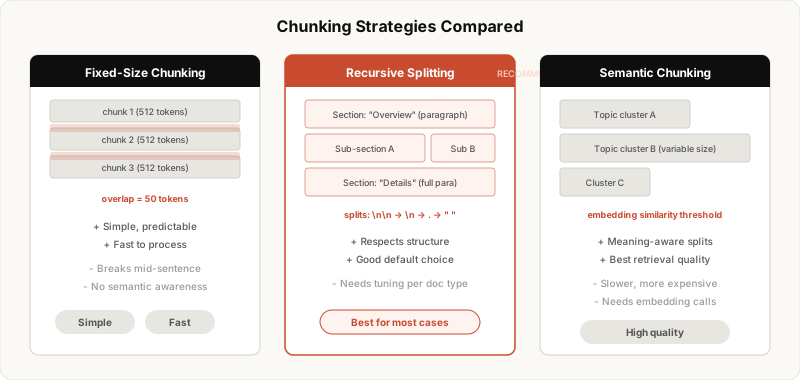
Recursive Character Splitting (recommended default)
The recursive splitter tries progressively smaller separators (\n\n → \n → . → ) until the chunk fits within your target size. This respects document structure — paragraphs stay intact when possible.
from langchain.text_splitter import RecursiveCharacterTextSplitter

splitter = RecursiveCharacterTextSplitter(
    chunk_size=800,        # target tokens (not characters)
    chunk_overlap=100,     # overlap between consecutive chunks
    length_function=len,
    separators=["\n\n", "\n", ". ", " ", ""],
)

chunks = splitter.split_documents(all_docs)
print(f"Created {len(chunks)} chunks from {len(all_docs)} documents")
Choosing chunk size:
- 500-800 tokens — Good default for most use cases
- 200-400 tokens — Better for precise factual Q&A (e.g., “What is the API rate limit?“)
- 1000-1500 tokens — Better for summarization or complex reasoning
Why overlap matters: Without overlap, a key sentence at the boundary between two chunks gets split in half. An overlap of 10-15% of chunk size ensures boundary sentences appear in both neighboring chunks.
Semantic Chunking (advanced)
For higher retrieval quality, split based on meaning rather than character count. This embeds each sentence, then groups consecutive sentences whose embeddings are similar:
from langchain_experimental.text_splitter import SemanticChunker
from langchain_openai import OpenAIEmbeddings

semantic_splitter = SemanticChunker(
    OpenAIEmbeddings(model="text-embedding-3-small"),
    breakpoint_threshold_type="percentile",
    breakpoint_threshold_amount=75,
)

semantic_chunks = semantic_splitter.split_documents(all_docs)
This produces chunks of variable size — each one is a coherent “topic block.” The tradeoff: it’s slower and requires embedding calls during ingestion.
Embedding and Storing
Now embed each chunk into a vector and store it:
from langchain_openai import OpenAIEmbeddings
from langchain_community.vectorstores import Chroma

# Initialize embedding model
embeddings = OpenAIEmbeddings(
    model="text-embedding-3-small",  # $0.02 per 1M tokens
    # model="text-embedding-3-large"  # higher quality, $0.13 per 1M tokens
)

# Create vector store and persist to disk
vectorstore = Chroma.from_documents(
    documents=chunks,
    embedding=embeddings,
    persist_directory="./chroma_db",
    collection_name="knowledge_base",
)

print(f"Stored {len(chunks)} vectors in Chroma")
Embedding model choice:
| Model | Dimensions | Cost (per 1M tokens) | Best for |
|---|---|---|---|
text-embedding-3-small |
1536 | $0.02 | Most use cases, great quality/cost ratio |
text-embedding-3-large |
3072 | $0.13 | When retrieval precision is critical |
all-MiniLM-L6-v2 (local) |
384 | Free | Privacy-sensitive, offline use |
For production with Postgres, use pgvector instead of Chroma:
from langchain_community.vectorstores import PGVector

CONNECTION_STRING = "postgresql+psycopg://user:pass@localhost:5432/ragdb"

vectorstore = PGVector.from_documents(
    documents=chunks,
    embedding=embeddings,
    connection=CONNECTION_STRING,
    collection_name="knowledge_base",
    pre_delete_collection=False,
)
Adding Metadata
Enrich chunks with metadata that enables filtered retrieval later:
from datetime import datetime

for chunk in chunks:
    # Preserve original metadata from loaders
    chunk.metadata["ingested_at"] = datetime.now().isoformat()
    chunk.metadata["chunk_size"] = len(chunk.page_content)

    # Add custom metadata based on content or source
    if "api" in chunk.metadata.get("source", "").lower():
        chunk.metadata["doc_type"] = "api_reference"
    elif "guide" in chunk.metadata.get("source", "").lower():
        chunk.metadata["doc_type"] = "guide"
Stage 2: Retrieval
Basic Similarity Search
The simplest retrieval: embed the query, find the k nearest vectors.
# Load existing vector store
vectorstore = Chroma(
    persist_directory="./chroma_db",
    embedding_function=embeddings,
    collection_name="knowledge_base",
)

# Simple similarity search
query = "How do I handle authentication in the API?"
results = vectorstore.similarity_search(query, k=5)

for doc in results:
    print(f"[{doc.metadata.get('source', 'unknown')}]")
    print(doc.page_content[:200])
    print("---")
Retrieval with Metadata Filtering
Filter by metadata before searching — this dramatically improves precision when you know the document type:
# Only search API reference docs
results = vectorstore.similarity_search(
    query,
    k=5,
    filter={"doc_type": "api_reference"},
)
Maximum Marginal Relevance (MMR)
Standard similarity search can return near-duplicate chunks. MMR balances relevance with diversity — it penalizes results that are too similar to each other:
results = vectorstore.max_marginal_relevance_search(
    query,
    k=5,
    fetch_k=20,        # fetch 20 candidates, then pick 5 diverse ones
    lambda_mult=0.7,   # 0 = max diversity, 1 = max relevance
)
This is almost always better than pure similarity search. Use it as your default.
Multi-Query Retrieval
A single query can miss relevant chunks because of vocabulary mismatch. Generate multiple query variations and merge results:
from langchain.retrievers.multi_query import MultiQueryRetriever
from langchain_openai import ChatOpenAI

llm = ChatOpenAI(model="gpt-4o-mini", temperature=0)

retriever = MultiQueryRetriever.from_llm(
    retriever=vectorstore.as_retriever(search_kwargs={"k": 5}),
    llm=llm,
)

# This generates 3 query variations, retrieves for each, and deduplicates
results = retriever.invoke("How do I handle authentication in the API?")
Re-ranking
Embedding similarity is a rough approximation. A cross-encoder re-ranker scores each (query, document) pair more accurately:
from langchain.retrievers import ContextualCompressionRetriever
from langchain_cohere import CohereRerank

# First retrieve broadly, then re-rank
base_retriever = vectorstore.as_retriever(search_kwargs={"k": 20})

reranker = CohereRerank(
    model="rerank-english-v3.0",
    top_n=5,
)

retriever = ContextualCompressionRetriever(
    base_compressor=reranker,
    base_retriever=base_retriever,
)

results = retriever.invoke("How do I handle authentication?")
The retrieval quality ladder (from worst to best):
- Basic similarity search
- MMR search
- Multi-query + MMR
- Multi-query + MMR + re-ranking
Each step adds latency and cost. Start with MMR and add re-ranking only if retrieval quality is your bottleneck.
Stage 3: Generation
Prompt Template
The prompt is where retrieval meets generation. A well-structured prompt makes the difference between a useful answer and a hallucinated one:
from langchain_core.prompts import ChatPromptTemplate

SYSTEM_PROMPT = """You are a helpful technical assistant. Answer the user's
question based ONLY on the provided context. If the context doesn't contain
enough information to answer, say "I don't have enough information to answer
that" — do not make up an answer.

Rules:
- Be precise and technical
- Reference specific sections from the context when possible
- If multiple sources provide different information, note the discrepancy
- Format code examples with proper syntax highlighting

Context:
{context}"""

prompt = ChatPromptTemplate.from_messages([
    ("system", SYSTEM_PROMPT),
    ("human", "{question}"),
])
The Complete RAG Chain
Wire everything together into a single chain:
from langchain_openai import ChatOpenAI
from langchain_core.output_parsers import StrOutputParser
from langchain_core.runnables import RunnablePassthrough

llm = ChatOpenAI(model="gpt-4o", temperature=0.1)

# Format retrieved docs into a single context string
def format_docs(docs):
    formatted = []
    for i, doc in enumerate(docs):
        source = doc.metadata.get("source", "unknown")
        formatted.append(f"[Source {i+1}: {source}]\n{doc.page_content}")
    return "\n\n---\n\n".join(formatted)

# Build the chain
rag_chain = (
    {
        "context": retriever | format_docs,
        "question": RunnablePassthrough(),
    }
    | prompt
    | llm
    | StrOutputParser()
)

# Query
answer = rag_chain.invoke("How do I handle authentication in the API?")
print(answer)
Adding Citations
Return the source chunks alongside the answer so users can verify:
from langchain_core.runnables import RunnableParallel

# Chain that returns both the answer and source documents
rag_chain_with_sources = RunnableParallel(
    {
        "docs": retriever,
        "question": RunnablePassthrough(),
    }
).assign(
    answer=lambda x: (
        prompt.invoke({
            "context": format_docs(x["docs"]),
            "question": x["question"],
        })
        | llm
        | StrOutputParser()
    ).invoke(x["question"])
)

result = rag_chain_with_sources.invoke("How do I handle authentication?")
print("Answer:", result["answer"])
print("\nSources:")
for doc in result["docs"]:
    print(f"  - {doc.metadata.get('source', 'unknown')}")
Streaming Responses
For a real-time UX, stream tokens as they’re generated:
async def stream_rag_response(question: str):
    context_docs = await retriever.ainvoke(question)
    context = format_docs(context_docs)

    messages = prompt.invoke({
        "context": context,
        "question": question,
    })

    async for chunk in llm.astream(messages):
        yield chunk.content
Putting It All Together
Here’s the complete pipeline as a reusable class:
from langchain_openai import ChatOpenAI, OpenAIEmbeddings
from langchain_community.vectorstores import Chroma
from langchain_core.prompts import ChatPromptTemplate
from langchain_core.output_parsers import StrOutputParser
from langchain_core.runnables import RunnablePassthrough
from langchain.text_splitter import RecursiveCharacterTextSplitter


class RAGPipeline:
    def __init__(
        self,
        persist_dir: str = "./chroma_db",
        embedding_model: str = "text-embedding-3-small",
        llm_model: str = "gpt-4o",
        chunk_size: int = 800,
        chunk_overlap: int = 100,
    ):
        self.embeddings = OpenAIEmbeddings(model=embedding_model)
        self.llm = ChatOpenAI(model=llm_model, temperature=0.1)
        self.splitter = RecursiveCharacterTextSplitter(
            chunk_size=chunk_size,
            chunk_overlap=chunk_overlap,
        )
        self.vectorstore = Chroma(
            persist_directory=persist_dir,
            embedding_function=self.embeddings,
            collection_name="knowledge_base",
        )
        self.retriever = self.vectorstore.as_retriever(
            search_type="mmr",
            search_kwargs={"k": 5, "fetch_k": 20},
        )
        self.prompt = ChatPromptTemplate.from_messages([
            ("system", SYSTEM_PROMPT),
            ("human", "{question}"),
        ])

    def ingest(self, documents: list):
        """Chunk and store documents."""
        chunks = self.splitter.split_documents(documents)
        self.vectorstore.add_documents(chunks)
        return len(chunks)

    def query(self, question: str) -> dict:
        """Retrieve context and generate an answer."""
        docs = self.retriever.invoke(question)
        context = self._format_docs(docs)

        answer = (
            self.prompt
            | self.llm
            | StrOutputParser()
        ).invoke({"context": context, "question": question})

        return {
            "answer": answer,
            "sources": [
                {
                    "content": d.page_content[:200],
                    "source": d.metadata.get("source", "unknown"),
                }
                for d in docs
            ],
        }

    def _format_docs(self, docs):
        parts = []
        for i, doc in enumerate(docs):
            source = doc.metadata.get("source", "unknown")
            parts.append(f"[Source {i+1}: {source}]\n{doc.page_content}")
        return "\n\n---\n\n".join(parts)


# Usage
pipeline = RAGPipeline()

# Ingest
from langchain_community.document_loaders import DirectoryLoader
loader = DirectoryLoader("docs/", glob="**/*.md")
docs = loader.load()
n = pipeline.ingest(docs)
print(f"Ingested {n} chunks")

# Query
result = pipeline.query("How do I configure rate limiting?")
print(result["answer"])
Evaluation: Is Your RAG Actually Working?
A RAG pipeline without evaluation is just vibes. Here are the three metrics that matter:
1. Retrieval Quality
Are you finding the right chunks?
# Manual evaluation: for each test question,
# check if the relevant chunk appears in top-k
test_cases = [
    {
        "question": "What is the API rate limit?",
        "expected_source": "docs/api-reference.md",
    },
]

hits = 0
for tc in test_cases:
    results = retriever.invoke(tc["question"])
    sources = [d.metadata.get("source") for d in results]
    if tc["expected_source"] in sources:
        hits += 1

recall = hits / len(test_cases)
print(f"Retrieval recall@5: {recall:.1%}")
2. Faithfulness
Is the answer grounded in the retrieved context, or is the LLM hallucinating?
from ragas.metrics import faithfulness
from ragas import evaluate

# Requires: pip install ragas
eval_result = evaluate(
    dataset={
        "question": ["What is the API rate limit?"],
        "answer": [result["answer"]],
        "contexts": [[d.page_content for d in result["docs"]]],
    },
    metrics=[faithfulness],
)
print(f"Faithfulness: {eval_result['faithfulness']:.2f}")
3. Answer Relevance
Does the answer actually address the question asked?
from ragas.metrics import answer_relevancy

eval_result = evaluate(
    dataset={...},  # same structure as above
    metrics=[answer_relevancy],
)
Target scores:
- Faithfulness > 0.85
- Answer Relevance > 0.80
- Retrieval Recall@5 > 0.70
If you’re below these, fix retrieval first — no amount of prompt engineering will save bad retrieval.
Common Pitfalls and How to Fix Them
| Problem | Symptom | Fix |
|---|---|---|
| Chunks too large | Answers include irrelevant info | Reduce chunk_size to 400-600 |
| Chunks too small | Answers lack context | Increase chunk_size to 800-1000 |
| Wrong chunks retrieved | Answer is off-topic | Try re-ranking, multi-query, or semantic chunking |
| LLM hallucinating | Makes up facts not in context | Strengthen system prompt, lower temperature |
| Duplicate results | Same info repeated in context | Use MMR instead of similarity search |
| Slow responses | > 3s latency | Cache embeddings, use smaller LLM for retrieval, stream responses |
What’s Next
This pipeline handles 80% of RAG use cases. For the remaining 20%:
- Agentic RAG — Let the LLM decide when and what to retrieve, using tool calling
- Graph RAG — Build a knowledge graph from your documents for multi-hop reasoning
- Hybrid search — Combine vector similarity with BM25 keyword search for better recall
- Query routing — Route different question types to different retrieval strategies
- Conversation memory — Maintain context across multi-turn conversations
The core pattern stays the same: retrieve relevant context, ground the LLM’s response, evaluate, iterate.
Start with the simple pipeline above. Measure where it breaks. Fix that specific failure mode. That’s how production RAG systems are built — one measured improvement at a time.


