


Most developers use Claude Code like a search engine — ask a question, get an answer, move on. That’s fine for one-off tasks, but it leaves 90% of the value on the table.
The real power is in skills: reusable prompt templates that encode your team’s engineering standards, run on demand via slash commands, and can be wired into hooks for fully automated quality gates. Think of skills as “engineering runbooks that execute themselves.”
This guide walks through building a complete skill library — from code review to security scanning — with real definitions you can drop into your project today.
Table of Contents
- What Are Claude Code Skills?
- Project Setup — CLAUDE.md and Skills Directory
- Skill: Automated Code Review
- Skill: Security Scanner
- Skill: Test Generator
- Skill: Commit Message Generator
- Skill: PR Creator with Description
- Skill: Dependency Audit
- Wiring Skills into Hooks
- CLAUDE.md — The Team Convention File
- Team Maturity Model
- CI/CD Integration
- Measuring Impact
- Anti-Patterns to Avoid
What Are Claude Code Skills?
Skills are markdown files that live in your project’s .claude/skills/ directory. Each skill defines:
- Frontmatter — name, description, and slash command trigger
- System prompt — the persona, rules, and focus areas
- Steps — the execution sequence Claude should follow
When you type /review in Claude Code, it finds the matching skill, loads the prompt, and executes the steps with full access to your codebase, git history, and toolchain.
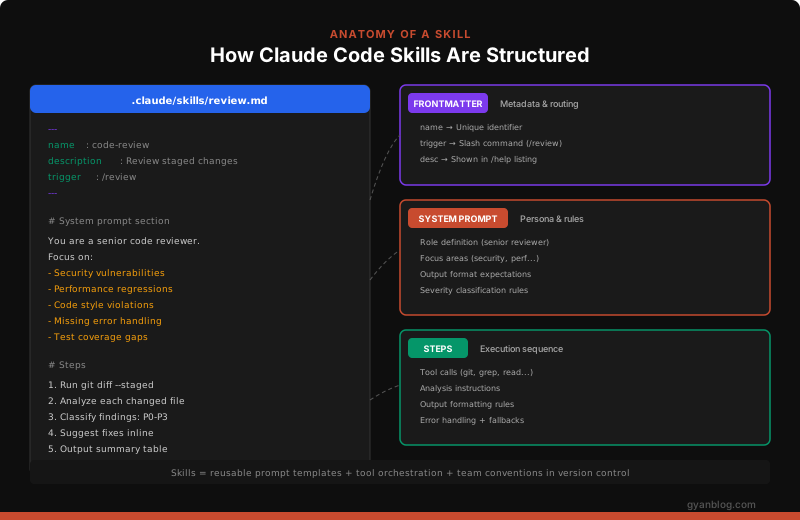
Skills are version-controlled alongside your code. When someone joins the team, they get the same skills, the same standards, the same quality gates — automatically.
Skills vs. One-Off Prompts
| One-Off Prompt | Skill | |
|---|---|---|
| Consistency | Different every time | Same output format, same checks |
| Shareable | Lives in one person’s head | Version-controlled, team-wide |
| Composable | Standalone | Can trigger other skills, hooks |
| Measurable | No tracking | Consistent outputs = measurable |
| Onboarding | “Ask Dave how he prompts” | Clone repo, run /review |
Project Setup
Directory Structure
my-project/
├── .claude/
│   ├── skills/
│   │   ├── review.md          # Code review skill
│   │   ├── security-scan.md   # Security scanning
│   │   ├── test-gen.md        # Test generation
│   │   ├── commit.md          # Commit message
│   │   ├── pr.md              # PR creation
│   │   └── dep-audit.md       # Dependency audit
│   └── settings.json          # Hooks & permissions
├── CLAUDE.md                   # Team conventions
├── src/
└── ...
The Foundation: CLAUDE.md
Before building skills, create a CLAUDE.md in your project root. This file is always loaded into Claude’s context and defines the baseline conventions every skill inherits:
# Project: MyApp

## Stack
- TypeScript + Node.js 22
- React 19 + Next.js 15
- PostgreSQL + Drizzle ORM
- Jest + React Testing Library

## Code Conventions
- Use `const` over `let`. Never `var`.
- Prefer named exports over default exports.
- Error messages must include context: `throw new Error(\`Failed to fetch user \${userId}: \${err.message}\`)`
- All API endpoints must validate input with Zod schemas.
- SQL queries must use parameterized queries — never string interpolation.

## Git Conventions
- Commit messages follow Conventional Commits: `feat:`, `fix:`, `chore:`, `docs:`
- Branch names: `feat/description`, `fix/description`, `chore/description`
- PRs must reference an issue number.

## Security Requirements
- No secrets in code (use env vars)
- All user input must be sanitized
- API routes must check authentication
- SQL injection prevention via parameterized queries only
Skill: Automated Code Review
This is the highest-value skill. It catches bugs, style violations, and security issues before they hit a PR.
---
name: code-review
description: Review staged changes for bugs, security issues, and style violations
---

You are a senior staff engineer performing a code review. You are thorough,
specific, and constructive. You never say "looks good" unless it actually does.

## Process

1. Run `git diff --staged` to see what's being committed. If nothing is staged,
   run `git diff` to review unstaged changes instead.

2. For each changed file, analyze:
   - **Correctness**: Logic errors, off-by-one, null/undefined risks, race conditions
   - **Security**: Injection, XSS, auth bypass, secret exposure, insecure crypto
   - **Performance**: N+1 queries, unnecessary re-renders, missing indexes, memory leaks
   - **Style**: Violations of project conventions defined in CLAUDE.md
   - **Error handling**: Missing try/catch, swallowed errors, unhelpful error messages
   - **Tests**: Is the change tested? Are edge cases covered?

3. Classify each finding:
   - **P0 (Blocker)**: Security vulnerability, data loss risk, crash bug
   - **P1 (Must Fix)**: Logic error, missing error handling, broken edge case
   - **P2 (Should Fix)**: Performance issue, style violation, missing test
   - **P3 (Nit)**: Naming, formatting, minor improvement

4. Output format:
Code Review Summary
Files reviewed: [count] Findings: [P0: n, P1: n, P2: n, P3: n] Verdict: [APPROVE / REQUEST CHANGES / NEEDS DISCUSSION]
Findings
[P0] filename.ts:42 — SQL injection in user query
Issue: User input interpolated directly into SQL string. Fix: Use parameterized query. [code suggestion]
5. If there are zero P0/P1 findings, end with: "LGTM — ship it."Usage
# Stage your changes, then review
git add -A
claude /review

# Or review specific files
claude "review only the changes in src/api/"
Skill: Security Scanner
A dedicated SAST-style scanner that checks your code against OWASP patterns and common vulnerability classes.
---
name: security-scan
description: Scan codebase for security vulnerabilities (OWASP Top 10, secrets, injection)
---

You are a senior application security engineer performing a static analysis
security scan. You are methodical and classify findings by OWASP category.

## Scan Process

1. Identify the scope:
   - If the user specified files/directories, scan those
   - Otherwise, scan all source files (src/, lib/, app/) excluding node_modules, dist, .next

2. For each file, check for:

### Injection (OWASP A03)
   - SQL string concatenation or template literals with user input
   - Command injection via exec(), spawn() with unsanitized args
   - XSS via dangerouslySetInnerHTML, innerHTML, or unescaped template output
   - NoSQL injection in MongoDB queries with $where or unvalidated operators

### Broken Access Control (OWASP A01)
   - API routes without authentication middleware
   - Missing authorization checks (user accessing other user's data)
   - IDOR patterns (using user-supplied IDs without ownership check)
   - Exposed admin routes without role verification

### Cryptographic Failures (OWASP A02)
   - Hardcoded secrets, API keys, tokens, passwords
   - Weak hashing (MD5, SHA1 for passwords)
   - Missing TLS enforcement
   - Sensitive data in logs or error messages

### Security Misconfiguration (OWASP A05)
   - CORS set to `*` (allow all origins)
   - Debug mode enabled in production config
   - Default credentials in configuration files
   - Missing security headers (CSP, HSTS, X-Frame-Options)

### Vulnerable Dependencies
   - Check package.json for known vulnerable packages
   - Flag packages with critical CVEs

3. Output format:
Security Scan Report
Scope: [files/directories scanned] Risk Level: [CRITICAL / HIGH / MEDIUM / LOW / CLEAN]
Findings
[CRITICAL] A03-Injection: src/api/users.ts:28
Category: SQL Injection
Code: db.query(\SELECT * FROM users WHERE id = ${req.params.id}`) **Fix**: Use parameterized query:db.query(‘SELECT * FROM users WHERE id = $1’, [req.params.id])`
OWASP: A03:2021 Injection
4. End with a summary table of findings by OWASP category.Usage
# Full scan
claude /security-scan

# Scan specific directory
claude "/security-scan src/api/"

# Scan only changed files
claude "run security scan on files changed in this branch vs main"
Skill: Test Generator
Generate tests that actually cover edge cases, not just happy paths.
---
name: test-gen
description: Generate comprehensive tests for a given file or function
---

You are a senior QA engineer who writes thorough, maintainable tests.
You never write tests that just confirm the obvious. You focus on edge cases,
error paths, and boundary conditions.

## Process

1. Read the target file/function specified by the user.

2. Analyze:
   - All code paths (happy path, error paths, early returns)
   - Input boundaries (null, undefined, empty, max values, negative)
   - Async behavior (race conditions, timeout, rejection)
   - Side effects (database calls, API calls, file I/O)
   - State transitions

3. Generate tests following project conventions:
   - Use the test framework specified in CLAUDE.md (Jest by default)
   - Use descriptive test names: `it('should return 404 when user does not exist')`
   - Group related tests with `describe` blocks
   - Mock external dependencies (database, APIs) — never hit real services
   - Include at minimum:
     - 1 happy path test
     - 2 error/edge case tests
     - 1 boundary condition test
     - 1 test for each thrown error type

4. Write the test file to the correct location following project conventions:
   - `src/foo.ts` → `src/__tests__/foo.test.ts` (or co-located based on project)

5. Run the tests to verify they pass. If any fail, fix them.

6. Report coverage improvement if possible.
Example Output
// src/__tests__/userService.test.ts
import { getUserById, createUser } from '../userService';
import { db } from '../db';

jest.mock('../db');

describe('getUserById', () => {
  it('should return user when found', async () => {
    const mockUser = { id: '1', name: 'Alice', email: '[email protected]' };
    (db.query as jest.Mock).mockResolvedValueOnce({ rows: [mockUser] });

    const result = await getUserById('1');
    expect(result).toEqual(mockUser);
    expect(db.query).toHaveBeenCalledWith(
      'SELECT * FROM users WHERE id = $1',
      ['1']
    );
  });

  it('should throw NotFoundError when user does not exist', async () => {
    (db.query as jest.Mock).mockResolvedValueOnce({ rows: [] });

    await expect(getUserById('999')).rejects.toThrow('User 999 not found');
  });

  it('should throw on empty string ID', async () => {
    await expect(getUserById('')).rejects.toThrow('User ID is required');
  });

  it('should handle database connection errors', async () => {
    (db.query as jest.Mock).mockRejectedValueOnce(new Error('ECONNREFUSED'));

    await expect(getUserById('1')).rejects.toThrow('ECONNREFUSED');
  });
});

describe('createUser', () => {
  it('should reject duplicate email', async () => {
    (db.query as jest.Mock).mockRejectedValueOnce({
      code: '23505', // unique_violation
      constraint: 'users_email_unique',
    });

    await expect(
      createUser({ name: 'Bob', email: '[email protected]' })
    ).rejects.toThrow('Email already exists');
  });
});
Skill: Commit Message Generator
Never write a bad commit message again.
---
name: smart-commit
description: Generate a conventional commit message from staged changes
---

You are a developer who writes precise, helpful commit messages following
Conventional Commits format.

## Process

1. Run `git diff --staged` to see what's being committed.
2. Run `git log --oneline -10` to see recent commit style.

3. Analyze the changes and determine:
   - **Type**: feat, fix, refactor, chore, docs, test, perf, ci
   - **Scope**: The module or area affected (e.g., auth, api, ui)
   - **Summary**: One line, imperative mood, under 72 chars
   - **Body**: If the change is non-trivial, explain WHY not WHAT

4. Format:
type(scope): summary
- Bullet point explaining why this change was needed
- Another point if relevant
Closes #ISSUE_NUMBER (if apparent from branch name or context)
5. Present the message to the user for approval.
6. If approved, run the git commit with the message.

## Rules
- Never use generic messages ("update code", "fix stuff", "changes")
- The summary must explain WHAT changed, the body explains WHY
- If multiple unrelated changes are staged, suggest splitting into multiple commits
- Include breaking change footer if applicable: `BREAKING CHANGE: description`
Skill: PR Creator
---
name: create-pr
description: Create a well-structured PR with description, test plan, and linked issues
---

You are a developer creating a pull request. You write clear, reviewer-friendly
PR descriptions that save time for everyone.

## Process

1. Run `git log main..HEAD --oneline` to see all commits on this branch.
2. Run `git diff main...HEAD --stat` for a summary of changed files.
3. Run `git diff main...HEAD` for the full diff.

4. Analyze all changes (not just the latest commit) and generate:

   **Title**: Short, descriptive, under 70 chars. Format: `type(scope): description`

   **Body**:
   ```markdown
   ## Summary
   [2-3 sentences explaining what this PR does and why]

   ## Changes
   - [Bullet list of key changes, grouped by area]

   ## Test Plan
   - [ ] [How to verify each change works]
   - [ ] [Edge cases to check]

   ## Security Considerations
   - [Any security implications of this change]

   ## Screenshots
[If UI changes, mention that screenshots should be added]- Check if branch is pushed to remote. If not, push with -u flag.
- Create the PR using
gh pr create. - Return the PR URL.
Rules
- Never create a PR with just “Updates” as the description
- Always include a test plan — even if it’s “Run existing test suite”
- Reference related issues if branch name contains issue numbers
- Flag if the diff is over 500 lines — suggest splitting
---

## Skill: Dependency Audit

```markdown
---
name: dep-audit
description: Audit dependencies for vulnerabilities, outdated packages, and unused imports
---

You are a supply chain security engineer auditing project dependencies.

## Process

1. Run the appropriate audit command:
   - Node.js: `npm audit` or check `package-lock.json`
   - Python: Check `requirements.txt` or `pyproject.toml`

2. Check for:
   - **Critical/High CVEs**: Must be fixed immediately
   - **Outdated packages**: Major versions behind
   - **Unused dependencies**: Installed but never imported
   - **Duplicate packages**: Multiple versions of the same package
   - **License issues**: Copyleft licenses in commercial projects (GPL in MIT project)

3. For each finding, provide:
   - Package name and current version
   - Issue (CVE number, outdated version, unused)
   - Risk level (Critical/High/Medium/Low)
   - Fix command (`npm update package` or `npm install package@version`)

4. Output a prioritized remediation plan:
Dependency Audit Report
Critical (fix now)
| Package | Issue | Fix |
|---|---|---|
| [email protected] | CVE-2021-23337 (command injection) | npm install [email protected] |
Recommended Updates
| Package | Current | Latest | Breaking Changes |
|---|---|---|---|
| next | 14.2.0 | 15.1.0 | Yes — see migration guide |
Unused (safe to remove)
- moment (replaced by dayjs in src/utils/date.ts)
Wiring Skills into Hooks
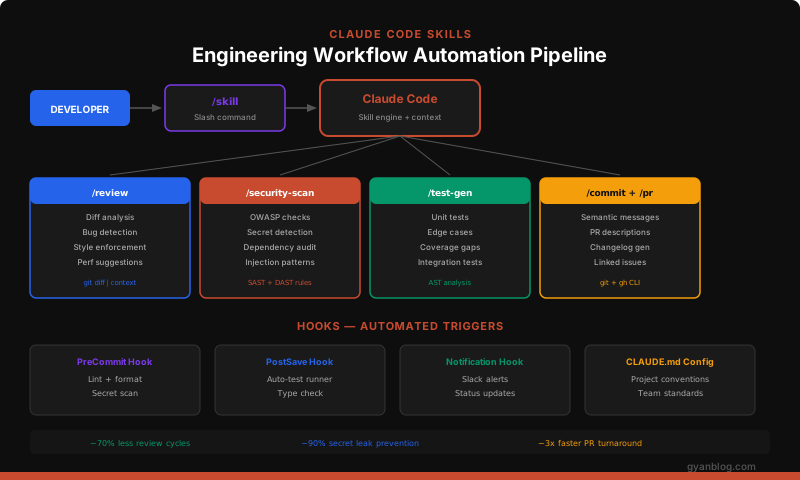
Skills become truly powerful when wired into hooks — automated triggers that fire on specific events. Configure hooks in .claude/settings.json:
{
  "hooks": {
    "pre-commit": {
      "command": "claude /security-scan --changed-only --fail-on-critical",
      "description": "Security scan on staged files before commit"
    },
    "post-save": {
      "command": "claude /review --quick",
      "description": "Quick review on save",
      "pattern": "src/**/*.{ts,tsx}"
    },
    "pre-push": {
      "command": "claude /dep-audit --critical-only",
      "description": "Check for critical dependency vulnerabilities"
    }
  },
  "permissions": {
    "allow": [
      "git diff",
      "git log",
      "git status",
      "npm audit",
      "npm test"
    ]
  }
}
Hook Best Practices
1. **Keep hooks fast** — Pre-commit hooks should complete in < 10 seconds.
   Use `--changed-only` or `--quick` flags in your skill prompts to limit scope.

2. **Don't block on nits** — Only fail on P0/P1 (blockers). Let P2/P3 through
   and catch them in PR review.

3. **Log hook output** — Save results to `.claude/logs/` for debugging.

4. **Make hooks skippable** — Developers need an escape hatch for emergencies.
   Document `--no-verify` usage but make it require a reason.
CLAUDE.md — The Team Convention File
The CLAUDE.md file is the single most impactful thing you can add to a project. It’s loaded into every Claude Code session automatically and shapes all skill behavior.
Template for Teams
# [Project Name]

## Architecture
- [High-level architecture description]
- [Key directories and what they contain]
- [Important patterns (MVC, hexagonal, etc.)]

## Stack
- [Language + version]
- [Framework + version]
- [Database]
- [Test framework]
- [Build tool]

## Code Conventions
- [Naming conventions (camelCase, snake_case)]
- [Import ordering rules]
- [Error handling patterns]
- [Logging conventions]

## Git Conventions
- [Commit message format]
- [Branch naming]
- [PR requirements]

## Security Requirements
- [Auth patterns]
- [Input validation rules]
- [Secrets management]
- [SQL query rules]

## Testing Requirements
- [Minimum coverage threshold]
- [What must be tested]
- [Mocking conventions]
- [Test file location convention]

## Off-Limits
- [Files/directories Claude should never modify]
- [Patterns Claude should never use]
- [Things that require human approval]
Real-World Example
# Acme API

## Architecture
- Hexagonal architecture: domain/ (core), adapters/ (infra), ports/ (interfaces)
- Domain logic must never import from adapters/
- All external I/O goes through ports

## Stack
- TypeScript 5.5, Node.js 22 LTS
- Fastify 5 (not Express)
- PostgreSQL 16 + Drizzle ORM
- Vitest (not Jest)

## Code Conventions
- Use `Result<T, E>` pattern for operations that can fail — never throw in domain logic
- Prefer `const enum` over string literals for domain types
- All public functions must have JSDoc with @example
- Max function length: 30 lines. If longer, extract.

## Security
- ALL API inputs validated with Zod schemas at the adapter boundary
- SQL via Drizzle query builder only — raw SQL requires security team review
- PII must be encrypted at rest (use crypto.encrypt() from lib/crypto)
- Rate limit: 100 req/min for authenticated, 20 req/min for anonymous

## Testing
- Minimum 80% line coverage on PRs
- Domain logic: pure unit tests, no mocks
- Adapters: integration tests with testcontainers
- Test file location: co-located (foo.ts → foo.test.ts)

## Off-Limits
- Never modify migrations/ directly — use `npm run migration:create`
- Never modify .env.production
- Never use `any` type — use `unknown` and narrow
Team Maturity Model
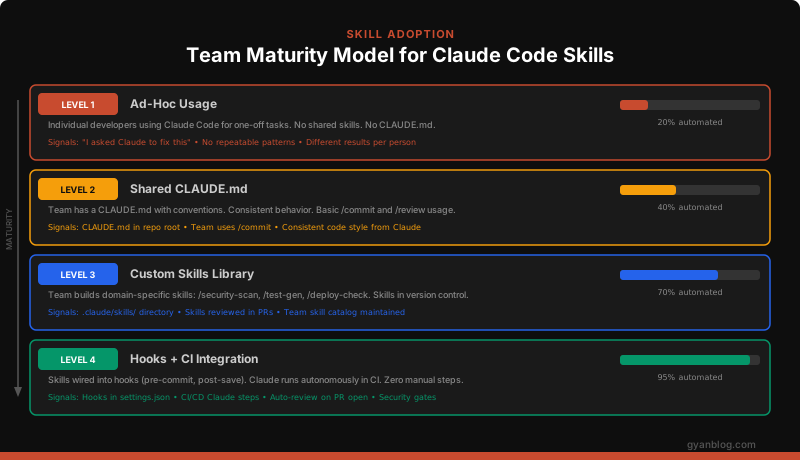
Level 1 → Level 2: Add CLAUDE.md
The single biggest improvement. Create a CLAUDE.md with your project’s conventions. Now every developer gets consistent Claude behavior.
Time to implement: 30 minutes.
Level 2 → Level 3: Build Your First 3 Skills
Start with the highest-impact skills:
/review— Code review (saves the most time)/security-scan— Security scanning (catches the scariest bugs)/commit— Commit messages (improves git history quality)
Time to implement: 2-3 hours.
Level 3 → Level 4: Wire Into Hooks
Connect skills to automated triggers:
Pre-commit  → /security-scan (critical only)
Post-save   → /review (quick mode)
Pre-push    → /dep-audit
PR creation → /review (full) + /security-scan (full)
Time to implement: 1-2 hours.
CI/CD Integration
Run Claude Code in CI for automated PR review and security gates:
# .github/workflows/claude-review.yml
name: Claude Code Review

on:
  pull_request:
    types: [opened, synchronize]

jobs:
  review:
    runs-on: ubuntu-latest
    steps:
      - uses: actions/checkout@v4
        with:
          fetch-depth: 0  # Full history for diff

      - name: Install Claude Code
        run: npm install -g @anthropic-ai/claude-code

      - name: Run Code Review
        env:
          ANTHROPIC_API_KEY: ${{ secrets.ANTHROPIC_API_KEY }}
        run: |
          claude --skill review \
            --context "PR #${{ github.event.pull_request.number }}" \
            --output review-report.md

      - name: Run Security Scan
        env:
          ANTHROPIC_API_KEY: ${{ secrets.ANTHROPIC_API_KEY }}
        run: |
          claude --skill security-scan \
            --fail-on critical \
            --output security-report.md

      - name: Post Review Comment
        if: always()
        uses: actions/github-script@v7
        with:
          script: |
            const fs = require('fs');
            const review = fs.readFileSync('review-report.md', 'utf8');
            const security = fs.readFileSync('security-report.md', 'utf8');

            await github.rest.issues.createComment({
              owner: context.repo.owner,
              repo: context.repo.repo,
              issue_number: context.issue.number,
              body: `## Claude Code Review\n\n${review}\n\n---\n\n## Security Scan\n\n${security}`
            });
Gate Critical Findings
      - name: Check for Blockers
        run: |
          if grep -q "CRITICAL" security-report.md; then
            echo "::error::Critical security finding detected"
            exit 1
          fi
Measuring Impact
Track these metrics before and after adopting skills:
| Metric | How to Measure | Expected Impact |
|---|---|---|
| PR review cycles | Count of “request changes” per PR | ~50-70% reduction |
| Time to merge | PR open → merge duration | ~40% faster |
| Security findings in prod | Bugs tagged “security” | ~80% reduction |
| Commit message quality | % following Conventional Commits | ~95% compliance |
| Test coverage | Coverage tool output | ~15-20% increase |
| Developer satisfaction | Team survey | Significant improvement |
Simple Tracking Script
#!/bin/bash
# metrics.sh — Track skill adoption metrics

echo "=== Claude Skills Metrics ==="

# PRs merged this week
echo "PRs merged (7d): $(gh pr list --state merged --limit 100 \
  --json mergedAt --jq '[.[] | select(.mergedAt > (now - 604800 | strftime("%Y-%m-%dT%H:%M:%SZ")))] | length')"

# Average PR review cycles
echo "Avg review rounds: $(gh pr list --state merged --limit 20 \
  --json reviews --jq '[.[].reviews | length] | add / length')"

# Commits following conventional format
TOTAL=$(git log --oneline --since="7 days ago" | wc -l)
CONVENTIONAL=$(git log --oneline --since="7 days ago" | grep -cE "^[a-f0-9]+ (feat|fix|chore|docs|test|refactor|perf|ci)")
echo "Conventional commits: ${CONVENTIONAL}/${TOTAL} ($(( CONVENTIONAL * 100 / TOTAL ))%)"
Anti-Patterns to Avoid
1. The “Do Everything” Skill
# BAD — too broad, inconsistent results
---
name: do-everything
---
Review the code, fix bugs, add tests, update docs, and deploy.Fix: One skill, one responsibility. Compose multiple skills instead.
2. No CLAUDE.md
Without CLAUDE.md, every skill operates in a vacuum. Claude doesn’t know your conventions, stack, or patterns. The same /review skill will give different feedback on different projects — which defeats the purpose.
3. Blocking Hooks on Nits
{
  "hooks": {
    "pre-commit": {
      "command": "claude /review --fail-on-any-finding"
    }
  }
}Fix: Only block on P0/P1. Nits go in PR comments, not commit blockers.
4. Not Version-Controlling Skills
Skills in .claude/skills/ should be committed to the repo. If they live only on one person’s machine, they’re not team skills — they’re personal shortcuts.
5. Ignoring Skill Output
The worst anti-pattern: running /security-scan, seeing findings, and merging anyway. Skills only work if the team agrees to act on their output.
Quick Start — 5 Minutes to Your First Skill
# 1. Create the skills directory
mkdir -p .claude/skills

# 2. Create a minimal review skill
cat > .claude/skills/review.md << 'EOF'
---
name: code-review
description: Review staged changes
---

Review the staged git changes. For each file, check for:
- Bugs and logic errors
- Security issues (injection, auth bypass, secrets)
- Missing error handling
- Style violations per CLAUDE.md

Classify findings as P0 (blocker), P1 (must fix), P2 (should fix), P3 (nit).
Output a summary table. If no P0/P1 findings, say "LGTM".
EOF

# 3. Create a minimal CLAUDE.md
cat > CLAUDE.md << 'EOF'
# My Project
- TypeScript + Node.js
- Use const, never var
- All SQL must be parameterized
- Commit messages: Conventional Commits format
EOF

# 4. Test it
git add -A
claude /review
That’s it. You now have a repeatable, shareable code review that runs the same way for every developer on the team.
Key Takeaways
- Start with CLAUDE.md — It’s 30 minutes of work that improves every interaction with Claude Code.
- Build 3 skills first —
/review,/security-scan,/commit. These cover 80% of the value. - Version-control everything — Skills, CLAUDE.md, settings. If it’s not in git, it doesn’t exist.
- Wire into hooks gradually — Start with non-blocking hooks, then promote to gates after the team trusts the output.
- Measure impact — Track PR cycles, time to merge, and security findings. Data drives adoption.
- One skill, one job — Keep skills focused. Compose them for complex workflows.
Skills transform Claude Code from “an AI assistant” into “an AI teammate that enforces your engineering standards.” The teams that adopt this pattern ship faster, catch more bugs, and spend less time on review bikeshedding.


